Data Sync
Data Sync
Data Sync replicates data between your saved connections: MongoDB to MongoDB, MongoDB to SQL, or SQL to MongoDB. A four-step wizard sets up the job (Source, Rules, Options and Review), with a live topology preview beside it. Once the job is running, a monitor shows events, lag and anything that failed to write. Data Sync replaces the earlier MongoSync.
Quick Start
- Click Data Sync in the activity bar (or run it from the command palette), then click New Sync Job.
- Source: name the job and pick the source connection and database.
- Rules: add a target database, then one rule per collection or table you want to replicate.
- Options: choose Full sync, Initial only or Incremental only.
- Review: check the summary and click Create & launch. Follow progress on the Monitor tab.
Supported Directions
| Source | Target | Typical use |
|---|---|---|
| MongoDB | MongoDB | Promote local data to Atlas, or keep dev, staging and production in step. |
| MongoDB | SQL (PostgreSQL, MySQL, …) | Feed a reporting warehouse from your application database. |
| SQL | MongoDB | Move relational data into documents, once or continuously. |
Every job needs MongoDB on at least one side. SQL to SQL replication isn't available yet, and the header of the wizard reminds you of this.
The Job List
The Data Sync tab lists every sync job with its status, and counts how many are live, in initial sync, paused, stopped, completed or failed. Search by job name, database or connection, or filter by status. Each job has Start, Stop, Edit and Delete actions. A failed job tells you why: the phase it failed in and the error.
The Sync Wizard
The step bar across the top shows where you are, and a tick marks every step that is complete. Click any finished step to go back to it. On the right, the Topology preview updates as you go, showing the source, the number of rules, each target and the chosen mode.
1. Source
Give the job a name and an optional description, then choose the source connection and source database. The topology preview shows how many collections or tables are available.
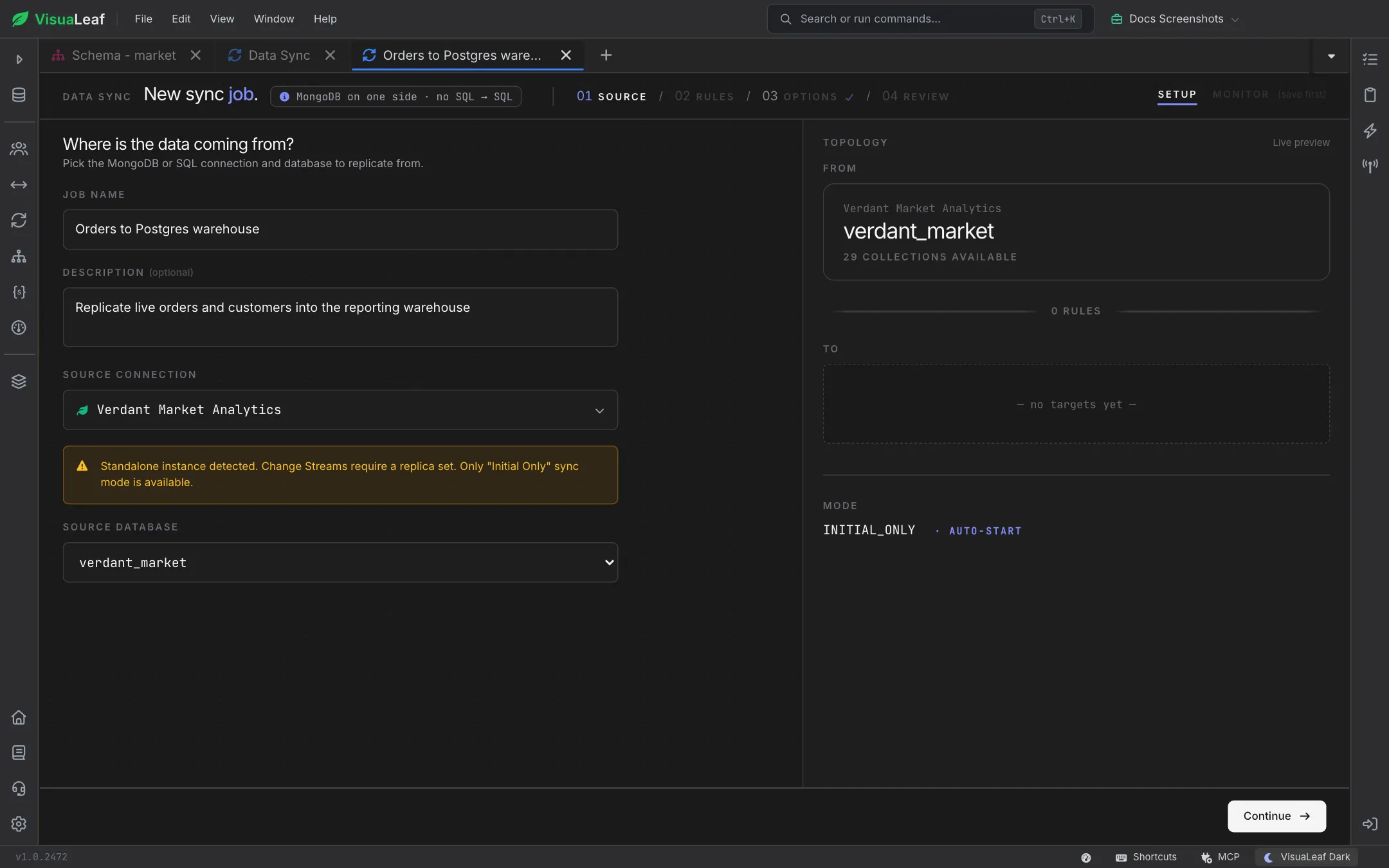
VisuaLeaf checks the source as soon as you pick it:
- MongoDB: live streaming relies on change streams, which need a replica set. On a standalone server you'll see a warning, and only Initial only mode is available.
- SQL: a Live capture (CDC) panel shows whether the database is ready for log-based change capture. Settings marked the app can enable this can be switched on for you, and you approve the exact statements before anything runs. Settings marked needs server setup come with steps you can copy and pass to your database administrator. Without CDC, changes are picked up by polling a watermark column.
2. Rules
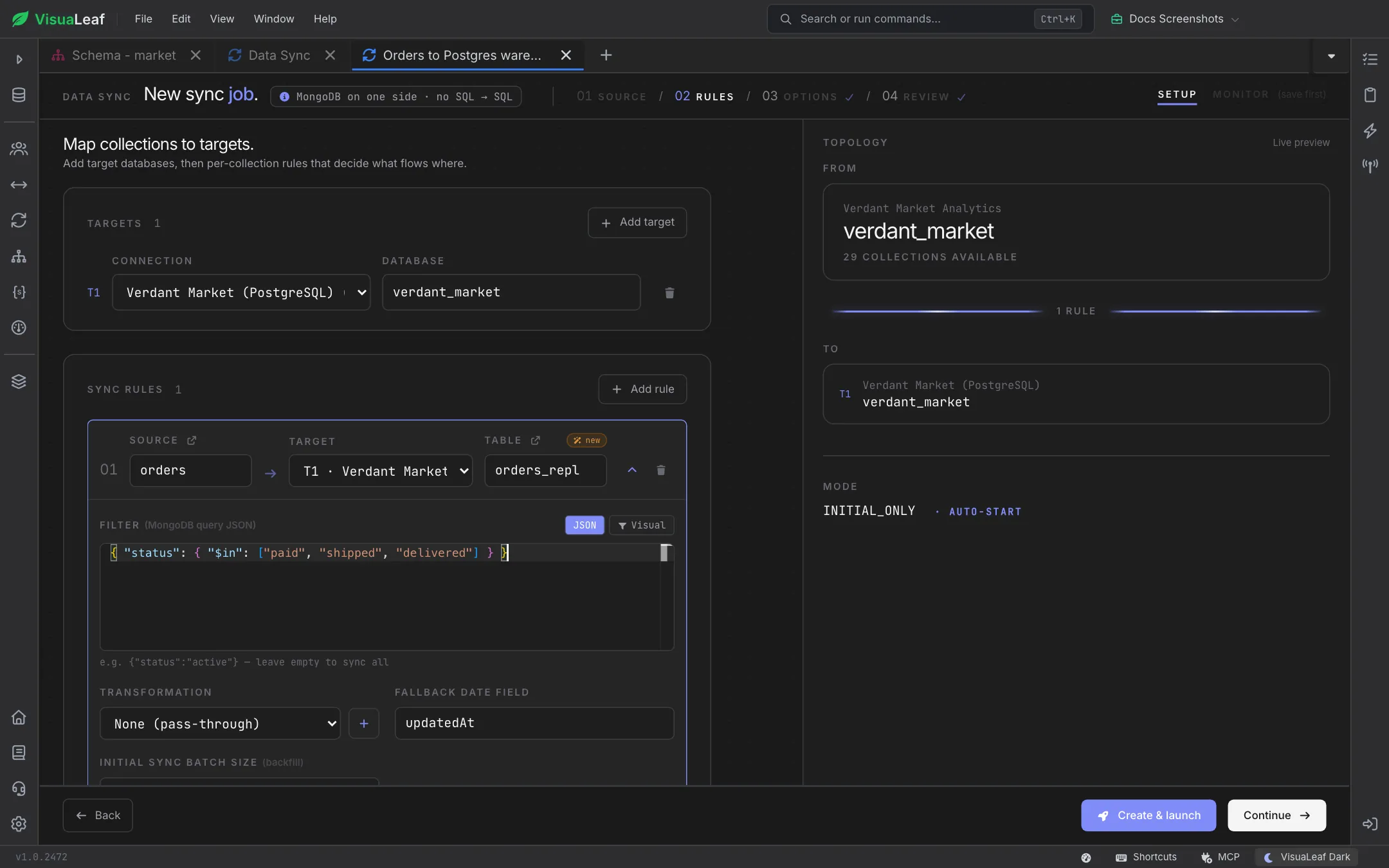
First add one or more targets. Each target is a saved connection plus a database, labelled T1, T2 and so on. Then add sync rules, one for each collection or table you want to replicate.
| Setting | Meaning |
|---|---|
| Source | The collection or table to read from. |
| Target and Table / Collection | Which target it goes to and the destination name. A new badge means it will be created. |
| Filter | Limits which rows are replicated. For a MongoDB source, write the query as JSON or switch to the Visual builder. For a SQL source, write a WHERE predicate. Leave it empty to sync everything. |
| Transformation | None (pass-through), or a saved transformation that renames, casts or computes fields on the way. Use + to create one. |
| Fallback date field / Watermark column | A last-updated field (for example updatedAt or updated_at) used to pick up changes. For SQL sources without CDC, this column drives change detection. |
| Initial sync batch size | How many rows are copied per round trip during the initial copy. Bigger batches finish sooner but use more memory. |
| On filter mismatch | What happens when a row that was already copied stops matching the filter: Keep on target, or Delete from target. |
3. Options
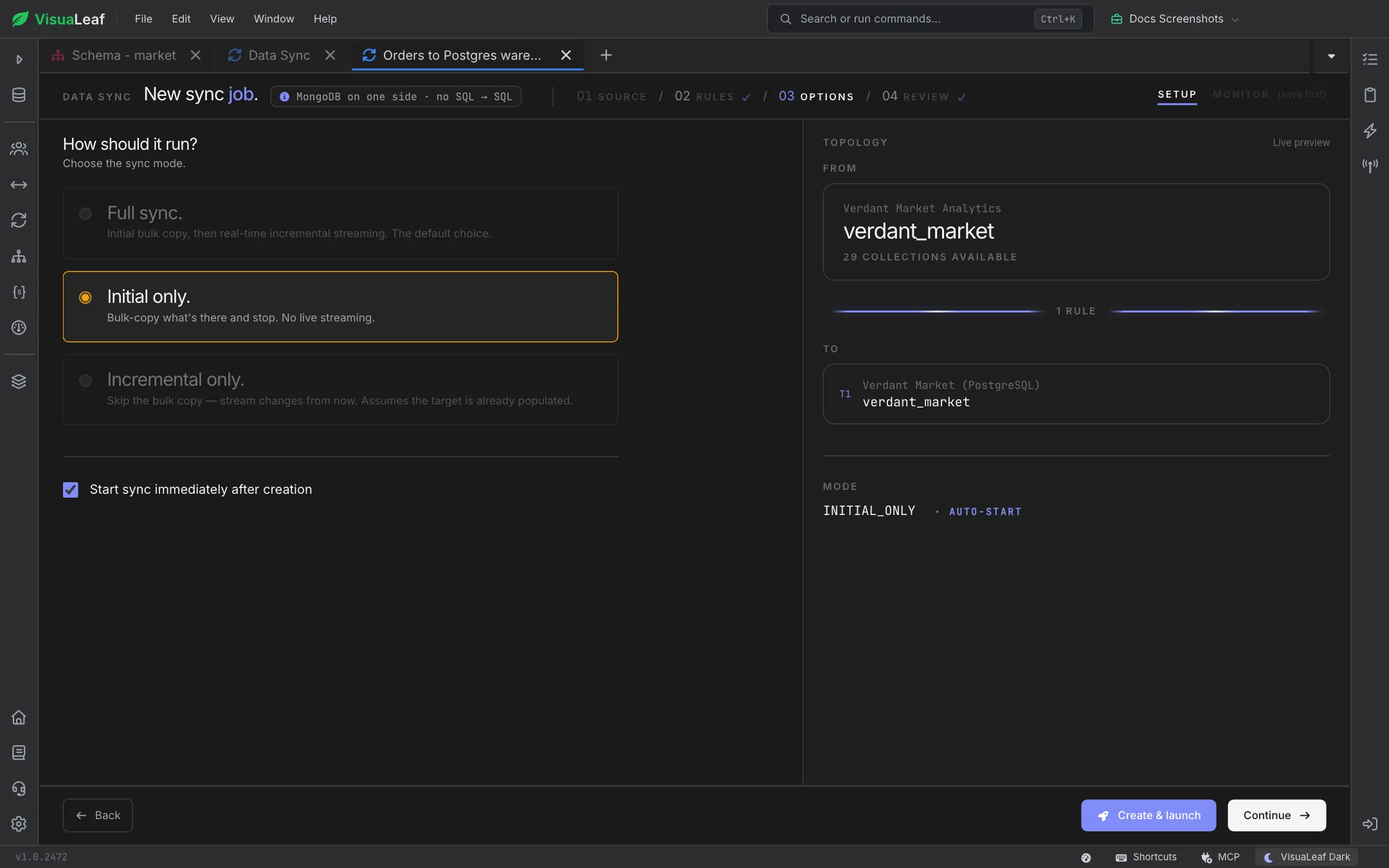
Choose how the job runs, and whether it starts immediately after you create it.
| Mode | Behavior |
|---|---|
| Full sync | Copies everything, then keeps streaming changes as they happen. This is the default. |
| Initial only | Copies what's there now and stops. No live streaming. |
| Incremental only | Skips the initial copy and streams changes from now on. Use it when the target is already populated. |
Modes the source can't support (for example, live streaming from a standalone MongoDB server) are greyed out.
4. Review
The review page summarizes the source, every target, each rule with its filter and transformation, and the options. Each section has an Edit link that jumps back to its step. A warning appears if any rule will delete rows from the target when they stop matching the filter. At the bottom, an estimate shows how many documents the initial copy will move.
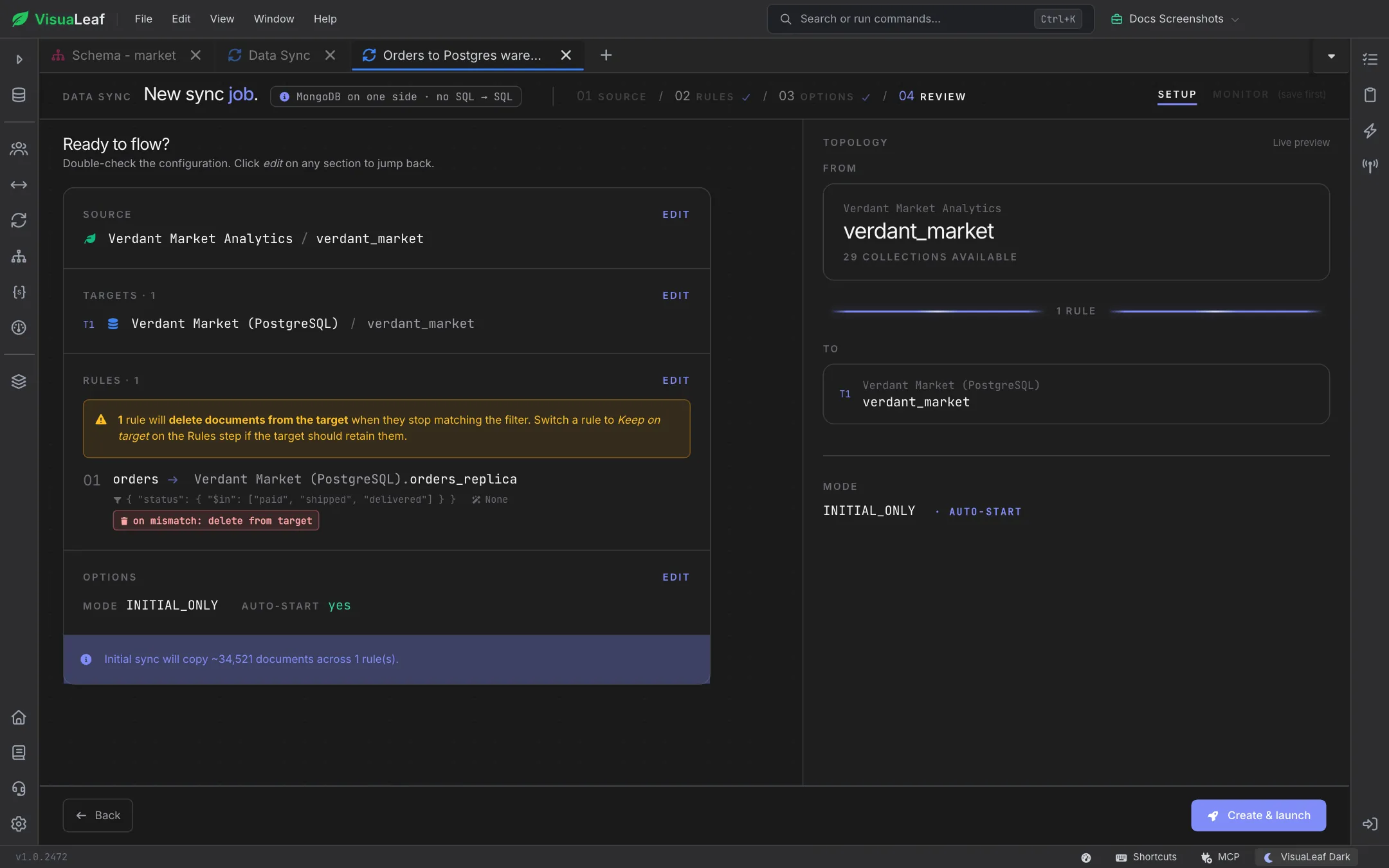
Click Create & launch to save the job (and start it, if auto-start is on). You can also click Create & launch from the Rules or Options step once the job is valid.
Monitoring a Sync
After the job is saved, switch from Setup to Monitor to watch it live. The job keeps running in the background, so you can close the tab and come back later.
- Overview: total events, replication lag, average latency, uptime, dead letters and the time of the last event. Also shows initial copy progress, per-rule insert, update and delete counts, and a feed of recent events you can filter by level.
- Audit Log: job lifecycle events, configuration changes, hourly summaries and replays.
- Dead Letters: rows that couldn't be written to the target, each with its error. Click Replay to write a row again once you've fixed the cause. An entry is only marked resolved after the write has succeeded.
- Explain: a short guide to every number and tab on the monitor.
Use Pause, Resume and Stop to control a running job. Re-sync resets the initial copy and copies everything into the current target again. Use it after you change the target database or table.
Pro Tips
- Test on a slice first: run Initial only with a tight filter to check the target shape before you switch to Full sync.
- Decide on filter mismatch deliberately: Delete from target keeps the target an exact match of the filter, while Keep on target keeps history.
- Use a replica set for live sync: even a single-node replica set lets MongoDB stream changes.
- Prefer CDC on SQL sources: log-based capture picks up deletes and doesn't depend on a watermark column.
- Check dead letters after schema changes: type mismatches show up there first.
Related Features
- Connection Manager - Save the source and target connections a sync moves data between
- Data Compare - Compare two collections and preview a sync plan
- SQL Migration - One-time migrations between SQL and MongoDB
- Task Manager - Track running, scheduled and completed jobs
Ready to try VisuaLeaf?
Download and start managing your MongoDB and SQL databases with ease.
Download Free Trial