What Is a SQL Database Schema and How Do You Design One?
Learn what a SQL database schema contains, how tables connect through primary and foreign keys, and how to design one using a real MySQL example.


Open a database for the first time, and you see tables, unfamiliar icons, and folders for columns, indexes, foreign keys, and constraints. Open a table, and rows appear. Switch to the diagram, and lines connect those tables.
Those views are showing different parts of the SQL database schema. The schema defines which tables exist, which columns belong to them, each column's data type, how tables connect, and which rules MySQL must enforce.
The schema is not the customer names, reservation codes, or payments stored in the rows. It is the structure that tells the database where those values belong and whether they are valid.
The MySQL database below contains 14 event-ticketing tables. We will open one table, inspect its data, follow a relationship, and then return to the complete diagram.
What Makes Up a SQL Database Schema?
| Part | What it controls | Example used below |
|---|---|---|
| Table | One type of record | customers |
| Column | One property of that record | email |
| Data type | Which values a column accepts | VARCHAR(150) |
| Primary key | The unique identifier for a row | customers.customer_id |
| Foreign key | A reference to another table | reservations.customer_id |
| Constraint | A rule applied to stored values | NOT NULL or UNIQUE |
| Index | A structure used to find rows faster | idx_reservation_customer |
| ER diagram | A visual map of tables and relationships | The 14-table booking diagram |
Start with the Database Sidebar
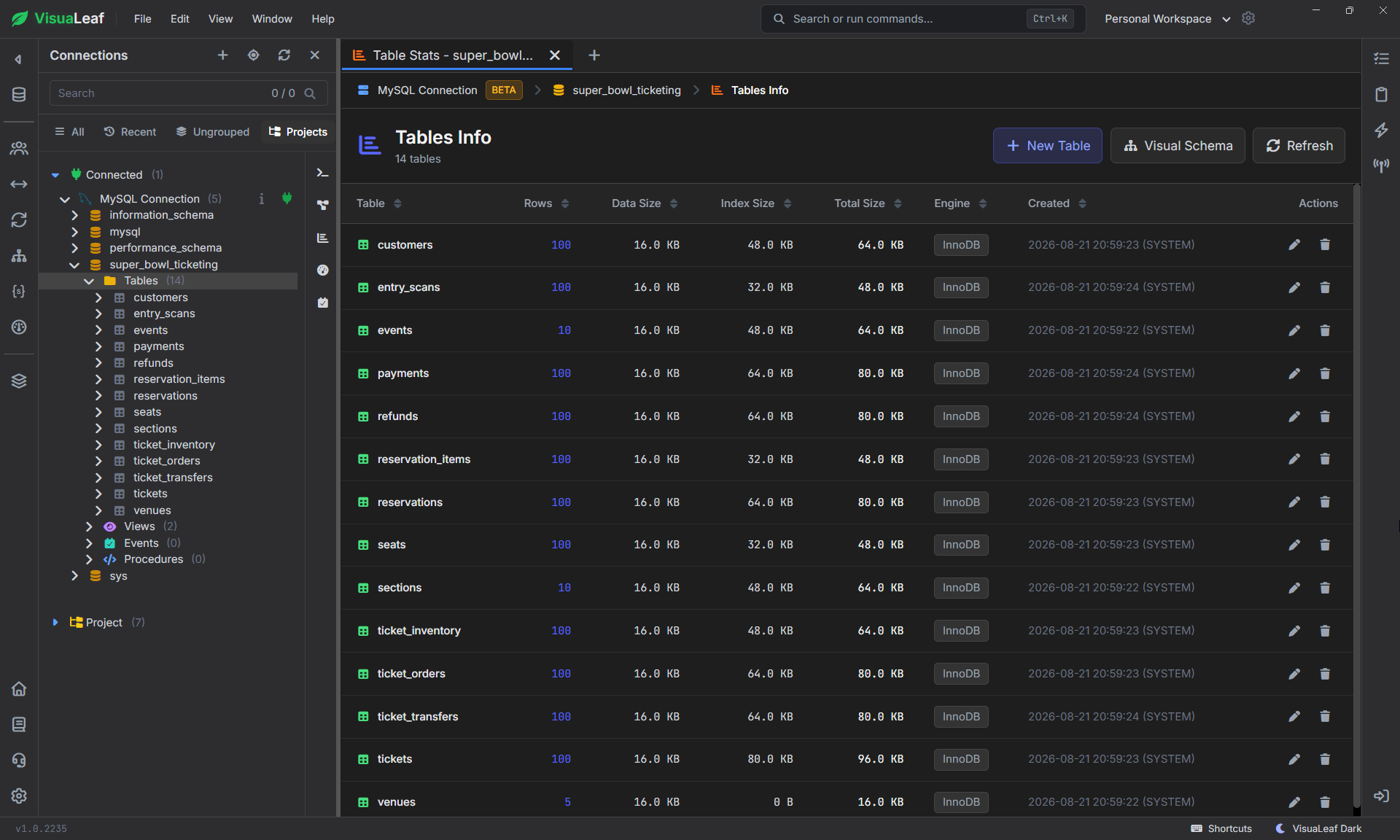
The sidebar shows the database super_bowl_ticketing and its 14 tables. Names such as customers, events, reservations, payments, and tickets already reveal how the application has been divided.
Each table has one job: customers stores customer details, events stores events, and reservations records temporary seat reservations. The full SQL database schema also includes their columns, rules, and relationships.
Open One Table Before Reading the Full Diagram
Expand customers and start with its columns.
customer_ididentifies one customer.first_nameandlast_namestore the name.emailstores up to 150 characters and must be unique.country_codeuses two characters.created_atrecords when the customer was added.
The key icon marks customer_id as the primary key. Names can repeat; this ID cannot.
Constraints control which values are allowed, while indexes help MySQL find rows more efficiently.
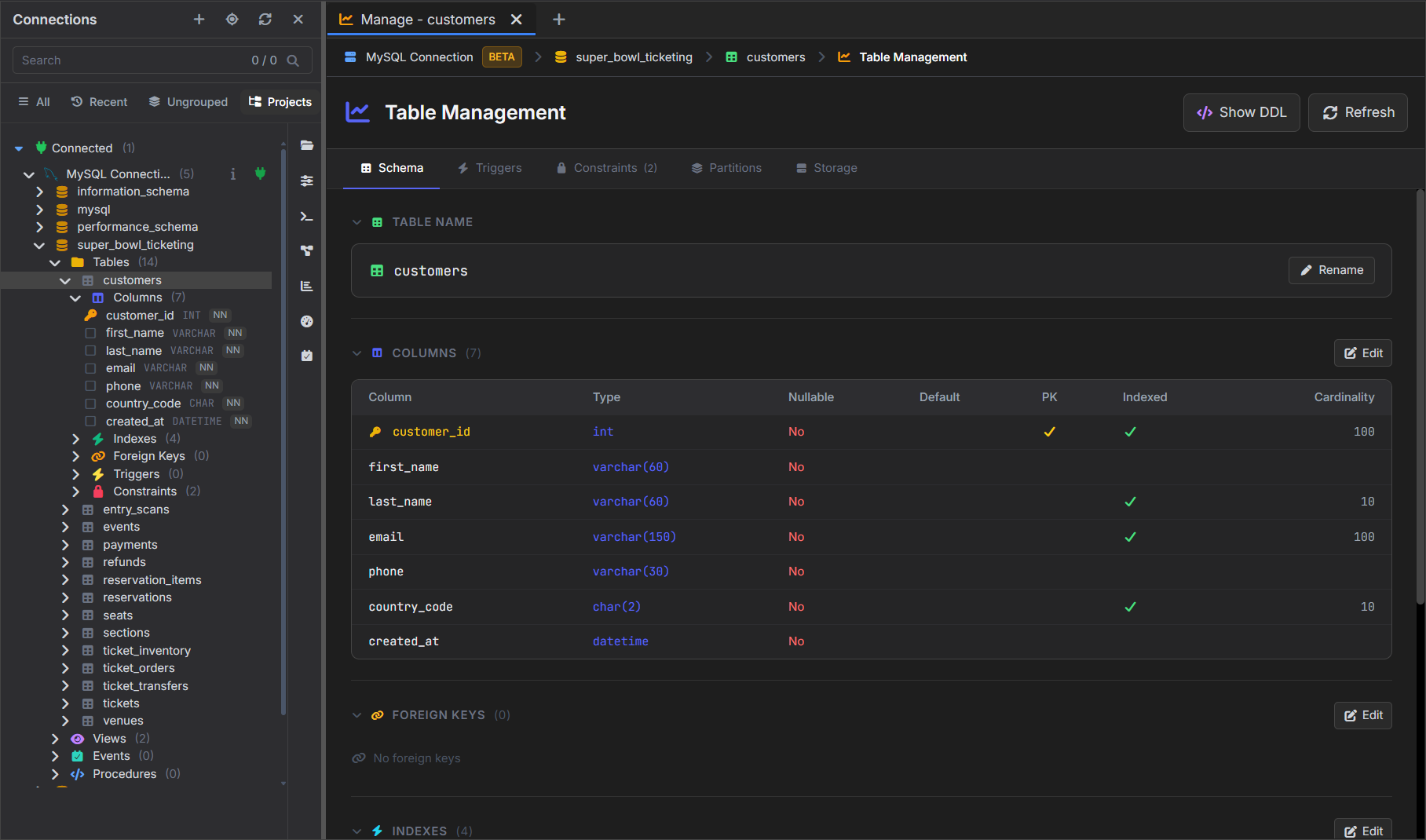
customers table defines seven columns and their data types.Table Structure vs. Stored Data
The previous view showed how customers is structured. This view shows five records stored inside it, beginning with Maya Carter.
Take the email column:
Schema: email VARCHAR(150) NOT NULL UNIQUE
Data:   fan001@example.com
VARCHAR(150) sets the maximum length. NOT NULL requires a value, and UNIQUE prevents duplicate email addresses. Every email in the result must follow those rules.
The table defines the structure. Each row contains one customer that follows it.
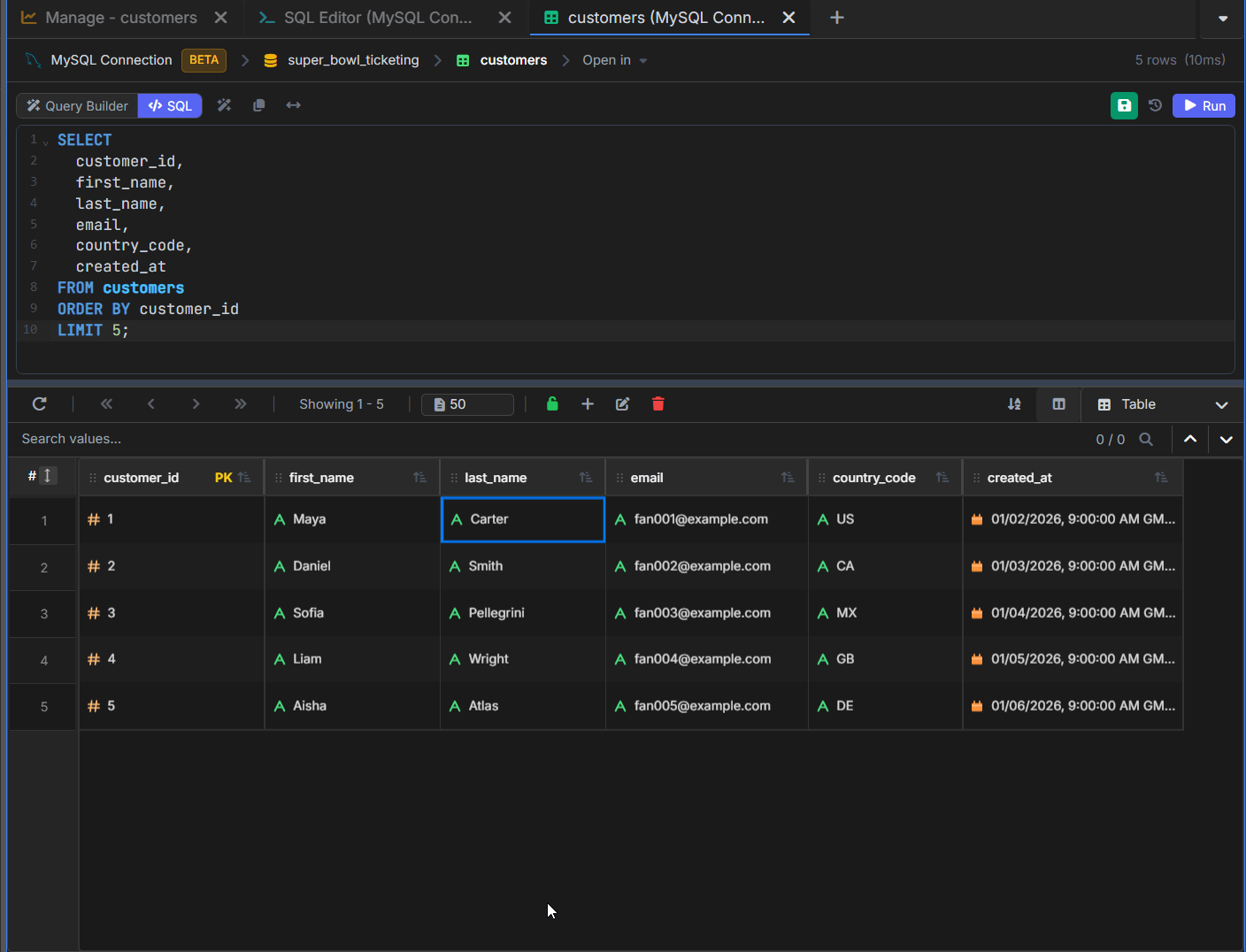
customers table.View the Complete Database Schema as an ER Diagram
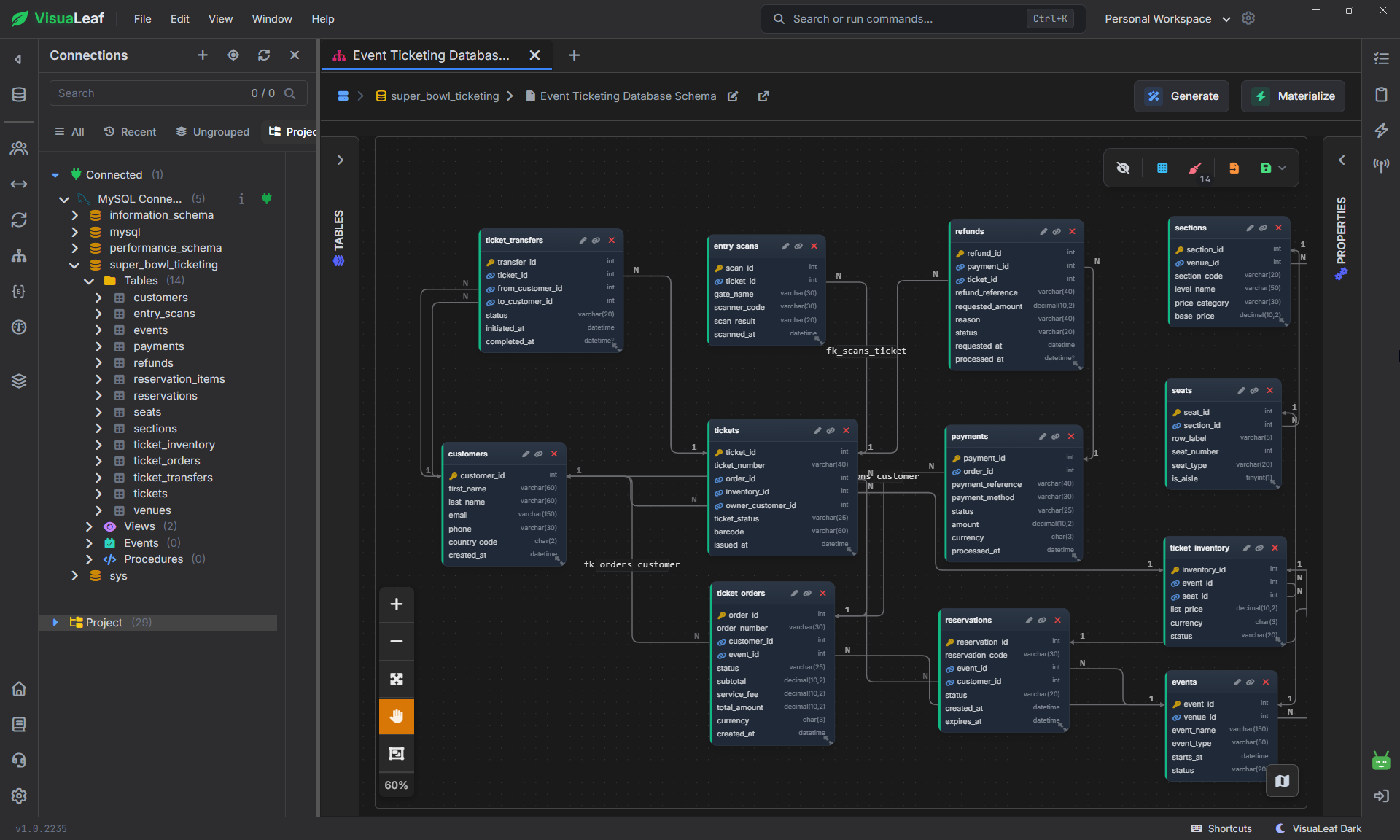
The table view shows one table at a time. To see how all 14 tables fit together, open the database as an ER diagram.
Each box represents a table, while the lines show how those tables are related. This gives you a complete view of the booking workflow, from customers and reservations to payments, tickets, refunds, and entry scans.
The diagram makes the SQL database schema easier to read, but the exact data types, keys, and constraints still come from the MySQL table definitions.
In the next section, we will zoom in on customers and reservations to understand one of those relationships.
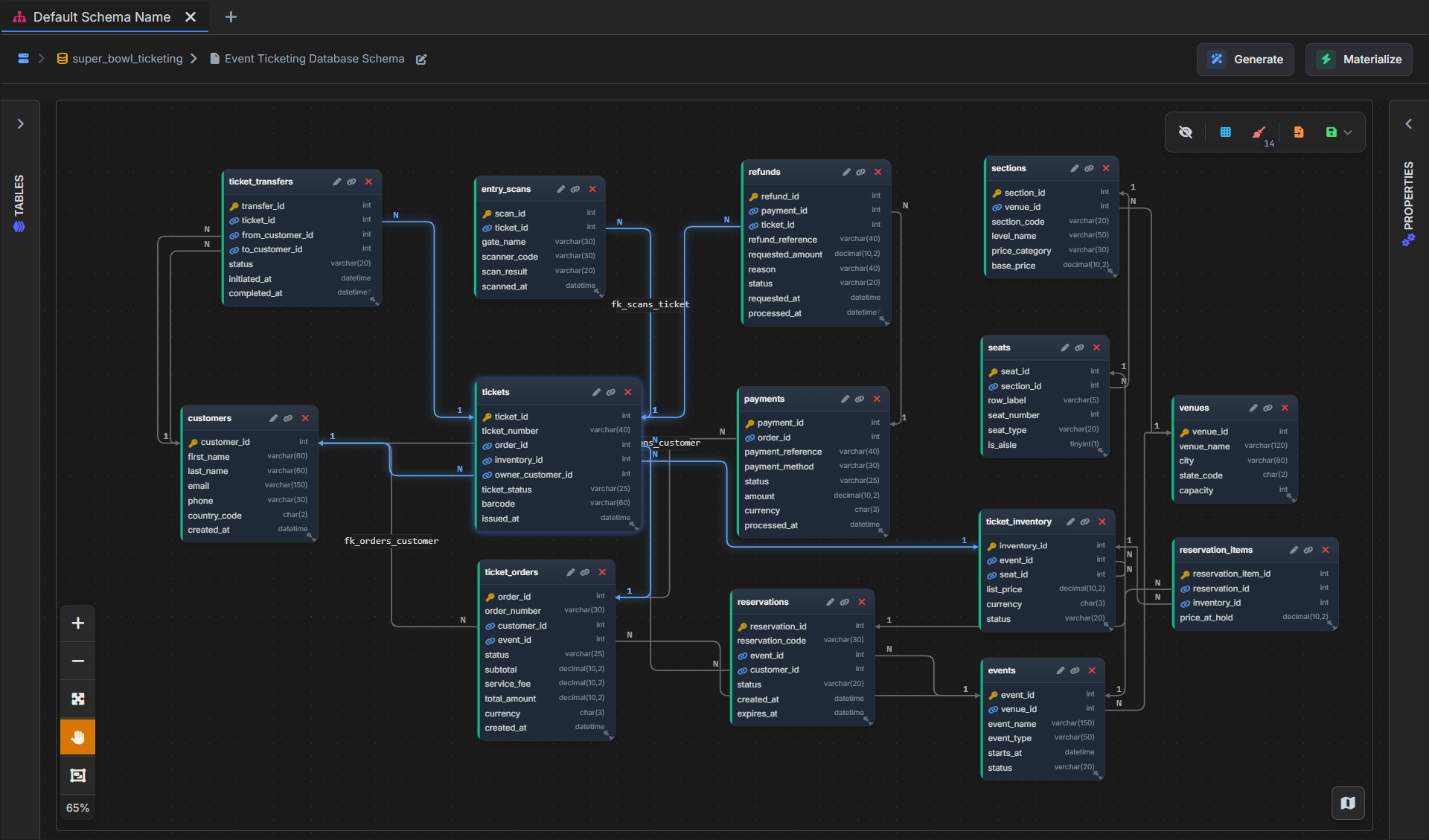
Here, the tickets table is selected, so its relationships are highlighted in blue. You can quickly trace how a ticket connects to its owner, order, inventory record, transfers, entry scans, and refunds.Follow One Relationship Between Two Tables
The diagram below focuses on customers and reservations. Both tables contain customer_id, but the column has a different role in each one:
customers.customer_id       primary key
reservations.customer_id    foreign key
customers.customer_id identifies the customer. reservations.customer_id stores that identifier inside a reservation.
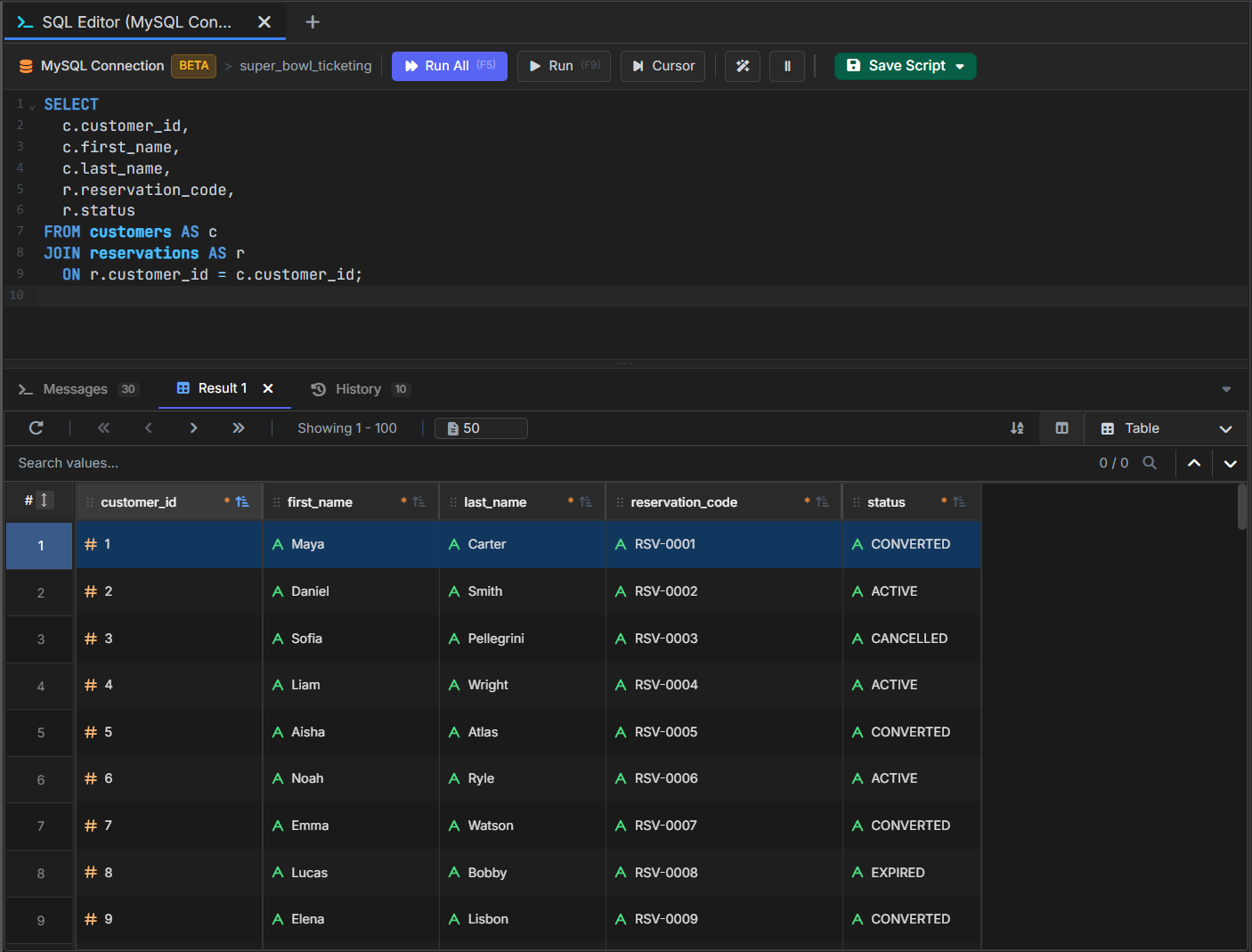
Customer 1 in the sample data is Maya Carter. Reservation RSV-0001 also contains customer_id = 1. That shared value connects the reservation to Maya without copying her name, email, or phone into the reservation.
One customer can create several reservations, while each reservation refers to one customer. This is a one-to-many relationship, with the foreign key on the “many” side.
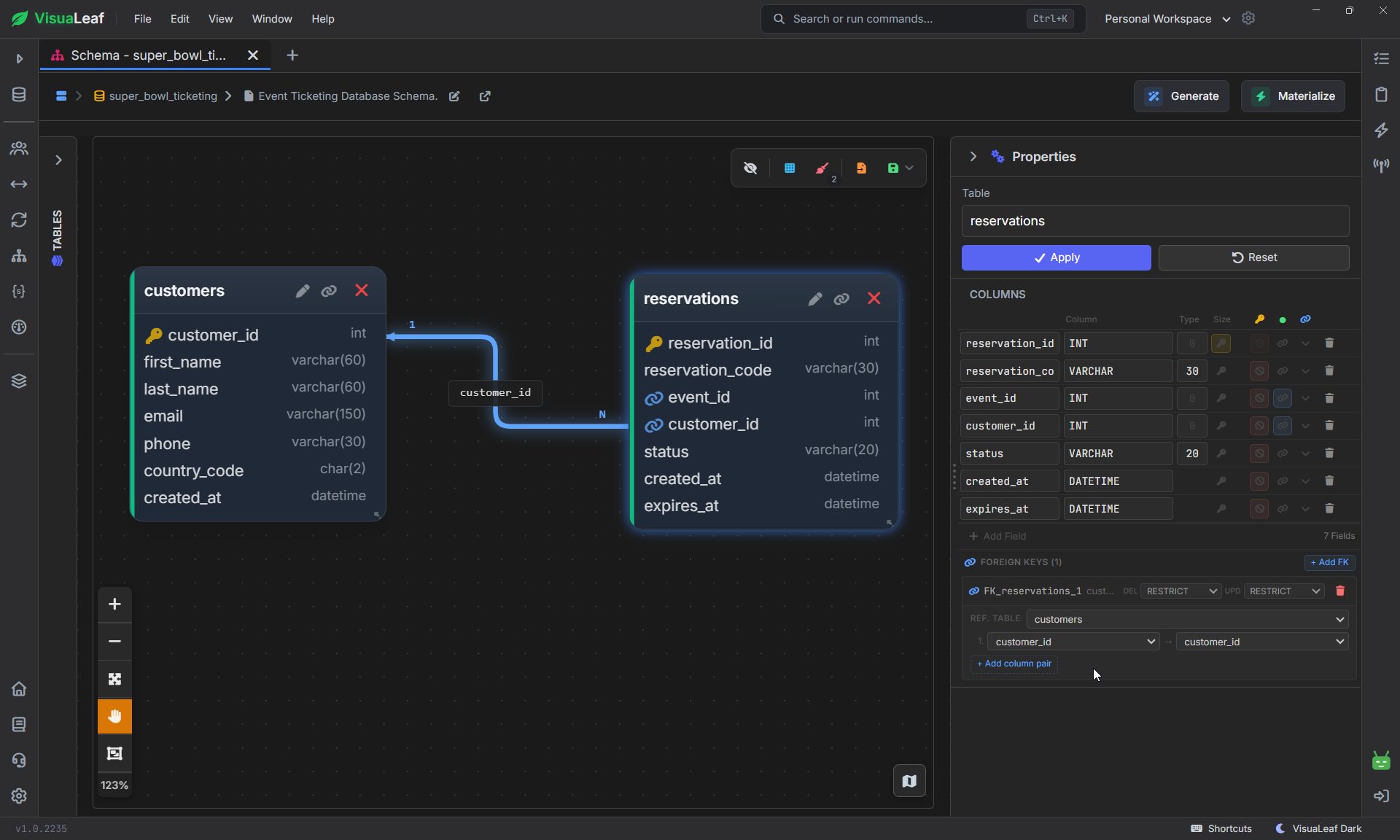
Selecting reservations also opens its properties, where you can review or edit its columns and the foreign key behind the relationship.The Same Relationship in SQL
The line in the diagram comes from this definition in the reservations table:
customer_id INT NOT NULL,

CONSTRAINT fk_reservations_customer
  FOREIGN KEY (customer_id)
  REFERENCES customers (customer_id)
The foreign key prevents a reservation from referring to a customer that does not exist. It also gives you the columns needed to join the tables:
SELECT
  c.customer_id,
  c.first_name,
  c.last_name,
  r.reservation_code,
  r.status
FROM customers AS c
JOIN reservations AS r
  ON r.customer_id = c.customer_id;
The JOIN follows the same connection shown in the diagram. The result combines customer details with the reservation that refers to that customer.
The first row confirms that customer 1, Maya Carter, is connected to reservation RSV-0001.
How Does a Bridge Table Connect Many-to-Many Data?
The next relationship uses three tables:
reservations
      ↓
reservation_items
      ↓
ticket_inventory
A reservation may contain more than one seat. Adding seat_1, seat_2, and seat_3 to reservations would set an arbitrary limit and leave empty columns in smaller reservations.
The schema uses reservation_items instead. Each row connects one reservation_id with one inventory_id. Adding another seat means inserting another row, not changing the design of the reservations table.
Together, these two one-to-many relationships allow reservation_items to act as a bridge between reservations and ticket inventory.
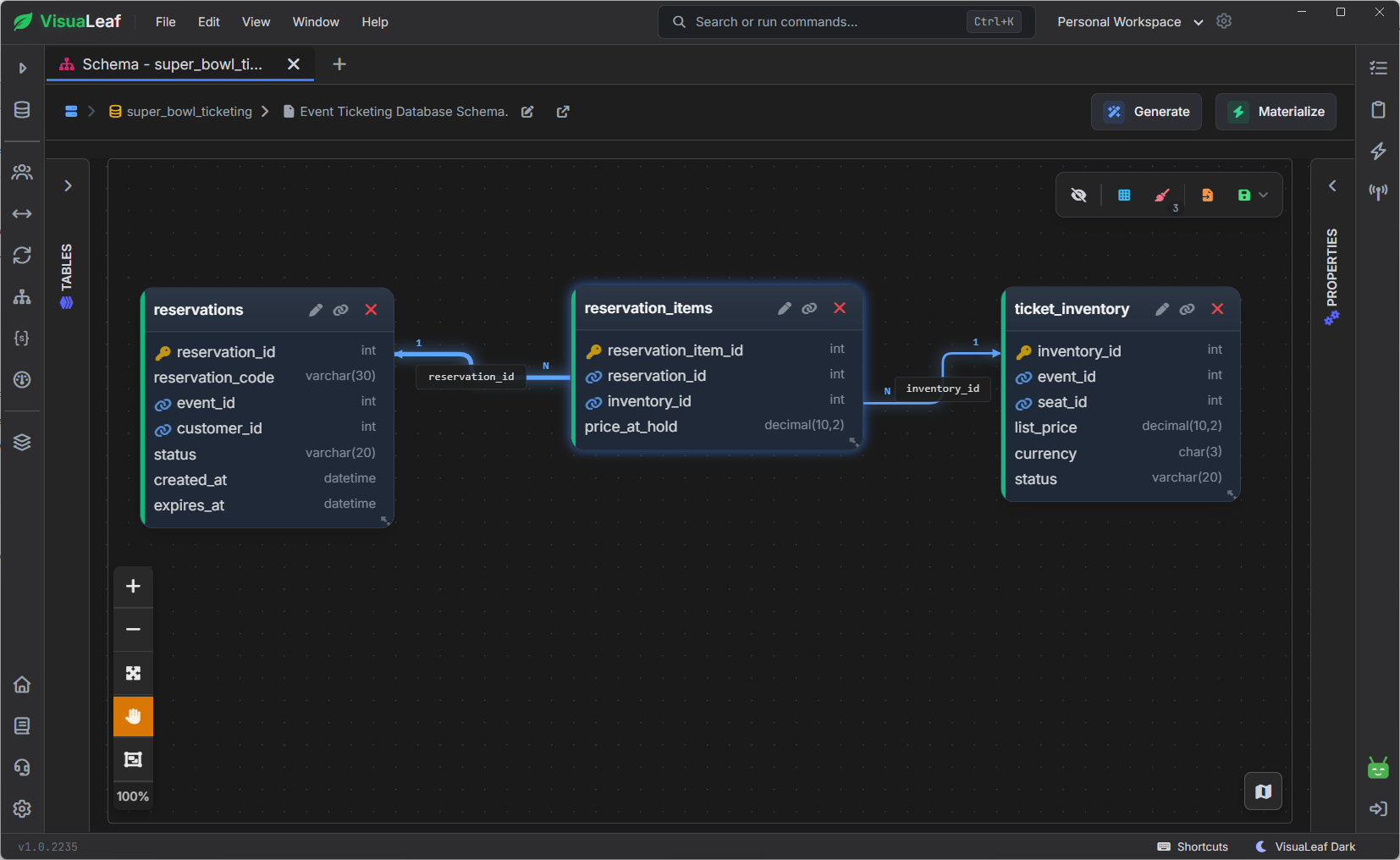
reservation_items connects reservations with ticket inventory.Database Normalization: 1NF, 2NF, and 3NF
Normalization reduces duplicated data and keeps related information in the correct table. The first three normal forms cover most of the problems beginners need to understand.
| Normal form | Main rule | Example from this schema |
|---|---|---|
| 1NF | Each field contains one value, with no repeating columns such as seat_1, seat_2, and seat_3. |
reservation_items stores each reserved inventory item in a separate row. |
| 2NF | A value associated with a combined key must depend on the complete combination. | In ticket_inventory, list_price and status belong to the combination of event_id and seat_id. |
| 3NF | Non-key values should not depend on other non-key values. | Customer names and emails stay in customers; reservations stores only customer_id. |
The separation between customers and reservations is a practical 3NF example. If every reservation repeated the customer’s email, changing that email would require several updates. Keeping it in customers gives the database one current value.
Normalization is not about creating as many tables as possible. Split information when it describes a different subject or relationship.
How Do You Design a SQL Database Schema?
Database schema design starts with the application's workflow, not a blank CREATE TABLE statement.
1. Write down what the application does. Here, the application needs to manage customers, events, seat reservations, orders, payments, issued tickets, transfers, refunds, and entry scans.
2. Identify the subjects. Customers, events, seats, reservations, payments, and tickets change independently, so they belong in separate tables.
3. Choose primary keys. Every table needs a stable way to identify one row.
4. Connect the tables. Add foreign keys for one-to-many relationships and bridge tables for many-to-many relationships.
5. Choose data types and constraints. Use DECIMAL(10, 2) for money, DATETIME for dates and times, NOT NULL for required values, and UNIQUE where duplicates are invalid.
6. Test real questions. Can you find available seats, reservations about to expire, tickets for an order, and scans for a ticket without duplicated data or text matching?
7. Add indexes for actual queries. An index should support a query the application runs, not exist just because an indexed database sounds faster.
Review the Complete Database Schema
After examining the smaller relationships, return to the complete diagram. The main parts of the booking system are now easier to follow:
-> Customers connect to reservations, orders, tickets, and transfers.
-> Events connect to reservations, orders, and ticket inventory.-> reservation_items connects reservations with ticket inventory.
-> Tickets connect to transfers, entry scans, and refunds.
-> Payments connect orders with refunds.
In VisuaLeaf, you can select a table to highlight its relationships and follow one part of the database at a time. Open a table’s properties when you need its exact data types, constraints, foreign keys, or indexes.
Conclusion: Understanding a SQL Database Schema
A SQL database schema defines more than a list of tables. It decides where each value belongs, how records connect, and which invalid values MySQL should reject.
Compare one table's definitions with its stored data, then follow one foreign key in the diagram. Connect that line to the SQL definition and JOIN condition before reading the larger structure.
That same method works when you design your own database: begin with the workflow, separate the main subjects, define their keys, and test the questions the application needs to answer.