Best Database Design Tools for 2027: Windows, macOS & Linux
Compare eight database design tools for 2027 for ER diagrams, MySQL schema design, SQL editing, visual queries, and team workflows on Windows, macOS, and Linux.


Most database trouble starts with a schema nobody ever drew. A handful of tables turn into fifty, someone adds a foreign key late on a Friday, and a few months later nobody can explain how orders connect to customers without reading raw DDL.
A visual design tool fixes that. You see the tables, you see the relationships, and you can show them to a teammate who wasn’t in the room. The catch is that “database tool” covers a lot of ground. Some let you design a schema before the database exists. Others are SQL clients that draw a diagram once you connect to a live server.
This article compares eight popular tools, focusing on schema design and documentation. For each one, you get what it does well, where it falls short, how many databases it connects to, what it costs, and how painful the free trial is to start.
Short on time? Jump to the strengths and weaknesses overview at the end for a quick side-by-side of all eight tools.
What I looked at
- Can you design a schema visually, or only view one that already exists?
- Can it reverse engineer a live database into a diagram?
- Can it generate SQL from the diagram (forward engineering)?
- Does it help with schema comparison, documentation export, or team workflows?
- How many databases can it connect to?
- What is free, what is paid, and how easy is it to start a trial?
The eight tools side by side
| Tool | Built around | Runs on | Databases | Price | Free trial |
|---|---|---|---|---|---|
| VisuaLeaf | One GUI for MongoDB and SQL | Windows, macOS, Linux | 37+ | Free Community Edition. Basic from $10/month or $79. Professional from $16/month or $149 | 14 days, email only; can be extended |
| DataGrip | SQL editing | Windows, macOS, Linux | 50+ | Free for non-commercial use. From $10.90/month or $109/year. Organizations from $259/user/year | 30 days, starts straight away |
| DbSchema | An offline model file | Windows, macOS, Linux | 100+ | Free Community. Pro from $196 personal / $294 business. Architect from $313.60 personal / $470.40 business | 15 days of Architect, one click; can be extended |
| DBeaver | Live database work | Windows, macOS, Linux | 100+ | Free Community. Lite $113/year, Enterprise $255/year, Ultimate $510/year | 14 days; request and import a licence key |
| Navicat | Live database work | Windows, macOS, Linux | 9 | Free Premium Lite. Premium perpetual licence from 75$/month or $1,499 perpetual; subscriptions also offered | 14 days, starts automatically |
| DbVisualizer | Live database work | Windows, macOS, Linux | 40+ plus JDBC | Free edition. Pro $199 the first year, then $89/year | 21 days, no account or card needed |
| TablePlus | A fast native client | macOS, Windows, Linux | 22 | Free edition with limits. Basic $99 one-time, Standard $129 one-time | Free forever, no signup needed |
| Beekeeper Studio | A clean SQL client | Windows, macOS, Linux | 24 | Free Community. Paid from $18/month or $168 billed yearly | 14 days, no email or card |
Prices are USD list prices before tax, checked in October 2026. Where a vendor splits business and personal plans, the business price is shown. Plans change often, so confirm on each vendor’s site before you buy.
How I Tested the 8 GUIs
All screenshots come from the same MySQL database, so the diagrams are comparable. For this comparison, I connected every tool to the same MySQL 8.4.11 database: super_bowl_ticketing, with 19 tables and 21 foreign-key relationships.
1. VisuaLeaf
- Platform: Windows, macOS, Linux
- Databases: MySQL, MongoDB, PostgreSQL, and 34 more
- Price: free Community Edition. Basic from $10/month or $79 one-time; Professional $149 one-time (each includes 1 year of updates)
- Free trial: 14 days of Pro features. Add your email in the app or on the dashboard and the trial starts, with the option to extend it
VisuaLeaf treats MongoDB and relational databases as equals, which is still rare. For schema work, you can create a diagram from scratch or reverse engineer an existing database into one, then stay in the same app for the rest of the job.
Key features
- Schema diagrams: create one from scratch or reverse engineer an existing database. ER diagrams for SQL databases are in the free Community Edition
- SQL editor: with inline editing and a visual query builder
- Index manager: create, change, and drop indexes
- Query profiler: find and diagnose slow queries (from Basic)
- Data compare and sync: across MongoDB and SQL databases (Professional)
- Data masking: hide sensitive fields in exports (from Basic)
- Task automation: import, export, and migration tasks, including scheduled transfers
- Charts and dashboards: built from your queries (Professional)
- AI Assistant in the Basic plan or MCP in the Pro one.
- Database Documentation: interactive HTML5, PDF, JSON, DDL (Pro)
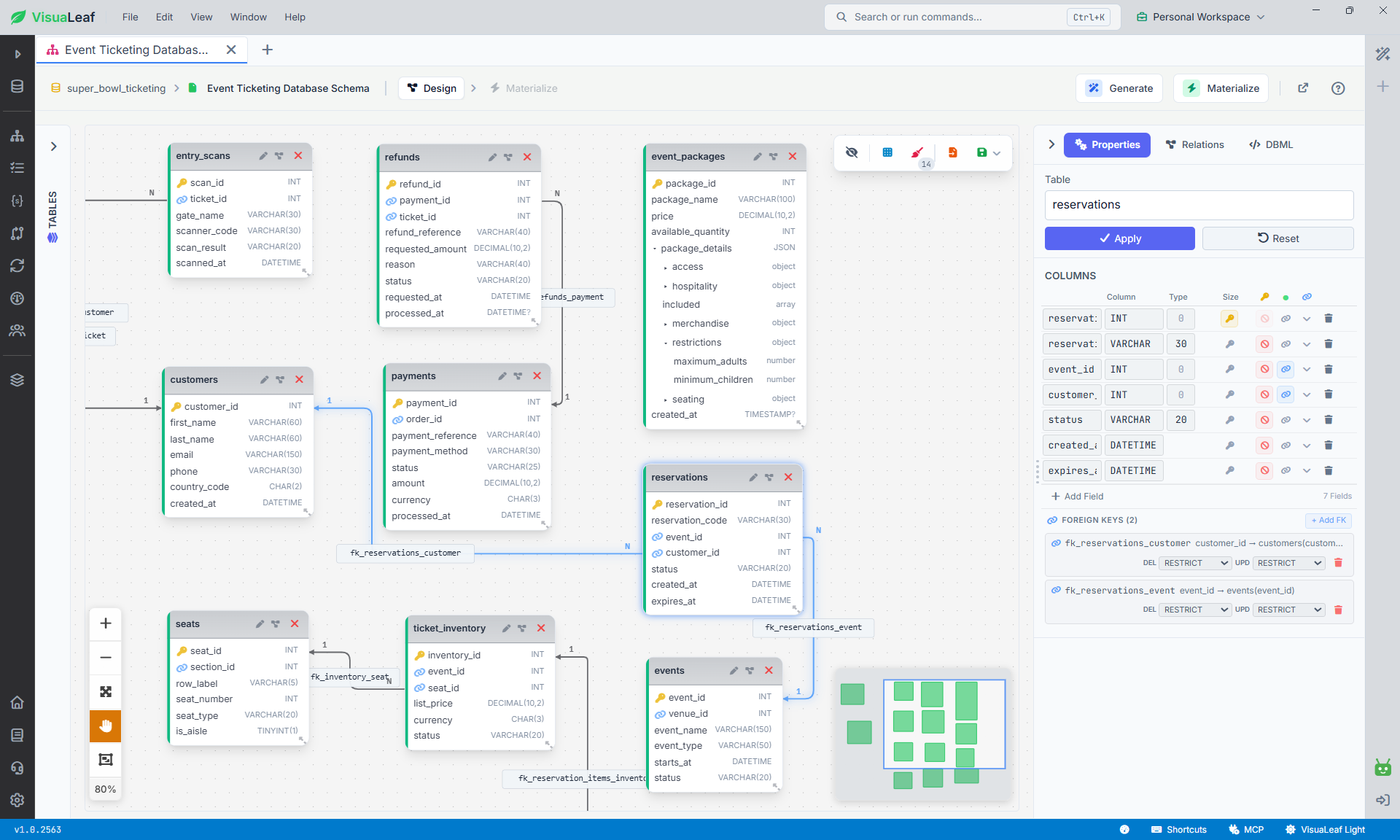
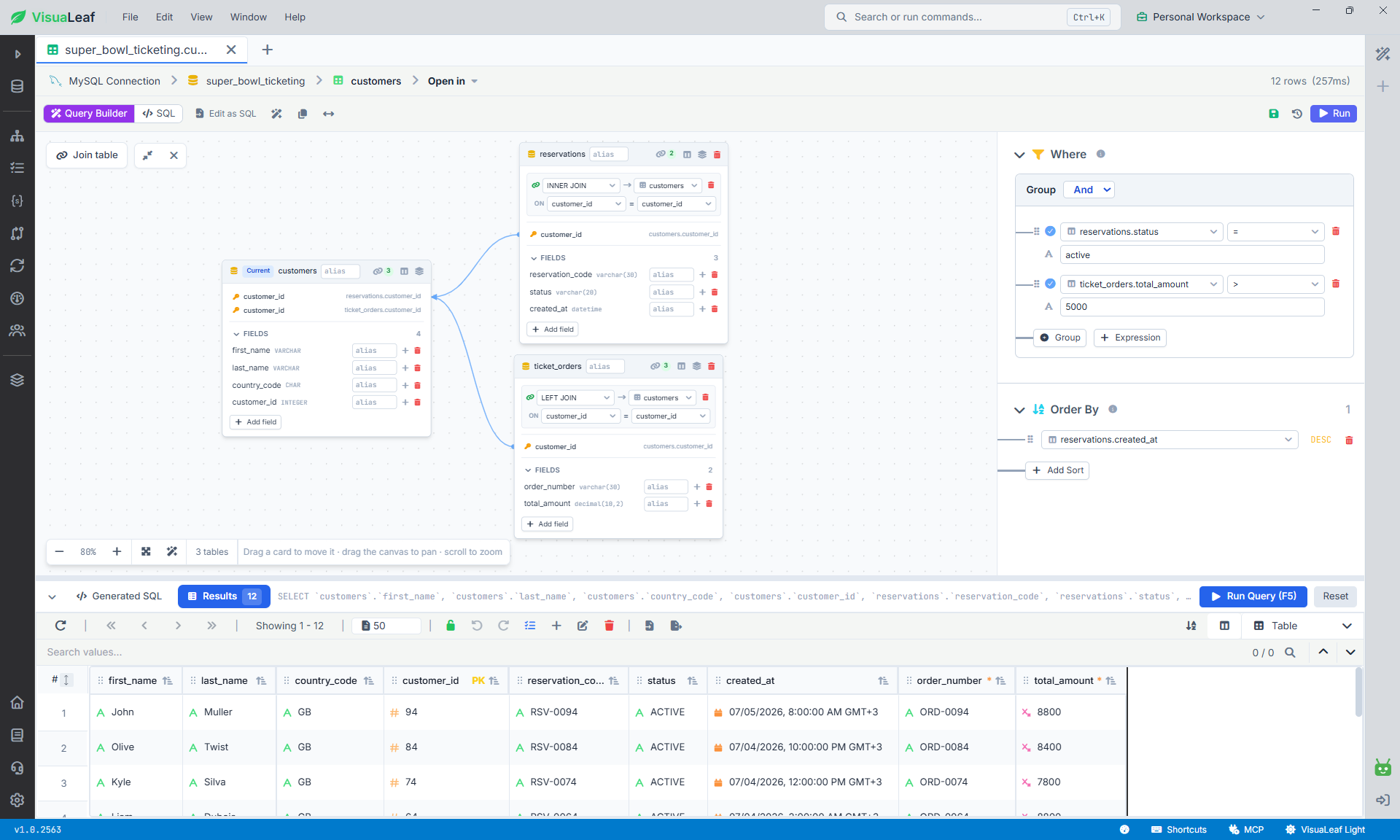
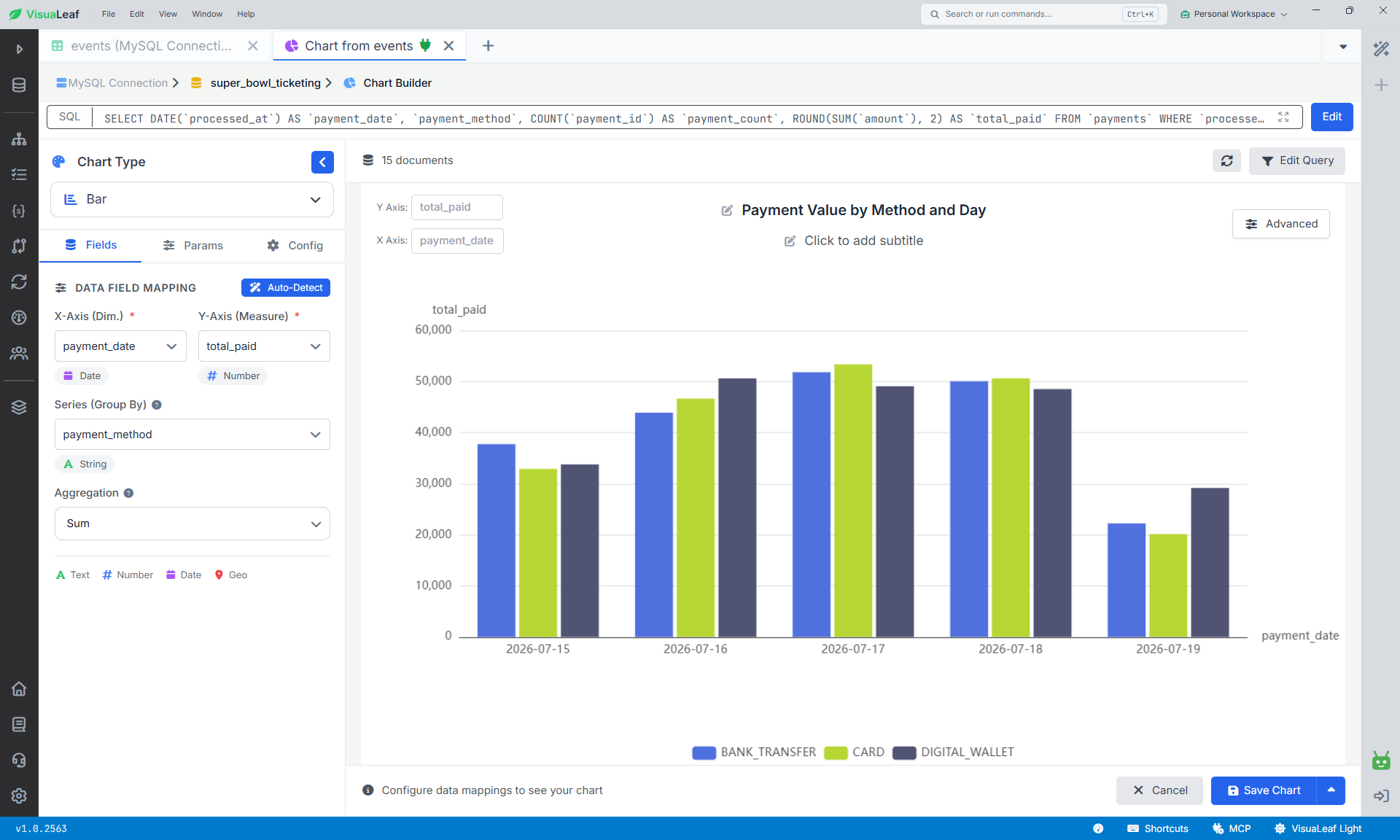
VisuaLeaf’s visual query builder and chart workspace: build a joined MySQL query on the left, or turn an aggregated SQL result into a payment chart on the right.
What I like
- One app for MongoDB and 36 other databases, which helps if your stack mixes both
- Diagrams you can create and reverse engineer, free for SQL databases
- Compare, sync, and masking sit next to the diagram, so you don’t need a second tool
- JSON fields can be expanded inside the diagram, which makes mixed relational and nested data easier to understand
Disadvantages
- It’s a newer product, so tutorials and community answers are thinner than for DBeaver or DataGrip
- The heavier features, such as data compare and sync or dashboards, need the Professional plan
2. DataGrip
- Platform: Windows, macOS, Linux
- Databases: MySQL, MongoDB, PostgreSQL, and dozens more (JetBrains doesn’t publish an exact number)
- Price: from $10.90/month or $109/year for individuals, $259/user/year for organizations. Free for non-commercial use
- Free trial: 30 days, starts directly in the app
DataGrip is JetBrains’ database IDE, and it’s the pick if you spend your day writing and refactoring SQL. The free license covers learning, hobby projects, open-source work, and content creation.
Key features
- ER diagrams: generated automatically, showing tables, relationships, and foreign keys for a connected database
- Query console: run queries in different modes, with local history so you don’t lose work
- Code completion: aware of table structure, foreign keys, and the objects in the code you’re editing
- On-the-fly analysis: flags probable bugs and suggests quick fixes
- Import and export: CSV, JSON, HTML, Markdown, Excel, and more
- Version control integration and query history
- AI assistance: schema-aware help with queries, errors, and SQL dialect conversion
- Cloud discovery: finds databases in your AWS, Google Cloud, or Azure account
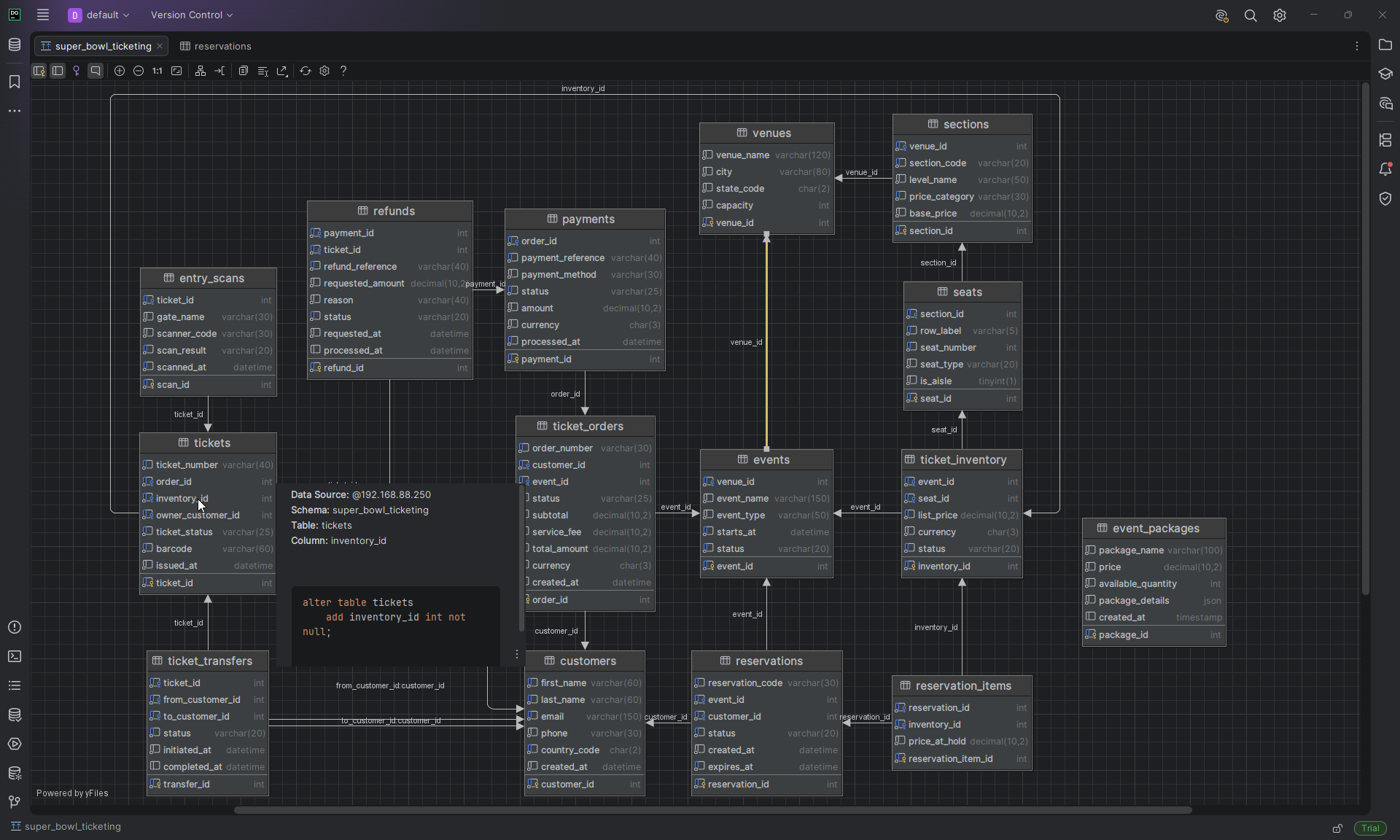
super_bowl_ticketing MySQL schema.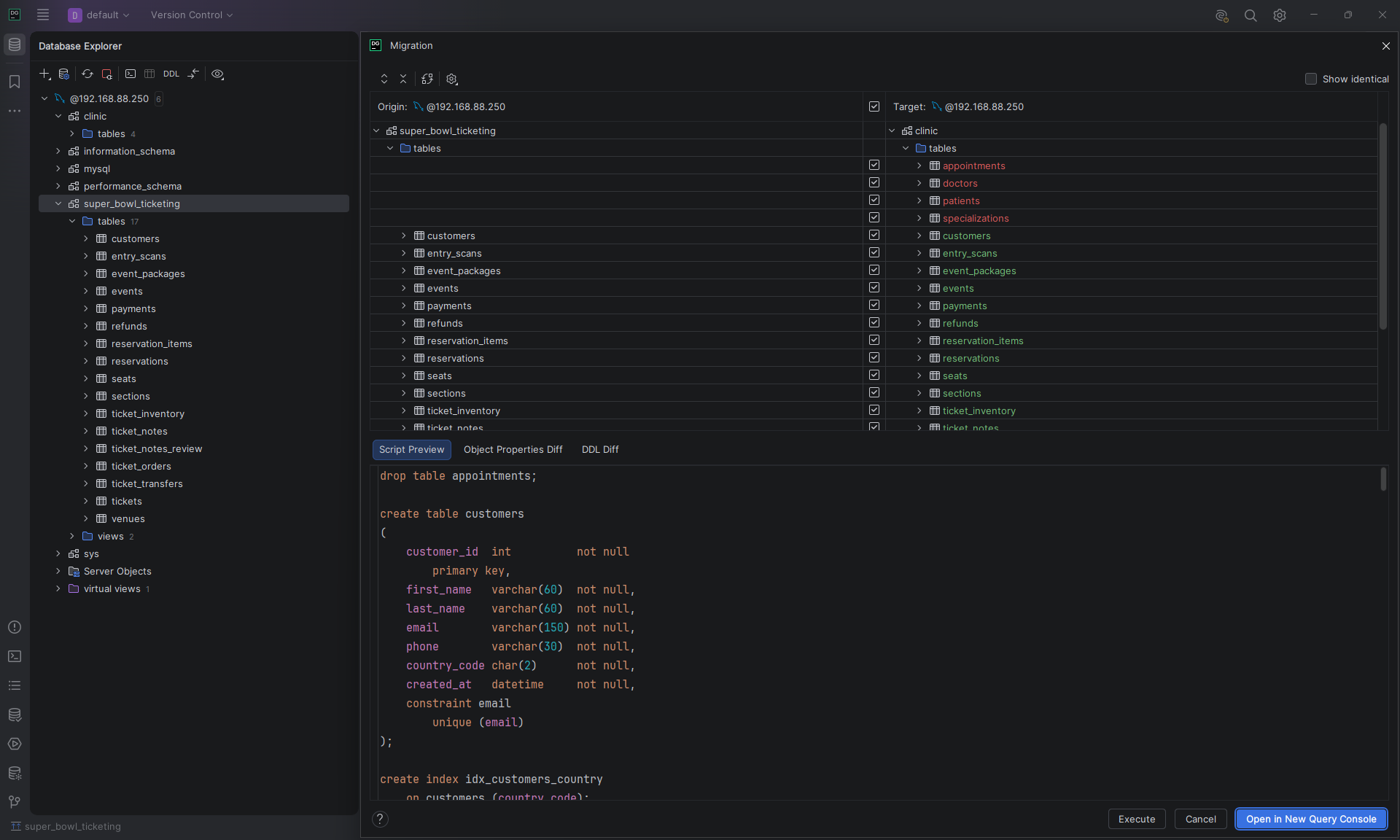
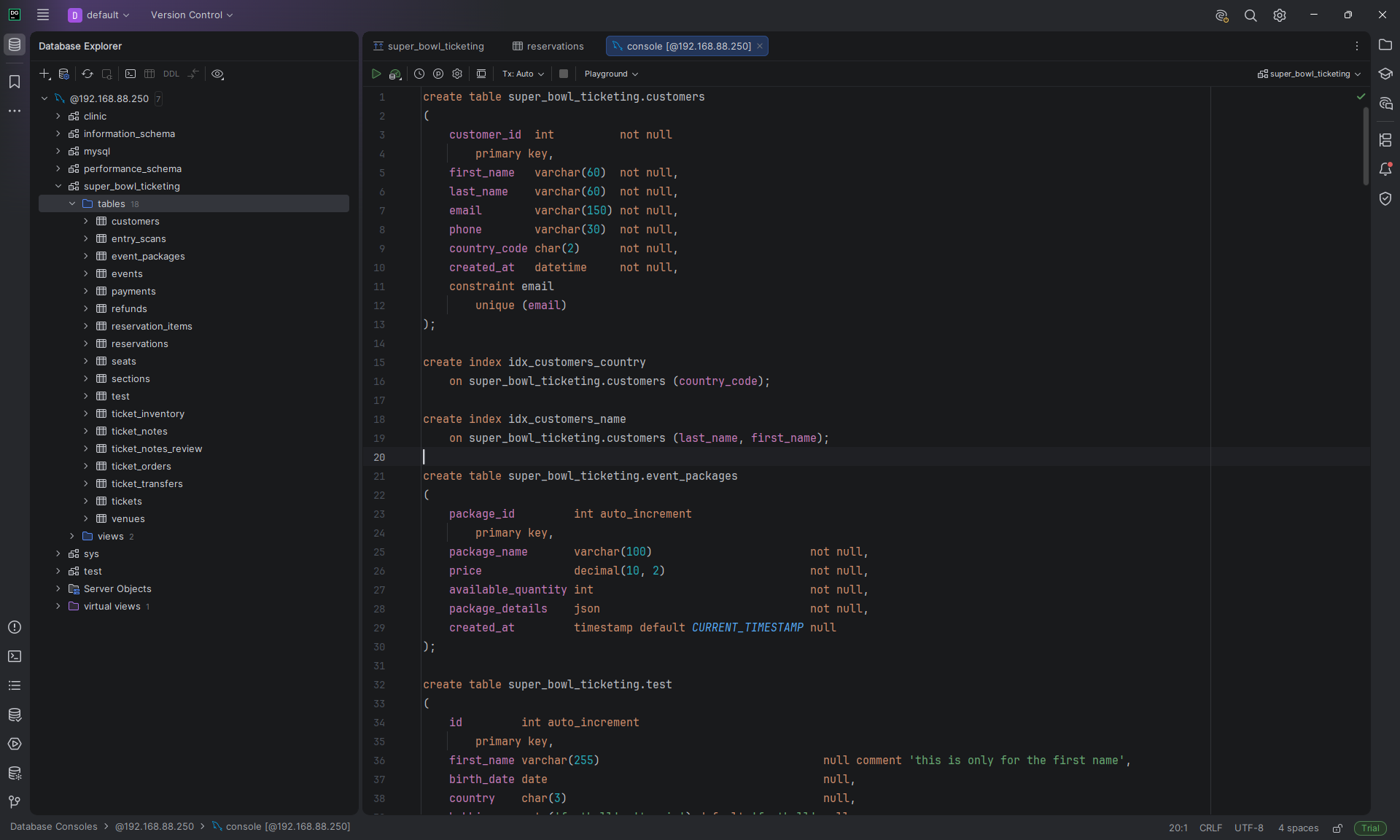
DataGrip generates DDL for existing MySQL tables and compares schema changes before creating a migration script.
What I like
- Smart completion, refactoring, and inspections for SQL
- ER diagrams without leaving the IDE
- The free non-commercial license is a real option for students and side projects
Disadvantages
- Commercial work needs a paid subscription
- It’s built for working with existing databases, not for designing new ones from a blank page
3. DbSchema
- Platform: Windows, macOS, Linux
- Databases: MySQL, MongoDB, PostgreSQL, and 70+ more
- Price: free Community Edition. Pro $294 one-time ($196 for personal use), Architect $470.40 one-time. Both include the first year of updates, then $75/year (Pro) or $120/year (Architect) to keep getting new versions. Monthly plans are also available
- Free trial: 15 days of the Architect edition, one click, no card.
DbSchema is a good design-first tool from the group. The diagram is the model, and you can save it to a file and work on it without a database connection. Community is free forever and covers connecting, reverse engineering, interactive diagrams, creating tables and columns, and a SQL editor. Pro and Architect add the design workflow on top.
Key features
- Interactive diagrams: reverse engineer a live database, or create and edit tables and columns visually. Free in Community
- SQL editor: with autocompletion, free in Community
- Offline model file: save the design to a file and work without a connection (Pro). The file works well with Git
- Schema synchronization: compare, diff, and generate migration scripts (Pro)
- Documentation: interactive HTML5, PDF, and Markdown (Pro)
- Visual query builder and relational data browse (Pro)
- Data generator and importer: fill tables with test data, load CSV, XML and XLS files (Pro)
- Logical and conceptual design: database-independent models that you can migrate to a physical schema later (Architect)
- AI assistant: a separate $9/month add-on for any edition, or your own key in Architect
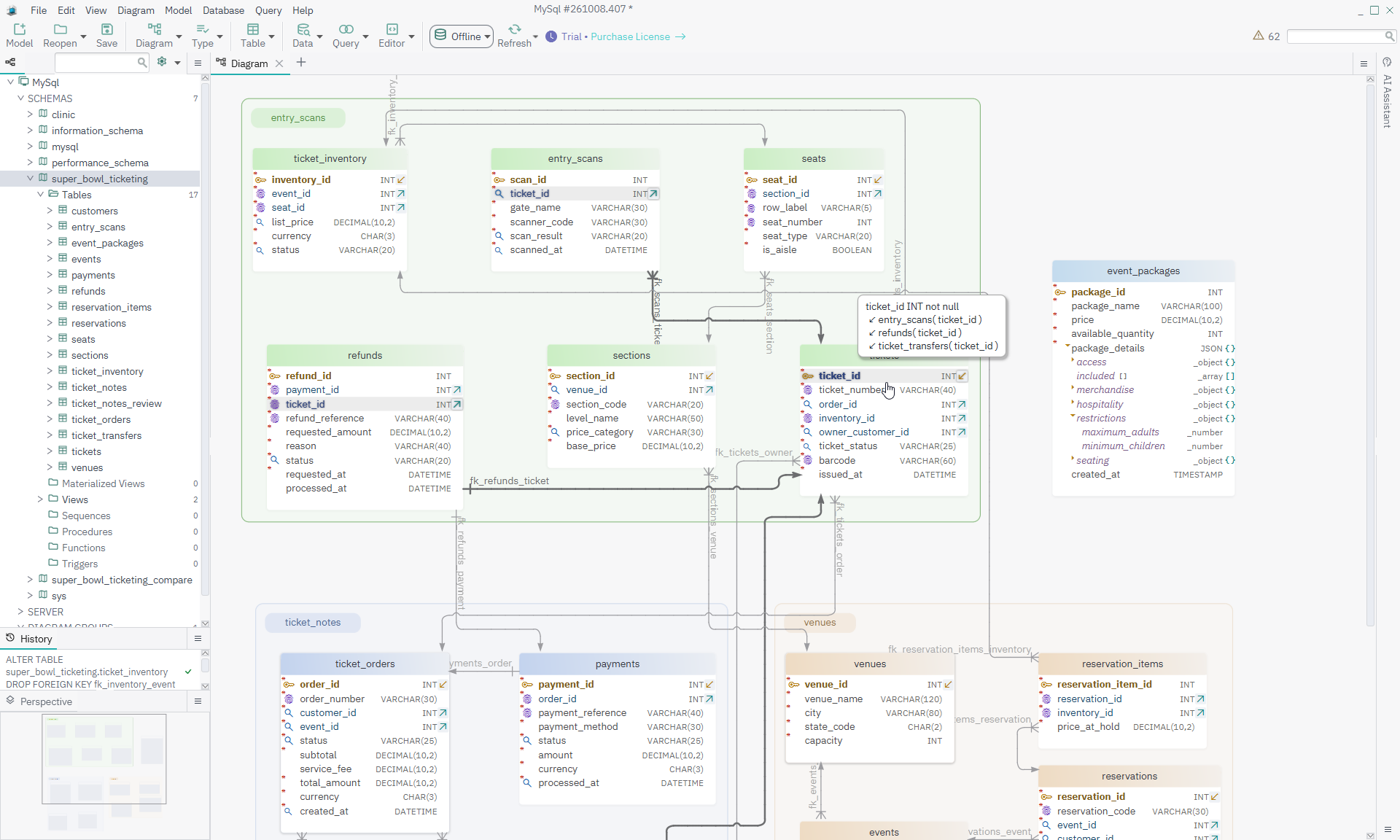
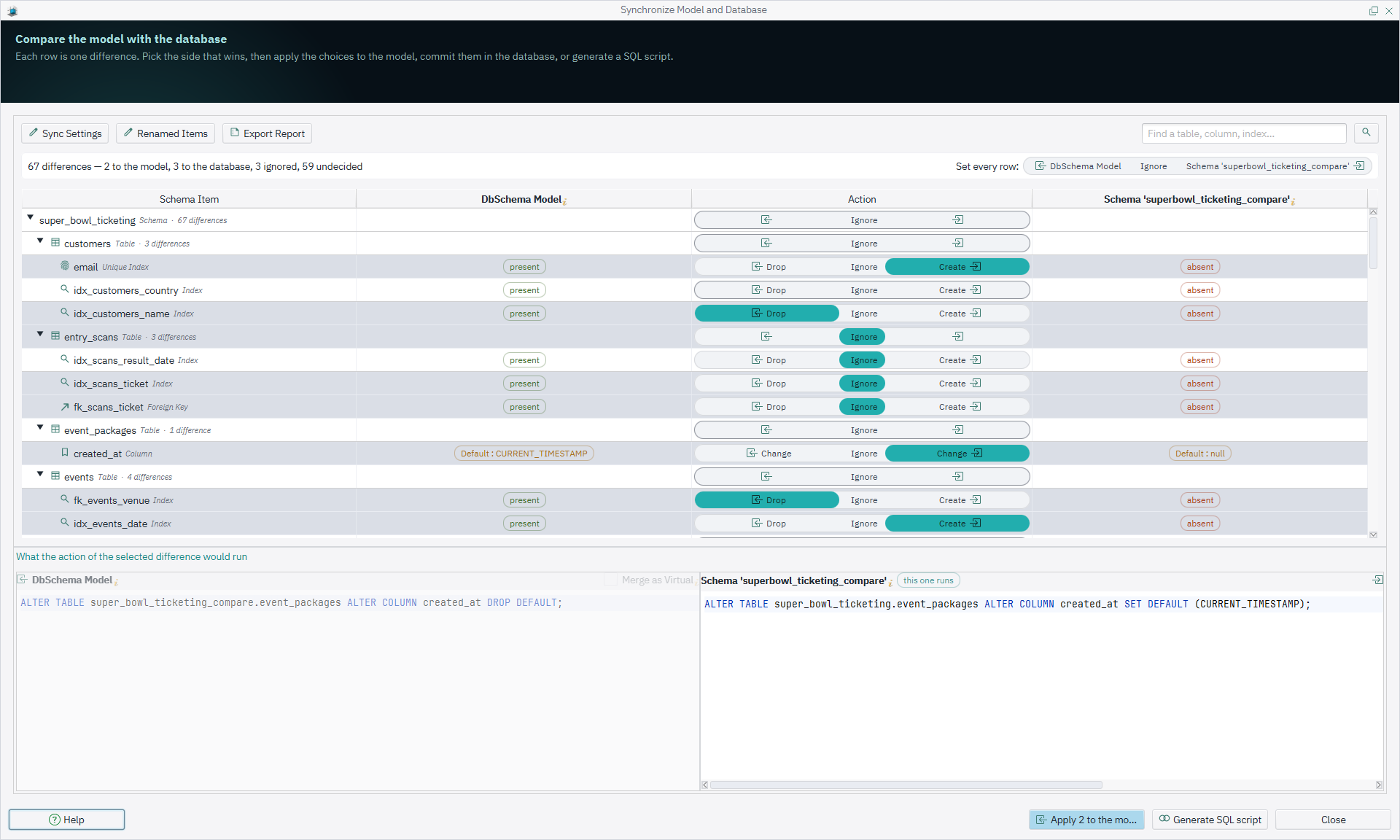
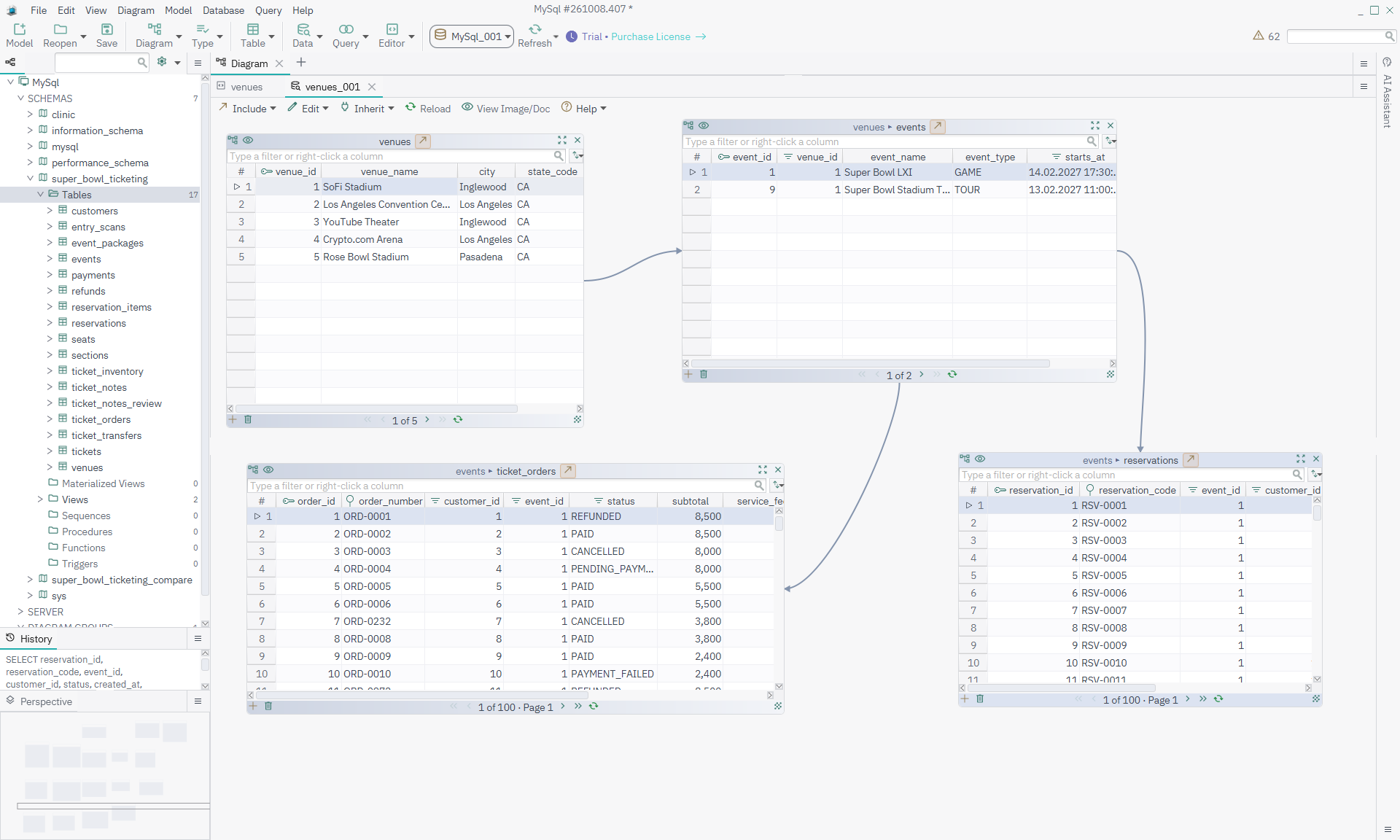
DbSchema’s Relational Data Editor follows connected rows across linked panes, from a venue to its events, orders, and reservations.
What I like
- You can model before the database exists, which most tools here can't do
- Diagrams, reverse engineering, and the SQL editor are free for every supported database
- Git-friendly model file and generated documentation make it good for teams
Disavantages
- Saving the model, documentation, and schema sync need a paid edition. When the trial ends, Community can't open the project files you saved
- Steeper learning curve: its model-first workflow and many features can feel less straightforward for beginners than a simpler live database client.
5. DBeaver
- Platform: Windows, macOS, Linux
- Databases: MySQL, MongoDB (paid editions), PostgreSQL, and 100+ more
- Price: free Community Edition. Lite $113/year ($12/month), Enterprise $255/year ($26/month), Ultimate $510/year
- Free trial: 15 days. Create an account, then import the license key into the app (the most involved sign-up of the eight)
DBeaver is the free all-rounder. The Community edition is open source and works with 100+ databases, and the paid editions add schema editing, comparison tools, and NoSQL support. It’s a general database tool first and a design tool second.
Key features
- ER diagrams: for a whole schema or a single table, in every edition. Editing the schema from the diagram (ERD edit mode) starts at Enterprise
- SQL editor and data editor: with query history and inline editing
- Visual query builder: build queries by clicking tables and columns (paid editions)
- Import, export, and charts: move data between databases and files, and draw analytical charts
- Schema comparison and table data comparison: (Enterprise)
- Mock data generation: fill tables with test data (Enterprise)
- Git sync and task scheduler: (Enterprise)
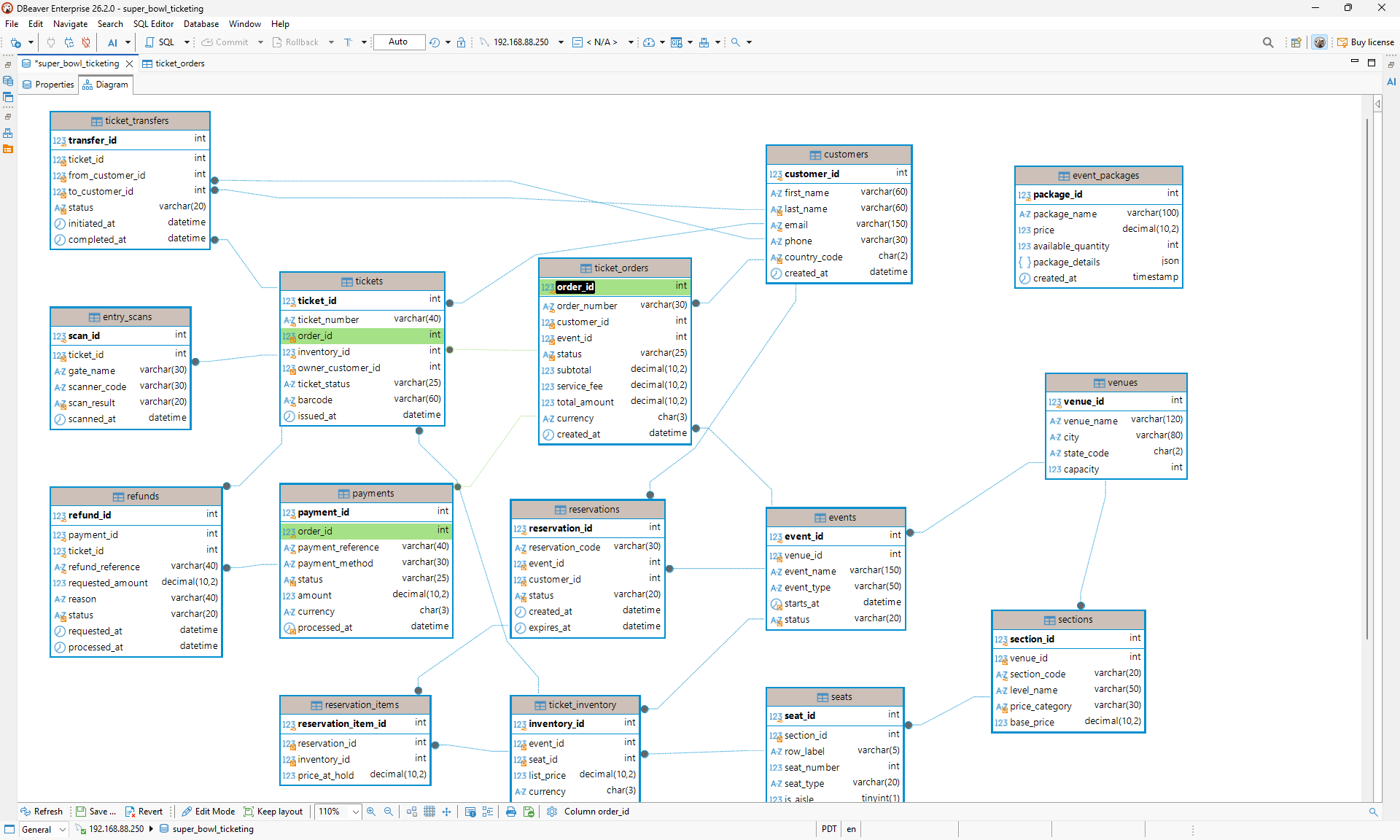
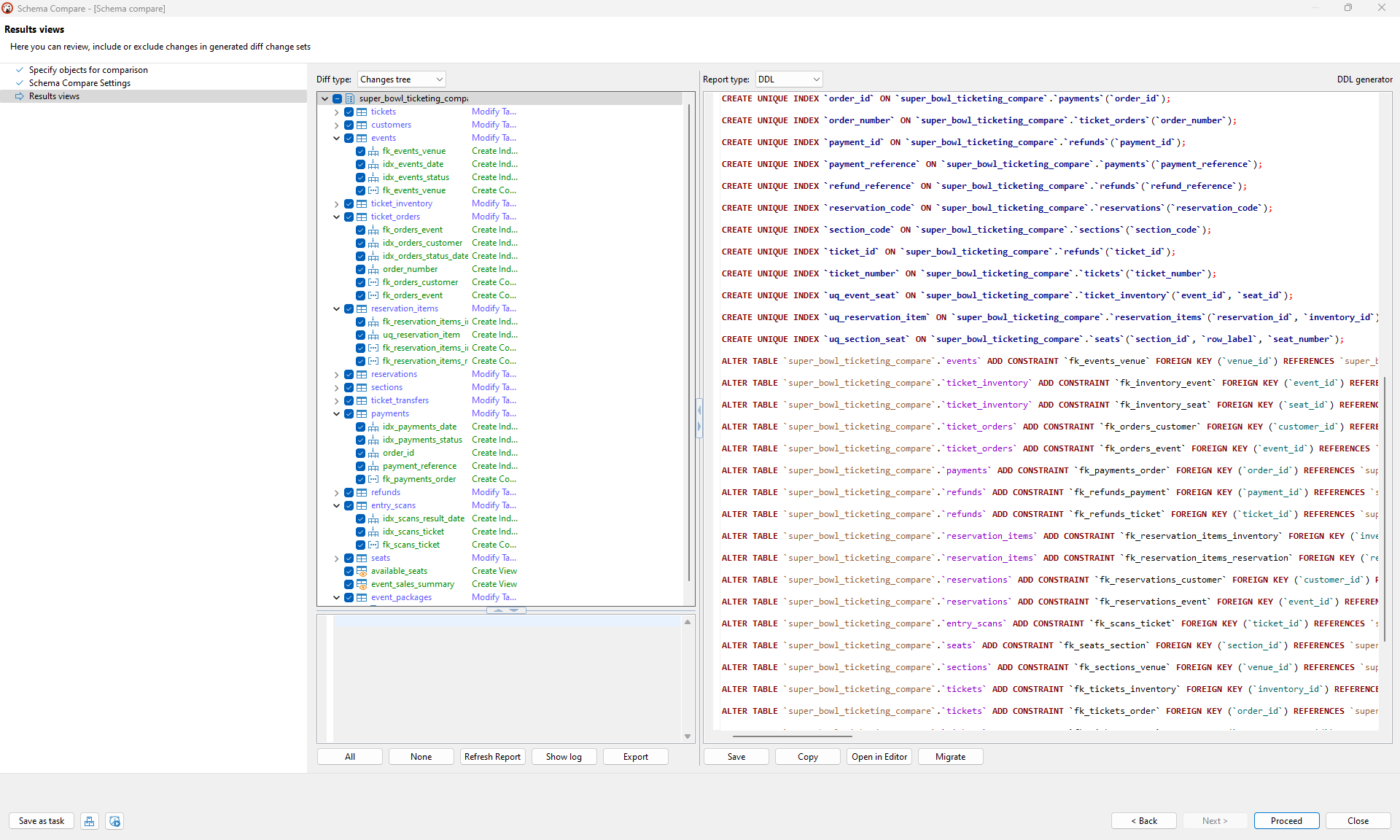
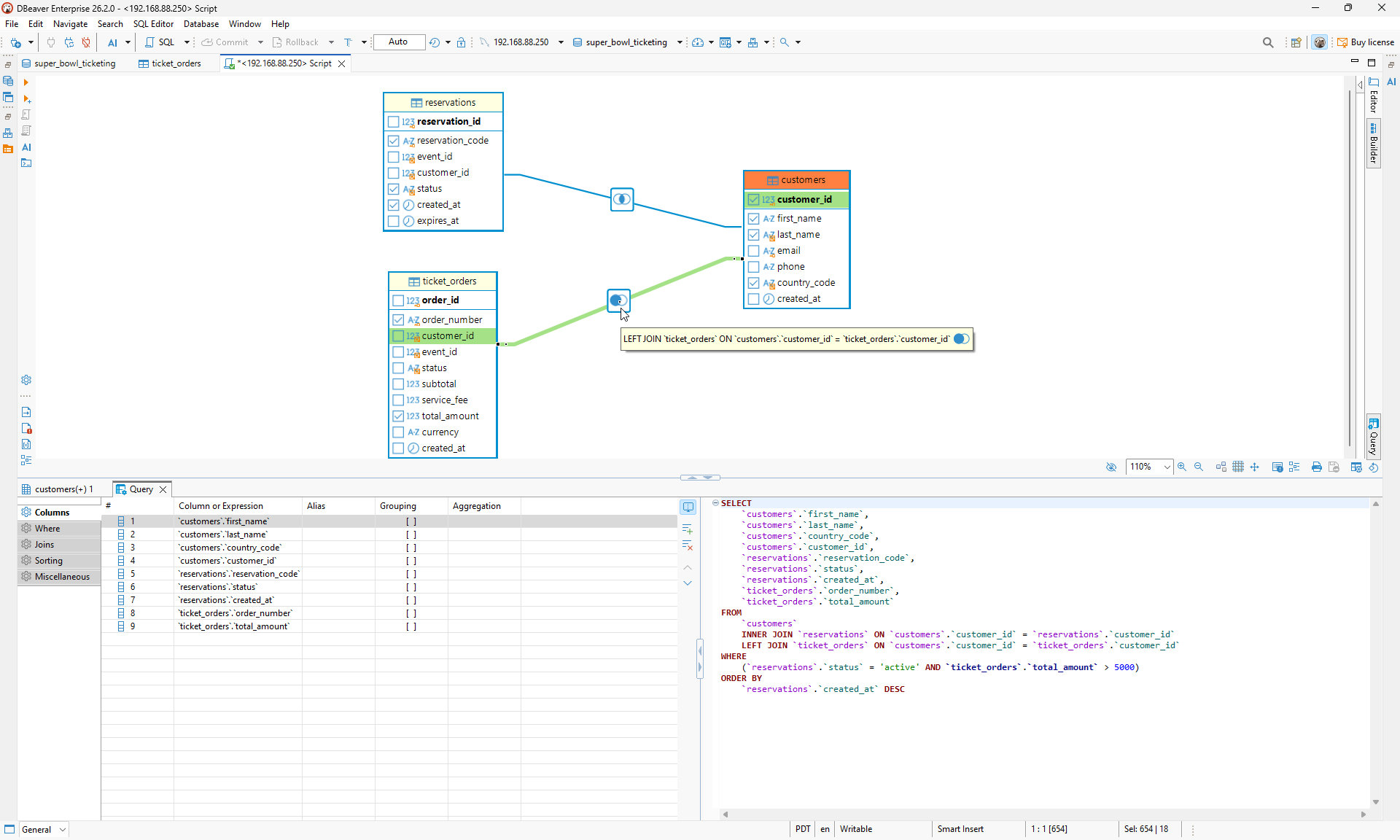
DBeaver goes beyond the diagram: compare a changed schema, then build a joined query visually and inspect the SQL it produces.
What I like
- A genuinely useful free edition, ER diagrams included
- Huge database coverage and a solid SQL editor
- Easy to browse and edit real data
Disadvantages
- Diagrams exist to explore a database, and editing the schema from them is an Enterprise feature
- Starting the trial is the most involved of the eight: account, email, then a license key to import
5. Navicat
Navicat is the polished, long-established name in this group. It is a live-connection tool first, but the Enterprise edition adds a proper modelling workspace. Instead of only generating a diagram from an existing database, you can start with a conceptual, logical, physical, or hybrid design and take it forward to MySQL.
Key features
- Model-first design (Enterprise): start with a conceptual, logical, physical, or hybrid model. For physical models, choose the target database and version before adding tables.
- Naming standards and documentation: create naming rules, a shared glossary, and a data dictionary alongside the model.
- Forward and reverse engineering (Enterprise): reverse-engineer a live database or SQL file into a model, then generate SQL or synchronize the finished model back to a database.
- Live ER diagram: Standard and Enterprise can also generate a quick diagram from an existing schema. It supports MySQL, Oracle, PostgreSQL, SQLite, SQL Server, and MariaDB.
- Structure and data synchronization: compare two databases and generate the scripts needed to bring them back in sync.
- Navicat Collaboration: share connections, queries, snippets
- Import, export, backup, and SSH tunneling: covers the everyday work around a live database connection.
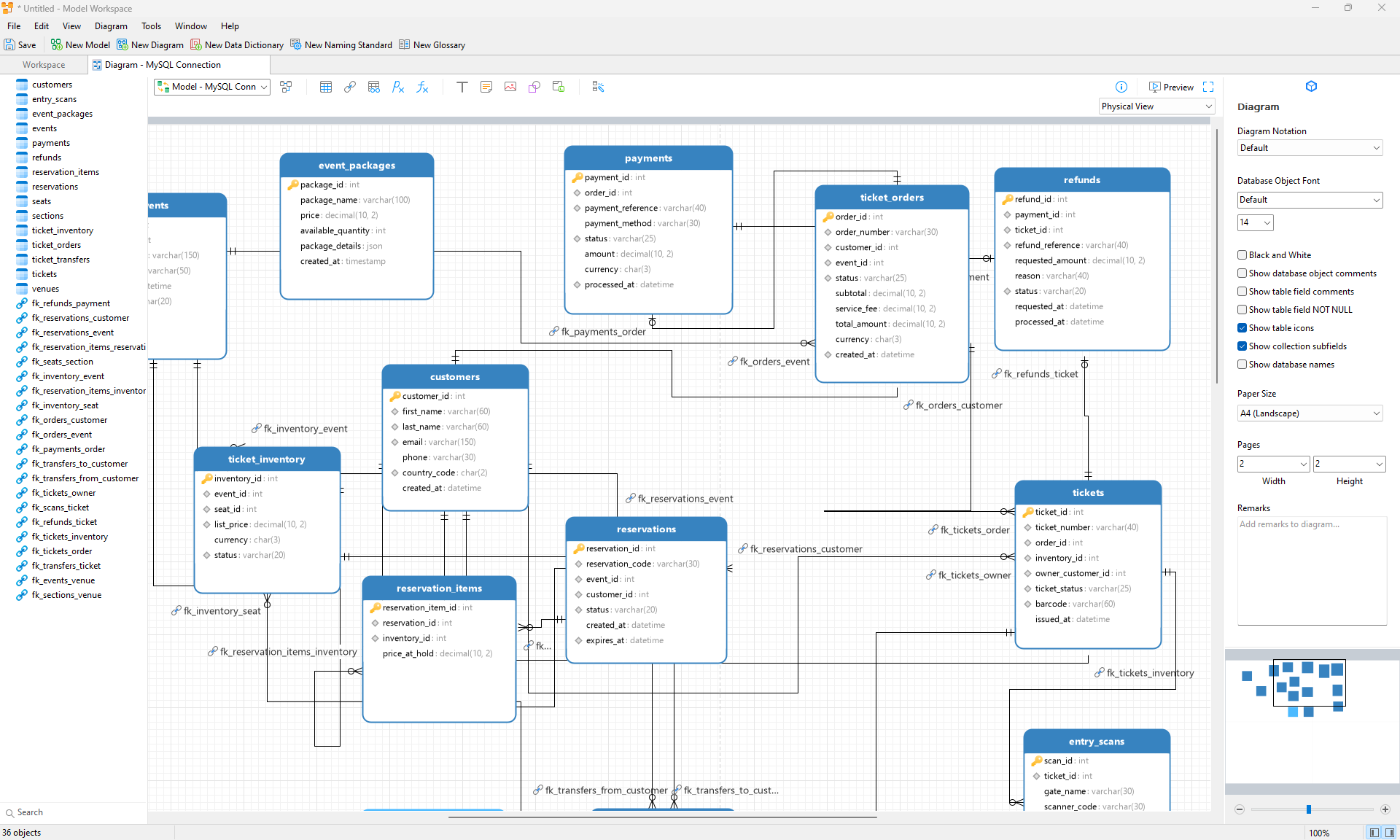
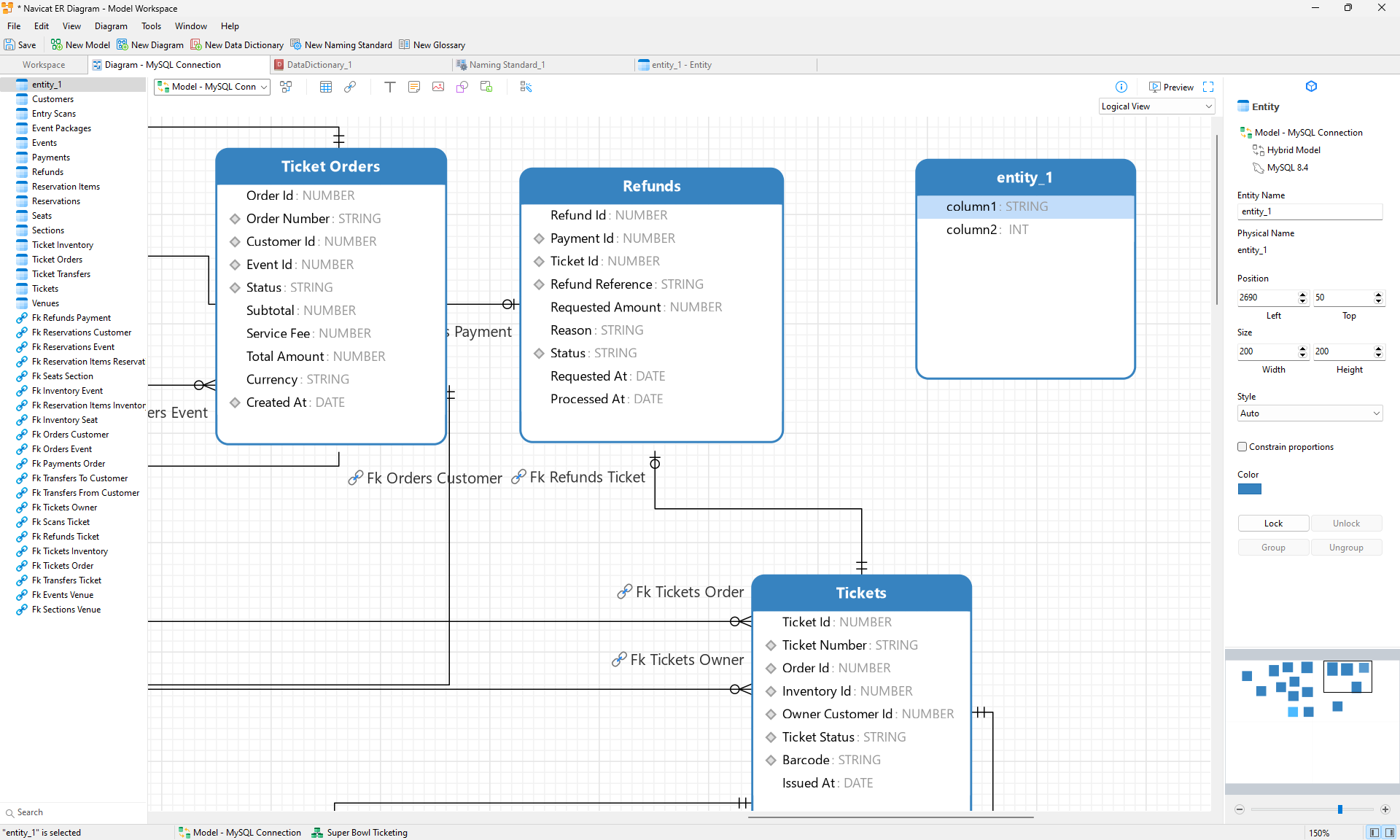
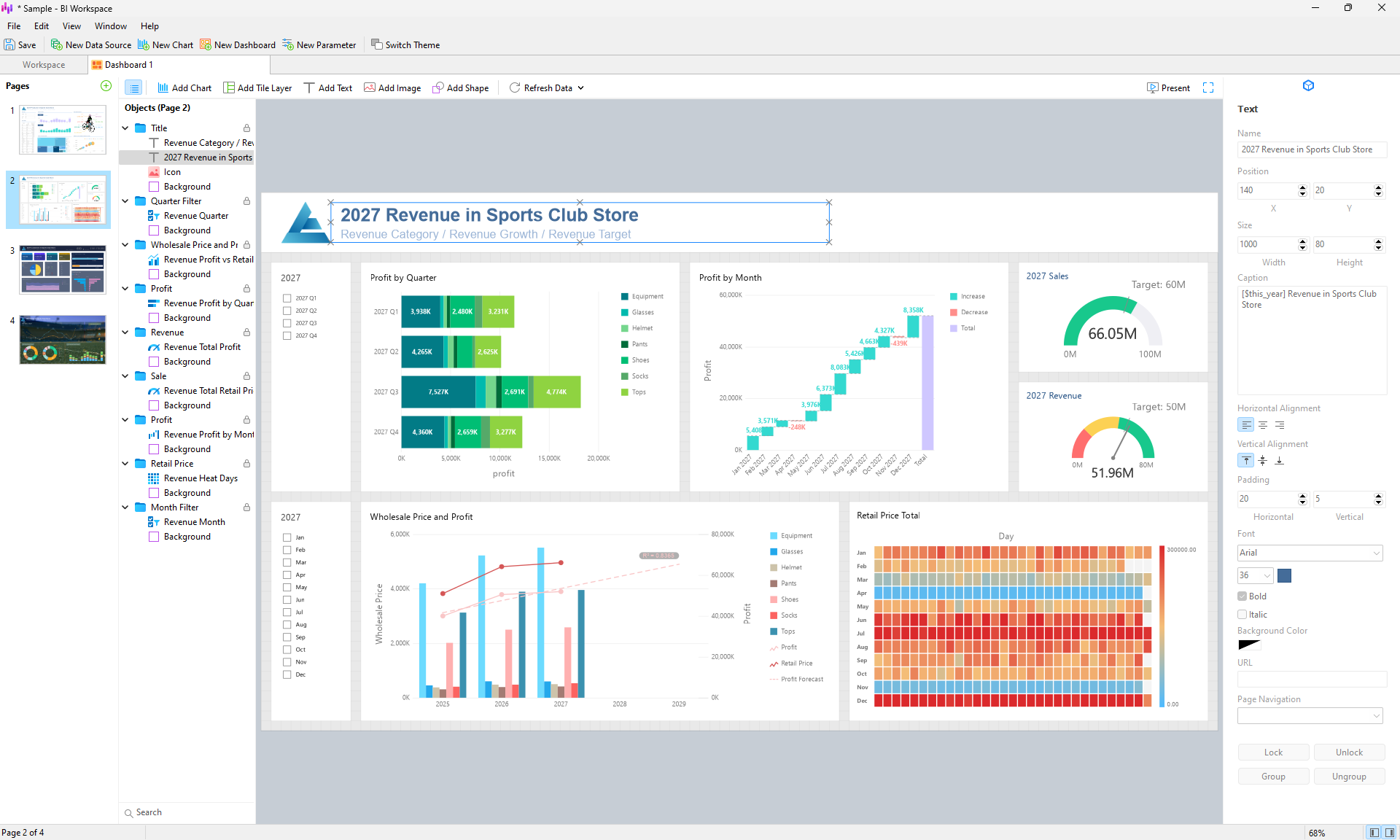
Navicat Enterprise pairs a proper modelling workspace with BI dashboards, so you can plan a database before building it and present data through charts afterward.
What I like
- A mature, polished interface with a long track record
- Sync and collaboration tools are strong for teams working across several databases
- The Premium Lite edition is free for commercial use, up to 5 users per organization
Disadvantages
- It has the highest price on the list, and the free Premium Lite has no ER diagram view
- The full modelling workspace may feel like overkill if you only need a quick, simple schema diagram.
6. DbVisualizer
- Platform: Windows, macOS, Linux
- Databases: MySQL, PostgreSQL, and 60+ others via JDBC
- Price: Free edition. Pro is $199 for the first year, then $89/year. Premium Support is $229 for the first year, then $119/year. A paid term includes a perpetual license for versions released during that period.
- Free trial: 21 days of Pro. Create an account, then start the trial from the app.
DbVisualizer is a mature JDBC database client built for databases that already exist. It is good for exploring a live schema, writing SQL, browsing data, and following relationships, but it is not really a design-from-scratch tool. The Free edition covers the essentials, while Pro adds data editing, visual querying, and analysis tools.
Key features
- References graph (Free): automatically maps primary and foreign keys, offers several layouts, and exports to PNG, SVG, or PDF.
- SQL editor and query history (Free): write queries, revisit previous work, and reuse it when needed.
- Connection management and SSH tunnelling (Free): manage multiple databases and connect securely to remote servers.
- Table and data editor (Pro): edit table structures and data directly in the app.
- Import and export tools (Pro): move data between files and databases.
- Visual Query Builder (Pro): build
SELECTqueries visually instead of writing every join and filter by hand. - Explain plan and charts (Pro): inspect query performance and turn result sets into charts.
- CLI and AI Assistant (Pro): run DbVisualizer from the command line or use its built-in AI help.
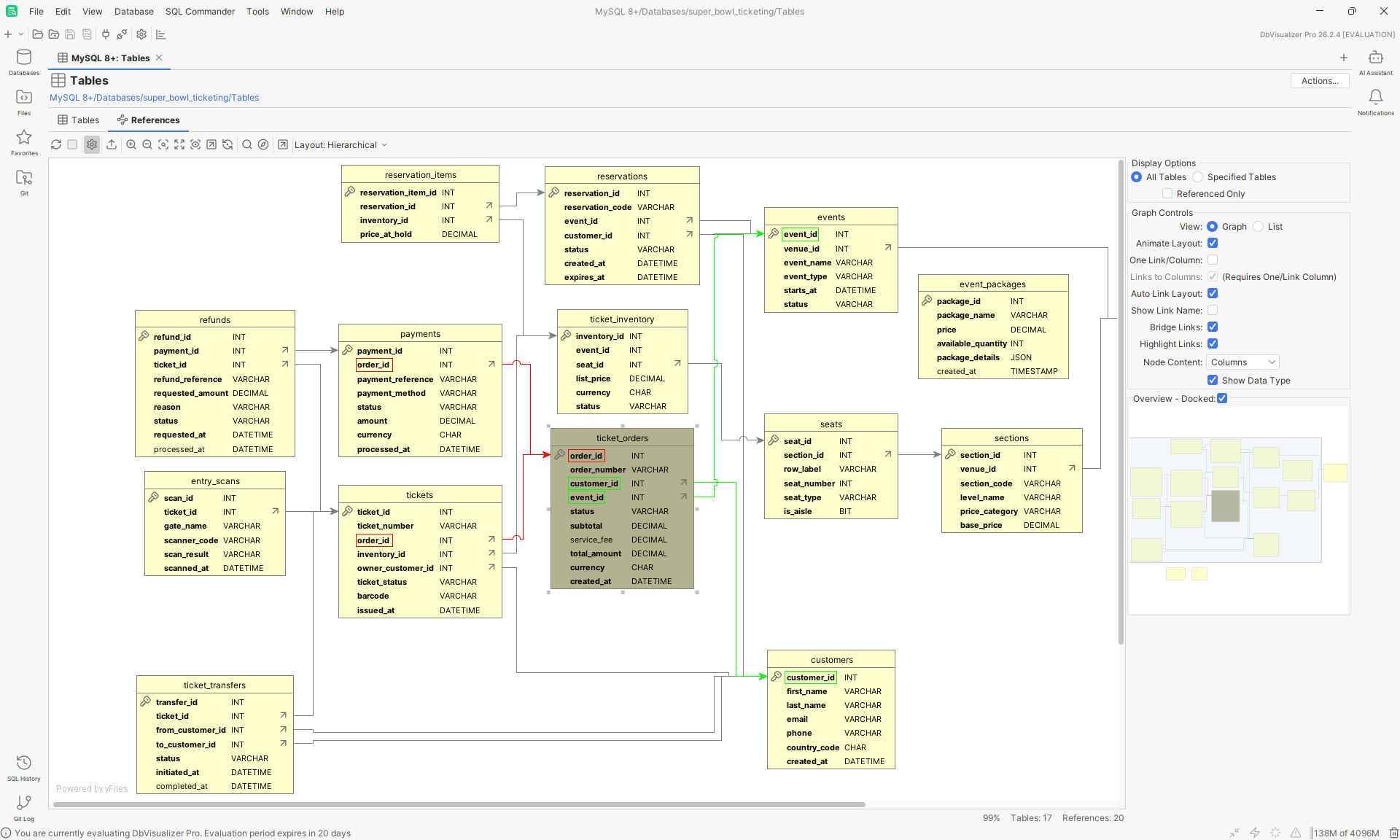
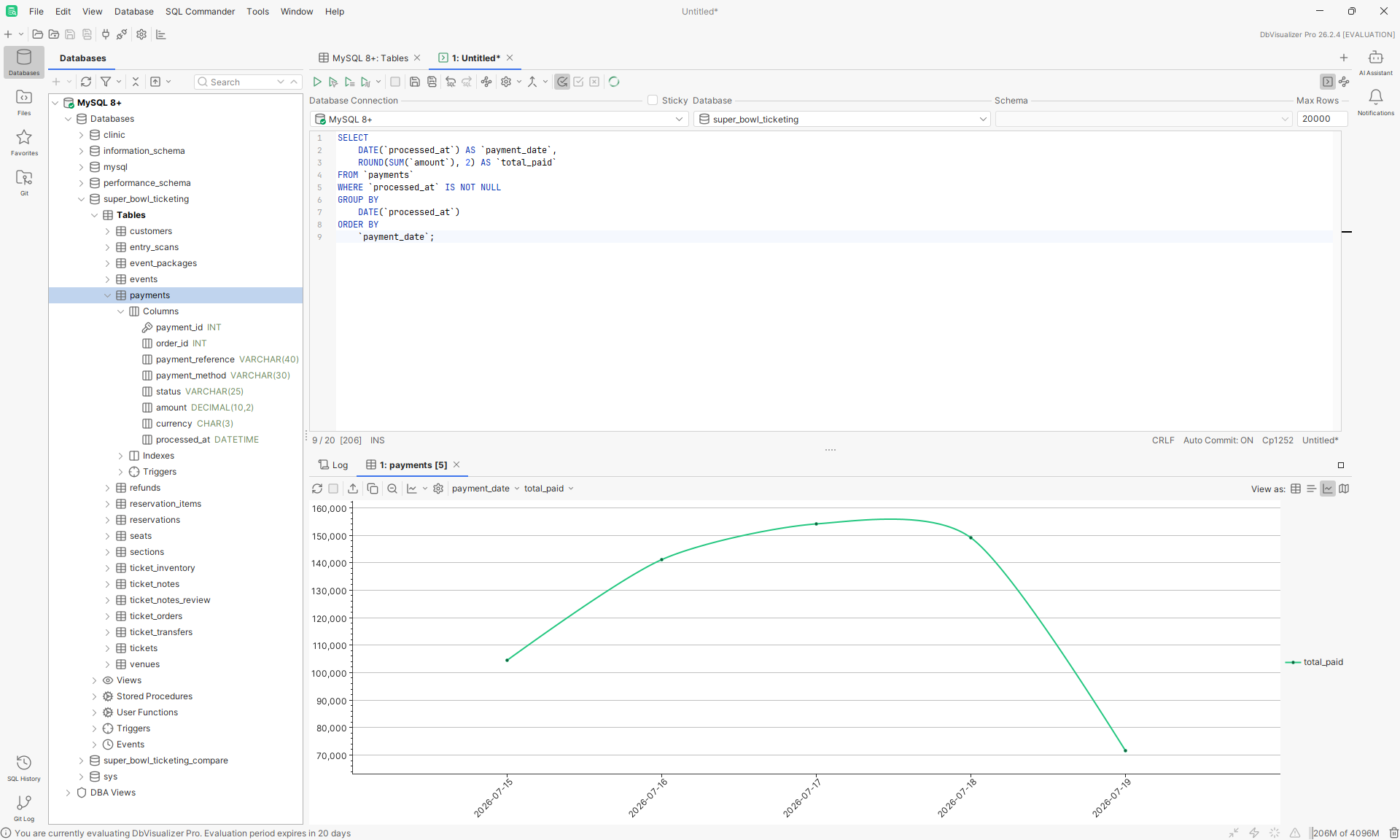
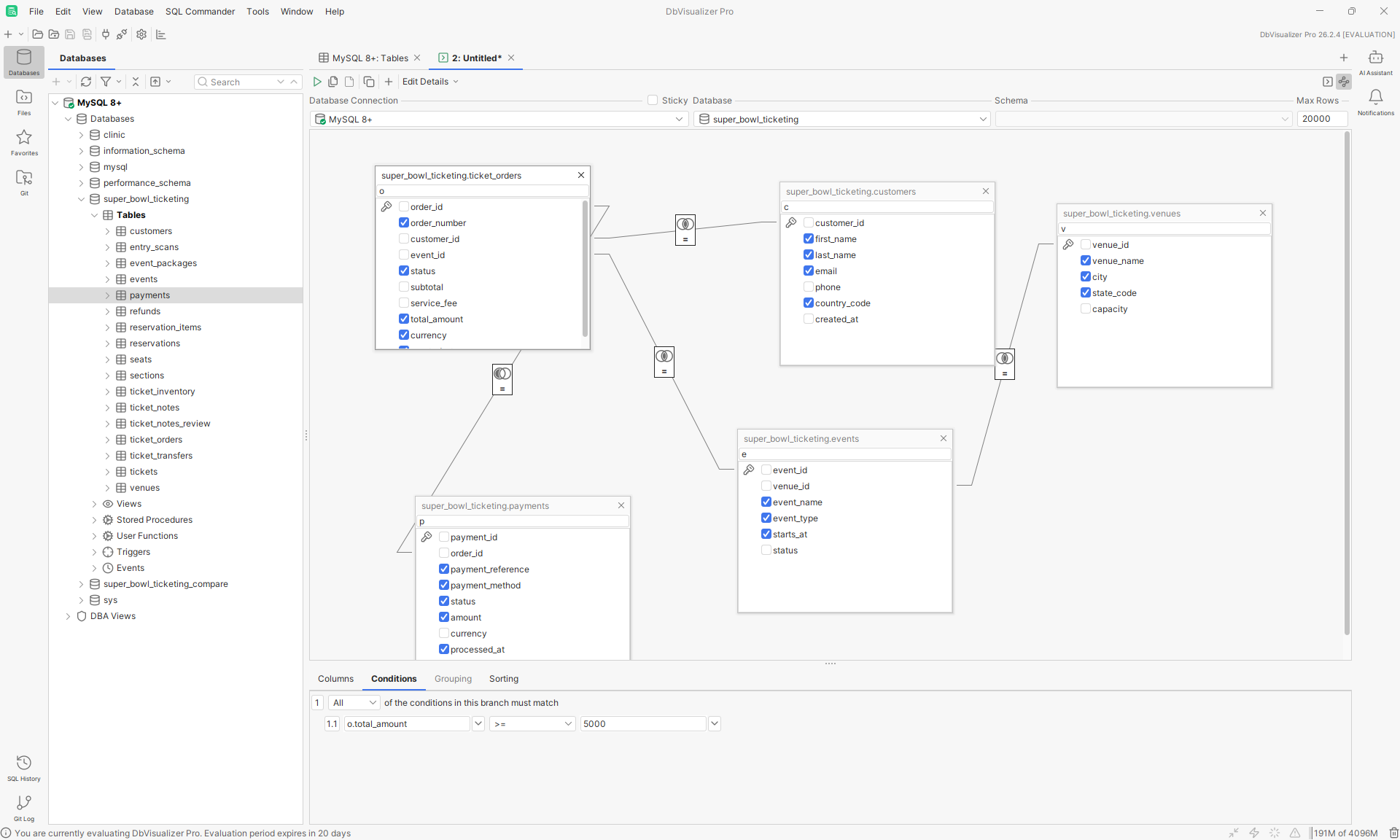
DbVisualizer Pro can load a multi-table SQL query into its visual builder, then turn an aggregated result into a chart directly in SQL Commander.
What I like
- The references graph is included in the free edition
- Works with any JDBC database, with extra support for the common ones
- Pro is cheap to renew, and your license is perpetual for the versions released during your term
Disavantages
- The graph is built from existing foreign keys, so it is a viewer, not a modeling tool. There is no offline model file or design-first workflow
- Table management, the data editor, and the query builder are all Pro. The trial needs an account before you can start it
7. TablePlus
- Platform: macOS, Windows, Linux (plus iOS)
- Databases: MySQL, PostgreSQL, SQLite, SQL Server, MariaDB, Redis, MongoDB, and more (13 in total)
- Price: free tier with limits. Basic $99 one-time (1 device), Standard $129 one-time (2 devices), Team $79 per seat from 3 seats. Each includes 1 year of updates, then an optional $59/device renewal
- Free trial: 14 days, no sign-up needed
TablePlus is the fast, native client of the group. It is built for people who spend their day in the data grid and want a quick, clean interface with a one-time price. It focuses on everyday database work rather than design, so schema diagrams are an add-on, not a core feature.
Key features
- Native interface: fast to open and responsive on large tables
- Data editor: edit rows inline and review changes before you commit them
- Advanced filters and query editor: with autocompletion
- Safe mode: helps prevent accidental changes on production databases
- Built-in ER diagram: generate a diagram directly from a live database or schema, then move tables around, zoom in, search for objects, and edit tables, columns, indexes, or foreign keys from the diagram.
- Plugin manager: install extra tools such as a SQL formatter or table dump
- iOS app: included for free with a valid license
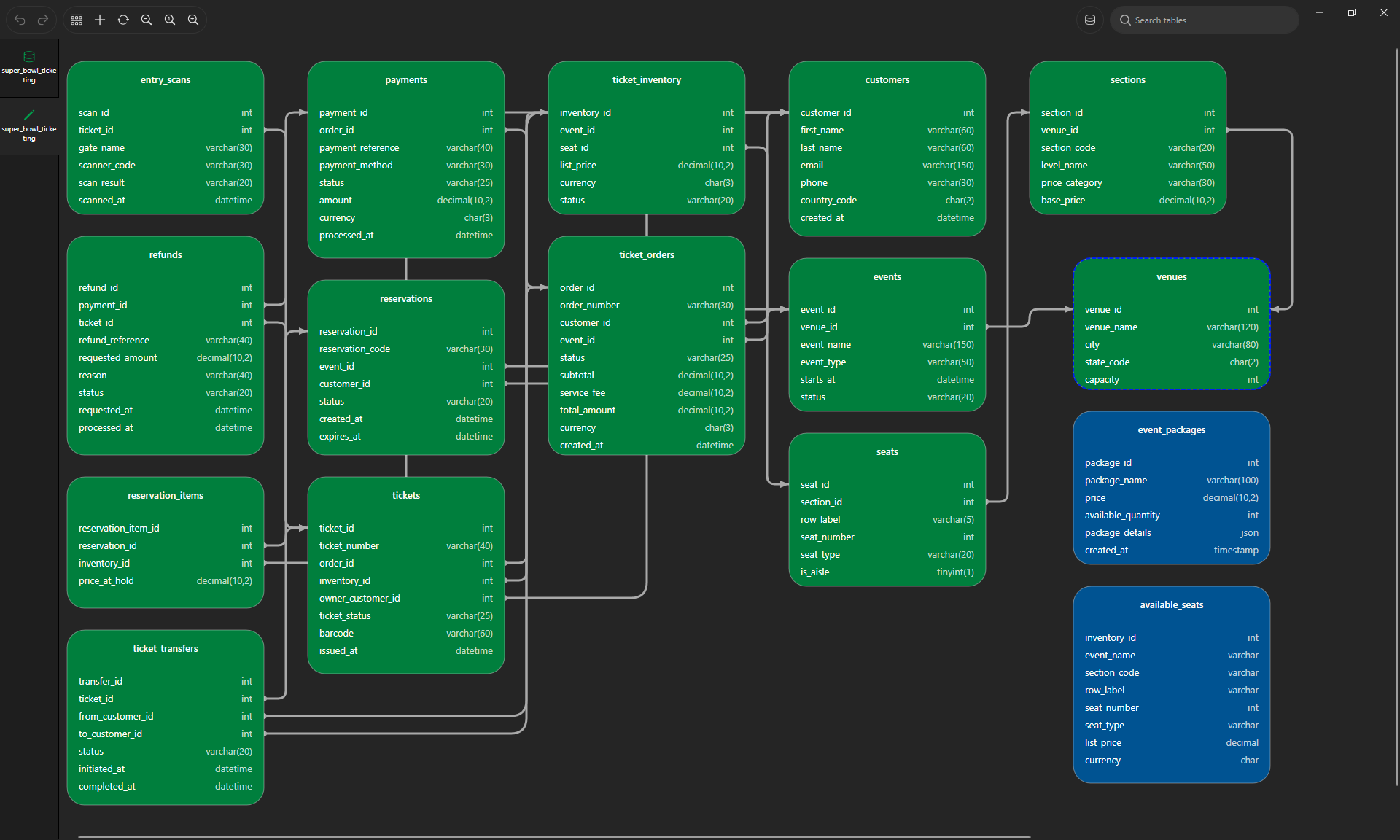
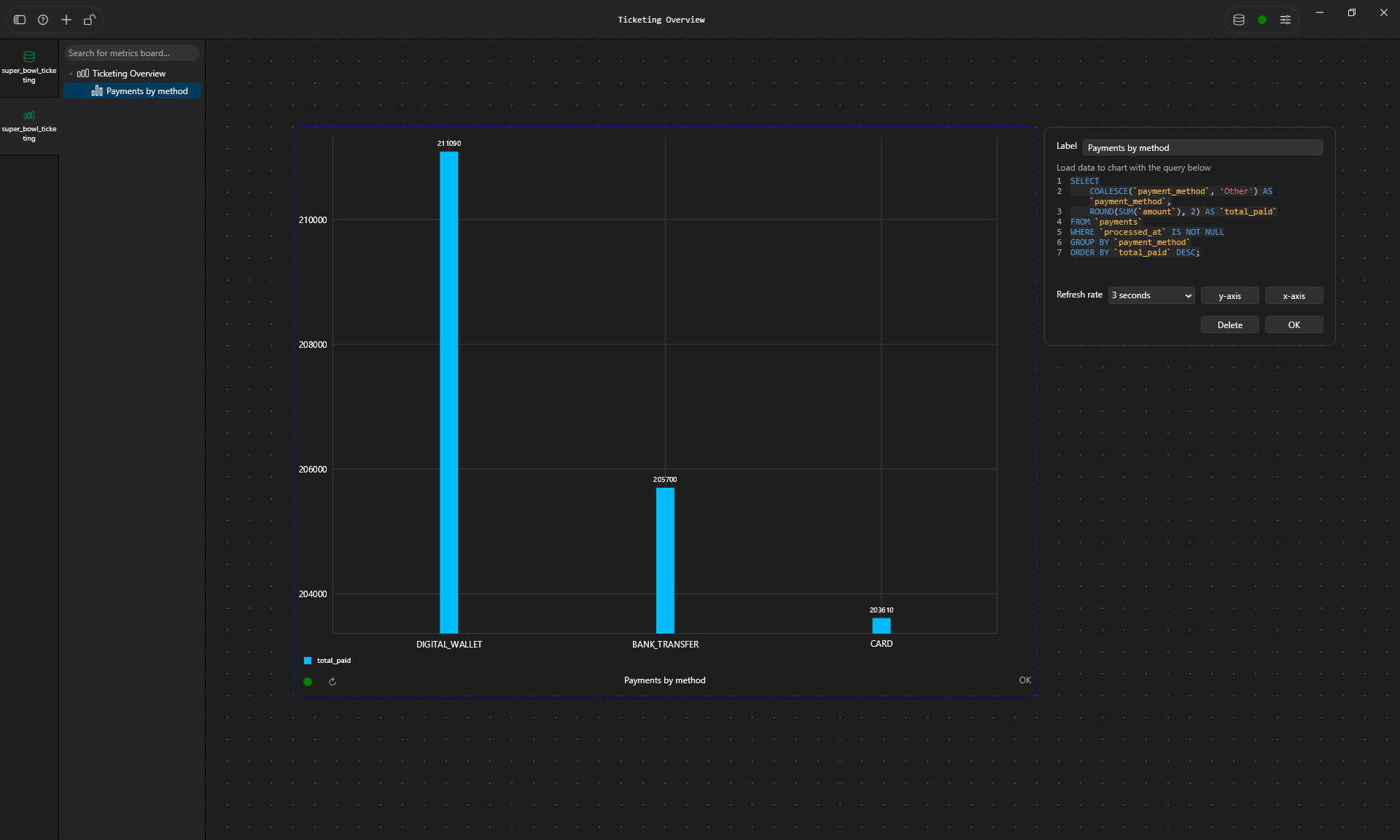
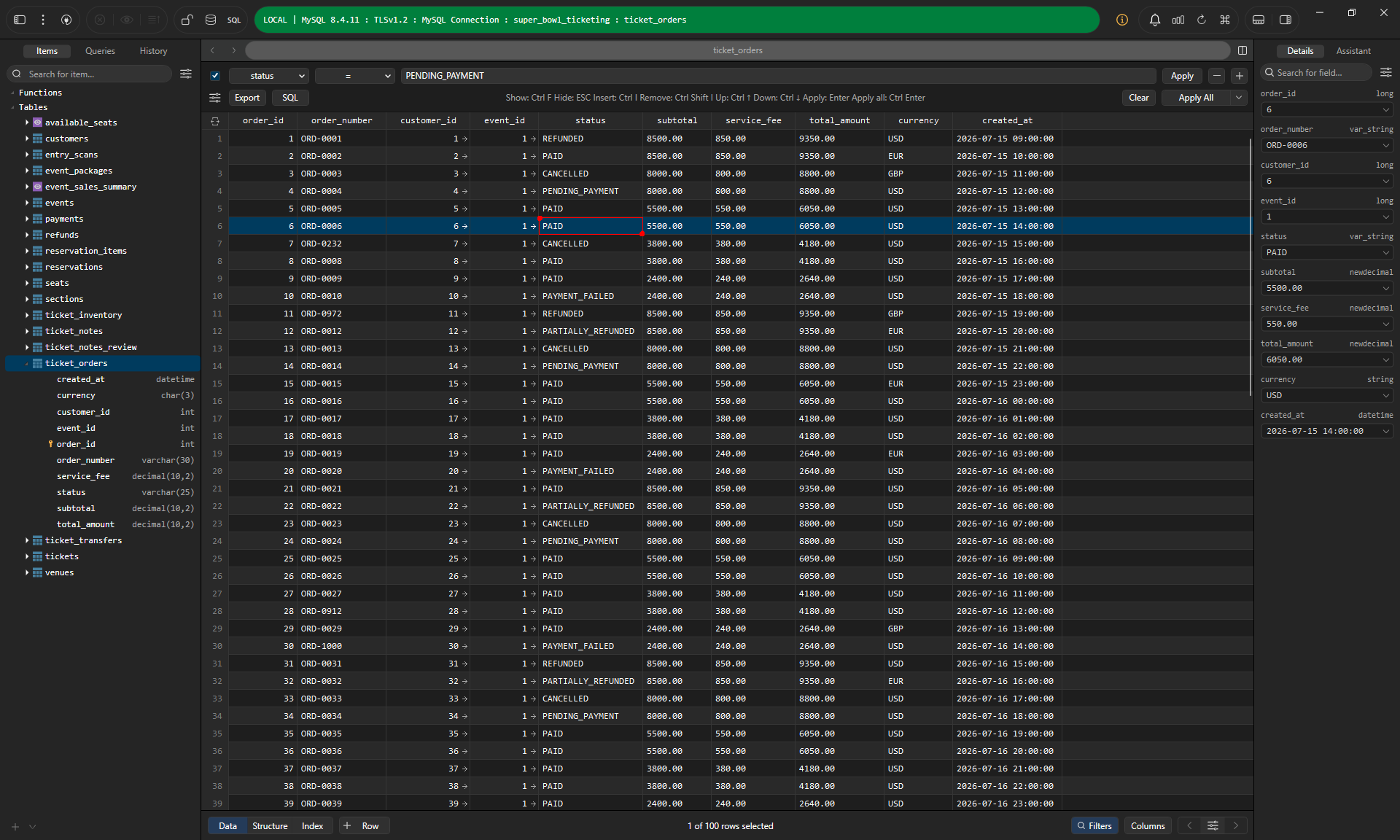
TablePlus combines a small SQL-powered Metrics Board with a fast spreadsheet-style grid for inspecting individual ticket orders.
What I like
- Fast, native, and pleasant to use every day
- A one-time price, and the app keeps working after the first year of updates
- Opens the free tier without any sign-up
Disavantages
- The free tier is limited to 2 tabs, 2 windows, and 2 advanced filters at a time
- Supports fewer databases than other tools
8. Beekeeper Studio
- Platform: Windows, macOS, Linux
- Databases: MySQL, PostgreSQL, SQLite, SQL Server, and 22 more (26 in total). Some engines are paid-only: Oracle from Indie, MongoDB from Professional
- Price: free Community Edition (open source). Indie $9/month, Professional $14/month, Business $18/month, all billed yearly. Monthly billing costs about double. Every paid plan includes a lifetime license for the versions released during your subscription
- Free trial: 14 days of all paid features. Install the app, click "start free trial," and you're in, no email, account, or card needed.
Beekeeper Studio is a clean SQL client with an open-source Community edition. The ER diagram (called the Visual Schema Explorer) is built in, but it's a paid feature: it isn't included in the Community edition, and the trial unlocks it.
Key features
- ER diagrams (paid): turn a live database schema into a visual map of its tables and foreign-key links. You can move tables around, use auto-layout when it gets messy, then export or copy the result.
- Table structure editor: create or change tables, relations, triggers, and indexes without writing every statement by hand.
- SQL editor and data grid: write SQL with autocomplete, then browse and edit rows in a clean spreadsheet-style view.
- Import, export, backup, and restore (paid): useful for moving data around and keeping database backups close.
- JSON Sidebar (paid): opens a selected row as formatted JSON, which is much easier to read than a long JSON value in one cell.
- AI Shell and Cloud Workspaces (Professional+): use your own AI provider to explore the schema and help write SQL, or sync connections and saved queries across devices and with a team.
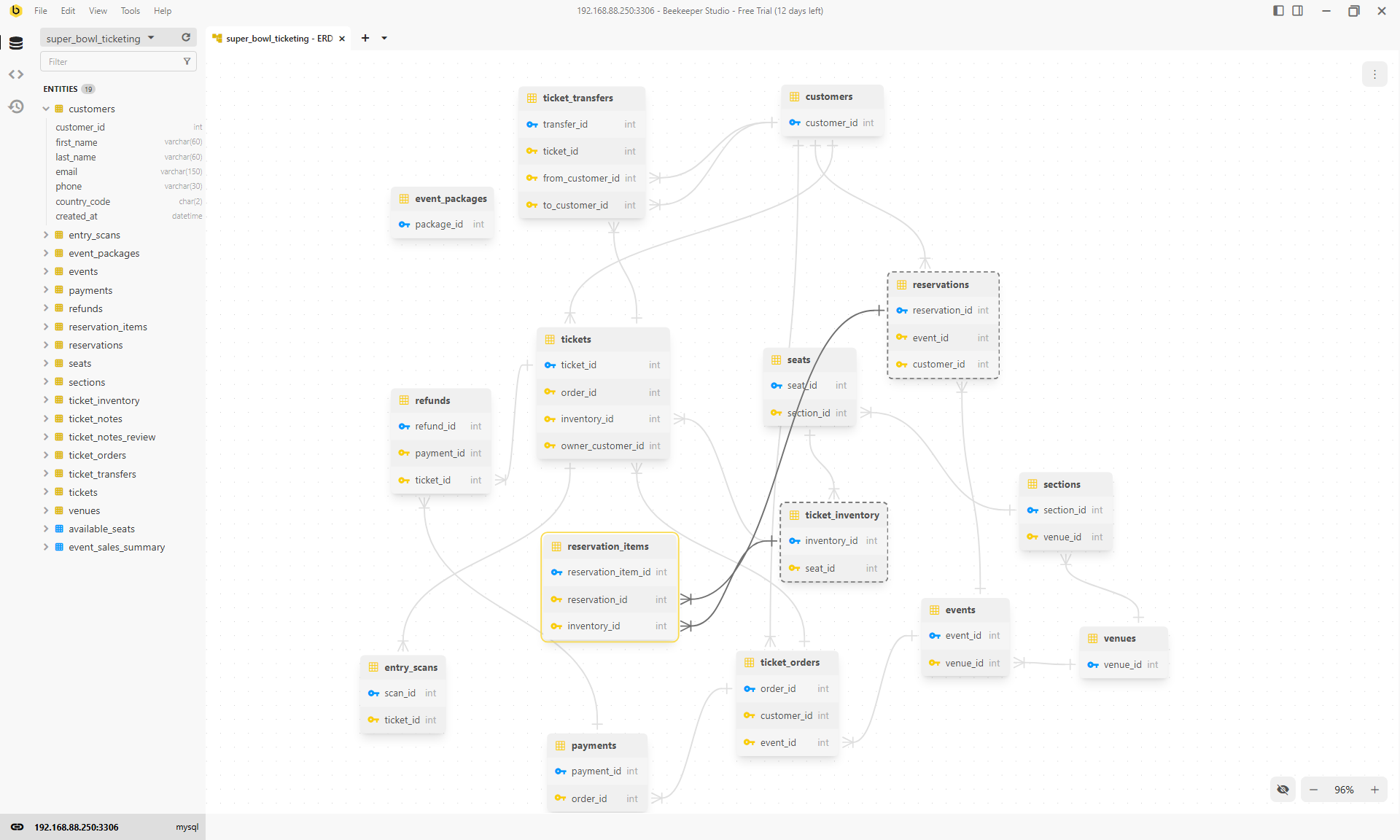
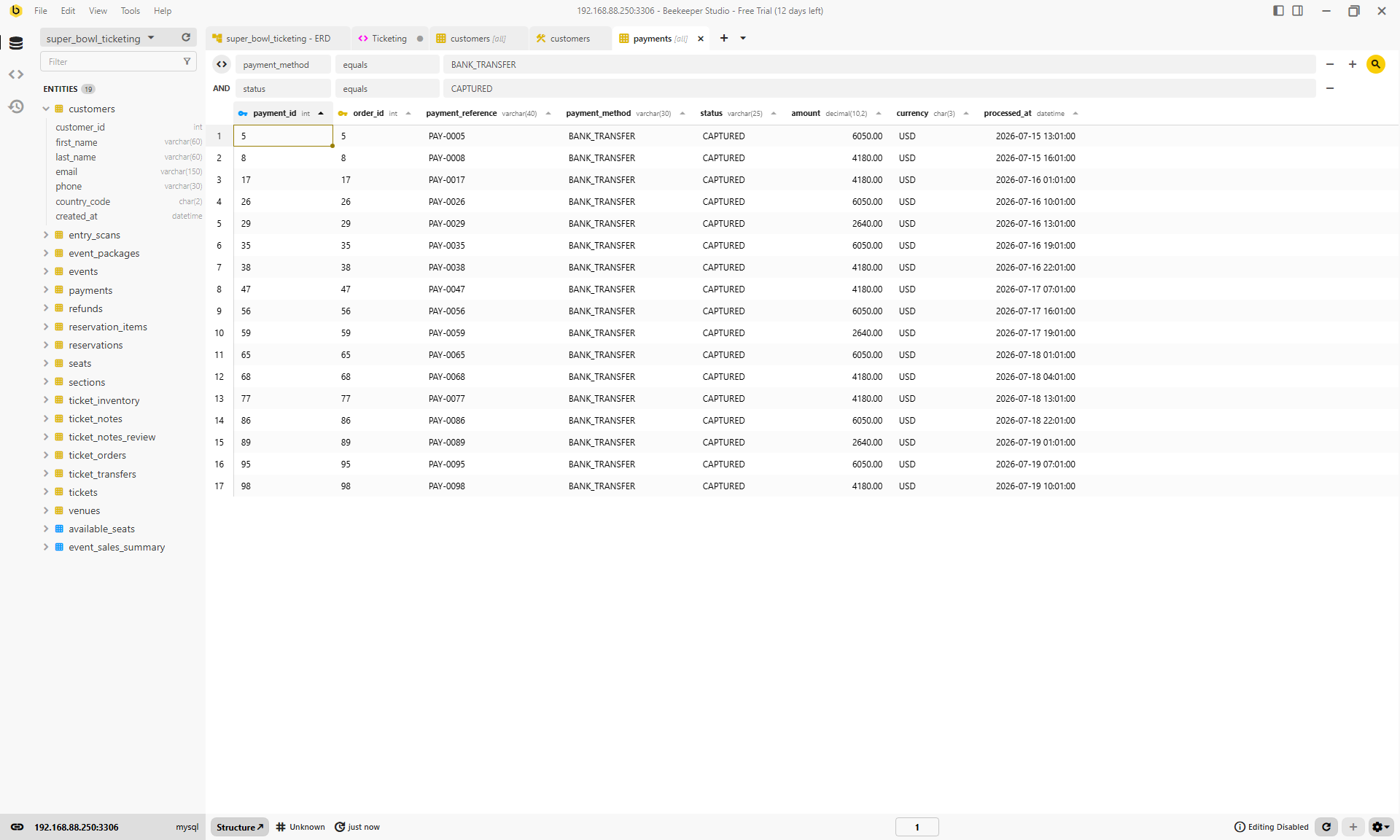
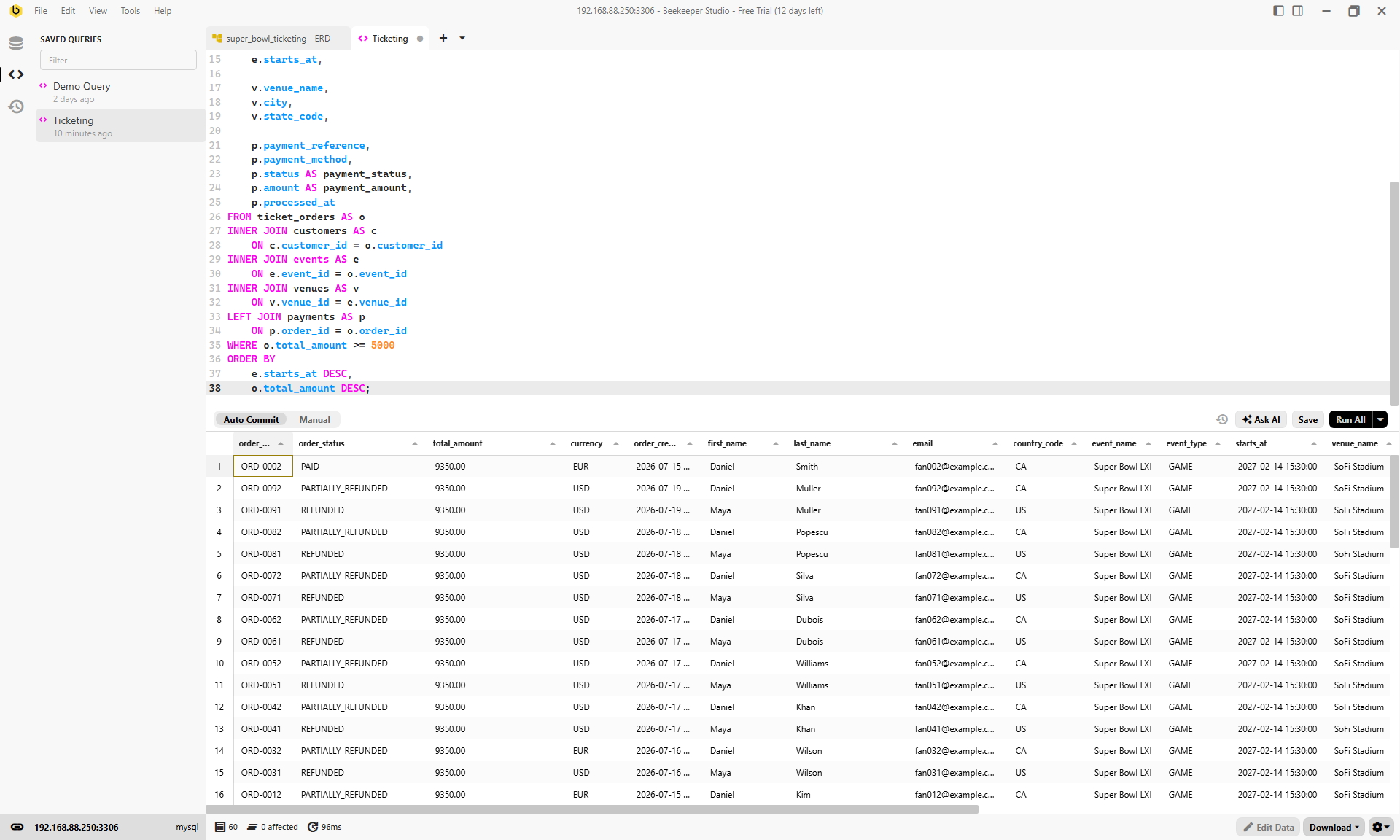
Beekeeper Studio makes everyday database work straightforward: filter live payment records in the grid, then save and run a multi-table query from the SQL editor.
What I liked: Beekeeper Studio is one of the easiest tools here to pick up. The interface is clean, browsing and editing data feels quick, and the SQL editor does not bury basic work behind lots of menus.
Disadvantages: The limitation comes after the trial: the free Community Edition does not include ER diagrams, import/export, or the JSON Sidebar. The ER diagram is also mainly built for following relationships; the full-database view keeps only primary and foreign keys visible, while a focused selection shows more detail.
So which one should you pick?
There’s no single winner, because these tools are built around different jobs. Start with whether you’re designing a schema from scratch or exploring one that already exists.
- You work with more than one kind of database: VisuaLeaf. It has ER diagrams you can create and reverse engineer, free for SQL databases. The same app also works with MongoDB, DuckDB, ClickHouse, and more (37 in total). It’s the newest tool here, so expect fewer community answers.
- You want to design a schema before the database exists: DbSchema. Diagrams are free, but saving the model file and generating docs need Pro.
- You want free ER diagrams: DBeaver Community, or the DbVisualizer free edition. Editing the schema from the diagram is paid in DBeaver.
- You write SQL all day: DataGrip, which is free for non-commercial use.
- You want a fast native app with a one-time price: TablePlus, if you’re fine with a diagram plugin and the free tier limits.
- You want the cleanest interface and an open-source core: Beekeeper Studio. Its ER diagram is in the paid editions, and the trial is the easiest to start.
- You manage several databases as a team and have the budget: Navicat. It’s the most expensive option here, and the diagram view isn’t in the free Lite edition.
All eight have a free edition or a trial, so the quickest way to decide is to point two or three of them at the same database and see which diagram your team can read.
Strengths and weaknesses
| Tool | Visual ER diagrams | Biggest strength | Biggest weakness |
|---|---|---|---|
| VisuaLeaf | Create from scratch or reverse-engineer an existing SQL database; free for SQL databases | MongoDB plus 36 other databases in one app, with compare, sync, and data masking | Newer product, with a smaller community than DBeaver or DataGrip |
| DataGrip | Generated from a connected database | The strongest SQL editor and refactoring help in this group | Paid for commercial use and aimed at databases that already exist |
| DbSchema | Design-first, offline model file | Model before a database exists, with Git support and interactive HTML documentation | Its model-first workflow can feel heavier than a simple live database client |
| DBeaver | Generated from a connection in every edition; diagram editing is Enterprise-only | A capable free Community edition with 100+ drivers | Visual schema editing is paid, and starting the trial is more involved than the others |
| Navicat | Live ER diagrams in Premium; full data modelling in Enterprise | Polished sync, collaboration, and modelling tools | The most expensive option here, while Premium Lite has no diagrams |
| DbVisualizer | References graph, including in the free edition | Export a clear relationship graph as PNG, SVG, or PDF | It reads existing foreign keys; it is not a design-from-scratch tool |
| TablePlus | Built-in ER diagram in paid editions, generated from a live database or schema | Fast native client with a one-time license option | The free tier limits workspaces and locks several advanced features |
| Beekeeper Studio | Auto-generated in paid editions and during the trial; the main view focuses on keys and relationships | One of the cleanest, easiest interfaces, with an open-source Community edition | Community does not include ER diagrams, import/export, or the JSON Sidebar |
Frequently asked questions
Which database design tool is best?
It depends on the job: VisuaLeaf or DBeaver for broader everyday database work; DbSchema is strong for planning; and DataGrip for SQL.
Are there free ER diagram tools?
Yes. DBeaver Community, DbVisualizer Free, DbSchema Community, and VisuaLeaf for SQL databases all include diagram features.
Can I generate an ER diagram from an existing MySQL database?
Yes. Connect the database and reverse engineer its tables, primary keys, and foreign keys into a diagram.
Can I design a schema before creating the database?
Yes. VisuaLeaf and DbSchema let you plan the structure first, then generate the SQL later.
Final thoughts
Try two or three tools with the same database before choosing one. The best option is the one whose diagram, SQL editor, and everyday workflow make sense to you and your team.
If you want to try the workflow used in this article, download VisuaLeaf for free and connect it to your MySQL, PostgreSQL, MongoDB, or another supported database.