MySQL Database Management System: Manage Your Data Visually
See how to manage a MySQL database visually. Browse and edit tables, run SQL, build joins and ER diagrams, expand JSON columns, check EXPLAIN plans, and create charts in VisuaLeaf.


MySQL uses tables to store application data. For instance, an online store can have individual tables for its customers, orders, items, and transactions. SQL is the language used to read and change that data.
The MySQL database management system includes the software that stores tables, executes SQL commands, manages access rights, and links related data. The MySQL Server operates in the background, and applications connect to it.
In this tutorial, we will demonstrate the operation of MySQL using an example of a ticketing database. Also, we will describe how VisuaLeaf can help you work with your tables, make SQL queries, see relations, inspect JSON data, and create charts without switching between multiple tools.
What Is the MySQL Database Management System?
MySQL is an open-source relational database management system developed and supported by Oracle. “Relational” means that it stores data in separate tables that can be connected. You can read more in the official MySQL documentation.
Imagine a ticketing database with these tables:
customersstores customer details.ticket_ordersstores each purchase.paymentsstores payments made for those orders.ticketsstores the tickets included in each order.
Each row is one record. Each column stores one type of information, such as an email address, order status, or payment amount.
A primary key identifies a row. For example, customers.customer_id identifies one customer. A foreign key connects tables. The customer_id column in ticket_orders points to customers.customer_id.
MySQL manages those rules and stores the data. A tool such as VisuaLeaf gives you a visual way to work with it.
MySQL, SQL, a Database, and a GUI
These terms do not mean the same thing:
| Term | Simple meaning |
|---|---|
| MySQL | The system that stores and manages the data |
| SQL | The language used to communicate with MySQL |
| MySQL database | A group of tables and other database objects |
| MySQL GUI | A visual application used to connect to MySQL |
Think of MySQL as the engine. VisuaLeaf is one of the tools you can use to control and inspect that engine. Queries still run on MySQL Server, not inside the GUI itself.
Connect to a MySQL Database
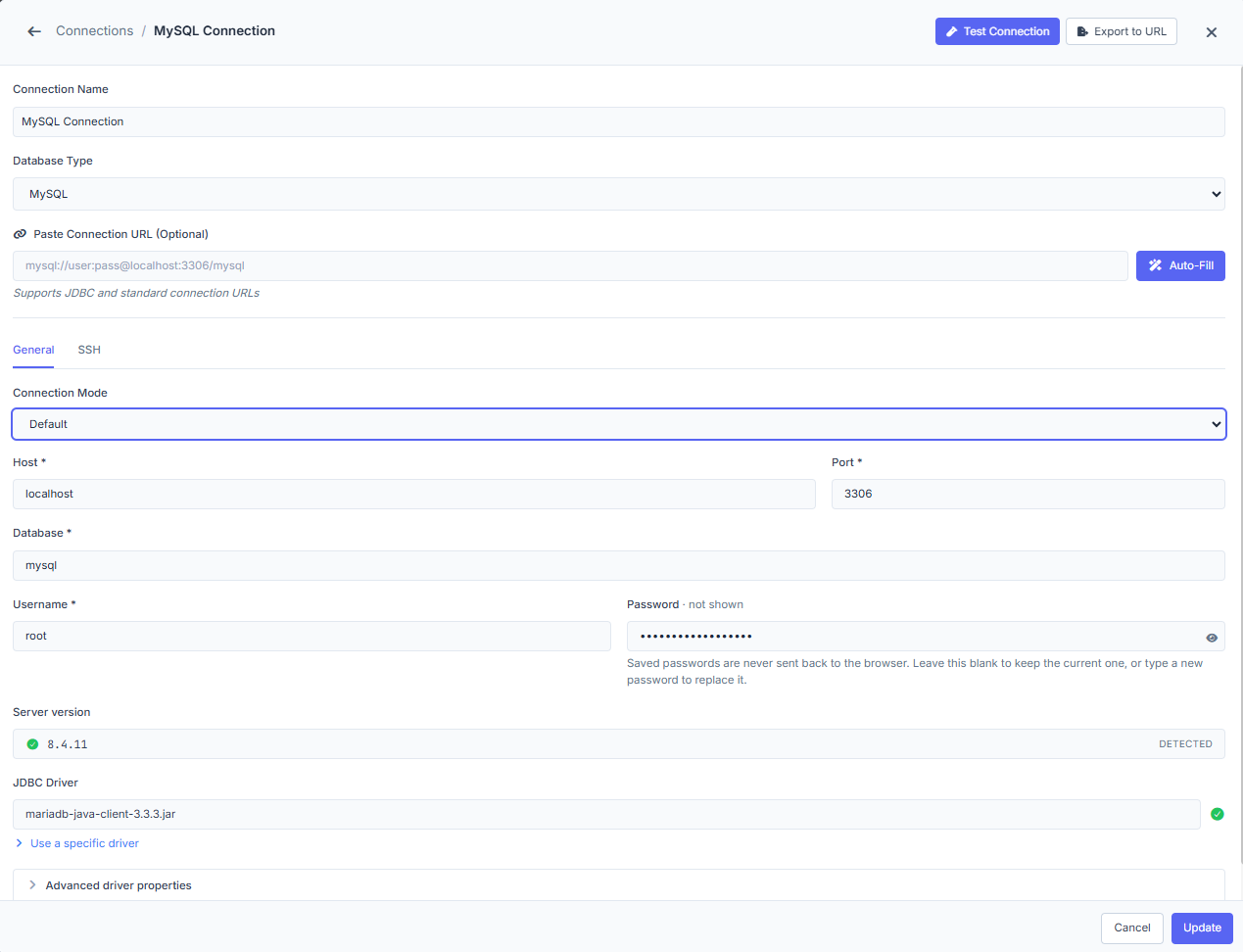
MySQL normally runs as a server. To connect, you usually need:
- Host
- Port
- Database name
- Username
- Password
The default MySQL port is usually 3306, although a server can use a different one. A managed MySQL service may also require SSL. A local Docker database may use localhost as the host.
If the connection fails, check the simple things first: Is the MySQL server running? Is the port correct? Does the database exist? Are the username and password correct?
VisuaLeaf keeps saved connections in one workspace, so you can reopen the same database without entering all the details again.
Browse and Edit MySQL Tables
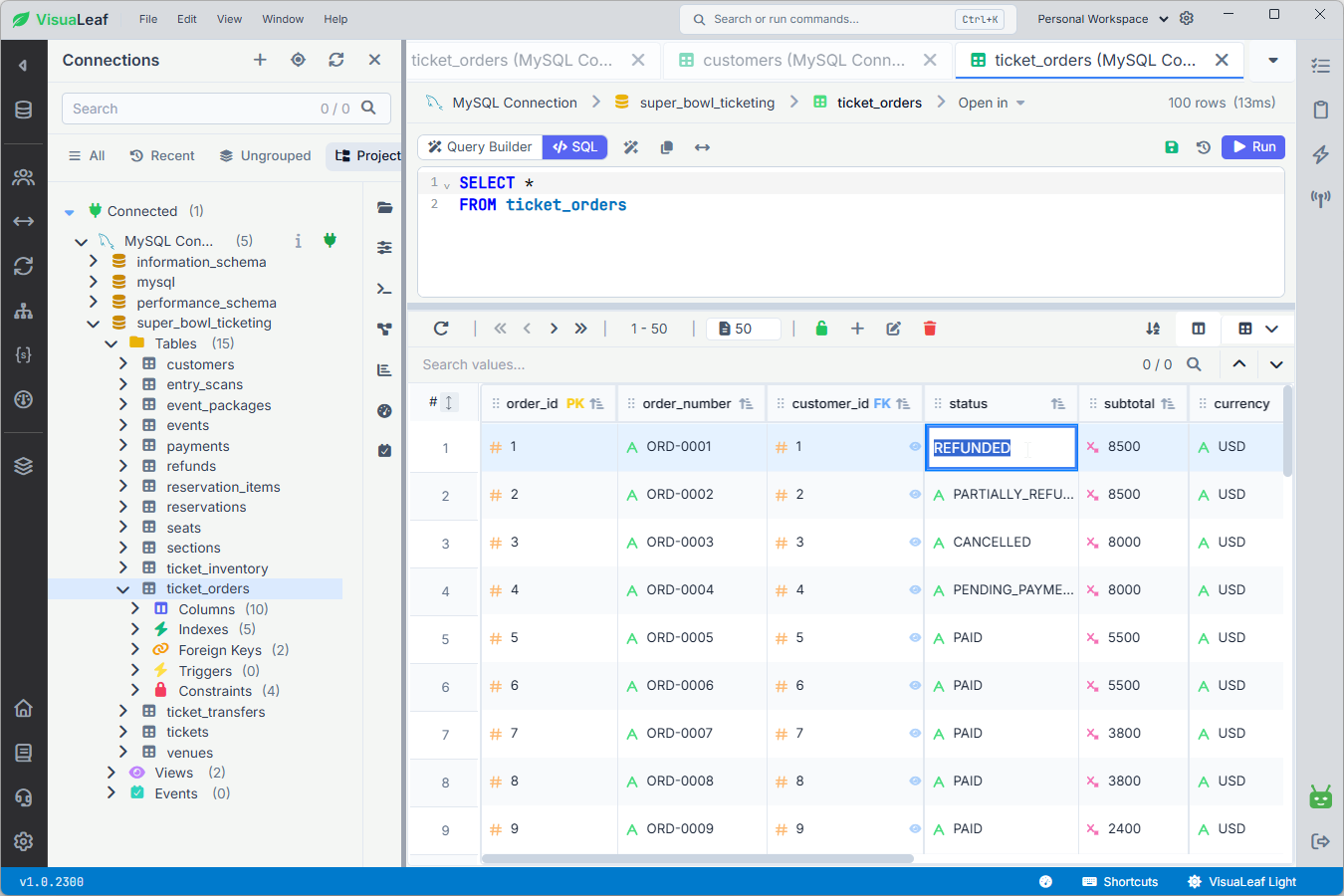
Open a table to browse its records, sort the results, or search for a specific value. Here, the ticket_orders table is open in VisuaLeaf with 100 records.
You can also edit data directly in the grid. In this example, the order status was changed from PAID to REFUNDED. After you save the edit, VisuaLeaf sends the change to the connected MySQL server—it is not changed only inside the app.
The same change in SQL would be:
UPDATE ticket_orders
SET status = 'REFUNDED'
WHERE order_id = 1;
Before saving, check that you selected the correct connection, database, table, and row.
PAID to REFUNDED directly in the table grid.Manage Table Structure
Table Management shows how a MySQL table is built, not only the data stored inside it.
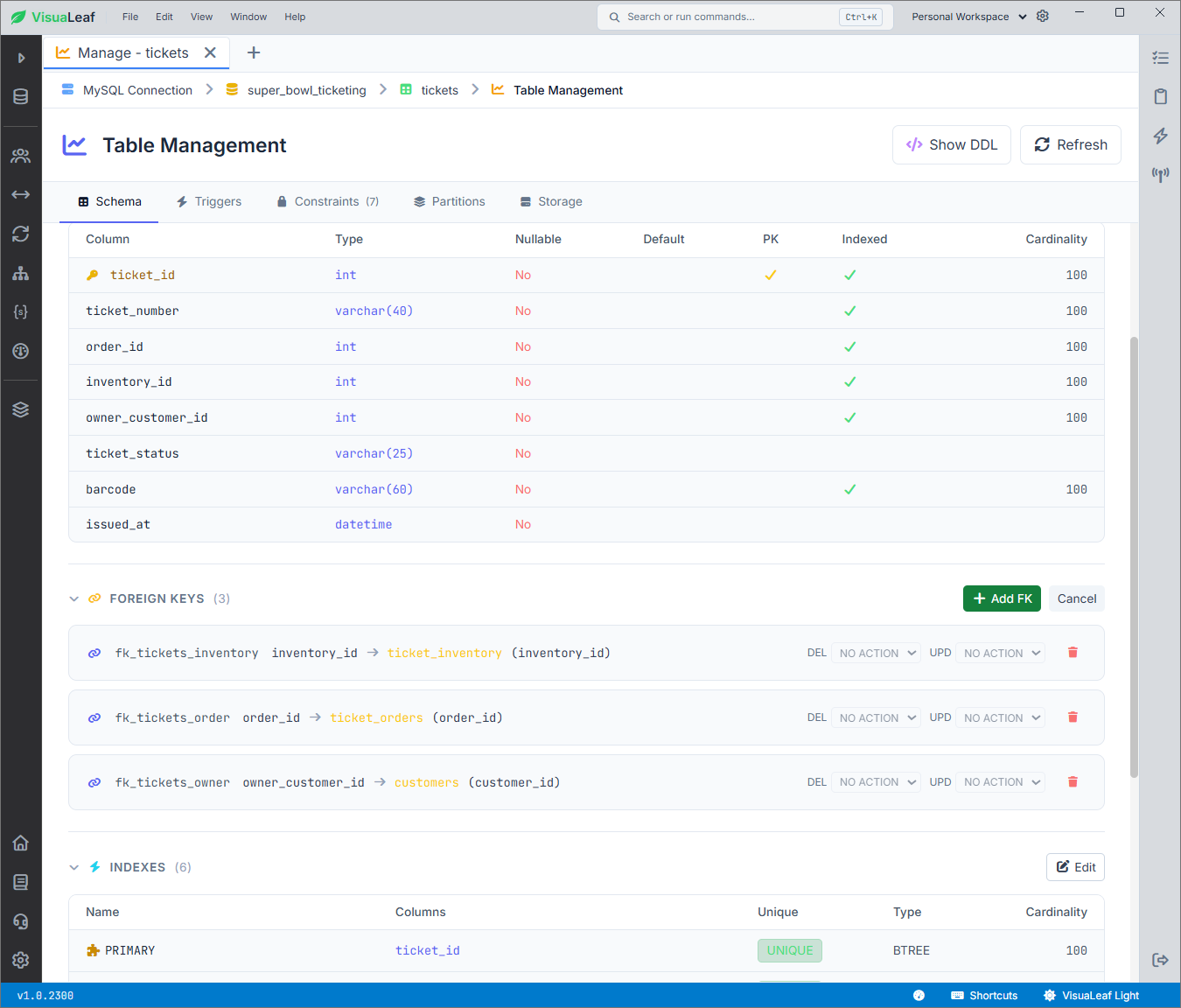
Here, the tickets table has eight columns. ticket_id is the primary key. Three foreign keys connect every ticket to its inventory record, order, and owner:
inventory_idpoints toticket_inventory.inventory_id.order_idpoints toticket_orders.order_id.owner_customer_idpoints tocustomers.customer_id.
You can also inspect or edit indexes, constraints, triggers, partitions, and storage settings. Select 'Show DDL' to see the complete CREATE TABLE statement.
The linked columns must use compatible data types. MySQL may reject a foreign key when the two columns do not match. The foreign-key documentation explains these rules in detail.
tickets table columns, foreign keys, and indexes in VisuaLeaf.Write and Run SQL
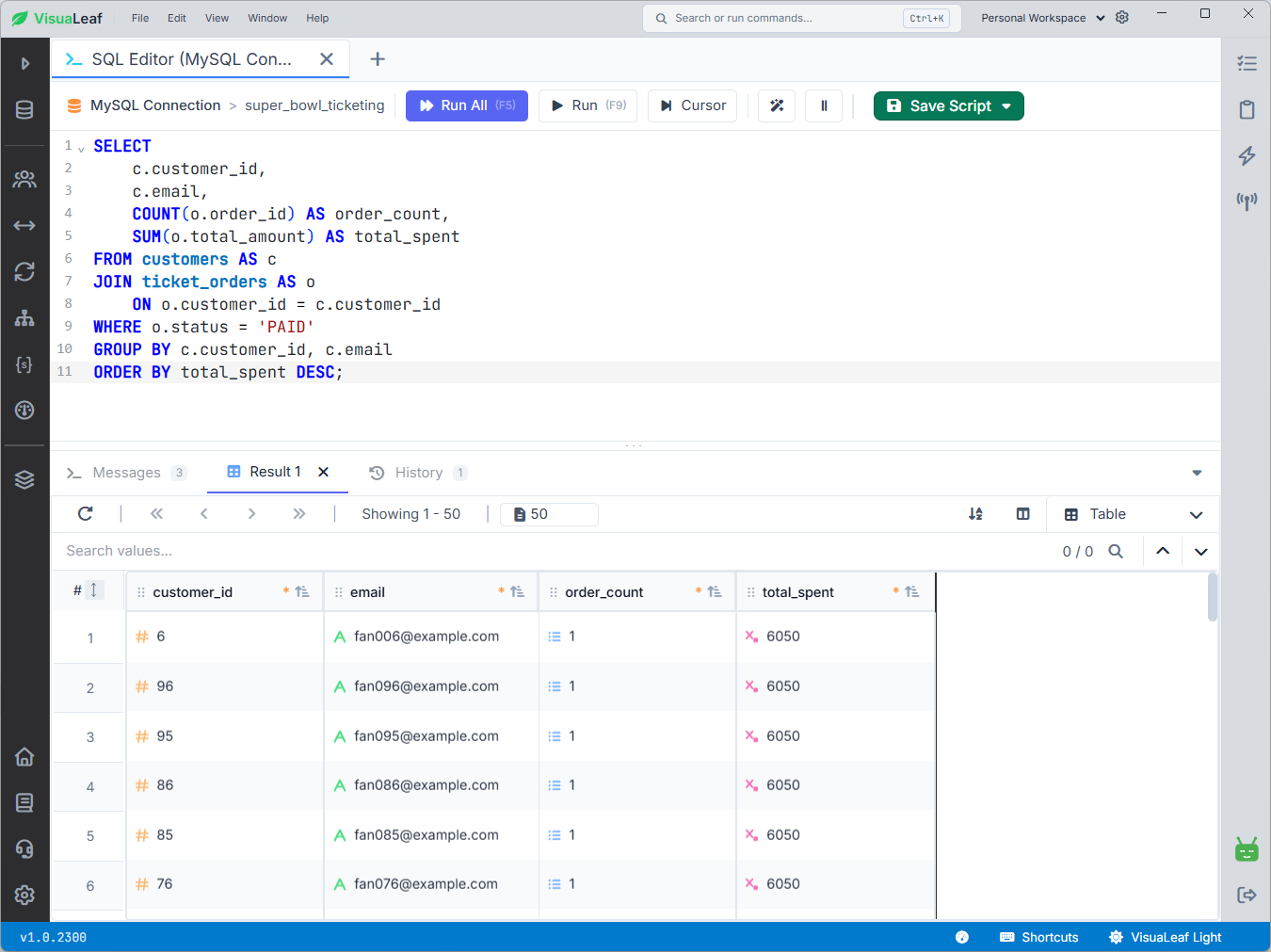
The SQL Editor is useful when you know the query you want to run. VisuaLeaf provides autocomplete for MySQL tables, columns, and functions. You can format the query, run it, and view the results below the editor.
This query shows how much each customer spent on orders with the PAID status:
SELECT
    c.customer_id,
    c.email,
    COUNT(o.order_id) AS order_count,
    SUM(o.total_amount) AS total_spent
FROM customers AS c
JOIN ticket_orders AS o
    ON o.customer_id = c.customer_id
WHERE o.status = 'PAID'
GROUP BY c.customer_id, c.email
ORDER BY total_spent DESC;
The table and column names now match the real super_bowl_ticketing database. Refunded and partially refunded orders are not included because the query filters for PAID.
Build MySQL Joins Visually
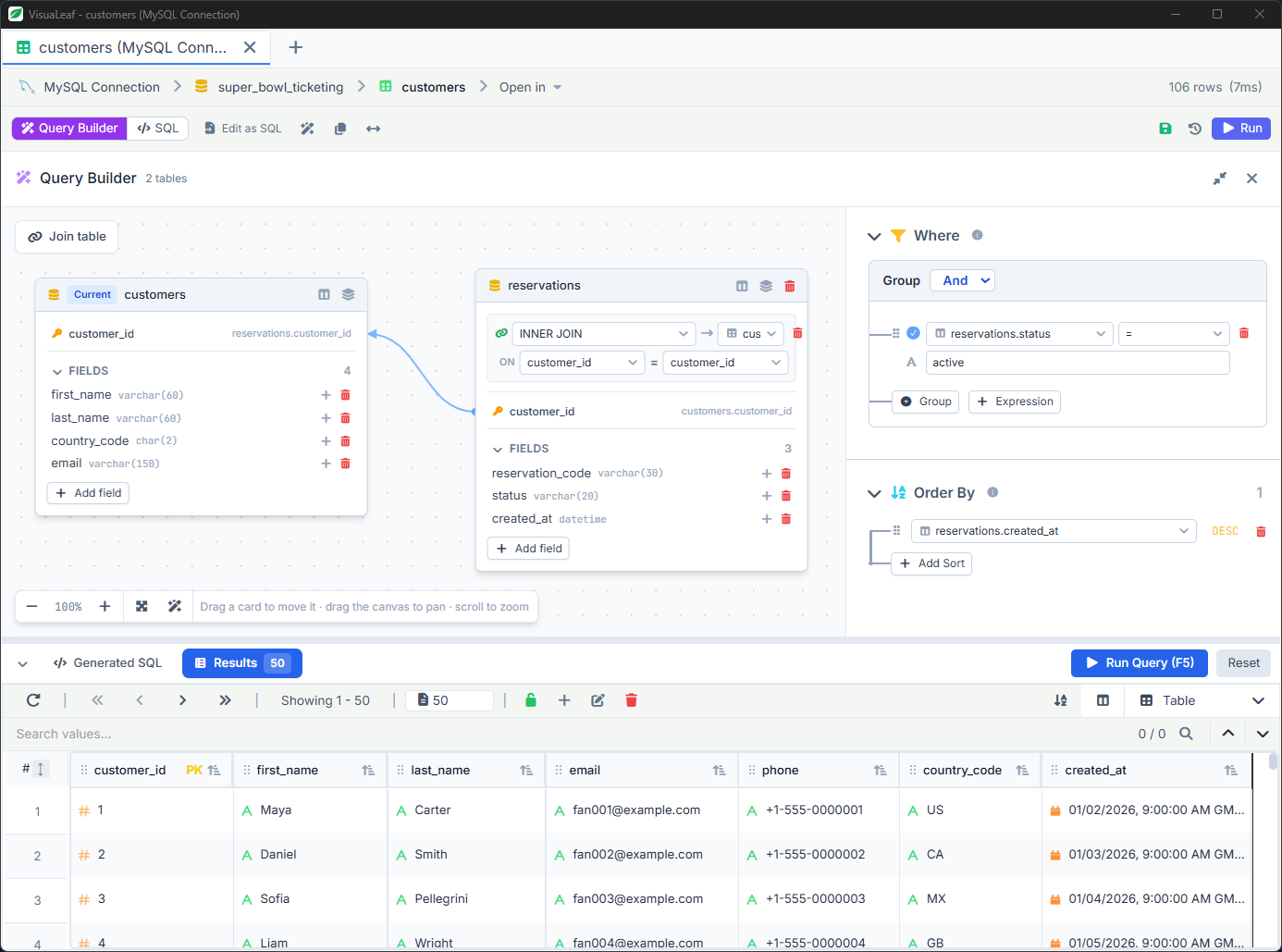
The Visual Query Builder lets you join tables without writing the full query yourself.
In this example, customers is joined with reservations using the customer_id column. The query shows customer details and reservation information. It only includes active reservations and sorts the newest ones first.
SELECT
    c.first_name,
    c.last_name,
    c.country_code,
    c.email,
    r.reservation_code,
    r.status,
    r.created_at
FROM customers AS c
INNER JOIN reservations AS r
    ON r.customer_id = c.customer_id
WHERE r.status = 'ACTIVE'
ORDER BY r.created_at DESC;
Because this uses an INNER JOIN, customers without a matching reservation are not included. You can check the generated SQL before running the query.
Design a MySQL ER Diagram
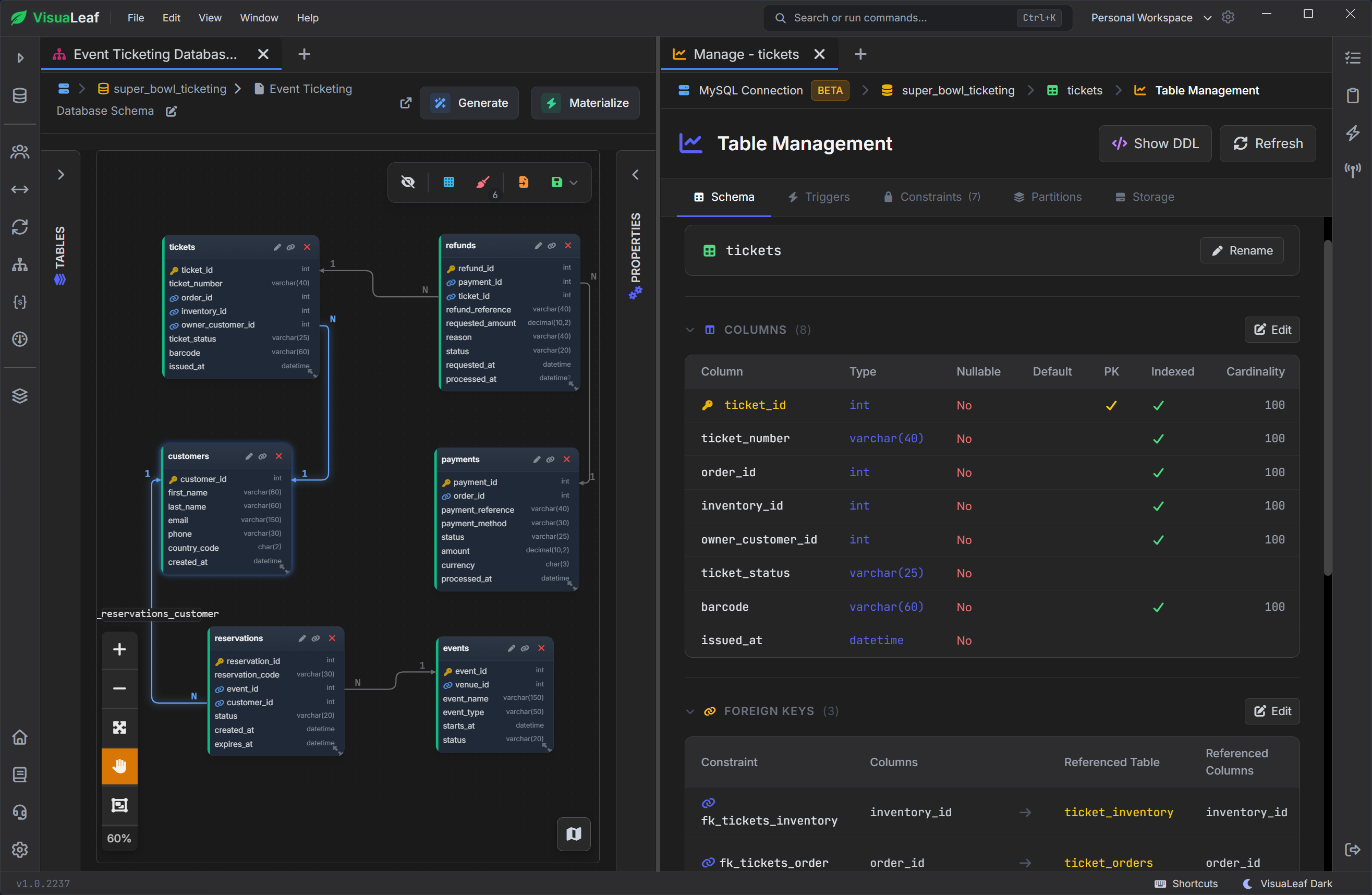
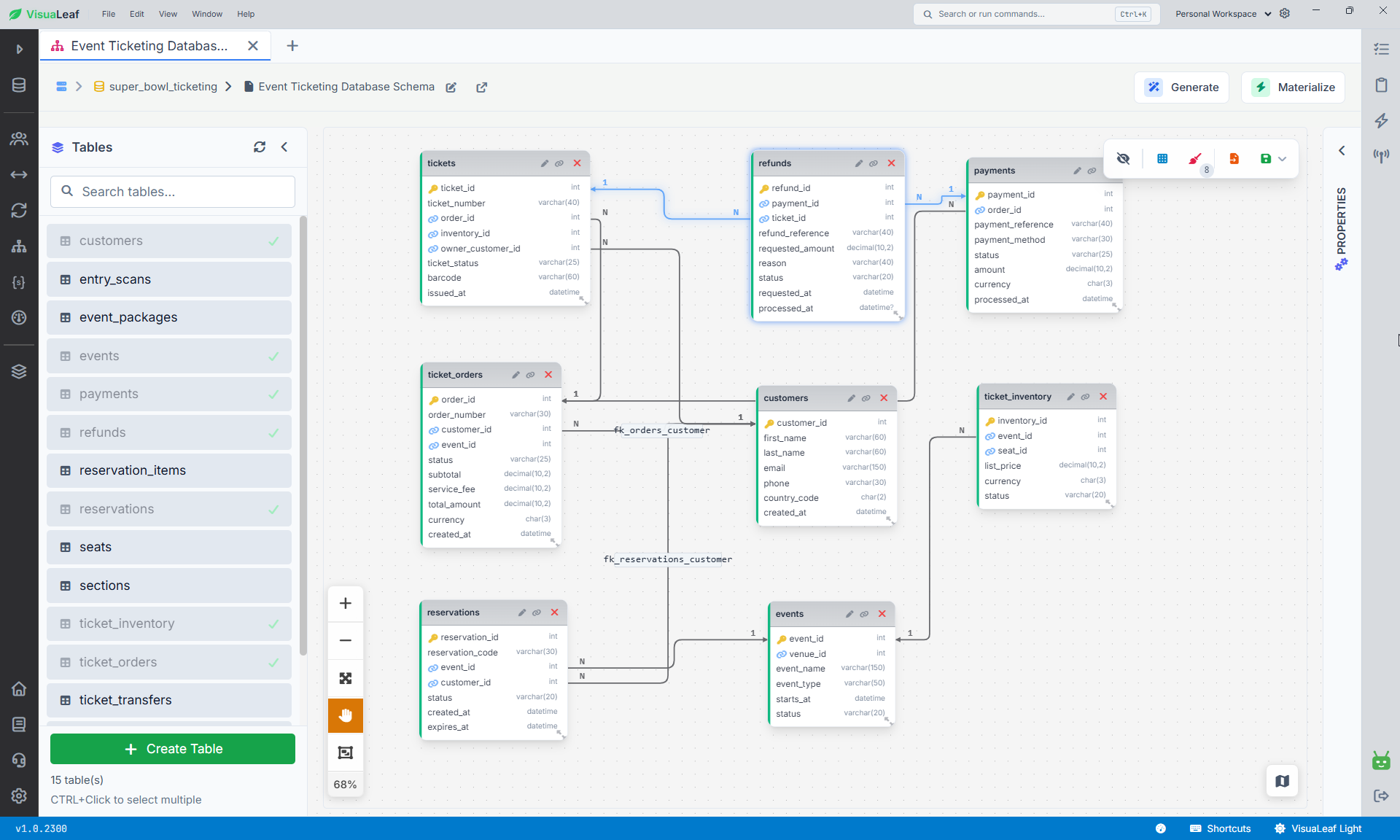
A MySQL ER diagram shows your tables, columns, keys, and relationships in one view. This makes it easier to understand how tables such as customers, ticket_orders, payments, and refunds are connected.
You can also design new tables directly on the canvas. Add the columns, choose their data types, set the keys, and connect related tables. When the design is ready, use Materialize to create it in the connected MySQL database.
Because this changes the real database, review the design carefully before applying it.
Explore MySQL JSON Columns
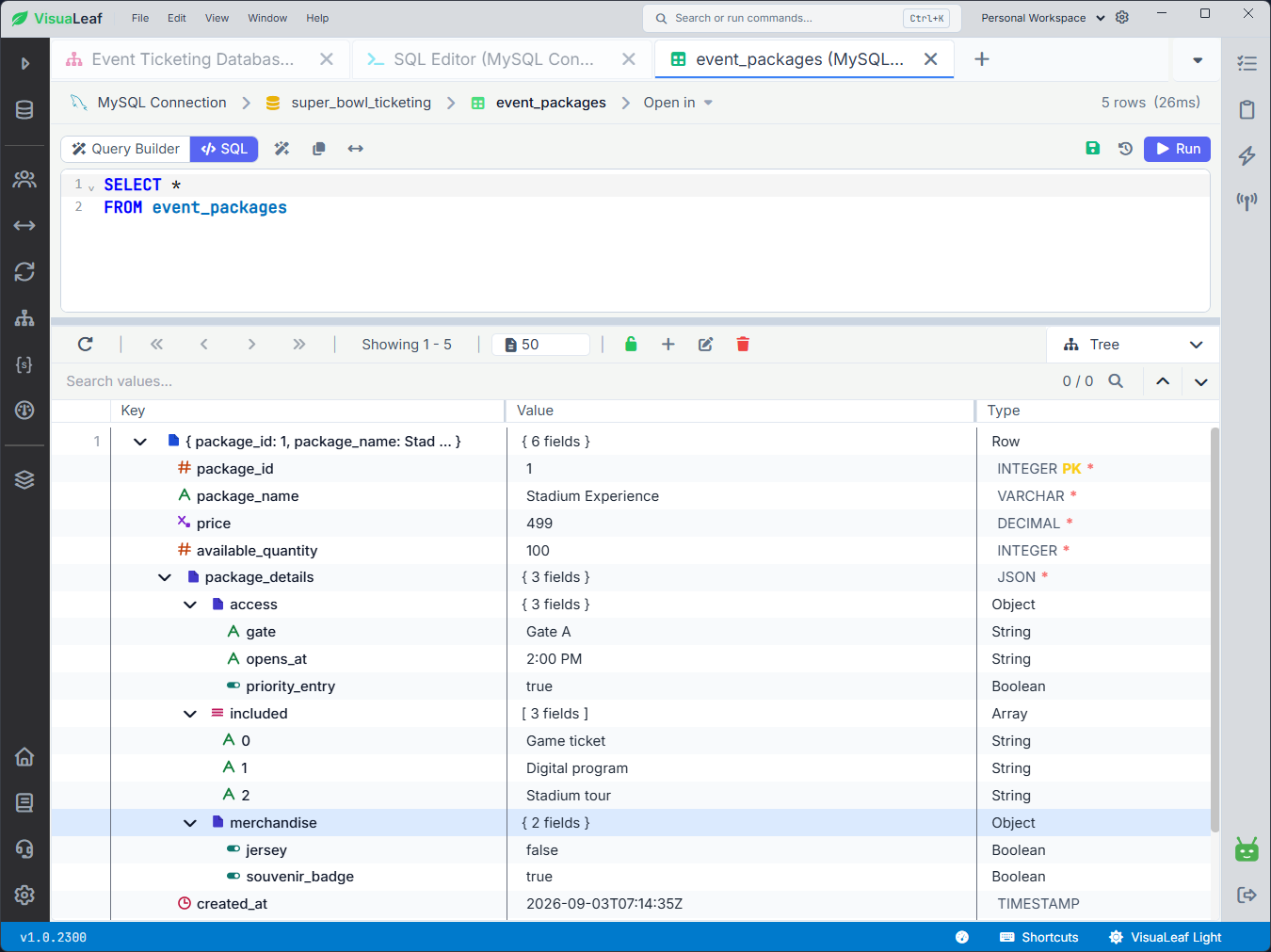
MySQL can store objects and lists inside a JSON column. These values can be difficult to read when displayed as one long line.
In VisuaLeaf, you can open a JSON value and expand it as a tree. This lets you inspect nested objects, arrays, keys, and values without manually formatting the data.
This is useful for columns containing settings, product details, event information, or other flexible data.
Check Query Performance with EXPLAIN
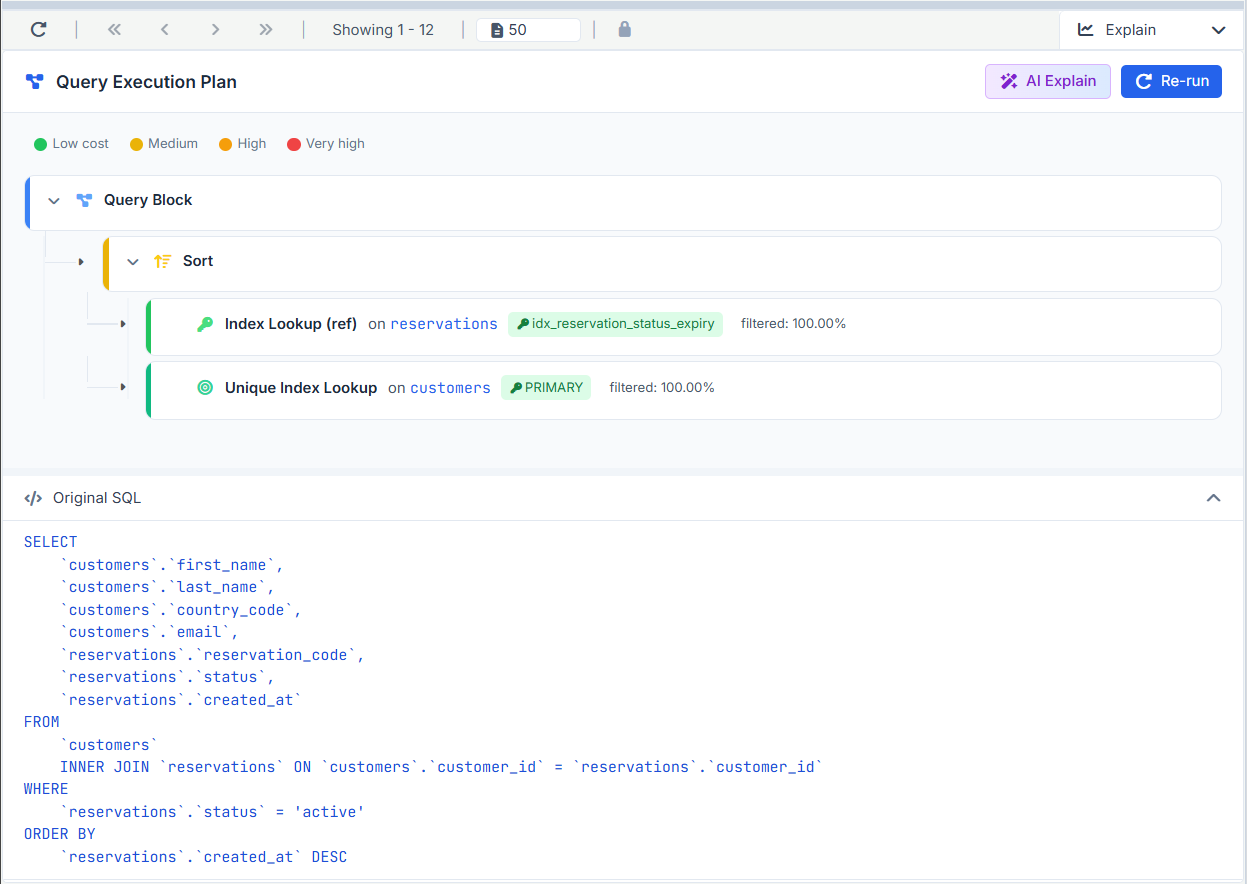
The Explain view shows how MySQL plans to run your query.
In this example, MySQL uses idx_reservation_status_expiry to find active reservations. It then uses the PRIMARY index to match each reservation with a customer. Finally, it sorts the results by creation date.
The green indicators show that both index lookups have a low cost. This view helps you quickly spot index use, full table scans, joins, and expensive steps.
Turn Query Results into Charts
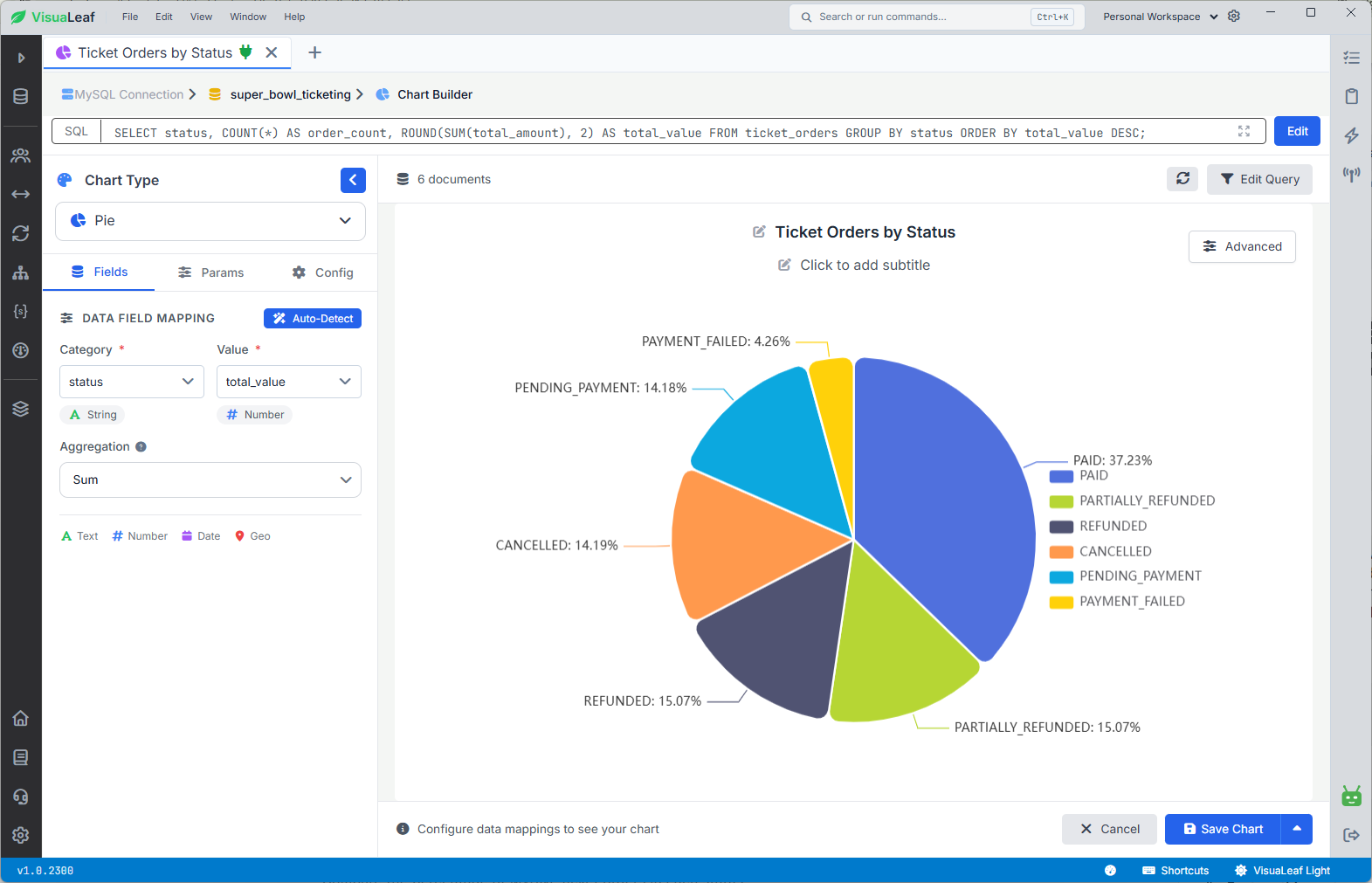
Sometimes a table of numbers is hard to read. You can turn a query result into a chart directly in VisuaLeaf.
This query compares the number and total value of orders in each status:
SELECT
    status,
    COUNT(*) AS order_count,
    ROUND(SUM(total_amount), 2) AS total_value
FROM ticket_orders
GROUP BY status
ORDER BY total_value DESC;
You can display the result as a bar or pie chart, and save it in a dashboard. This is useful for quick analysis. For large company reports with many users and strict access rules, a full business intelligence tool may still be a better choice.
Keep MySQL and Other Databases Together
Many projects use more than one database. You might work with MySQL, MariaDB, PostgreSQL, MongoDB, or SQLite during the same day.
VisuaLeaf keeps these connections in one workspace. Each database still keeps its own features and query language. A query written for MySQL may not work in another system without changes.
You can see the full MySQL workflow on the VisuaLeaf MySQL GUI client page.
Conclusion
The MySQL database management system stores relational data, runs SQL, and manages rules such as keys, constraints, and indexes. VisuaLeaf does not replace MySQL. It gives you a visual way to work with it.
You can browse and edit tables, manage their structure, write SQL, build joins, generate a MySQL ER diagram, open JSON values, read EXPLAIN plans, and turn query results into charts from the same workspace. The important part is not having more buttons. It is being able to see the data, structure, query, and result together.
Download VisuaLeaf to explore tables, run SQL, build ER diagrams, and create charts from your MySQL data.