How to update documents in MongoDB
Update one or many MongoDB documents with updateOne() and updateMany(): $set, $inc, $unset, and setting a field from another field. mongosh, Node, Python.
Quick Answer
Pass a filter and an update operator. updateOne changes the first match, updateMany changes all of them:
db.users.updateOne({ name: 'Ann' }, { $set: { status: 'active' } })
db.users.updateMany({ status: 'trial' }, { $set: { status: 'expired' } })
The second argument needs an operator such as $set. A plain object is rejected with "Update document requires atomic operators".
The update operators you will use most
| Operator | Does | Example |
|---|---|---|
$set | Sets a field, creating it if missing | { $set: { status: 'active', 'address.city': 'Paris' } } |
$unset | Removes a field | { $unset: { legacyId: '' } } |
$inc | Adds to a number (negative to subtract) | { $inc: { logins: 1, credits: -5 } } |
$currentDate | Sets a field to the current date | { $currentDate: { updatedAt: true } } |
$rename | Renames a field | { $rename: { fullname: 'name' } } |
$push | Appends to an array | { $push: { tags: 'vip' } } |
You can combine operators in one update, as long as two of them don't touch the same field:
db.users.updateMany(
  { status: 'trial' },
  { $set: { status: 'expired' }, $currentDate: { updatedAt: true } }
)
In VisuaLeaf
Update documents in VisuaLeaf
For one value, click it in VisuaLeaf's Tree or Table View and type. Inputs are type-aware for dates, ObjectIds and Decimal128 and validate as you type, which guards against the type drift the findings above caught. Single edits go into the undo history.
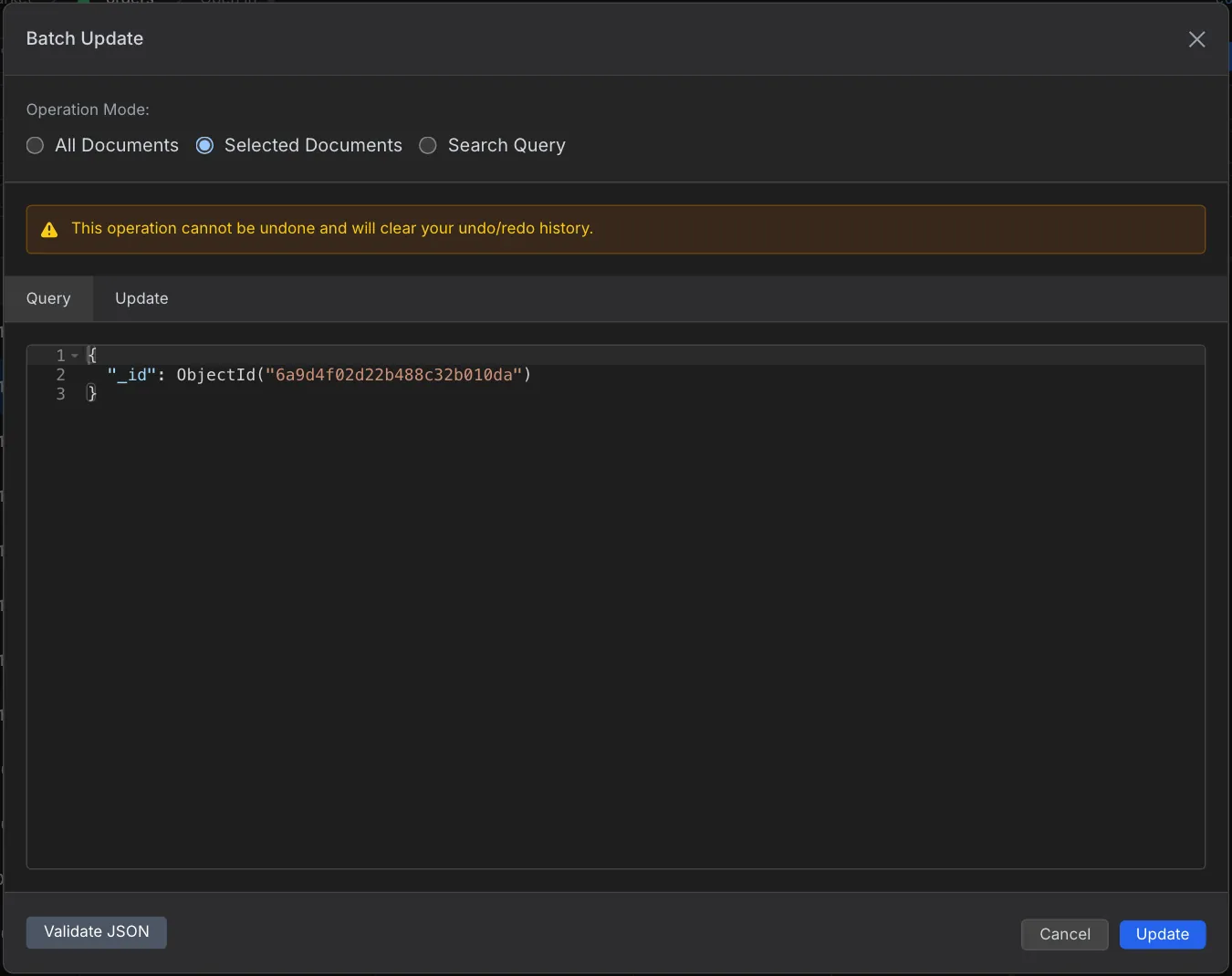
For many documents, select rows in Table View, right-click and choose Batch Update. Pick the operation mode: All Documents, Selected Documents or Search Query. Then check the Query tab to see which documents will match, and write the change on the Update tab with $set, $unset, $inc, $push or $pull. Validate JSON catches syntax mistakes before you apply. A batch update can't be undone and clears the undo history, so the Query tab is your last check. See the Collection Activity docs.
Reading the result
{
  acknowledged: true,
  matchedCount: 3,    // documents the filter found
  modifiedCount: 2,   // documents that actually changed
  upsertedCount: 0
}
modifiedCount can be lower than matchedCount: MongoDB doesn't rewrite a document whose values already equal the new ones (more on exactly when below). A matchedCount of 0 means the filter matched nothing, which is the first thing to check when "the update did nothing". Common reasons are a string vs ObjectId mismatch on _id, or a typo in a field name.
What we found testing this
We checked exactly what counts as "modified" on MongoDB 7.0, starting from three documents where two already had s: 'a' and every n was the integer 1:
| Update | matched | modified |
|---|---|---|
updateMany({}, { $set: { s: 'a' } }) | 3 | 1 |
updateMany({}, { $inc: { n: 0 } }) | 3 | 0 |
updateMany({}, { $unset: { missingField: '' } }) | 3 | 0 |
updateOne({ _id: 1 }, { $setOnInsert: { q: 1 } }) | 1 | 0 |
updateOne({ _id: 1 }, { $set: { n: NumberLong('1') } }) | 1 | 1 |
- A type change counts as a modification even when the number is equal. Setting the int
1toNumberLong('1')reportedmodifiedCount: 1and the stored type becamelong. This is how an "update that changes nothing" can still change how other queries and schema validation see the field. $setOnInsertwithoutupsert: trueis silently ignored. No error, justmodifiedCount: 0.- The "no operators" mistake fails differently per tool. mongosh and Node throw
MongoInvalidArgumentError: Update document requires atomic operators. PyMongo raises a plainValueError: update only works with $ operatorsbefore anything reaches the server, so a handler that only catches PyMongo errors won't see it. - Two operators on the same field are rejected outright:
{ $set: { s: 'x' }, $unset: { s: '' } }fails withUpdating the path 's' would create a conflict at 's'and changes nothing.
Update all documents, or set a field from another field
An empty filter matches every document:
db.users.updateMany({}, { $inc: { logins: 1 } })To compute a value from the document's own fields, pass an array as the update. That's an aggregation pipeline, so field paths like '$name' are read as values:
db.users.updateMany({}, [
  { $set: { label: { $concat: ['$name', '-', { $toString: '$logins' }] } } }
])
Without the square brackets, { $set: { label: '$name' } } sets label to the literal string "$name". It's an easy mistake to miss.
For updates that need real logic per document (loops, lookups, conditions), see bulk updates with mongosh scripts.
Get the updated document back, or replace it
// returns the document after the change (the default is before)
db.users.findOneAndUpdate(
  { name: 'Bo' },
  { $set: { vip: true } },
  { returnDocument: 'after' }
)

// replace the whole document except _id
db.users.replaceOne({ name: 'Cy' }, { name: 'Cy', status: 'active', logins: 0 })
Add { upsert: true } to updateOne or updateMany to insert a document when nothing matches. The filter's equality fields and the $set fields both end up in the new document.
From Node.js and Python
const users = client.db('app').collection('users')

const r = await users.updateMany({ status: 'trial' }, { $set: { status: 'expired' } })
console.log(r.matchedCount, r.modifiedCount)

const doc = await users.findOneAndUpdate(
  { name: 'Bo' }, { $set: { vip: true } }, { returnDocument: 'after' }
)
from pymongo import ReturnDocument
r = db.users.update_many({"status": "trial"}, {"$set": {"status": "expired"}})
print(r.matched_count, r.modified_count)
doc = db.users.find_one_and_update(
{"name": "Bo"}, {"$set": {"vip": True}}, return_document=ReturnDocument.AFTER
)Before you run a big update
- Run the filter as a find first.
db.users.countDocuments({ status: "trial" })tells you how many documents you are about to change. - Index the filter field.
updateManyon an unindexed field scans the whole collection and holds write locks longer. - Stop using
update(). It's deprecated, and by default it updates only one document even when you meant all of them.
Frequently Asked Questions
What is the difference between updateOne and updateMany?
updateOne changes the first document that matches the filter. updateMany changes every matching document. Both take the same filter and update arguments.
Why does MongoDB say "Update document requires atomic operators"?
The update argument was a plain document. Wrap the fields in an operator, for example { $set: { status: "active" } }, or use replaceOne to replace the whole document.
Why is modifiedCount 0 when matchedCount is 1?
The document already had those values, so MongoDB did not rewrite it. The same happens for $inc by 0, $unset on a missing field, and $setOnInsert without upsert. Nothing is wrong.
How do I update a nested field?
Use dot notation inside $set, for example { $set: { "address.city": "Paris" } }. Setting { address: { city: "Paris" } } replaces the whole address object.