MongoDB Shell JavaScript: Bulk Updates, Loops & Analysis
Learn how to use mongosh scripts to analyze data, build cleanup plans, run bulk updates, verify results, and inspect query performance.


Most mongosh tutorials focus on individual commands: find a document, update a field, or run an aggregation.
That is useful when you already know exactly what needs to change. Real cleanup work is often more complicated. You may need to analyze several collections, calculate a value, loop through the results, preview the affected documents, and only then run the updates.
I tested this with a small SaaS database called saas_platform. Some workspaces had more active users than their subscription allowed. The goal was to:
- Find the workspaces above their seat limits
- Select users who had been inactive for more than 90 days
- Avoid deactivating owners and administrators
- Preview every selected user
- Deactivate the users in bulk
- Revoke their active sessions
- Verify that each workspace was back within its limit
This cannot be handled safely with one global updateMany() command. Each workspace has a different seat limit and needs to release a different number of seats.
That is where mongosh scripting becomes useful.
The database used for this test
The saas_platform database contains four collections:
| Collection | What it contains |
|---|---|
workspaces |
Workspace plans and seat limits |
users |
User accounts and their activity |
sessions |
Login sessions |
activityLogs |
Login and administrative events |
A workspace stores its subscription limit:
{
  workspaceId: "WS-1001",
  name: "Northstar Metrics",
  plan: "Team",
  seatLimit: 8,
  status: "active"
}
The users reference that workspace through workspaceId:
{
  userId: "USR-0009",
  workspaceId: "WS-1001",
  fullName: "Selene Mercer",
  role: "viewer",
  status: "active",
  lastLoginAt: ISODate("2026-03-04T09:00:00Z")
}
The test database contains six workspaces and 56 users. Three workspaces are above their seat limits, with eight extra users in total.
Those eight users have not logged in for more than 90 days, but their accounts and sessions are still active.
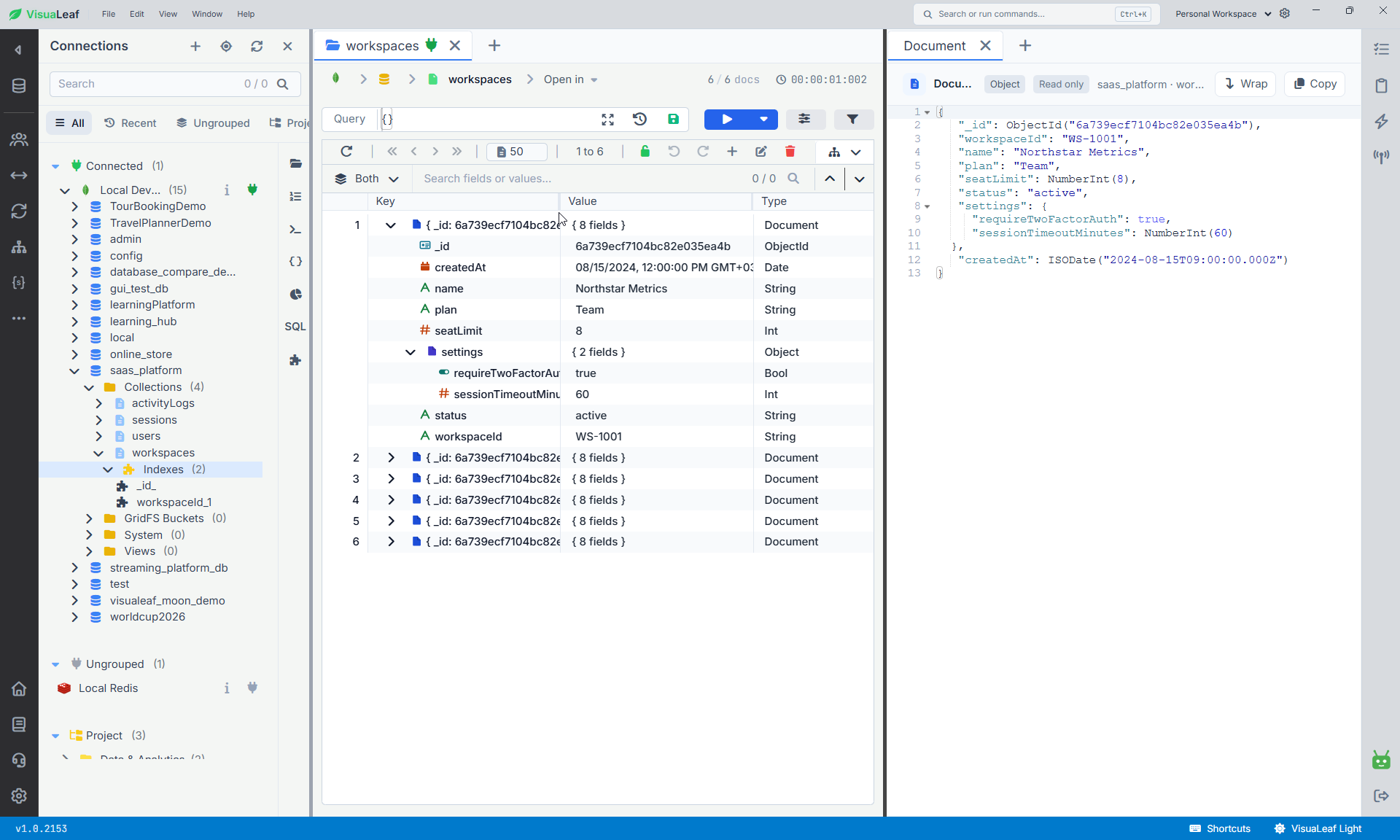
saas_platform database in VisuaLeaf, with its four collections and a workspace document open for inspection.Download the complete self-contained demo script. It creates a dedicated sample database and reproduces the same result shown in this article: eight users deactivated, eight active sessions revoked, and zero active sessions remaining. The script resets only the saas_platform database.
Mongosh can run JavaScript logic
Mongosh is not limited to isolated MongoDB commands. It provides a JavaScript and Node.js environment, allowing you to use variables, arrays, functions, conditions, loops, and date calculations alongside your database operations.
The analysis, cleanup plan, and bulk-update blocks below form one connected script. Copy them into the same editor in the order shown and execute them together. Running the blocks as separate executions may cause variables such ascleanupPlanto be unavailable. The verification, index,explain(), and BSON Date checks are self-contained and can be executed separately.
For this workflow, I first selected the database and calculated the inactivity cutoff:
const appDb = db.getSiblingDB("saas_platform");

const inactiveDays = 90;
const referenceDate = new Date("2026-08-05T09:00:00Z");

const cutoffDate = new Date(
  referenceDate.getTime() -
  inactiveDays * 24 * 60 * 60 * 1000
);

print(`Inactive before: ${cutoffDate.toISOString()}`);
I used a fixed referenceDate because it makes the test repeatable. Using a fixed reference date makes the candidate selection repeatable as long as the underlying data has not changed.
For a live cleanup, you could calculate the date from the current time instead:
const cutoffDate = new Date(
  Date.now() -
  inactiveDays * 24 * 60 * 60 * 1000
);
One important distinction: mongosh runs JavaScript, not Python. You can build the same workflow in Python, but you would run it outside mongosh through a driver such as PyMongo.
Find the workspaces above their seat limits
The seat limit is stored in workspaces, while the accounts we need to count are stored in users.
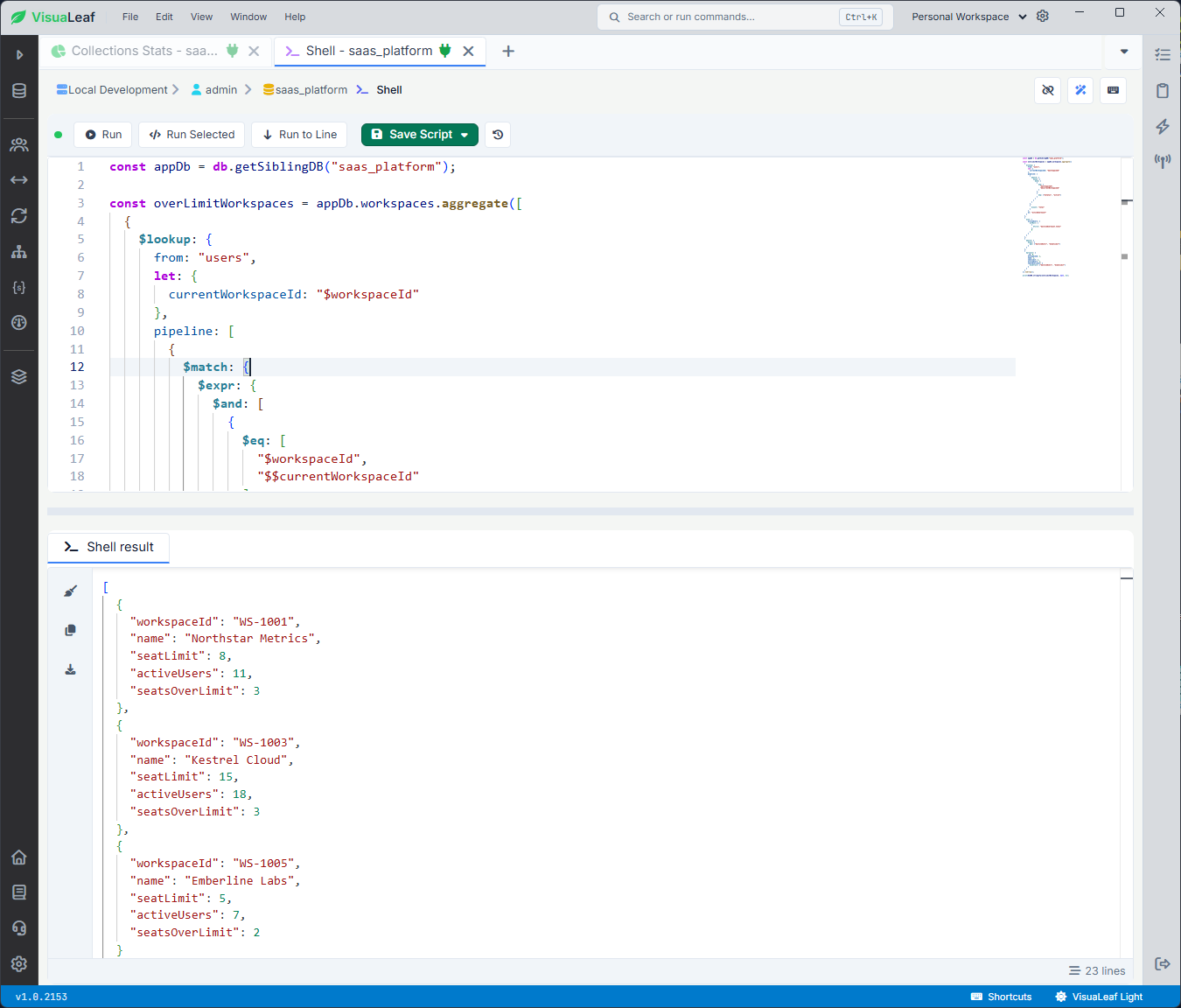
I used an aggregation with $lookup to count the active users belonging to each workspace:
const overLimitWorkspaces = appDb.workspaces.aggregate([
  {
    $lookup: {
      from: "users",
      let: {
        currentWorkspaceId: "$workspaceId"
      },
      pipeline: [
        {
          $match: {
            $expr: {
              $and: [
                {
                  $eq: [
                    "$workspaceId",
                    "$$currentWorkspaceId"
                  ]
                },
                {
                  $eq: ["$status", "active"]
                }
              ]
            }
          }
        },
        {
          $count: "total"
        }
      ],
      as: "activeUserCount"
    }
  },
  {
    $set: {
      activeUsers: {
        $ifNull: [
          {
            $first: "$activeUserCount.total"
          },
          0
        ]
      }
    }
  },
  {
    $match: {
      $expr: {
        $gt: ["$activeUsers", "$seatLimit"]
      }
    }
  },
  {
    $project: {
      _id: 0,
      workspaceId: 1,
      name: 1,
      seatLimit: 1,
      activeUsers: 1,
      seatsOverLimit: {
        $subtract: ["$activeUsers", "$seatLimit"]
      }
    }
  }
]).toArray();

print(EJSON.stringify(overLimitWorkspaces, null, 2));
The final toArray() is necessary because the next step uses JavaScript to loop through these results. Without it, the aggregation returns a cursor.
The result identified three affected workspaces:
| Workspace | Seat limit | Active users | Extra seats |
|---|---|---|---|
| Northstar Metrics | 8 | 11 | 3 |
| Kestrel Cloud | 15 | 18 | 3 |
| Emberline Labs | 5 | 7 | 2 |
At this point, the script had only analyzed the database. It had not changed anything.
Use a loop to select the right users
A global command such as this would be dangerous:
appDb.users.updateMany(
  {
    status: "active",
    lastLoginAt: {
      $lt: cutoffDate
    }
  },
  {
    $set: {
      status: "inactive"
    }
  }
);
It would deactivate every inactive user across the database. It would not consider how many seats each workspace actually needed to release.
Instead, I looped through the affected workspaces and created a separate query for each one:
const cleanupPlan = [];

overLimitWorkspaces.forEach(workspace => {
  const seatsToRelease = parseInt(
    workspace.seatsOverLimit.toString(),
    10
  );

  const candidates = appDb.users.find({
    workspaceId: workspace.workspaceId,
    status: "active",
    role: {
      $nin: ["owner", "admin"]
    },
    lastLoginAt: {
      $lt: cutoffDate
    }
  })
    .sort({
      lastLoginAt: 1
    })
    .limit(seatsToRelease)
    .toArray();

  candidates.forEach(user => {
    cleanupPlan.push({
      workspaceId: workspace.workspaceId,
      workspaceName: workspace.name,
      userId: user.userId,
      fullName: user.fullName,
      role: user.role,
      lastLoginAt: user.lastLoginAt
    });
  });
});

// Preview the selected users
print(`Users selected: ${cleanupPlan.length}`);

print(
  EJSON.stringify(
    cleanupPlan,
    null,
    2
  )
);

// Check whether every workspace has enough eligible users
overLimitWorkspaces.forEach(workspace => {
  const seatsToRelease = parseInt(
    workspace.seatsOverLimit.toString(),
    10
  );

  const selectedUsers = cleanupPlan.filter(
    user =>
      user.workspaceId === workspace.workspaceId
  ).length;

  if (selectedUsers < seatsToRelease) {
    print(
      `WARNING: ${workspace.name} needs to release ` +
      `${seatsToRelease} seats, but only ` +
      `${selectedUsers} eligible users were found.`
    );
  }
});
The important part is:
.limit(seatsToRelease)VisuaLeaf may return seatsOverLimit as a BSON Long, while limit() requires a regular integer. The script converts it before passing it to limit().
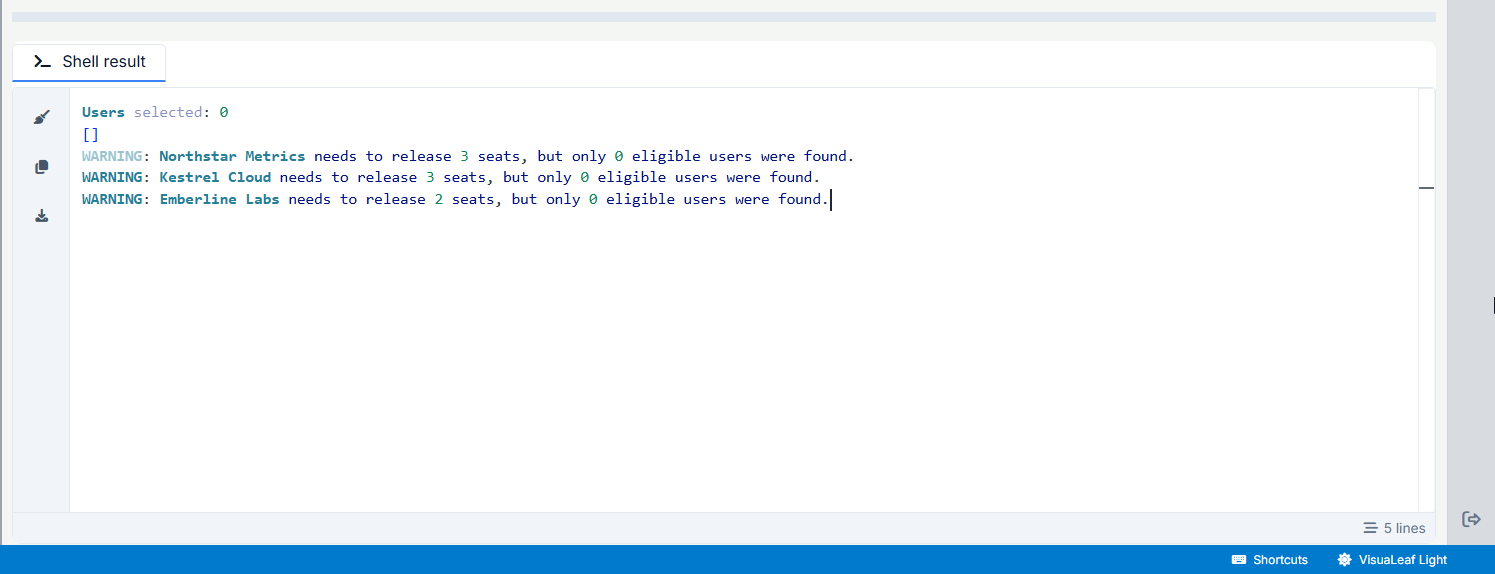
Northstar Metrics needs to release three seats, Kestrel Cloud needs three, and Emberline Labs needs two. The value passed to limit() changes during each loop.
The candidates are sorted by lastLoginAt: 1, so the users who have been inactive for the longest time are selected first.
The query also excludes owner and admin roles. A user's inactivity does not automatically mean the account is safe to deactivate.
Preview the cleanup plan
Before running any update, I printed the selected users:
print(`Users selected: ${cleanupPlan.length}`);

cleanupPlan.forEach((user, index) => {
  print(
    `${index + 1}. ` +
    `${user.fullName} | ` +
    `${user.workspaceName} | ` +
    `${user.role} | ` +
    `${user.lastLoginAt.toISOString()}`
  );
});
The test returned eight users, which matched the total number of seats over the limit.
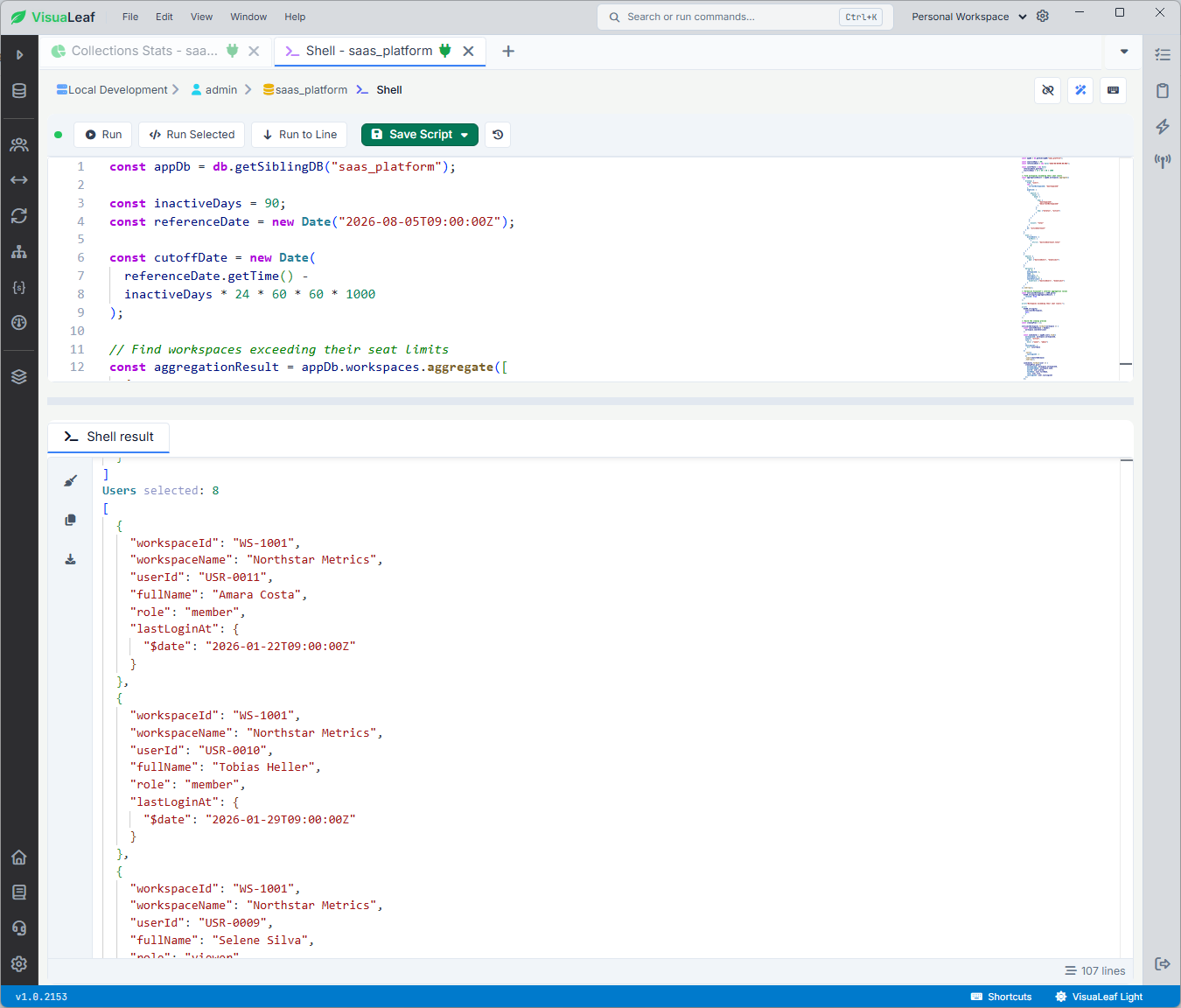
You should not check only the total. Review the workspace, role, user ID, and last login date as well. A query can return the expected number of documents while still selecting the wrong ones.
I also checked whether every workspace had enough eligible candidates:
const incompleteWorkspaces = [];

overLimitWorkspaces.forEach(workspace => {
  const selected = cleanupPlan.filter(
    user =>
      user.workspaceId === workspace.workspaceId
  ).length;

  if (selected < workspace.seatsOverLimit) {
    incompleteWorkspaces.push(
      workspace.workspaceId
    );

    print(
      `WARNING: ${workspace.name} needs to release ` +
      `${workspace.seatsOverLimit} seats, but only ` +
      `${selected} eligible users were found.`
    );
  }
});

if (incompleteWorkspaces.length > 0) {
  throw new Error(
    "Cleanup stopped: some workspaces do not have " +
    "enough eligible users."
  );
}

if (cleanupPlan.length === 0) {
  throw new Error(
    "No eligible users found. Nothing to update."
  );
}
This catches an important case: a workspace may be over its limit without having enough inactive users to fix the problem automatically.
The correct result may be a warning, not an update.
Build the bulk updates
After reviewing the plan, I converted each selected user into a bulkWrite() operation:
const scriptRunId = `seat-cleanup-${Date.now()}`;
const changedAt = new Date();

const userOperations = cleanupPlan.map(user => ({
  updateOne: {
    filter: {
      userId: user.userId,
      workspaceId: user.workspaceId,
      status: "active"
    },
    update: {
      $set: {
        status: "inactive",
        deactivatedAt: changedAt,
        deactivationReason:
          "subscription_seat_cleanup",
        lastCleanupRunId: scriptRunId
      }
    }
  }
}));
The filter checks status: "active" again because a user’s status could change between the preview and the update. The scriptRunId also identifies every document modified during this cleanup.
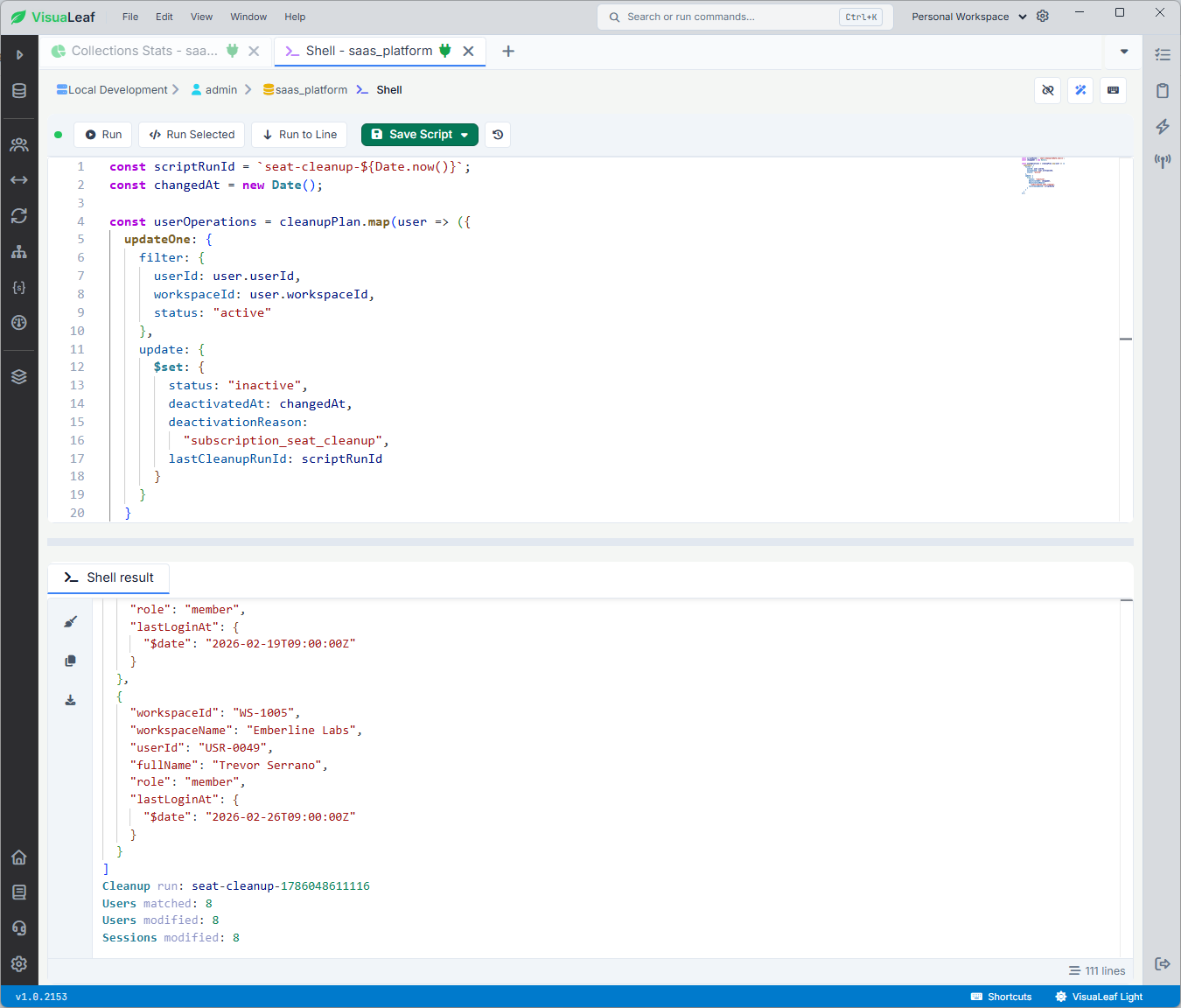
I then executed all eight operations:
const userResult = appDb.users.bulkWrite(
  userOperations,
  {
    ordered: false
  }
);

print(`Cleanup run: ${scriptRunId}`);
print(`Users matched: ${userResult.matchedCount}`);
print(`Users modified: ${userResult.modifiedCount}`);

if (
  userResult.matchedCount !==
  cleanupPlan.length
) {
  throw new Error(
    "Cleanup stopped: the number of matched users " +
    "does not match the reviewed cleanup plan."
  );
}
Using ordered: false allows MongoDB to continue processing the other independent operations if one of them fails.
The result confirmed that all eight selected users were updated:
Users matched: 8
Users modified: 8
If the number of matched users does not equal the reviewed cleanup plan, the script stops before revoking any sessions. This can happen if an account changes between the preview and the update.
Revoke the users’ active sessions
Deactivating an account is not enough if its existing session remains active.
I built a second batch for the sessions collection:
const sessionOperations = cleanupPlan.map(user => ({
  updateMany: {
    filter: {
      userId: user.userId,
      workspaceId: user.workspaceId,
      status: "active"
    },
    update: {
      $set: {
        status: "revoked",
        revokedAt: changedAt,
        revokeReason: "user_deactivated",
        lastCleanupRunId: scriptRunId
      }
    }
  }
}));

const sessionResult = appDb.sessions.bulkWrite(
  sessionOperations,
  {
    ordered: false
  }
);

print(
  `Sessions modified: ${sessionResult.modifiedCount}`
);
This batch uses updateMany because one user could have more than one active session.
The user and session batches are separate operations. They are not automatically atomic across both collections. The user updates could succeed while the session updates fail.
For a maintenance script like this, you need to inspect both results and verify the final database state. If the application requires both collections to succeed or fail together, you should evaluate using a transaction on a replica set or sharded cluster.
Verify the result
A successful bulk-write message shows what MongoDB processed, but the stored data should still be verified.
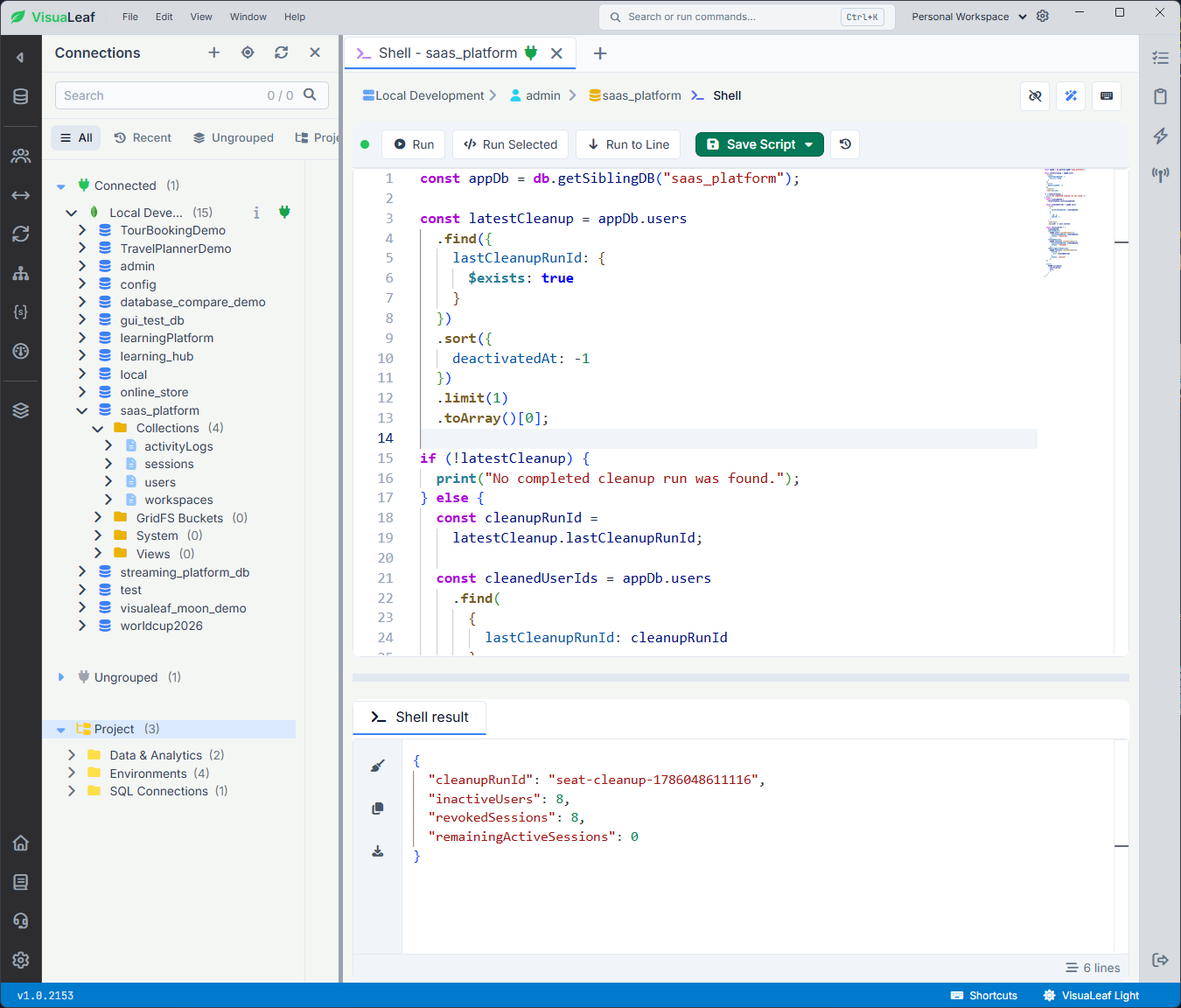
Because shell variables are not preserved between separate executions, I used the stored lastCleanupRunId to find and verify the latest cleanup:
const appDb = db.getSiblingDB("saas_platform");

const latestCleanup = appDb.users
  .find({
    lastCleanupRunId: {
      $exists: true
    }
  })
  .sort({
    deactivatedAt: -1
  })
  .limit(1)
  .toArray()[0];

if (!latestCleanup) {
  print("No completed cleanup run was found.");
} else {
  const cleanupRunId =
    latestCleanup.lastCleanupRunId;

  const cleanedUserIds = appDb.users
    .find(
      {
        lastCleanupRunId: cleanupRunId
      },
      {
        _id: 0,
        userId: 1
      }
    )
    .toArray()
    .map(user => user.userId);

  const verification = {
    cleanupRunId,
    inactiveUsers:
      appDb.users.countDocuments({
        lastCleanupRunId: cleanupRunId,
        status: "inactive"
      }),
    revokedSessions:
      appDb.sessions.countDocuments({
        lastCleanupRunId: cleanupRunId,
        status: "revoked"
      }),
    remainingActiveSessions:
      appDb.sessions.countDocuments({
        userId: {
          $in: cleanedUserIds
        },
        status: "active"
      })
  };

  print(
    EJSON.stringify(
      verification,
      null,
      2
    )
  );
}
The result confirmed that the cleanup deactivated eight users, revoked eight sessions, and left no active sessions for the affected accounts:
{
  "cleanupRunId": "seat-cleanup-1786048611116",
  "inactiveUsers": 8,
  "revokedSessions": 8,
  "remainingActiveSessions": 0
}
Finally, I reran the workspace analysis. None of the three previously over-limit workspaces still exceeded their seat limit.
Check the candidate query with explain()
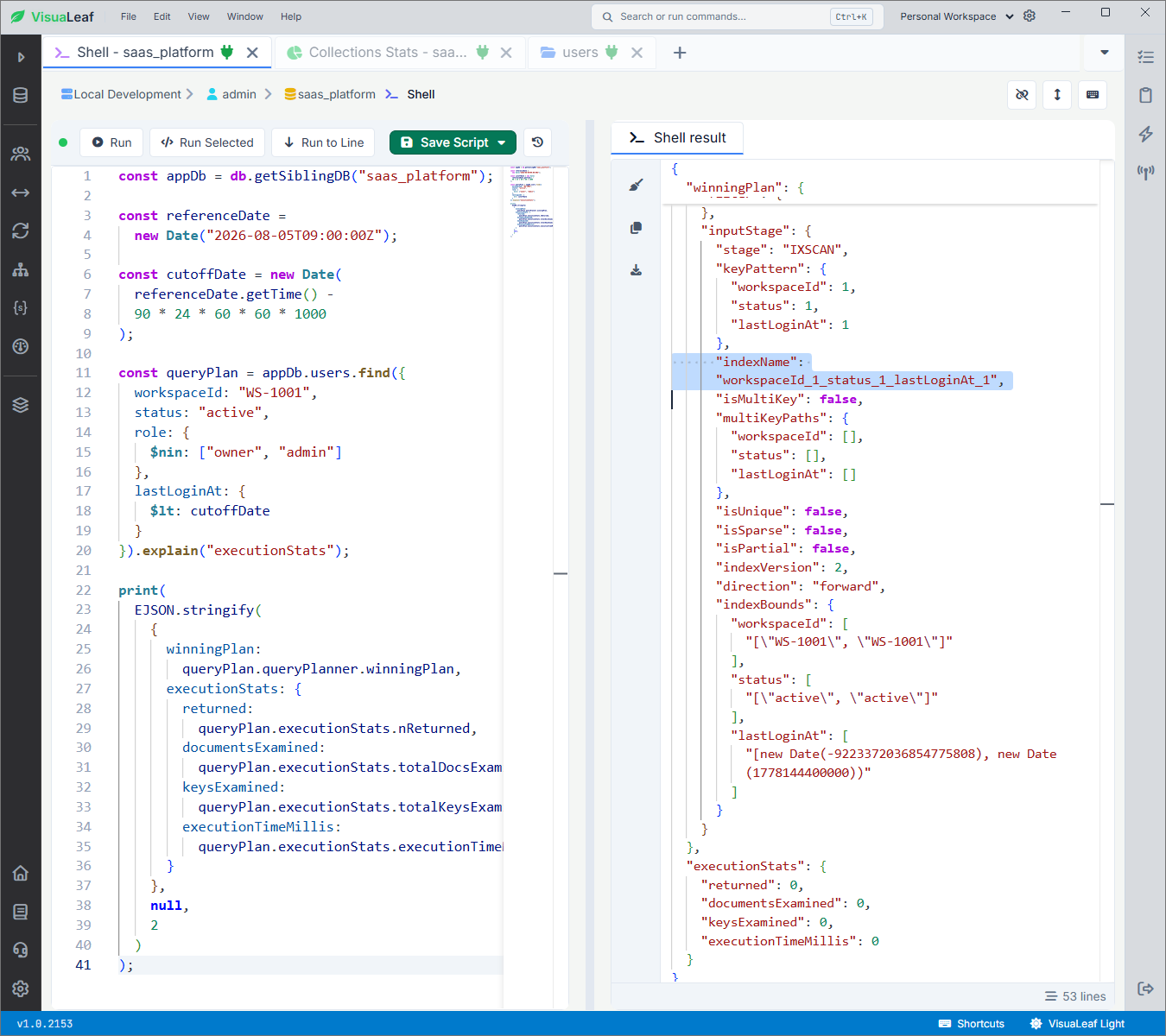
First, I created a compound index matching the query’s equality and range conditions:
const appDb = db.getSiblingDB("saas_platform");

const indexName = appDb.users.createIndex({
  workspaceId: 1,
  status: 1,
  lastLoginAt: 1
});

print(`Index ready: ${indexName}`);
This order fits the candidate query because it uses equality conditions on workspaceId and status, followed by a range condition on lastLoginAt.
I checked the execution plan with:
const appDb = db.getSiblingDB("saas_platform");

const referenceDate =
  new Date("2026-08-05T09:00:00Z");

const cutoffDate = new Date(
  referenceDate.getTime() -
  90 * 24 * 60 * 60 * 1000
);

const queryPlan = appDb.users.find({
  workspaceId: "WS-1001",
  status: "active",
  role: {
    $nin: ["owner", "admin"]
  },
  lastLoginAt: {
    $lt: cutoffDate
  }
}).explain("executionStats");

print(
  EJSON.stringify(
    {
      winningPlan:
        queryPlan.queryPlanner.winningPlan,
      executionStats: {
        returned:
          queryPlan.executionStats.nReturned,
        documentsExamined:
          queryPlan.executionStats.totalDocsExamined,
        keysExamined:
          queryPlan.executionStats.totalKeysExamined,
        executionTimeMillis:
          queryPlan.executionStats.executionTimeMillis
      }
    },
    null,
    2
  )
);
The winning plan used IXSCAN with the workspaceId_1_status_1_lastLoginAt_1 index. The query returned no users because the matching accounts had already been deactivated during the cleanup.
The useful part of this test is confirming that MongoDB selected the intended index and comparing the number of keys and documents examined.
What can go wrong
The inactivity filter works correctly only when lastLoginAt is stored as a BSON Date. I checked the field with:
const appDb = db.getSiblingDB("saas_platform");

appDb.users.findOne(
  {},
  {
    lastLoginAt: 1
  }
);
The result displayed lastLoginAt as a Date, confirming that the comparison with cutoffDate would work correctly.
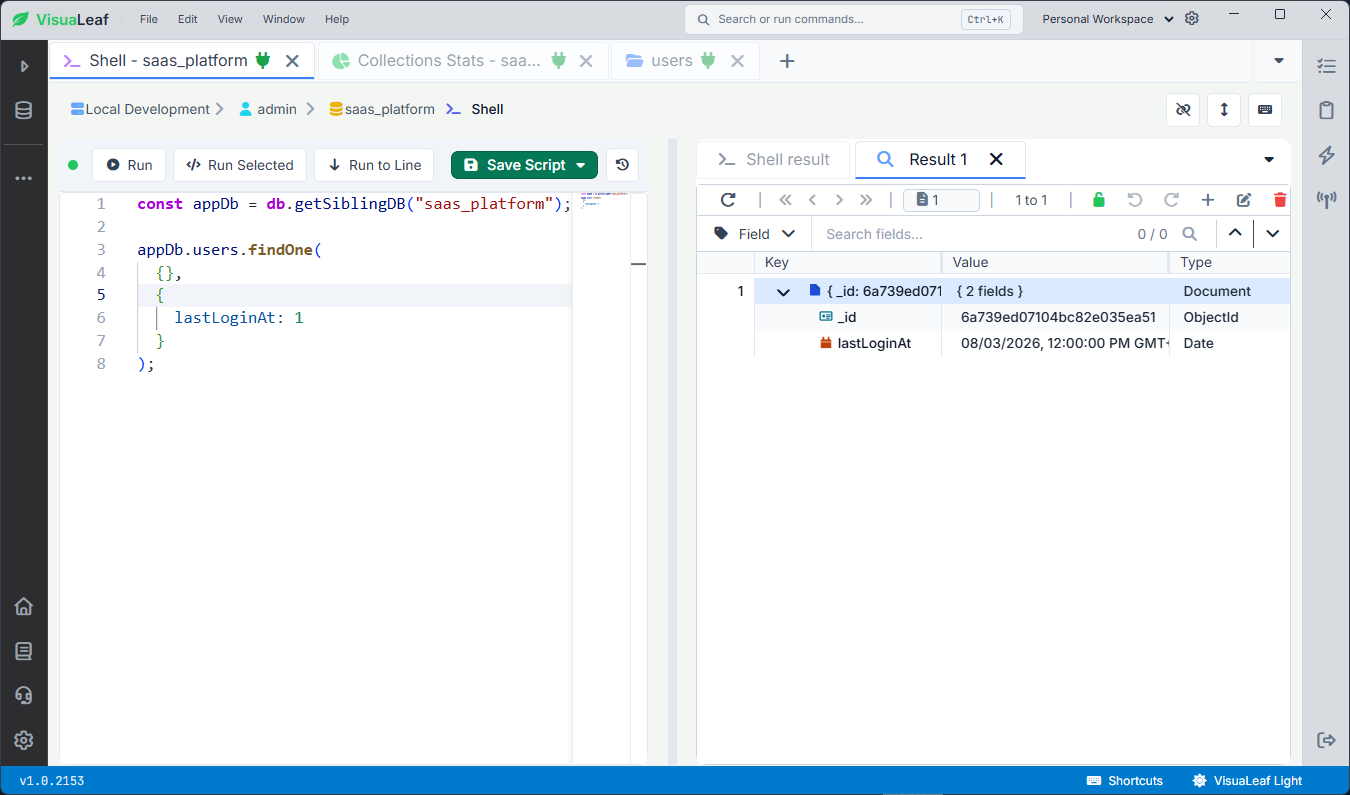
lastLoginAt is stored as a BSON Date before running the inactivity cleanup.The connected script also stops before creating the bulk operations if no users were selected or if a workspace does not have enough eligible candidates. This prevents an empty or incomplete cleanup from continuing.
The analysis, cleanup plan, and bulk operations must run in the same shell execution because they share variables such as cleanupPlan, changedAt, and scriptRunId. The verification, index, explain(), and BSON Date checks are self-contained and can be executed separately.
Workflow recap
The complete mongosh workflow follows this sequence:
1. Analyze the active-seat usage for each workspace.
2. Identify the workspaces exceeding their seat limits.
3. Use a JavaScript loop to build cleanupPlan.
4. Preview the selected users before modifying any data.
5. Use bulkWrite() to deactivate those users.
6. Use a second bulkWrite() batch to revoke their active sessions.
7. Verify the stored changes and confirm that no active sessions remain.
8. Run explain("executionStats") to check that the candidate query uses the compound index.
Steps 1–6 are parts of one connected script and should be copied into the same editor and executed together. The verification, index, explain(), and BSON Date checks are self-contained and can be executed separately.Running the script in VisuaLeaf
The code also works in standalone mongosh. I used the VisuaLeaf shell because I could keep the cleanup plan, bulk-write results, verification, and execution plan open separately.
I could also inspect the affected collections in shell, table, tree, or JSON view without switching between applications. This made it easier to preview the selected users and verify the changes after running the script.
Want to follow the workflow step by step? I prepared a.7zarchive containing five JavaScript (.js) files. Run them in order in VisuaLeaf to test each part of the workflow more easily.
Final result
This workflow used mongosh to analyze workspace usage, select inactive accounts, and preview the cleanup before making any changes to data.
The script then used bulkWrite() to deactivate eight users and revoke eight active sessions. Finally, I verified the stored data and used explain() to confirm that the candidate query used the intended compound index.
This is where mongosh scripting becomes useful: when a database task requires calculations, loops, multiple collections, bulk updates, and verification — not just one isolated query.