How to join collections in MongoDB with $lookup
Join two MongoDB collections with $lookup: a basic left join, flattening with $unwind, lookups with conditions, and why a join can come back empty.
Quick Answer
Use the $lookup aggregation stage. It adds an array of matching documents from the other collection to each input document:
db.orders.aggregate([
  { $lookup: {
      from: 'customers',          // collection to join
      localField: 'customerId',   // field in orders
      foreignField: '_id',        // field in customers
      as: 'customer'              // name of the new array field
  } }
])
Add { $unwind: '$customer' } after it if you want one object instead of an array.
What $lookup returns
$lookup is a left outer join. Every input document comes out, with an array of matches. No match gives an empty array, not a missing document:
{ _id: 10, customerId: 1, total: 40, customer: [ { _id: 1, name: 'Ana', email: 'ana@x.io' } ] }
{ _id: 13, customerId: 9, total: 5,  customer: [] }   // no customer 9
The SQL equivalent is:
SELECT *
FROM orders
LEFT JOIN customers ON customers._id = orders.customerId
If $lookup is new to you as a pipeline stage, read the aggregation pipeline explained with examples first. This page covers only the join.
In VisuaLeaf
Build the $lookup visually in VisuaLeaf
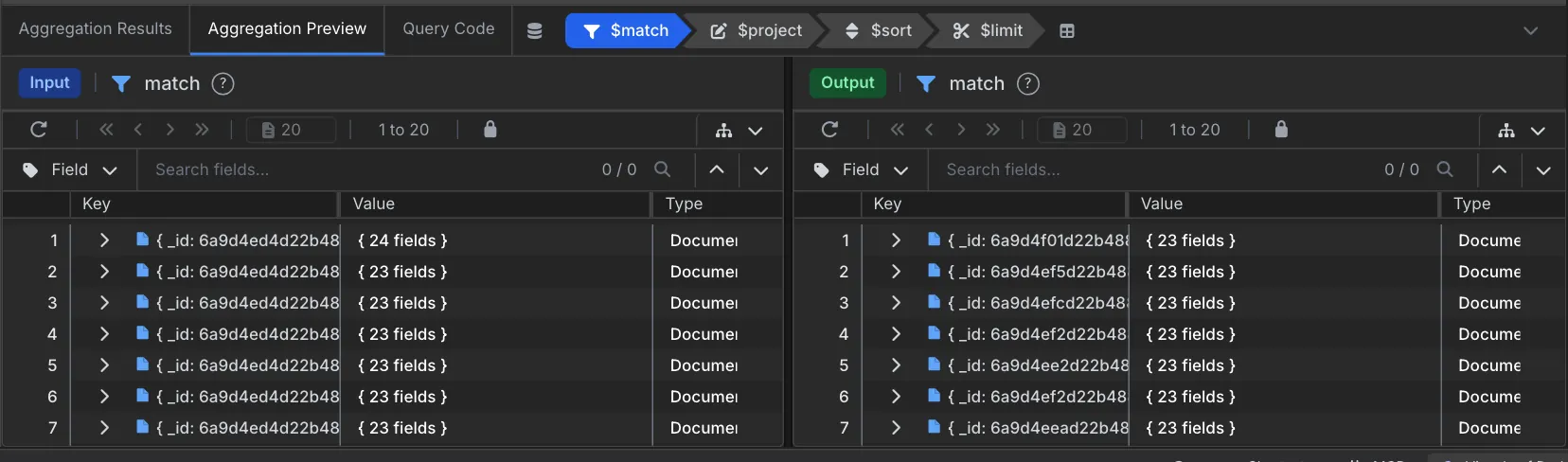
VisuaLeaf's aggregation builder lets you set up the join from dropdowns and check its output before you run the whole pipeline. Right-click the collection, choose Open Aggregation and add a $lookup stage from the Pipeline Stages palette. Then pick the collection to join, the local field, the foreign field and the name of the output array.
The Aggregation Preview tab shows each stage's input and output documents side by side. If the join comes back as an empty array, you see it on that stage straight away, which is usually the type mismatch described earlier.
Prefer SQL? In SQL Mode, a LEFT JOIN is translated into a $lookup pipeline you can inspect. And since the slow case above is a missing index on the foreign field, Manage Index on the joined collection's right-click menu is the place to add one. See the aggregation docs.
Flatten the result with $unwind
When each order has exactly one customer, the one-item array gets in the way. $unwind turns it into a plain object:
db.orders.aggregate([
  { $lookup: { from: 'customers', localField: 'customerId', foreignField: '_id', as: 'customer' } },
  { $unwind: '$customer' },
  { $project: { total: 1, 'customer.name': 1 } }
])
// { _id: 10, total: 40, customer: { name: 'Ana' } }
A plain $unwind drops documents whose array is empty, which silently turns your left join into an inner join. Order 13 above would disappear. To keep unmatched documents, use { $unwind: { path: '$customer', preserveNullAndEmptyArrays: true } }.
Join the other way: one-to-many
Start from the "one" side to collect the "many" side into an array, then compute on it:
db.customers.aggregate([
  { $lookup: { from: 'orders', localField: '_id', foreignField: 'customerId', as: 'orders' } },
  { $project: {
      name: 1,
      orderCount: { $size: '$orders' },
      spent: { $sum: '$orders.total' }
  } }
])
// { _id: 1, name: 'Ana', orderCount: 2, spent: 130 }
// { _id: 3, name: 'Cy',  orderCount: 0, spent: 0 }
If localField is an array, such as a list of tag ids, $lookup matches each element, so localField: 'tagIds' pulls in every referenced tag.
Join with extra conditions
Add a pipeline to filter, sort or reshape the joined documents. Since MongoDB 5.0 you can combine it with localField and foreignField:
db.customers.aggregate([
  { $lookup: {
      from: 'orders',
      localField: '_id',
      foreignField: 'customerId',
      pipeline: [
        { $match: { total: { $gte: 20 } } },
        { $sort: { total: -1 } },
        { $project: { _id: 0, total: 1 } }
      ],
      as: 'bigOrders'
  } }
])
For join conditions that aren't simple equality, use let to pass fields in and $expr to compare them. Inside the pipeline, $$name refers to a let variable and $field to the joined collection:
db.customers.aggregate([
  { $lookup: {
      from: 'orders',
      let: { cid: '$_id' },
      pipeline: [
        { $match: { $expr: { $and: [
          { $eq: ['$customerId', '$$cid'] },
          { $gte: ['$total', 20] }
        ] } } }
      ],
      as: 'bigOrders'
  } }
])
Why $lookup returns an empty array
| Cause | Fix |
|---|---|
| Type mismatch: one side stores an ObjectId, the other a string with the same hex | Convert first: { $addFields: { itemOid: { $toObjectId: '$itemId' } } }, then join on itemOid |
Wrong from name, such as a typo or the wrong case | from must be the exact collection name in the same database. Check with show collections |
| The collection is in another database | $lookup only joins collections in the same database |
localField and foreignField swapped | localField is on the collection you call aggregate() on |
The type mismatch is by far the most common one. '65a0…01' and ObjectId('65a0…01') look identical in many tools but never match.
Performance
For each input document, $lookup runs a query against the from collection. Make sure foreignField is indexed (_id always is), and $match as early as possible so fewer documents reach the join.
db.orders.createIndex({ customerId: 1 }) // for lookups from customers into ordersIf you join the same two collections on every read, that's a sign the data may belong in one document. See embedded vs referenced schema design.
What we found testing this
Setup: 10,000 orders joined to 2,000 customers on a plain number field, MongoDB 7.0, figures from the $lookup stage of explain("executionStats").
| customers.custNo | Collection scans | Documents examined | Keys examined | Time |
|---|---|---|---|---|
| No index | 10,001 | 20,002,000 | 0 | 4,780 ms |
Index on { custNo: 1 } | 0 | 10,000 | 10,000 | 339 ms |
- Without an index, every input document scans the whole other collection. One collection scan per order, 20 million documents read to produce 10,000 results. The cost is (input documents) × (size of the joined collection), so it explodes as either side grows. The index goes on
foreignFieldin thefromcollection, not on the collection you're aggregating. - The let/pipeline form can use the same index. Rewriting the join as
{ let: { k: '$custNo' }, pipeline: [ { $match: { $expr: { $eq: ['$custNo', '$$k'] } } } ] }still usedcustNo_1on 7.0 (411 ms). Range comparisons like$ltinside$exprare where index use gets less reliable, so checkindexesUsedin explain. $unwindright after$lookupdisappears into it. In explain, the pipeline[$lookup, $unwind]showed up as a single$lookupstage withunwinding: { preserveNullAndEmptyArrays: false }. The server streams one joined document at a time instead of building theasarray, so a lookup that matches thousands of documents can't hit the 16 MB document limit. With an$addFieldsbetween the two stages, explain showed three separate stages and no merge.
In Node.js and Python
const rows = await db.collection('orders').aggregate([
  { $lookup: { from: 'customers', localField: 'customerId', foreignField: '_id', as: 'customer' } },
  { $unwind: { path: '$customer', preserveNullAndEmptyArrays: true } }
]).toArray()
rows = list(db.orders.aggregate([
{"$lookup": {"from": "customers", "localField": "customerId", "foreignField": "_id", "as": "customer"}},
{"$unwind": {"path": "$customer", "preserveNullAndEmptyArrays": True}},
]))Frequently Asked Questions
Can MongoDB do joins?
Yes. The $lookup aggregation stage performs a left outer join between two collections in the same database.
How do I do an inner join in MongoDB?
Run $lookup, then $unwind the result without preserveNullAndEmptyArrays, or $match on the array not being empty. Documents with no match are dropped.
Can I join more than two collections?
Yes. Add one $lookup stage per collection. Each one can use fields added by earlier stages.
Can $lookup join across databases?
No. The from collection must be in the same database as the collection you run the aggregation on.
Why does my $lookup return an empty array?
Usually because one side stores an ObjectId and the other a string. Convert with $toObjectId or $toString before the lookup so both sides have the same type.