Fix "not authorized on … to execute command" in MongoDB
MongoDB logged you in but your user has no role allowing that command on that database. How to see your privileges and grant the right role.
Quick Answer
You're authenticated, but your user has no role that allows this command on this database. Ask an admin to grant one, scoped to the database you're using:
// run as an admin, in the user's authentication database
use admin
db.grantRolesToUser('app', [{ role: 'readWrite', db: 'shop' }])
If the message says Command find requires authentication instead, you aren't logged in at all. Add credentials to the connection string.
What the error means
The full message names the database and the command that was refused:
MongoServerError: not authorized on shop to execute command { insert: "orders", ... }MongoDB checks permissions per database and per action. Your user may read shop but not write to it, or have full rights on shop_dev but none on shop. Related messages mean different things:
| Message | Meaning |
|---|---|
not authorized on shop to execute command | Logged in, but no role allows this action on shop |
Command find requires authentication | Not logged in. The connection has no credentials. Older servers print it lowercase |
Insufficient permissions to list all databases | listDatabases with authorizedDatabases: false, without a cluster-wide role |
user is not allowed to do action [insert] on [shop.orders] | The Atlas wording of the first message |
Authentication failed | Wrong credentials or authSource. A different problem |
In VisuaLeaf
Check a user's effective privileges in VisuaLeaf
The error names the command that was refused, but not which role would have allowed it. VisuaLeaf's RBAC dashboard answers that without a usersInfo call:
- Right-click the connection in the sidebar and choose User & Roles Management.
- On the Users tab, search for the user. The Principal column shows it as
username@authDB, so a user defined in the wrong database stands out. - Click the eye icon and open Effective Privileges to see what the user can do across every role it holds, including inherited ones.
- On the Overview tab, click Grant Role to add the missing role, such as
readWriteon the database in the error.
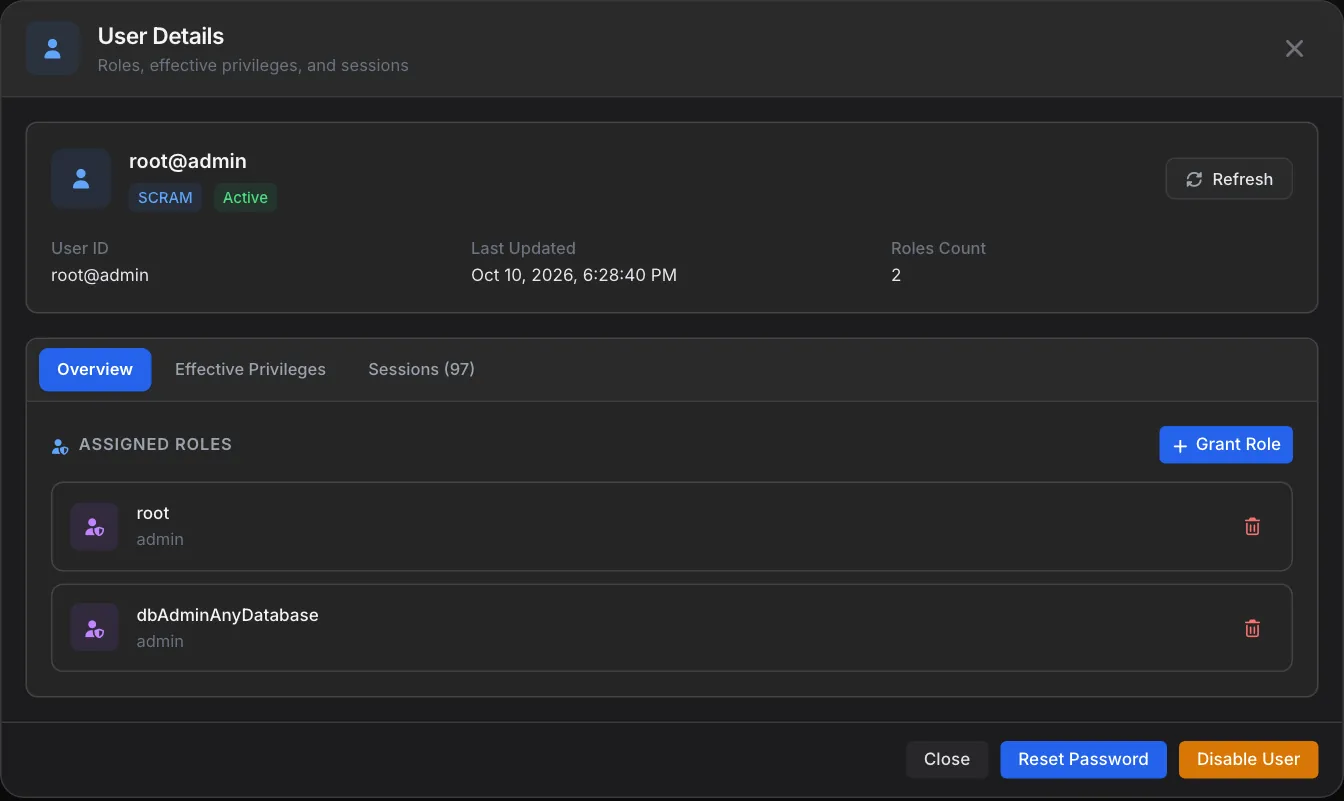
Managing users needs admin access to the admin database. Without it, the dashboard falls back to a read-only view of what your session can see. Details are in the Access Control docs.
What we found testing this
We reproduced these on MongoDB 7.0 with access control on:
- Both messages share one error code. "not authorized" and "requires authentication" are both code 13 (
Unauthorized). A failed login is code 18. Branch onerr.codein your error handling, not on the message text. - The message repeats your whole command, data included. A refused insert came back as
not authorized on shop to execute command { insert: "orders", documents: [ { b: 1, _id: ObjectId('…') } ], … }. If you log errors as-is, you're logging the documents your users sent. Logerr.codeanderr.codeNameinstead. - Grants and revokes hit open connections immediately. We kept one Node.js client open, granted
readon a second database from another session, and the very next query on the open client succeeded. After a revoke, the next query failed again. No reconnect either way. - Mongoose fails on
createbefore it gets to indexes. With a read-only user, Mongoose 8'sModel.init()threwnot authorized … { create: "orders" }even though the collection already existed. That comes fromautoCreate. With that off,autoIndexthen failed with{ createIndexes: … }for an index that didn't exist yet. Setting both tofalsefixed it, and reads worked throughout. - A role on an empty database lists nothing. A user with
readWriteon a database with no data yet got[]fromshow dbs, with no error.
Check what your user is allowed to do
Run this on the failing connection to see who you're logged in as, and your roles:
const s = db.runCommand({ connectionStatus: 1 }).authInfo
s.authenticatedUsers      // [ { user: 'app', db: 'admin' } ]   empty = not logged in
s.authenticatedUserRoles  // [ { role: 'read', db: 'shop' } ]
An admin can see a user's full effective privileges, including those inherited through other roles:
db.getSiblingDB('admin').getUser('app', { showPrivileges: true }).inheritedPrivilegesEach entry lists a resource (database and collection) and its actions. If the action from the error, such as insert, find or createIndex, isn't listed for that database, that's the gap.
Grant the right role
Pick the narrowest built-in role that covers the command:
| Role | Allows | Typical user |
|---|---|---|
read | find, aggregate, listCollections | Reporting, read replicas |
readWrite | read, plus insert, update, delete, createIndex, drop collection | Applications |
dbAdmin | Indexes, stats, validation, profiling. Not data reads | Ops tooling |
userAdmin | Create users and roles in that database | Account management |
readWriteAnyDatabase | readWrite on every database (admin only) | Migration tools |
use admin   // the database where the user was created
db.grantRolesToUser('app', [{ role: 'readWrite', db: 'shop' }])

db.getUser('app').roles
// [ { role: 'read', db: 'shop' }, { role: 'readWrite', db: 'shop' } ]
Run grantRolesToUser in the user's authentication database, the one it was created in, and put the target database in the role's db field. Run it anywhere else and it fails with Could not find user "app" for db "admin". On Atlas, edit the user under Database Access instead. Shell commands for managing users are restricted there.
Common traps
- The role is on the wrong database.
readWriteontestdoesn't covershop. Many tutorials grant ontest, which is also where a connection lands when its URI has no database name. - Admin-level commands.
listDatabases,serverStatusandcurrentOpact on the whole cluster and need cluster roles, such asclusterMonitororreadAnyDatabase, granted inadmin. - Mongoose with a read-only user. Connect with
{ autoCreate: false, autoIndex: false }, or startup fails with this error (details above).
Frequently Asked Questions
What is the difference between "not authorized" and "Authentication failed"?
Authentication failed means the login itself was rejected. Not authorized means the login worked but the user lacks a role for that command on that database.
Why does show dbs return an empty list instead of this error?
listDatabases returns only the databases you have privileges on, and a database with no data doesn't exist yet. A user whose only role is on an empty database gets an empty list.
Do I need to reconnect after granting a role?
No. In our test on MongoDB 7.0, the next command on an already-open connection used the new role, and a revoke took effect just as fast.
Which role does an application normally need?
readWrite on the application's own database. Avoid root or readWriteAnyDatabase for app users.