Fix "querySrv ENOTFOUND _mongodb._tcp" in MongoDB
Why a mongodb+srv:// URI fails with querySrv ENOTFOUND: a typo in the cluster host, a DNS server that cannot resolve SRV records, or a blocked network.
Quick Answer
The driver couldn't look up the DNS SRV record behind your mongodb+srv:// host, so it never reached MongoDB at all. First check the host name for a typo, then test the lookup directly:
nslookup -type=SRV _mongodb._tcp.cluster0.abcde.mongodb.netNo records back means the host name is wrong. Records back, but your app still fails, means your app's DNS resolver can't do SRV lookups. Switch the machine to a public DNS server such as 8.8.8.8 or 1.1.1.1, or use the standard mongodb:// connection string instead.
What the error means
| Client | What you see |
|---|---|
| Node.js driver, Mongoose, mongosh | Error: querySrv ENOTFOUND _mongodb._tcp.cluster0.abcde.mongodb.net |
| PyMongo | ConfigurationError: The DNS query name does not exist: _mongodb._tcp.cluster0.abcde.mongodb.net. |
A mongodb+srv:// URI doesn't name the servers. It names a DNS entry, and the driver asks DNS for the SRV record _mongodb._tcp.<host> to find the real hosts and ports. ENOTFOUND is Node's DNS error for "no such record". The failure happens before any network connection to MongoDB, so your credentials and IP access list aren't involved yet.
| Cause | How to tell |
|---|---|
| Typo or old host name in the URI | nslookup -type=SRV returns NXDOMAIN or no answer from every network |
| The cluster was deleted, paused or renamed | Same as above; check the cluster in Atlas |
| Your DNS resolver can't do SRV lookups | The lookup works with @8.8.8.8 but not with your default DNS |
| A VPN, proxy or firewall blocks DNS | It works on another network, such as a phone hotspot |
| Port in a +srv URI, or +srv pointing at localhost | You get a different error, shown below |
In VisuaLeaf
Paste the SRV string and test it step by step
- Open the Connection Manager, start a new connection and paste the
mongodb+srv://string into Paste Connection String. - Click Auto-Fill Form from Connection String. The Server tab is filled in from the string, including the DNS Seedlist host used for the SRV lookup, so a misspelled cluster name stands out.
- Click Test Connection and see which step stops. A failure at network connectivity points at DNS or the route to the cluster, not at your username or password.
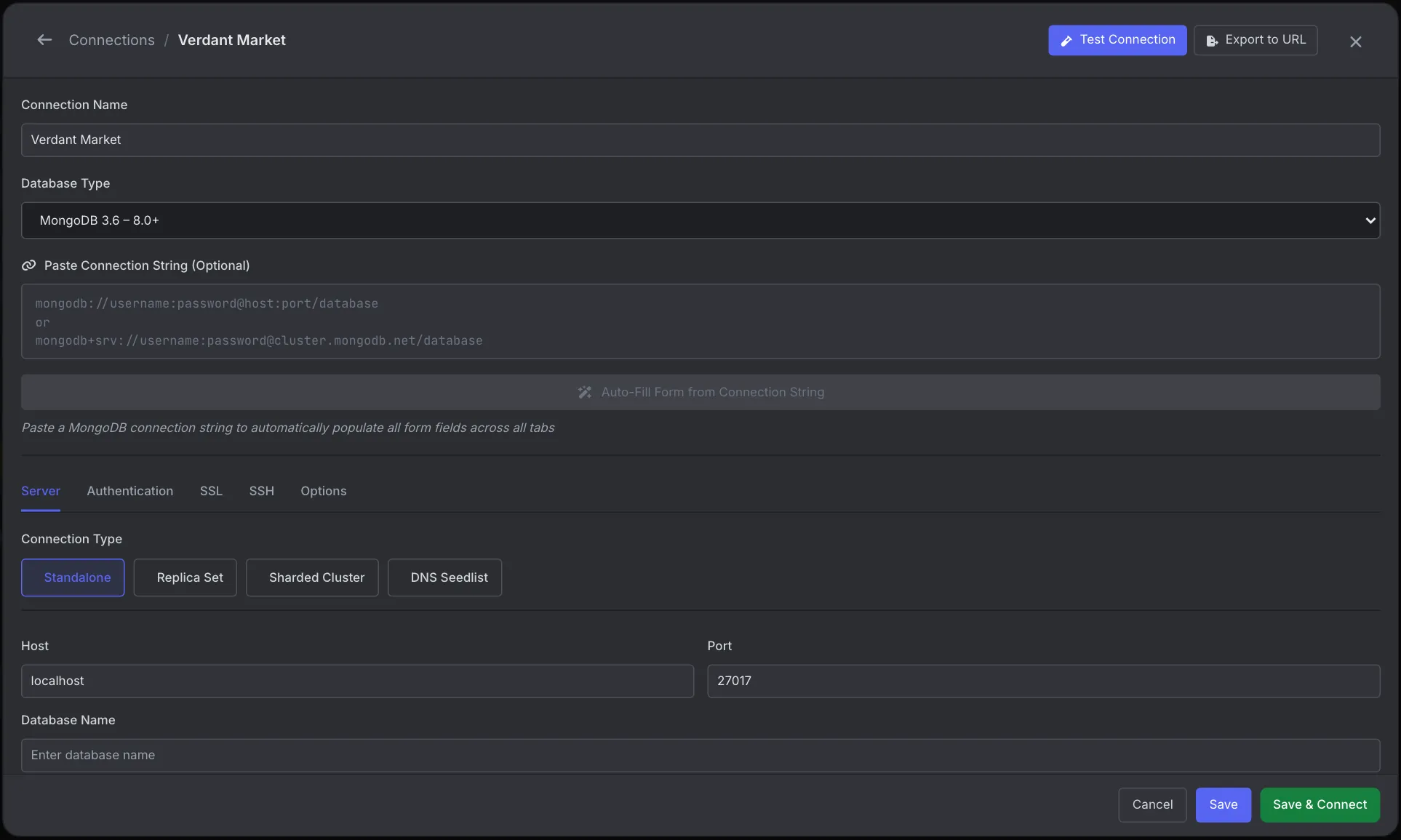
If the same string fails here and in your app, the problem is DNS on your machine or network, and the fixes below apply to both. See the Connection Manager docs.
What we found testing this
- How long it takes tells you the cause. A host name that doesn't exist failed in about 30 ms. When we pointed Node at a DNS server that wasn't there, the same connect failed with
querySrv ETIMEOUTafter 21 to 23 seconds. Fast ENOTFOUND means the name is wrong. A long wait then ETIMEOUT means the resolver is unreachable, from a VPN, firewall or broken DNS setting. dns.setServers()really does change the driver's lookup. The ETIMEOUT test above was produced that way, so the per-process fix below works with the official driver. Node'sdns.resolve*functions, which SRV lookups use, query DNS servers directly and skip the operating system's resolver (Node's documentation says so). That's why a host can open in your browser while Node can't resolve its SRV record.- A +srv string also reads a TXT record, and turns on TLS. MongoDB publishes a test record for driver authors. Pointing the Node driver at
mongodb+srv://test5.test.build.10gen.cc/producedhosts: ['localhost.test.build.10gen.cc:27017']from the SRV record,replicaSet: 'repl0'from the TXT record, andtls: true, none of which were in the string. A hand-writtenmongodb://replacement must add all three.
$ dig +short SRV _mongodb._tcp.test5.test.build.10gen.cc
10 1 27017 localhost.test.build.10gen.cc.
$ dig +short TXT test5.test.build.10gen.cc
"replicaSet=repl0&authSource=thisDB"
Check the connection string
Copy the string again from Atlas (Connect → Drivers) rather than editing an old one. Look for:
- The cluster ID part of the host,
cluster0.abcde.mongodb.net, which is unique to your cluster. A string from a tutorial or a teammate's cluster won't resolve. - Stray characters: a trailing space, smart quotes from a document, or a
<password>placeholder still in place. - A password with
@in it. An unencoded@splits the URI in the wrong place, so part of the password is treated as the host. Encode it:p@ssbecomesp%40ss.
mongodb+srv:// only works with a DNS name that has SRV records. mongodb+srv://localhost fails with querySrv ENOTFOUND _mongodb._tcp.localhost. For a local server, use mongodb://localhost:27017. Adding a port to a +srv URI fails earlier, with MongoParseError: mongodb+srv URI cannot have port number.
Test the DNS lookup yourself
Compare your default resolver with a public one:
# your default DNS
nslookup -type=SRV _mongodb._tcp.cluster0.abcde.mongodb.net

# Google's public DNS
nslookup -type=SRV _mongodb._tcp.cluster0.abcde.mongodb.net 8.8.8.8

# macOS / Linux alternative
dig +short SRV _mongodb._tcp.cluster0.abcde.mongodb.net
A healthy Atlas cluster returns one line per node, such as 0 0 27017 ac-xyz-shard-00-00.abcde.mongodb.net.. If only the 8.8.8.8 lookup works, the problem is your resolver: often a home router, a corporate DNS server or some VPN clients.
Fix 1: use a DNS server that answers SRV queries
Set the machine's DNS to 8.8.8.8 and 8.8.4.4 (Google) or 1.1.1.1 (Cloudflare) in your network settings, then retry. This is the most common fix on home and office Wi-Fi.
If you can't change system DNS, for example on a locked-down machine or inside a container, you can point just your Node process at another resolver before connecting:
import dns from 'node:dns'
dns.setServers(['8.8.8.8', '1.1.1.1'])   // before MongoClient / mongoose.connect

import { MongoClient } from 'mongodb'
const client = new MongoClient(process.env.MONGODB_URI)
await client.connect()
In Docker, pass --dns 8.8.8.8 to docker run, or set dns: in Compose.
Fix 2: use the standard mongodb:// connection string
A standard string lists every host, so no SRV lookup is needed. Build it from a lookup that works, for example on another network or with dig @8.8.8.8: hosts and ports from the SRV record, options from the TXT record, plus tls=true. It looks like this:
mongodb://user:pass@ac-xyz-shard-00-00.abcde.mongodb.net:27017,ac-xyz-shard-00-01.abcde.mongodb.net:27017,ac-xyz-shard-00-02.abcde.mongodb.net:27017/?ssl=true&replicaSet=atlas-xyz-shard-0&authSource=adminKeep ssl=true (or tls=true), replicaSet and authSource. The +srv lookup supplied those, as shown above. The trade-off: if Atlas changes the cluster's hosts, you have to update this string by hand.
Related: querySrv ECONNREFUSED and ETIMEOUT
The same lookup can fail with other codes. querySrv ETIMEOUT means no DNS server answered. In our test, even a resolver address with nothing listening produced ETIMEOUT, not ECONNREFUSED. querySrv ECONNREFUSED is reported when a resolver actively refuses the query. Both point at the resolver or network, not the host name, so Fix 1 and Fix 2 apply. Once DNS works, the next errors you might hit are server selection timed out (IP access list or firewall) and authentication failed (credentials).
Frequently Asked Questions
Is querySrv ENOTFOUND caused by my IP access list?
No. It fails at the DNS lookup, before the driver contacts MongoDB. An IP access list problem shows up later, as a server selection timeout.
Why does it work in Compass or mongosh but not in my Node app?
They may be using different resolvers, or a different copy of the connection string. Print the exact URI your app loads, and try dns.setServers(['8.8.8.8']) in the app to rule out the resolver.
Can I use mongodb+srv with a local MongoDB?
Not with localhost, because there is no SRV record for it. Use mongodb://localhost:27017 for local servers.
Does this happen with Mongoose too?
Yes. Mongoose uses the official MongoDB driver underneath, so the error and the fixes are the same.