Fix "MongoServerError: Authentication failed"
MongoDB says Authentication failed when the user, password or authSource is wrong. How to find which one, including passwords with special characters.
Quick Answer
The server rejected your user name and password in the database you authenticated against. Most often the password is right, but the user lives in a different database. Set authSource to the database where the user was created:
# user created in "admin" (the default for Atlas and Docker root users)
mongodb://app:secret@localhost:27017/shop?authSource=admin

# user created in "shop"
mongodb://app:secret@localhost:27017/shop?authSource=shop
If that's already right, check that special characters in the password are URL-encoded.
What the error means
Every client reports it the same way, error code 18, and the message never says which part was wrong:
| Client | What you see |
|---|---|
| mongosh | MongoServerError: Authentication failed. |
| Node.js driver, Mongoose | MongoServerError: Authentication failed. with code: 18, codeName: 'AuthenticationFailed', thrown by connect() |
| PyMongo | OperationFailure: Authentication failed., full error: {... 'code': 18 ...}, raised on the first operation |
| Atlas (any client) | bad auth : Authentication failed. |
| Cause | Typical situation |
|---|---|
| Wrong authSource | The user was created in shop but the connection authenticates against admin, or the other way round |
| Password has unencoded special characters | A password with @ : / ? # % in a connection string |
| Wrong password, or a placeholder | <password> left in an Atlas string, or a rotated password |
| The user doesn't exist on this server | A different cluster or environment than the one you created the user on |
| Docker init variables were ignored | MONGO_INITDB_ROOT_USERNAME set after the data volume already existed |
In VisuaLeaf
Check the auth database before you retry
Most of these failures come down to which database the user was created in. VisuaLeaf lets you check that without querying system.users:
- Connect once with an account that can manage users, right-click the connection in the sidebar and choose User & Roles Management. The Users tab shows each user's Principal as
username@authDB. - Open Edit Connection on the failing connection, go to the Authentication tab and set Auth Database to that database. It defaults to
admin. - Click Test Connection. It reports network, authentication, TLS and database access as separate steps, so you can confirm it's the login that fails and not the route to the server.
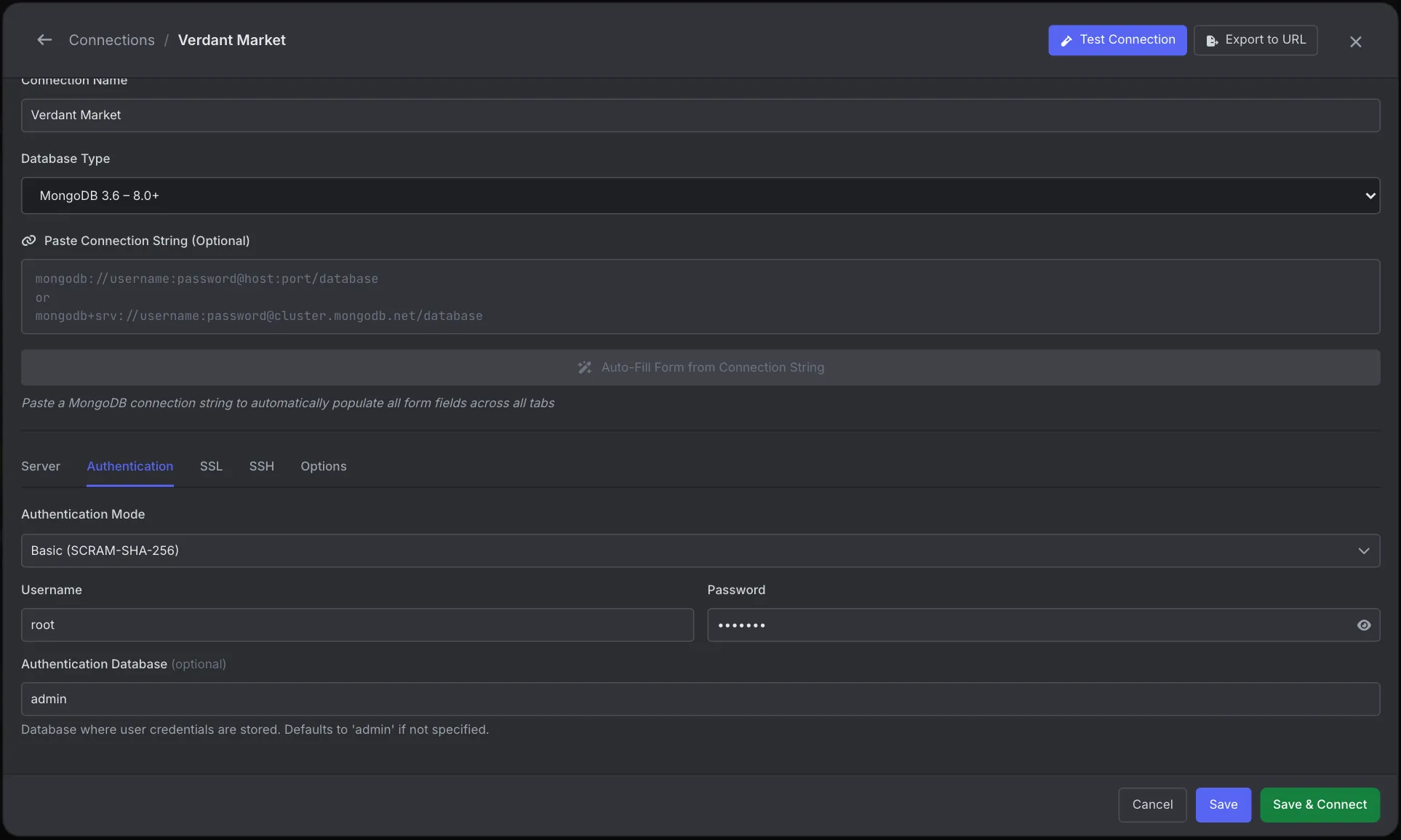
VisuaLeaf can't tell a wrong password from a wrong auth database either, because the server sends the same error for both. For that, the server log above is still the place to look. More in the Connection Manager docs.
What we found testing this
We reproduced each cause against a MongoDB 7.0 server with access control on. Three things the error message won't tell you:
- The server log names the real cause. A wrong password and a wrong authSource return the identical error to the client, but mongod logs them differently. Search the log for
Failed to authenticate:
docker logs mongo 2>&1 | grep 'Failed to authenticate'

# wrong password
... "user":"app","db":"shop" ... "error":"AuthenticationFailed: SCRAM authentication failed, storedKey mismatch"
# right password, wrong authSource
... "user":"app","db":"admin" ... "error":"UserNotFound: Could not find user "app" for db "admin""- It fails fast. Every rejected login came back in 7 to 47 ms. If your app hangs for 30 seconds before failing, credentials aren't the problem: see server selection timed out.
- The database in the URI path is the default authSource.
mongodb://app:…@host/shoplogged in a user created inshopwith no authSource at all. The same URI with no path, or with?authSource=admin, failed. - An unencoded
@never reaches the server. With the passwordp@ss:w/rd%, Node.js and mongosh failed locally withMongoRuntimeError: Unable to parse ss:w with URL, and PyMongo withInvalidURI: Bad database name "rd%@localhost:27017/shop". Once encoded asp%40ss%3Aw%2Frd%25, it connected.
Cause 1: authSource points at the wrong database
A MongoDB user belongs to the database it was created in. That database is its authentication database, separate from the databases it has roles on. When the URI has no authSource, the driver authenticates against the database in the URI path, or admin if there is none.
So a user created with use shop then db.createUser(...) fails with this error on a ?authSource=admin connection, even with the correct password. Find where the user lives (run this as an admin):
db.getSiblingDB('admin').system.users.find({}, { user: 1, db: 1, _id: 0 })
// [ { user: 'app', db: 'shop' }, { user: 'root', db: 'admin' } ]
The db field is the value authSource needs. The same setting in code:
// Node.js driver
const client = new MongoClient('mongodb://localhost:27017/shop', {
  auth: { username: 'app', password: process.env.DB_PASSWORD },
  authSource: 'shop',
})
# PyMongo
client = MongoClient("localhost", 27017,
username="app", password=os.environ["DB_PASSWORD"],
authSource="shop")Cause 2: special characters in the password
The connection string is a URL, so @, :, /, ?, #, % and brackets in a password must be percent-encoded. An unencoded @ fails to parse (exact messages above). Other characters can parse cleanly but send the wrong password, which the server reports as this error.
const password = encodeURIComponent('p@ss:w/rd')   // 'p%40ss%3Aw%2Frd'
const uri = `mongodb://app:${password}@localhost:27017/?authSource=admin`
from urllib.parse import quote_plus
uri = f"mongodb://app:{quote_plus('p@ss:w/rd')}@localhost:27017/?authSource=admin"Passing the user name and password as separate options, as in the Node and Python examples above, avoids encoding altogether.
Cause 3: the user isn't on this server
Users are per deployment. A user created on your local server doesn't exist on staging or Atlas, and on Atlas, database users are managed under Database Access, not with createUser in the shell. Confirm you're on the server you think you are, then check the user exists:
db.getSiblingDB('shop').getUser('app') // null means no such user in "shop"If it was a password typo, an admin can reset the password without dropping the user:
db.getSiblingDB('shop').changeUserPassword('app', passwordPrompt())Cause 4: Docker never created the root user
The official mongo image only reads MONGO_INITDB_ROOT_USERNAME and MONGO_INITDB_ROOT_PASSWORD the first time it starts with an empty data directory. If the volume already had data, from an earlier run without the variables or with a different password, they're silently ignored, and the credentials in your Compose file don't exist.
# destroys the data in the volume: only for local dev databases
docker compose down -v
docker compose up -d
The root user is created in admin, so connect with ?authSource=admin.
Frequently Asked Questions
How do I tell a wrong password from a wrong authSource?
The client error is identical. Check the mongod log: a wrong password logs "SCRAM authentication failed, storedKey mismatch", a wrong authSource logs "UserNotFound: Could not find user ... for db ...".
What does authSource do?
It tells the driver which database holds the user's credentials. It must match the database the user was created in, which is not necessarily the database you want to query.
My password works in Compass but fails in my app. Why?
Compass encodes the password for you when you type it in a form. In your app's connection string you must encode it yourself with encodeURIComponent, or pass it as a separate option.
Authentication succeeds but queries fail. Is that this error?
No. That is an authorization problem, "not authorized on db to execute command". The user logged in but lacks a role on that database.