How to list users in MongoDB
List MongoDB users with show users, getUsers() or usersInfo across every database, and find orphaned users left behind by dropped databases.
Quick Answer
Switch to the database the users were created in, then run show users:
use admin
show users
To list users from every database at once, run db.adminCommand({ usersInfo: { forAllDBs: true } }).
Users belong to a database
Each MongoDB user is stored with the database it was created in (its authentication database). show users only shows users of the current database, so an empty result usually means you're in the wrong one:
use shop
show users      // users created in shop

use admin
show users      // users created in admin, often the admins
Each entry shows the user's name, its database and its roles:
{
  _id: 'shop.shop_app',
  user: 'shop_app',
  db: 'shop',
  roles: [ { role: 'readWrite', db: 'shop' } ],
  mechanisms: [ 'SCRAM-SHA-1', 'SCRAM-SHA-256' ]
}
In VisuaLeaf
List users in VisuaLeaf
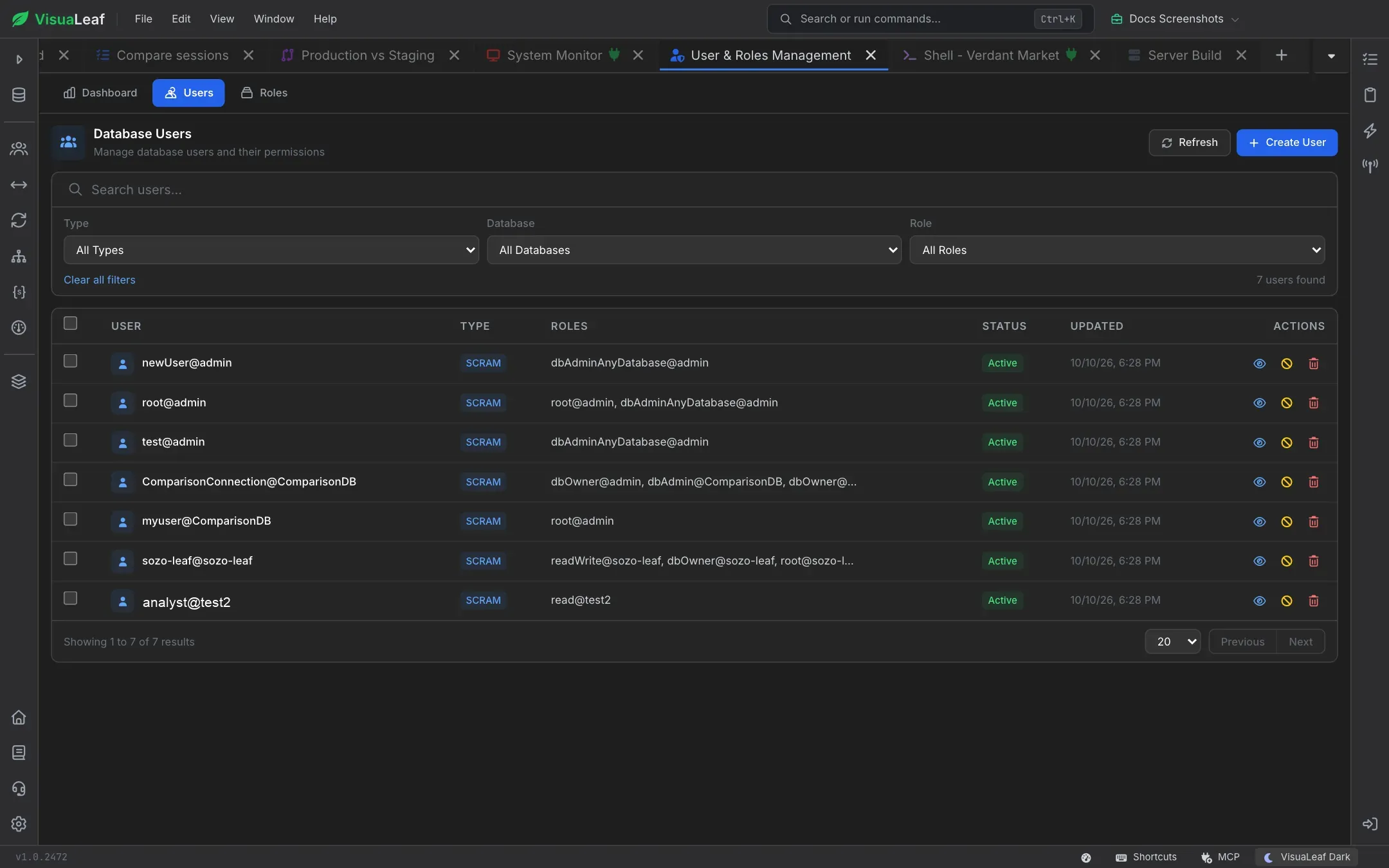
VisuaLeaf's RBAC Dashboard lists every user on the server in one table, so you don't have to loop over databases calling getUsers(). On the Users tab you can search by username, principal or authentication database, and filter by type (SCRAM, X.509 or external), by role, or by the database the user is defined in. That last filter is the one that matters here, because a MongoDB user belongs to its authentication database. Each row shows the user's roles and whether the account is active or disabled.
Open a user to see the Effective Privileges tab, which resolves every role and inherited role into the actions the user can actually perform, and the Sessions tab with its open connections. See the Access Control docs.
List users across all databases
The usersInfo command with forAllDBs returns every user on the server. Map it into something readable:
db.adminCommand({ usersInfo: { forAllDBs: true } }).users.map(u => ({
  user: u.user,
  db: u.db,
  roles: u.roles.map(r => r.role + '@' + r.db)
}))
[
{ user: 'admin', db: 'admin', roles: [ 'root@admin' ] },
{ user: 'shop_app', db: 'shop', roles: [ 'readWrite@shop' ] },
{ user: 'reporting', db: 'shop', roles: [ 'read@shop' ] }
]Running it needs the viewUser privilege on every database, which userAdminAnyDatabase and root include.
Filter, or show one user in detail
| Command | Shows |
|---|---|
db.getUser('shop_app') | One user of the current database |
db.getUsers({ filter: { 'roles.role': 'readWrite' } }) | Users of the current database that have a given role |
db.runCommand({ usersInfo: 'shop_app', showPrivileges: true }) | The user plus every privilege its roles grant, including inherited ones |
db.runCommand({ connectionStatus: 1 }) | Who you are logged in as right now |
In mongosh, db.getUsers() returns a document like { users: [...], ok: 1 }, not a plain array as the old mongo shell did. Scripts written for the old shell need .users added.
What we found testing this
1. Users outlive their database, and nothing warns you
We created a user in shop, then dropped shop. The user was still in usersInfo, could still log in, and its first insert brought the database back with the old permissions intact. To find users whose database no longer exists:
const existing = new Set(db.getMongo().getDBNames())
db.adminCommand({ usersInfo: { forAllDBs: true } }).users
  .filter(u => u.db !== 'admin' && !existing.has(u.db))
  .map(u => u.user + '@' + u.db)
// [ 'legacy_app@old_shop' ]
The same check flags users created for a database that was never written to, so review the list before you remove anything.
2. getUser() returns null for a missing user
db.getUser('nobody') doesn't throw, it returns null. A script that checks .roles on the result fails with a TypeError rather than a clear "user not found".
3. Ordinary users can't run show users
A readWrite user gets not authorized on shop to execute command { usersInfo: 1, ... }. It can still look itself up with db.runCommand({ usersInfo: 'its_name' }), which is handy for checking which roles an app connection really has.
4. The mechanisms field tells you who is SHA-256 only
Users created with defaults list [ 'SCRAM-SHA-1', 'SCRAM-SHA-256' ]. Anyone showing only [ 'SCRAM-SHA-256' ] can't be used by clients that force SHA-1. Worth checking before you connect an old tool.
From Node.js or Python
Drivers don't have a list-users helper. Run usersInfo as a command:
const { users } = await client.db('admin').command({ usersInfo: { forAllDBs: true } })
console.log(users.map(u => `${u.user}@${u.db}`)) // [ 'admin@admin', 'shop_app@shop' ]
users = client["shop"].command("usersInfo")["users"]
print([u["user"] for u in users]) # users of the shop databaseWhy the list is empty
- Wrong database. The users were created in
adminor another database. UseforAllDBsto find them. - No users exist yet. Normal on a local server without access control. See how to create a user.
- Missing privileges. Without
viewUseron a database you get a "not authorized" error, or only your own user. - MongoDB Atlas. Atlas manages database users outside the cluster. List them under Database Access in the Atlas UI or with the Atlas CLI.
Frequently Asked Questions
What is the difference between show users and db.getUsers()?
They return the same users. show users prints them in the shell; db.getUsers() returns a document you can filter or read in a script.
How do I see a user's password?
You can't. MongoDB stores only salted SCRAM hashes. Reset it with db.changeUserPassword() instead.
How do I list roles instead of users?
Run show roles, or db.getRoles({ showBuiltinRoles: true }) to include the built-in ones.
Where are users stored?
In the admin.system.users collection, whatever database they were created in. Use usersInfo or show users rather than querying it directly.