9 Best MySQL GUI Clients in 2027 for Windows, Mac, and Linux
Compare nine MySQL GUI clients with hands-on tests, pros and cons, free-edition limits, OS support, and verified annual or perpetual pricing.


Most MySQL GUIs can run a query and show you a table. The differences appear when you need more than that: joining tables without writing SQL, understanding why a query is slow, or checking what changed between two copies of your data.
I tested nine clients on the same fictional running-store database and ran the same tasks in each. That way, the comparison shows how each tool behaves in practice, not just what its feature page promises.
What I checked in each client:
- Can you browse and edit data without writing SQL?
- Is there a visual query builder, and does it show the SQL it generates?
- Does it draw an ER diagram from your foreign keys, and can you edit it?
- Can it explain a slow query with a readable execution plan or profiler?
- Can it compare data or schemas between two databases?
- Which features are free, and which need a paid edition?
- Does it run natively on Windows, macOS, and Linux?
Tested on Windows 11 with MySQL 8.4.11. Prices checked on November 24, 2026.
Quick comparison
| Tool | Best for | Edition tested | Operating systems | Free option | Annual or perpetual price |
|---|---|---|---|---|---|
| 1. VisuaLeaf | Best overall visual workspace | Professional | Windows, macOS, Linux | Community edition | Basic $79 perpetual; Professional $149 perpetual, with one year of updates |
| 2. dbForge Studio for MySQL | MySQL development and administration on Windows | Enterprise | Windows natively; macOS/Linux through CrossOver or Wine | Express edition | Standard $119.95/year; Professional $209.95/year; Enterprise $269.95/year |
| 3. DbSchema | Modeling and test data | Pro | Windows, macOS, Linux | Community edition | Pro $294 perpetual; Architect $470.40 perpetual |
| 4. phpMyAdmin | Managing MySQL in the browser | Single edition | Browser; PHP/web-server or container deployment | Entire application | $0 license fee |
| 5. DBeaver | One client for many databases | Ultimate 26.2.0 | Windows, macOS, Linux | Community edition | Lite $113/year; Enterprise $255/year; Ultimate $510/year |
| 6. Navicat for MySQL | Data profiling | Navicat 18 for MySQL | Windows, macOS, Linux | Separate Navicat Premium Lite product, with restrictions | $279.99/year; or $559 perpetual |
| 7. DbGate | Visual queries plus charts | Premium | Windows, macOS, Linux; self-hosted web options | Community edition | Premium $120/year; $150/year Team Premium |
| 8. SQLyog | Windows admin and backups | Commercial trial | Windows natively | Community edition | Commercial SQLyog $299 perpetual, including first-year maintenance |
| 9. HeidiSQL | Free lightweight client | Single edition | Windows, Linux, macOS (Apple Silicon) | Entire application | $0 license fee |
Prices are in USD for one user, before applicable taxes unless the storefront specifies otherwise. Only annual subscriptions and perpetual purchases are shown.
How I tested the clients
The starting database, mysql_store_demo, contained ten tables and an order-summary view. It included customers, products, orders, payments, shipments, and reviews, with foreign keys and JSON product specifications. The original dataset had 600 orders, 1,800 order items, and 30 products.
I inspected the schema in each client, ran queries, and tested additional features appropriate to the tool. Where a visual query builder was available, I used the same orders–order items–products example. Other tasks included inspecting execution plans, browsing linked records, generating fictional customers, profiling column data, charting query results, adding an index, and creating a backup.
These were usability and feature tests on a small database. Query timings are not a performance ranking: indexes and test tables changed during the work, and a GUI's execution-plan costs are not elapsed milliseconds. The operating systems above are the vendors' supported platforms; my hands-on tests were on Windows.
1. VisuaLeaf
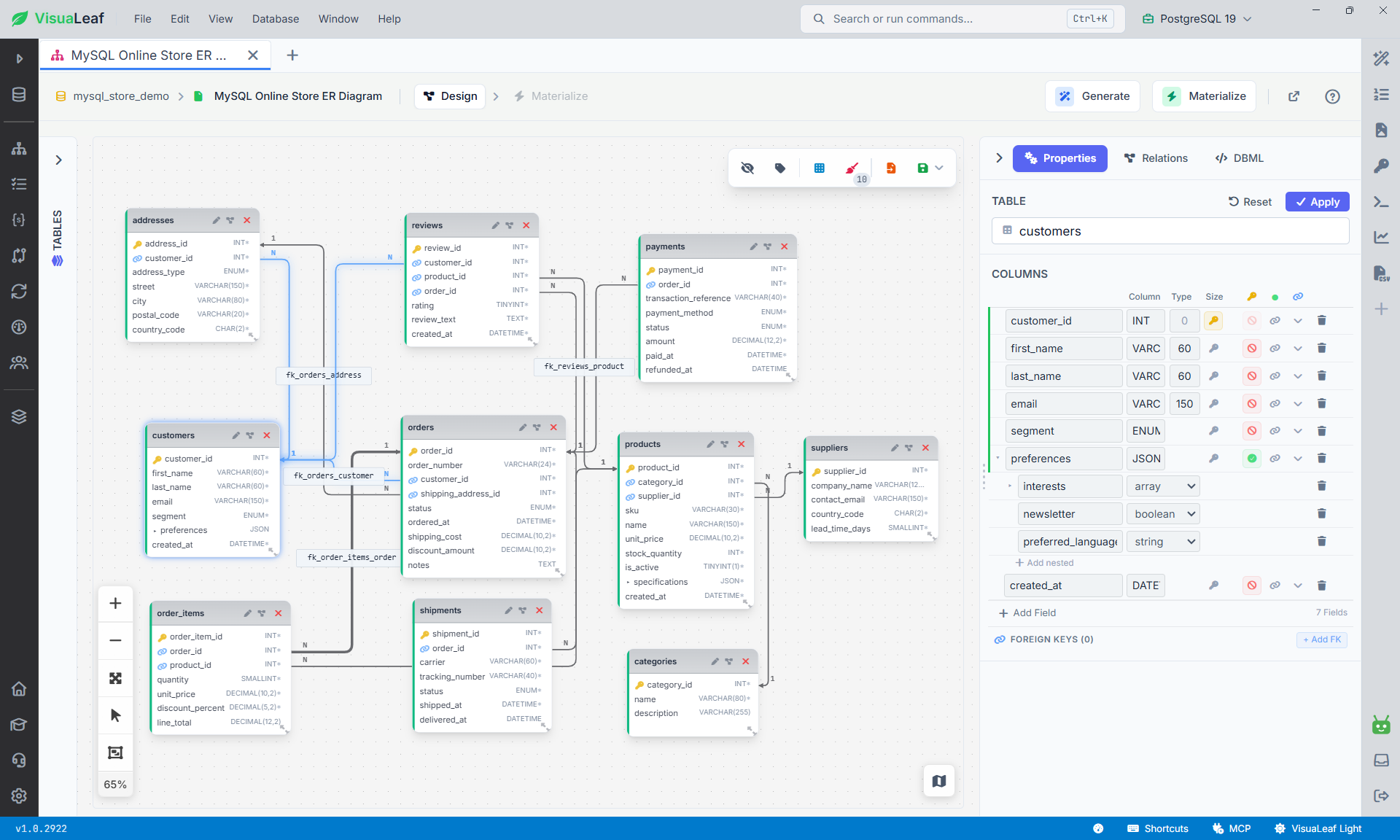
I tested VisuaLeaf Professional edition. It keeps schema, data, and query tools in one application, for SQL databases and MongoDB alike.
Feature highlights
- Schema diagrams: draw one from scratch or reverse-engineer a live database
- SQL editor: inline editing, plus a visual query builder that shows the generated SQL as you build
- Index manager: create, change, and drop indexes
- Query profiler: spot and diagnose slow statements (Basic and up)
- Data compare and sync: row-level differences across SQL and MongoDB databases (Professional)
- Data masking: hide sensitive fields in exports (Basic and up)
- Task automation: import, export, and migration jobs, including scheduled transfers
- Charts and dashboards: built straight from query results (Professional)
- AI help: AI Assistant in Basic, MCP support in Professional
- Documentation: interactive HTML5, PDF, JSON, or DDL (Professional)
In the Visual Query Builder, I joined orders, order_items, and products, selected the order number, quantity, line total, and product name, and filtered for delivered orders. Seeing the joins, filter, and results together made the query easy to follow. The Query Profiler complemented this with statement activity, execution counts, timings, and the execution plan; useful for investigating which queries deserve a closer look.
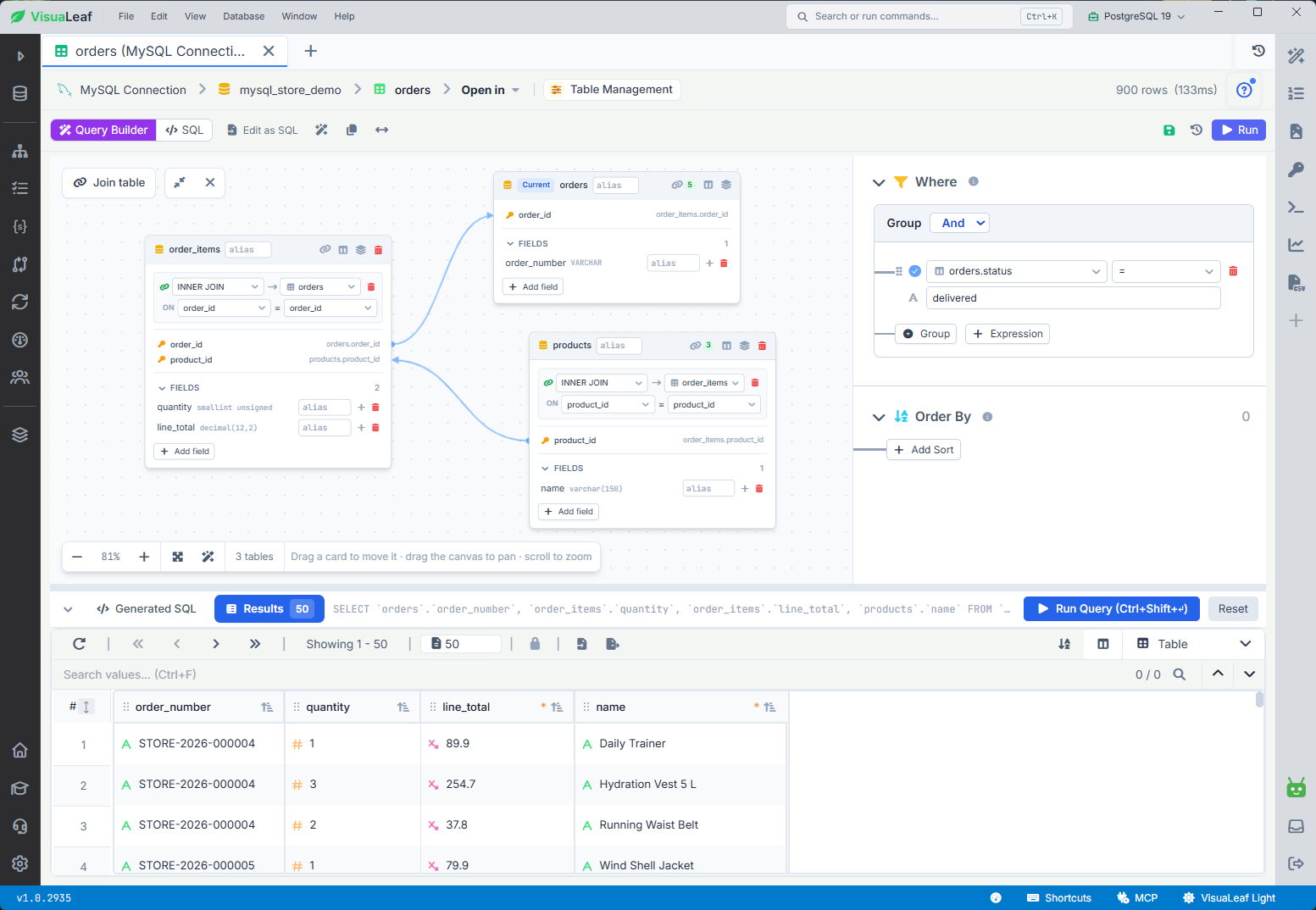
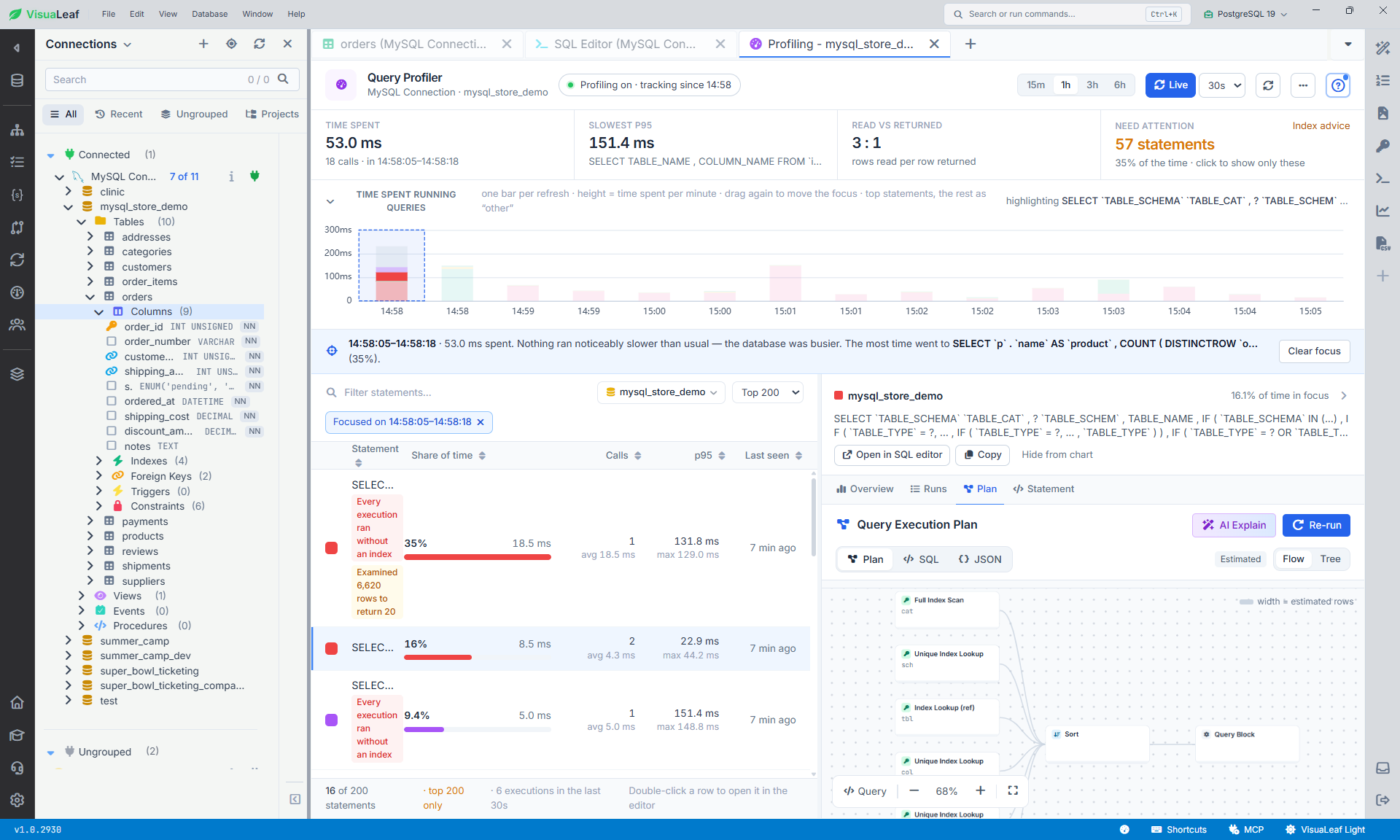
VisuaLeaf’s Visual Query Builder and Query Profiler showing table joins, filtered results, statement activity, and an execution plan.
Pros
- The visual query builder shows the generated SQL as you build.
- Profiling and comparison sit alongside the everyday editing tools.
- Useful when MySQL is part of a wider SQL and MongoDB workflow.
Cons
- Query Profiler requires a paid plan.
- Newer on the market than the other tools here, so there are fewer community guides and forum answers. Still, it's a strong choice.
My personal note: There are a lot of features, so it can take a while to find your way around at first. The built-in tutorials inside the app helped me get up to speed quickly.
Price: Community is free. Basic is $79, and Professional is $149 as perpetual purchases with one year of updates. A 14-day Professional trial is available. Compare editions.
2. dbForge Studio for MySQL
I tested dbForge Studio for MySQL Enterprise. It's the most MySQL-focused tool on this list, covering development and administration in one studio. Check the edition matrix, because features are spread across several plans.
Feature highlights
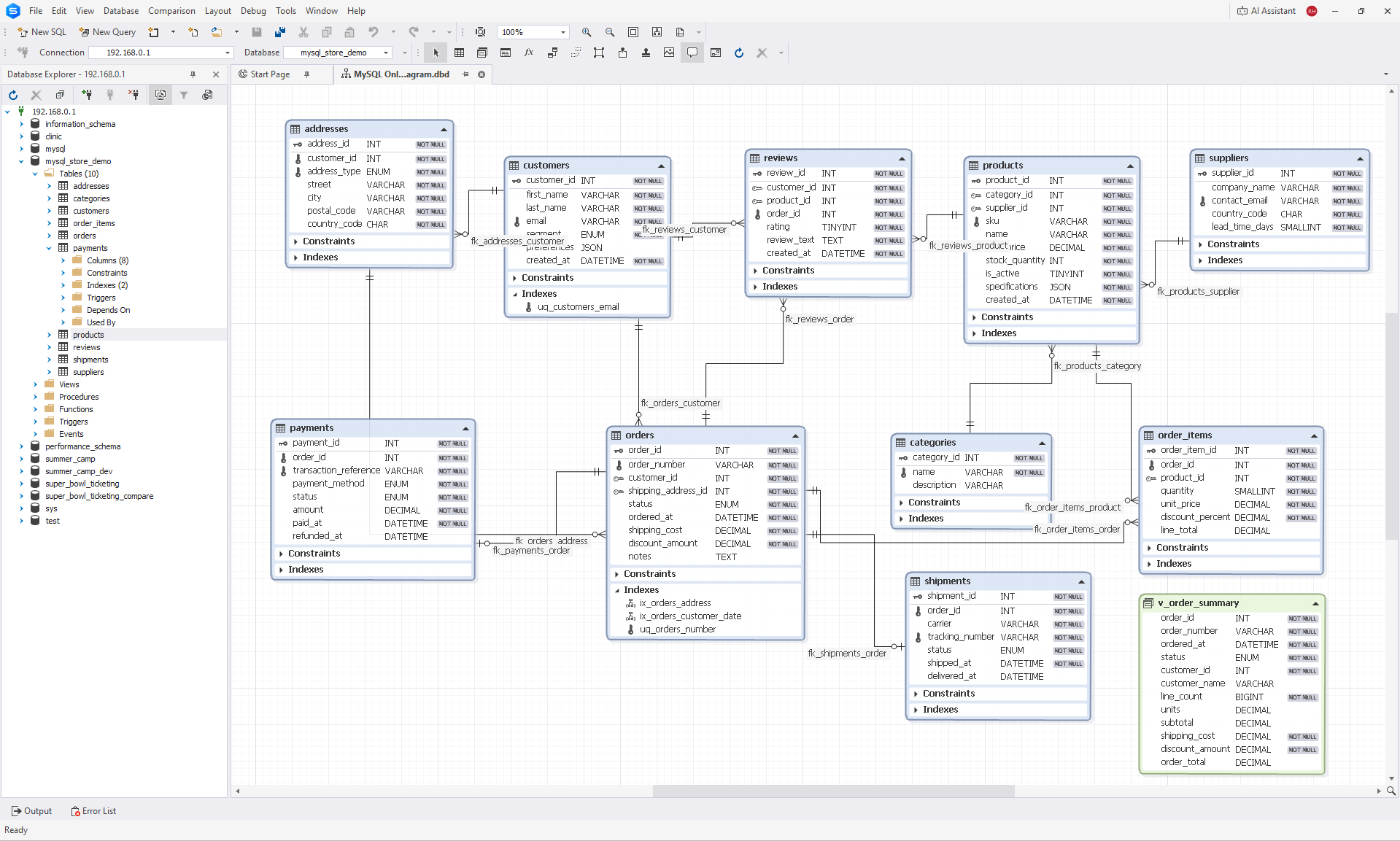
- Database Designer: design and edit the schema on an ER diagram
- Query Builder: build queries visually, with the SQL generated for you (Standard and up)
- Query Profiler: execution-plan diagrams and query statistics (Standard and up)
- Master-Detail Browser: see parent and child records side by side (Standard and up)
- Debugger: step through stored procedures, functions, and triggers
- Schema and data compare: find differences and generate sync scripts (Professional and up)
- Backup and restore: with command-line automation in higher editions
- Data Generator and Documenter: realistic test data and schema documentation (Enterprise)
- Source control: version your database objects (Enterprise)
The Query Profiler displayed the query's access paths, joins, sorting, and estimated costs as a diagram. I also used the Master-Detail Browser: after connecting orders and order_items, selecting order 8 showed its three matching items underneath, without writing a join.
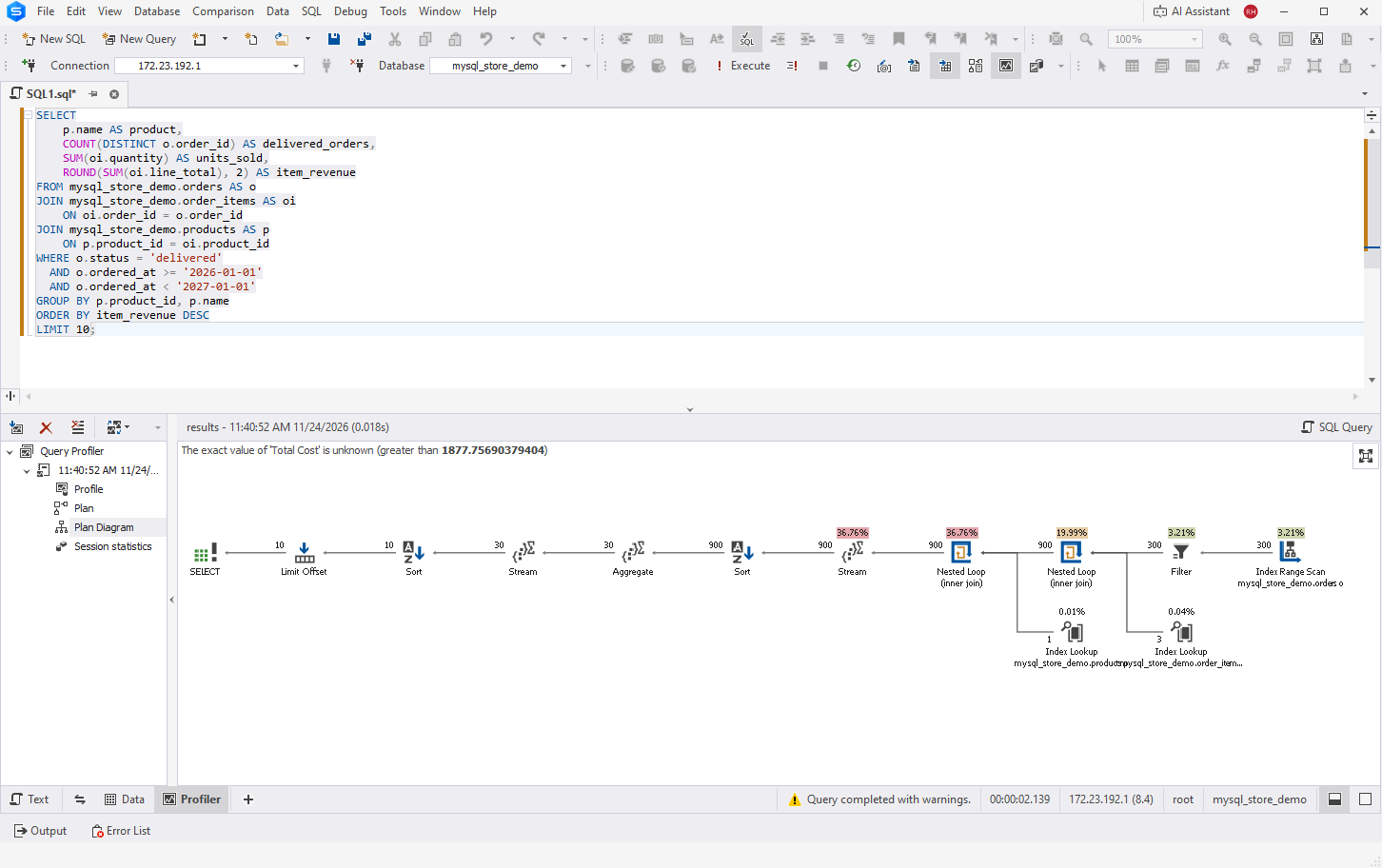
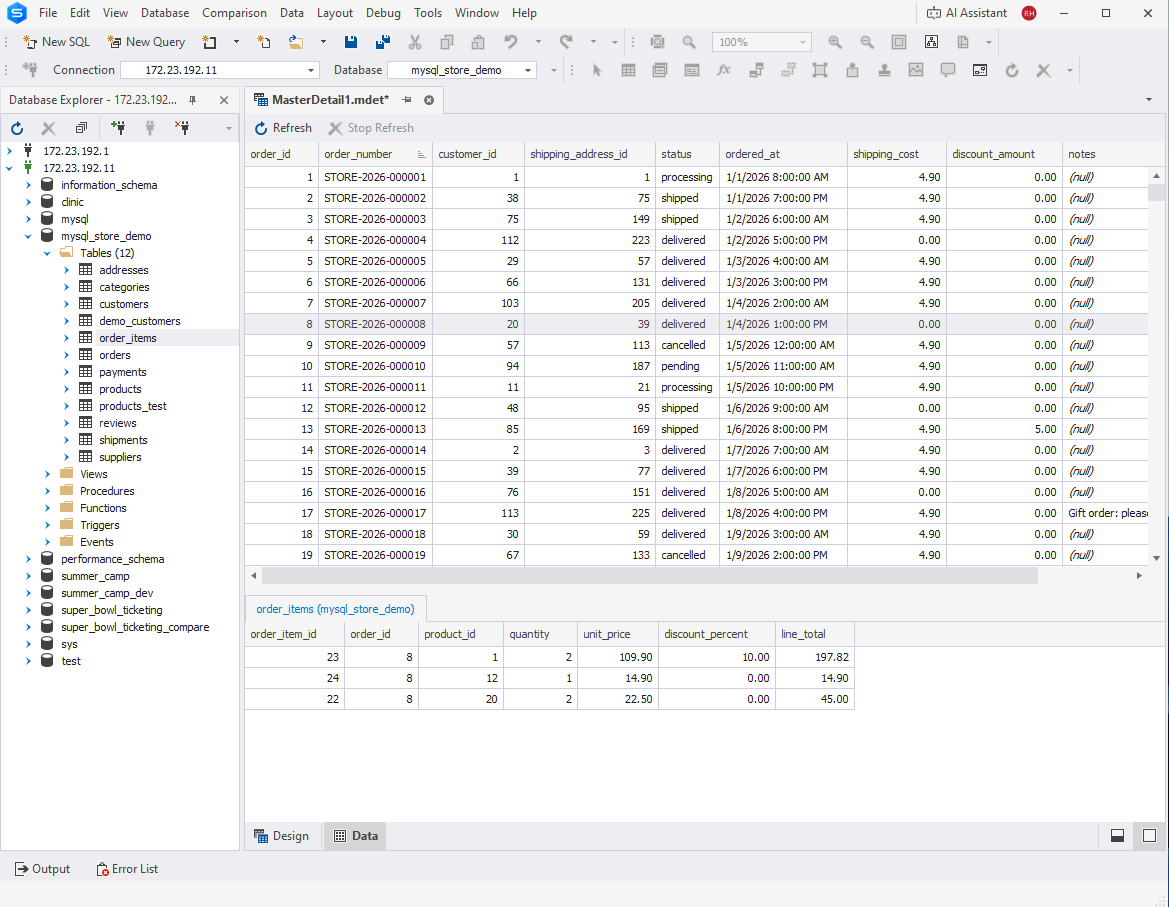
dbForge Studio visualizing a query's execution plan and displaying order 8 with its three related order items.
Pros
- Broad MySQL development and administration coverage.
- Clear execution-plan visualization and practical linked-record browsing.
- Database Designer for visual schema work alongside the admin tools.
Cons
- Native Windows application; macOS and Linux require a compatibility layer.
- Comparison, reporting, and other advanced functions require a higher edition.
My personal note: On macOS or Linux it needs CrossOver or Wine, which is extra setup I'd rather avoid.
Price: Express is free. Advertised annual prices are $99.95 for Standard, $179.95 for Professional, and $229.95 for Enterprise. Both features shown here are in Standard or higher. Pricing · macOS/Linux installation.
3. DbSchema
I tested DbSchema Pro, which puts the diagram and design model at the center of the workflow.
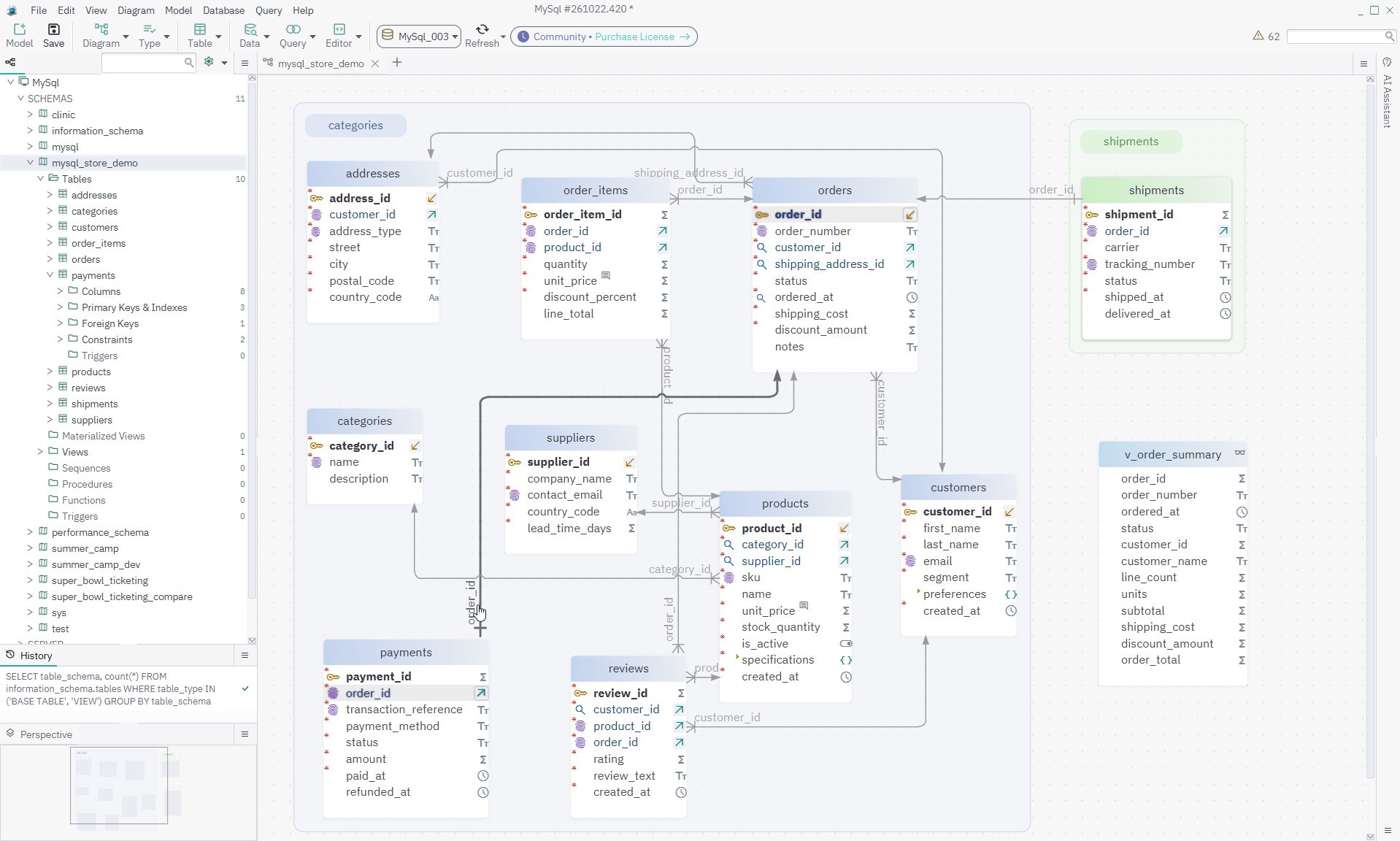
Feature highlights
- Diagram-first design: reverse-engineer a database, then edit and save the model offline
- Schema sync: compare the model with the live database and generate the migration SQL
- Visual query builder: joins and filters on a diagram, next to the results
- Relational data browser: follow foreign keys from one table's rows to the next
- Data generator: patterned test data that can reuse existing parent keys
- Documentation: HTML, PDF, or Markdown
- AI Assistant: optional paid add-on
I used the visual builder to connect orders, order items, and products, then filtered for delivered orders. The joined tables, generated SQL, and returned rows were visible together.
The Data Generator was the strongest practical example. I created a separate demo_customers table and generated 100 rows. The configuration showed first-name and last-name patterns, an email pattern, a date generator, and a skipped auto-increment ID. The result reported "Succeed 100."
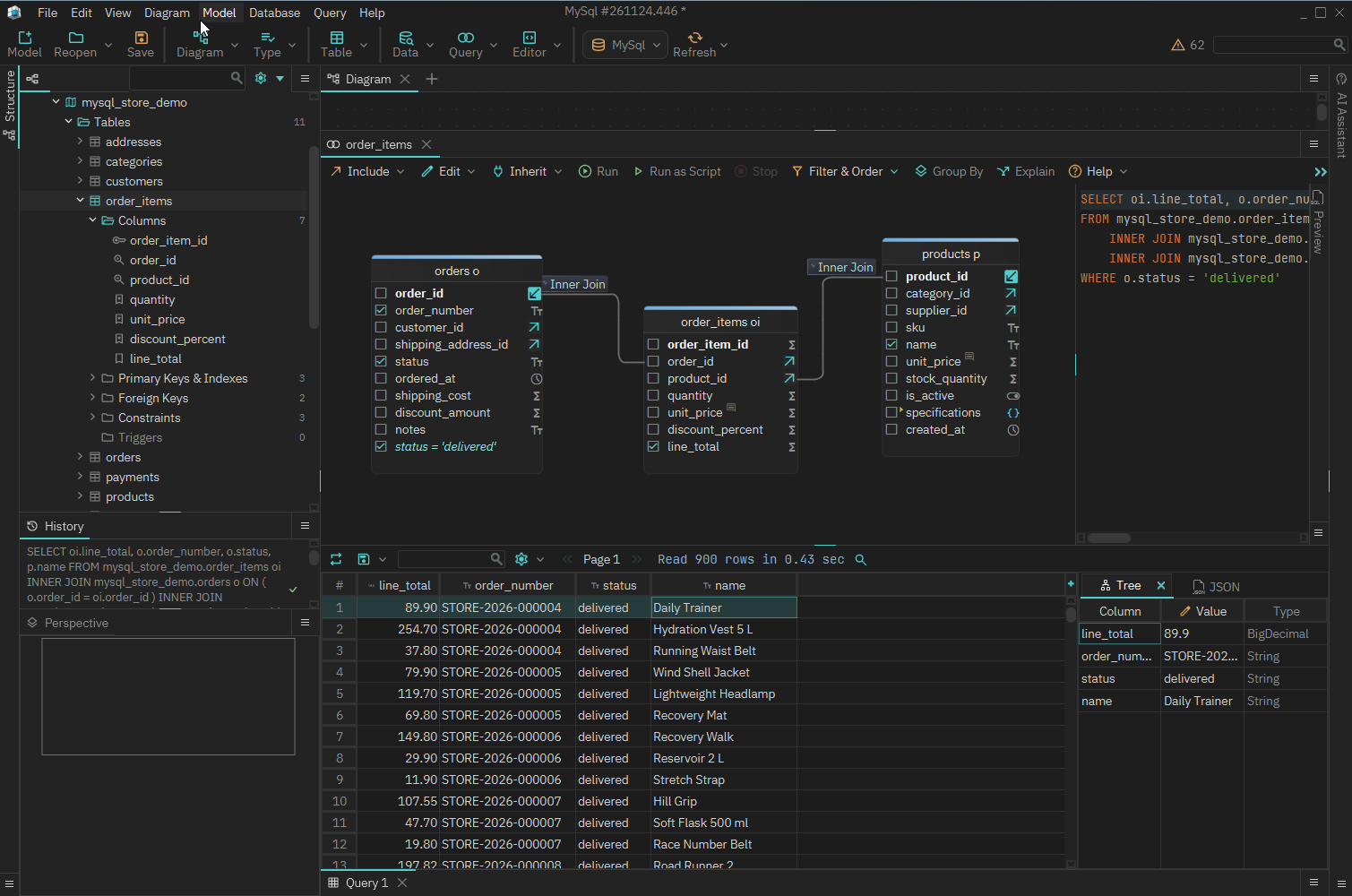
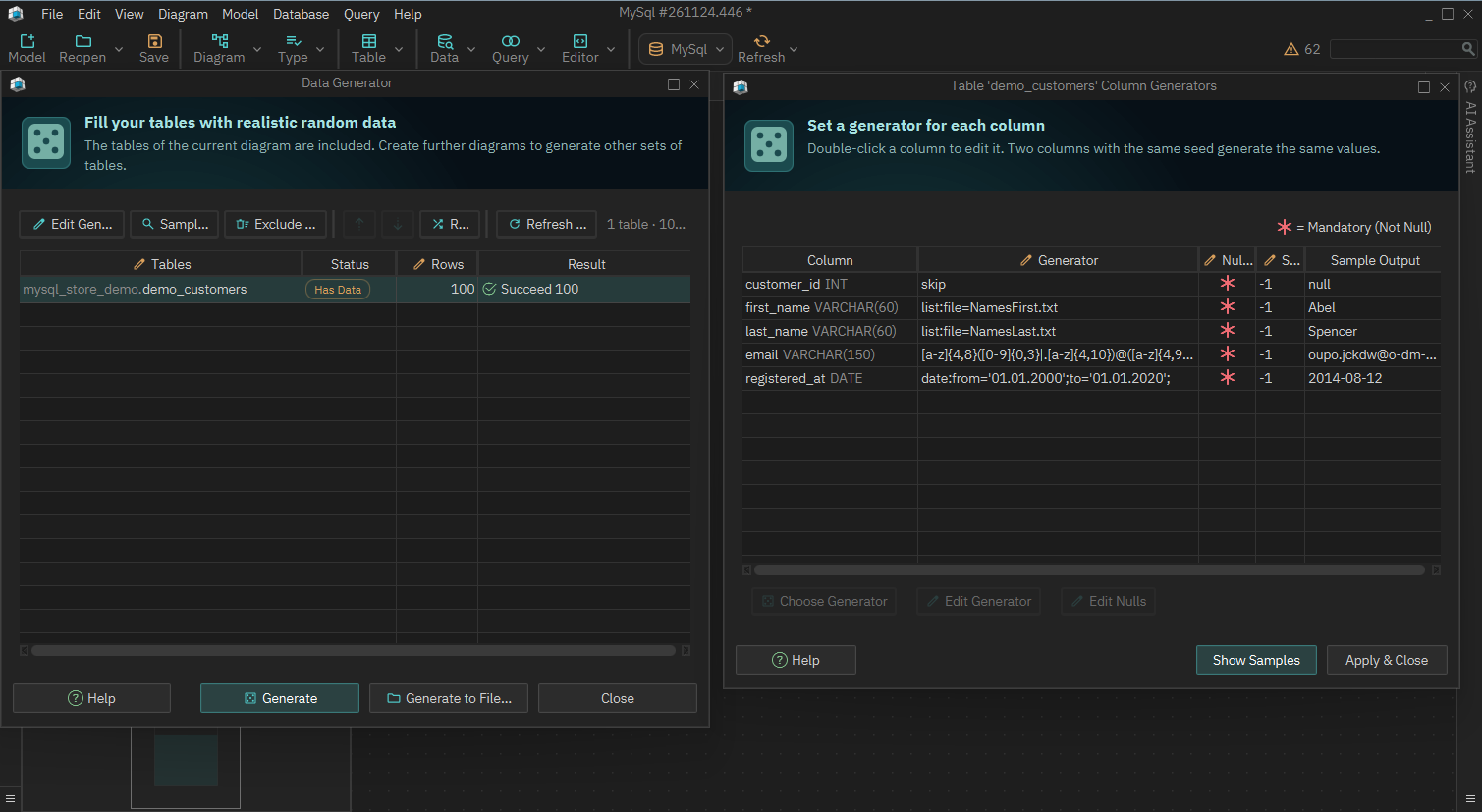
DbSchema's visual query builder alongside a successful generation of 100 demo customers with configurable column patterns.
Pros
- Strong emphasis on diagrams and the database model.
- Configurable test-data patterns with sample output.
- A perpetual Pro license is available.
Cons
- Saving model files, the visual query builder, the relational data browser, and the generator all require Pro.
- The diagram is part of almost every screen, which can feel crowded when you just want to write SQL.
My personal note: DbSchema is one of the most complete design tools I've used, and the diagram-first approach really pays off when you're modeling. What annoys me a little is that the diagram follows you everywhere, even in the query builder and SQL editor, when sometimes I just want a clean editor.
Price: Community is free. Pro is $294 perpetual and includes one year of upgrades; later updates are optional at $75/year. Pricing and license terms.
4. phpMyAdmin
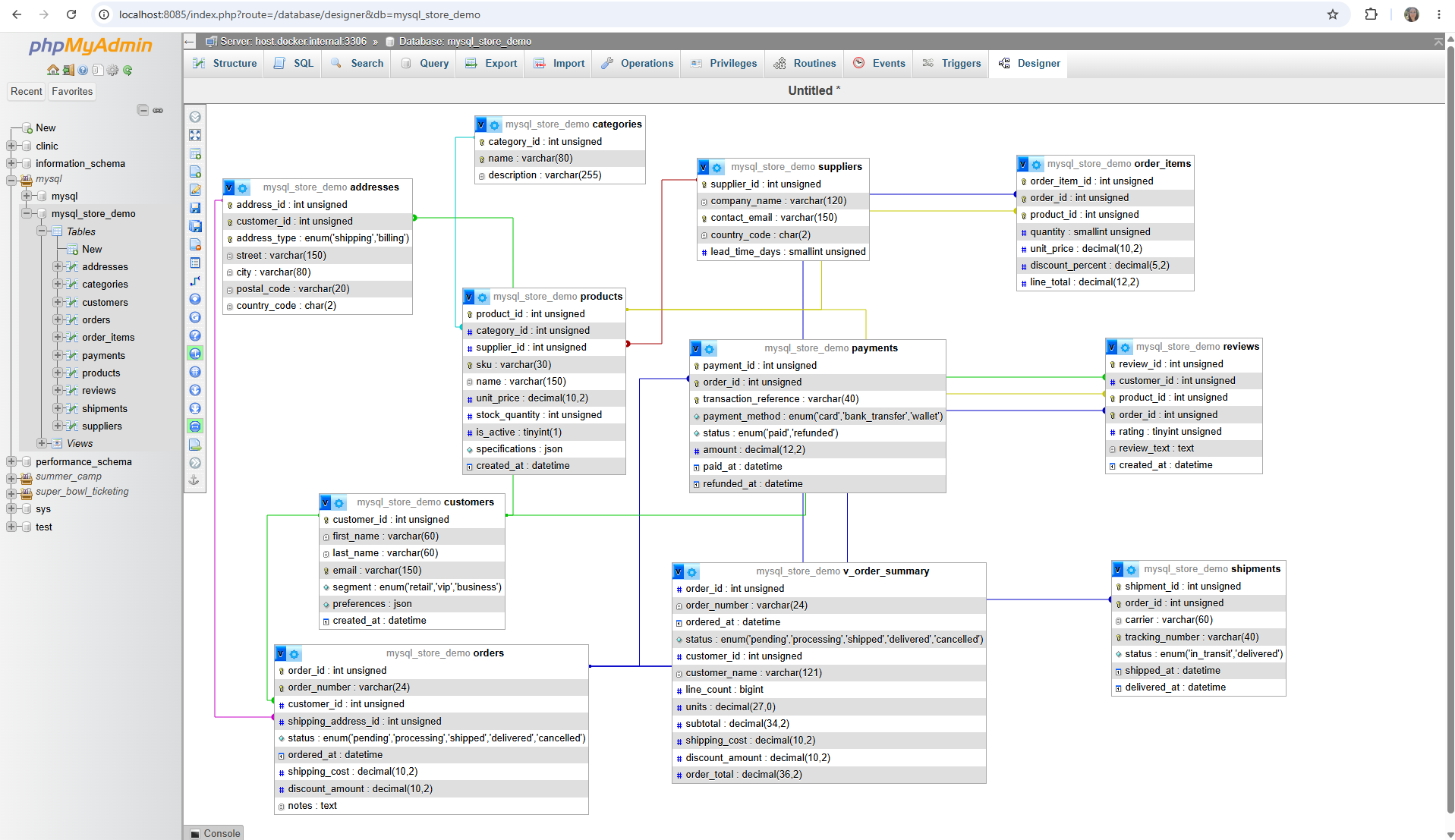
phpMyAdmin is a web application for MySQL and MariaDB administration, free under the GNU GPL with a single edition. Project overview · License.
Feature highlights
- Browser access: nothing to install on the desktop
- Designer: a graphical view of tables and relationships
- Structure editor: tables, columns, and indexes through forms
- User management: accounts and privileges
- Import and export: SQL, CSV, and other formats
- SQL tab: run queries directly against the server
I used a Docker deployment. After connecting, I ran the delivered-product revenue query and created a composite index on orders(status, ordered_at) through the Structure interface.
The Designer availability and saved layouts depend on the installation's configuration.
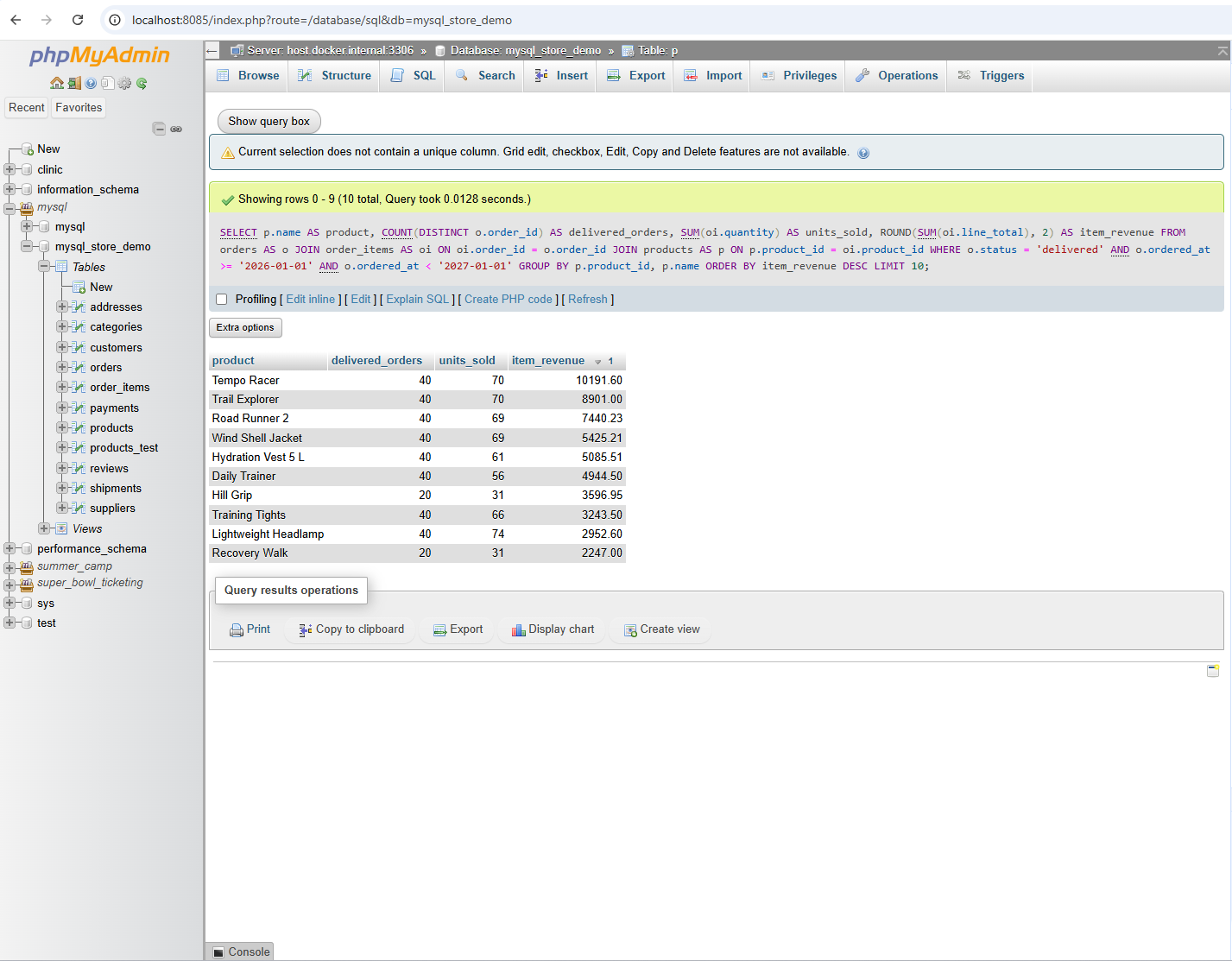
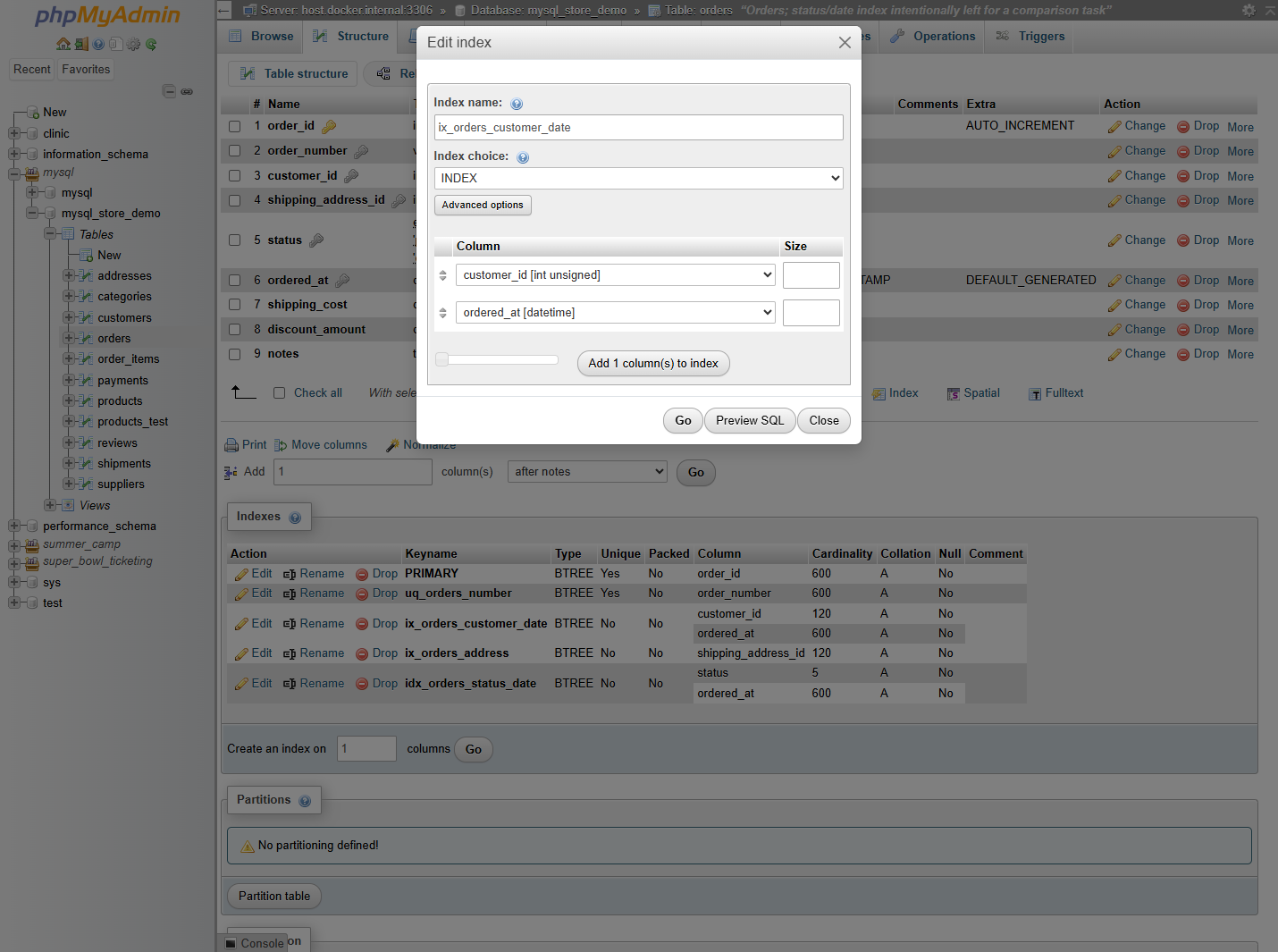
phpMyAdmin running a product-revenue query and showing the composite status-and-date index created on the orders table.
Pros
- Entirely free, with no paid feature tier to unlock.
- Browser access suits shared or hosted environments.
- Useful table, index, import/export, and user-management controls.
Cons
- Requires a running PHP/web-server stack or container deployment.
- Feels more like an administration console than a desktop development workspace.
- Designer may need additional configuration.
My personal note: It works, but it looks and feels like an admin panel from years ago.
Price: $0 for the software. Hosting or infrastructure costs, if any, are separate.
5. DBeaver
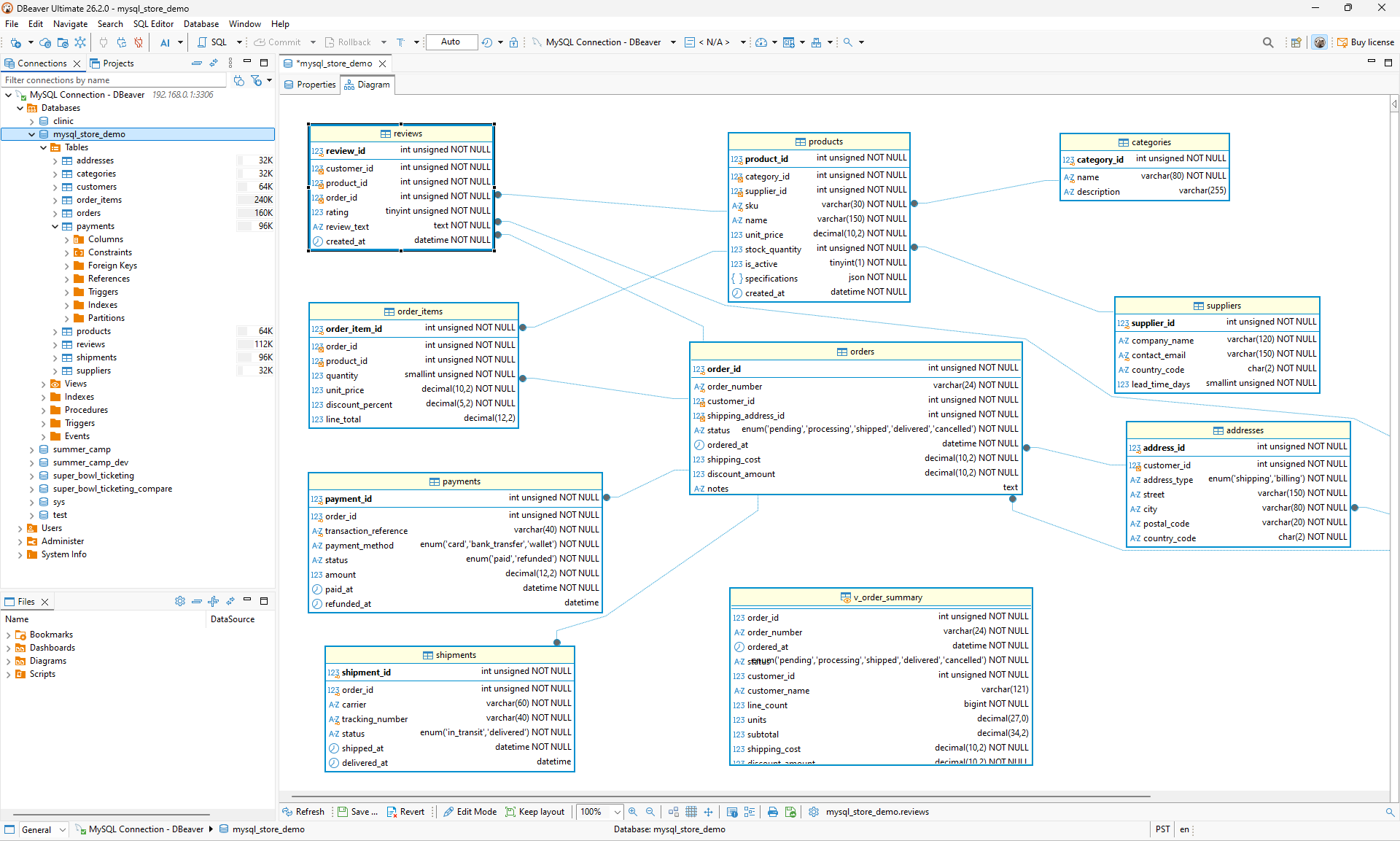
I tested DBeaver Ultimate 26.2.0. Its wider appeal is database coverage: MySQL alongside PostgreSQL and many other JDBC-based systems.
Feature highlights
- SQL editor: one editor for MySQL and dozens of other databases
- ER diagrams: view tables and relationships
- Visual query builder: build joins without writing SQL (Lite and up)
- Graphical execution plans: read plans as a diagram (Lite and up)
- JSON and XML viewer: format nested values beside the result grid
- Schema and data compare: spot differences between databases (Enterprise, Ultimate)
- Task scheduler: automate recurring jobs (Enterprise, Ultimate)
- Data transfer: import, export, and move data between databases
The JSON value viewer was useful with the store's products.specifications column. I opened the Value panel and formatted the selected product's specification, keeping the product rows visible beside it.
I also generated an execution plan for the delivered-product revenue query. The graphical view displayed sorting, grouping, nested loops, and table-access methods.
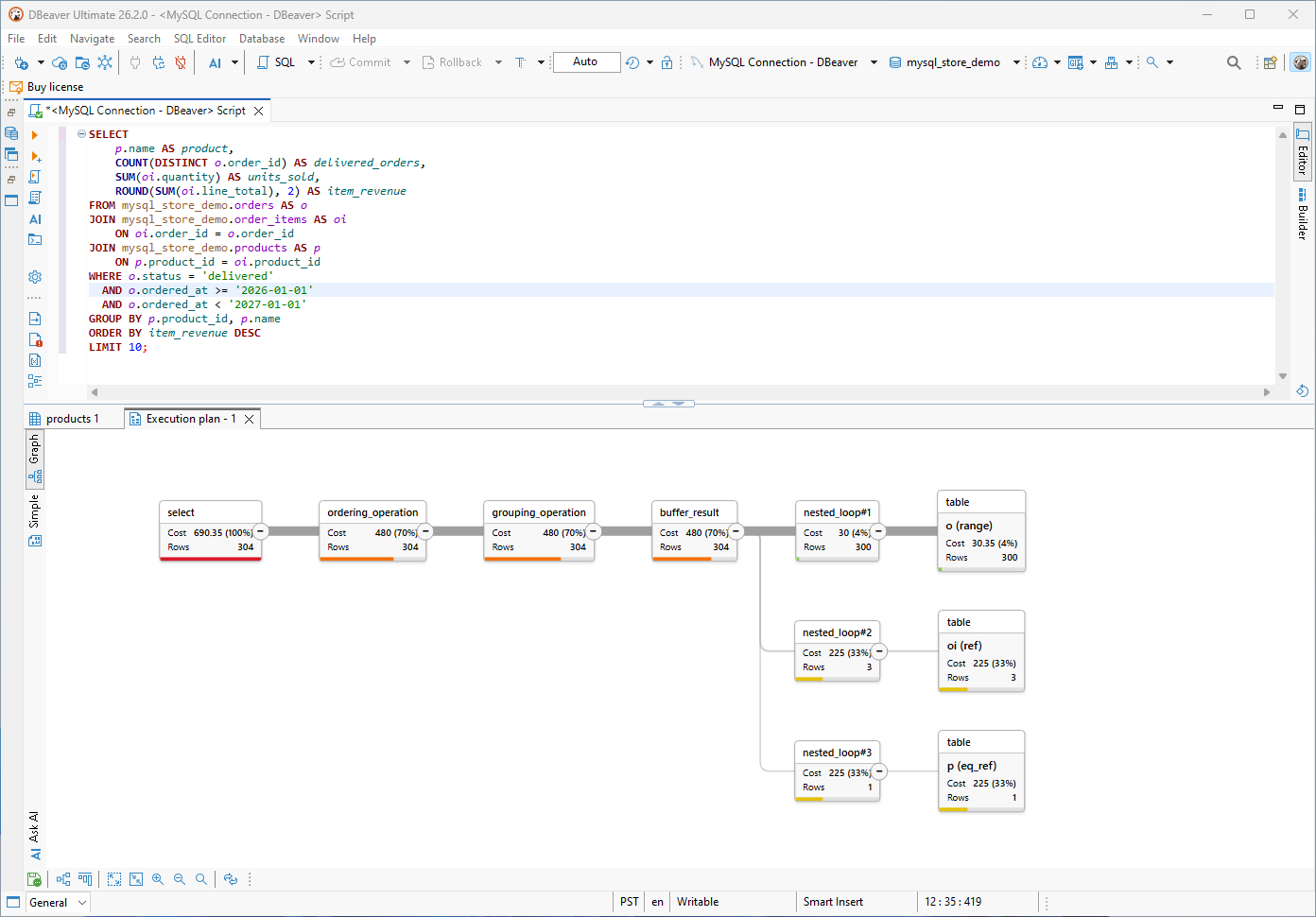
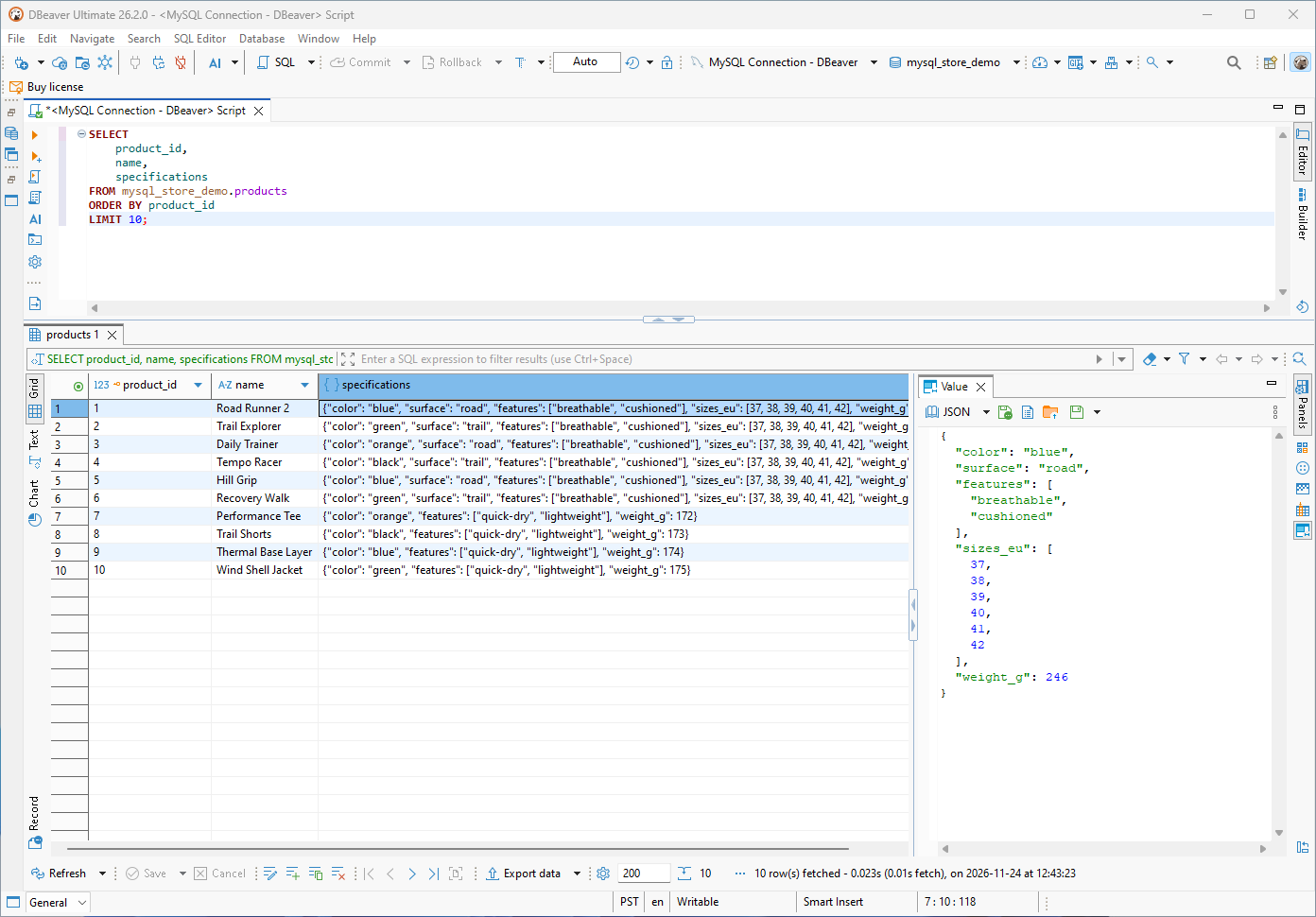
DBeaver inspecting JSON product specifications and visualizing the revenue query's execution plan in Ultimate.
Pros
- Graphical execution plans that make MySQL plans easy to read.
- Useful JSON cell inspection and formatting.
- Convenient for working across several database engines.
Cons
- The number of panels and settings takes time to learn.
- Visual query building, graphical plans, and advanced development tools are in paid editions.
My personal note: Too many panels and settings; finding the right option took longer than it should.
Price: Community is free. Annual plans are Lite $113, Enterprise $255, and Ultimate $510. Compare editions.
6. Navicat for MySQL
I tested Navicat 18 for MySQL, which pairs a polished editor with data-quality and modeling tools. Product overview.
Feature highlights
- Data Profiling: statistics and value distributions for any column
- Query Builder: visual joins and filters, with the SQL shown alongside
- ER Diagram View: an automatic diagram of the database (Standard, Enterprise)
- Data modeling: reverse-engineer into a model workspace (Enterprise)
- Data transfer and sync: move and synchronize data between databases
- Backup and automation: scheduled backups and batch jobs
- BI tools: charts and dashboards (Enterprise)
Data Profiling was the most interesting part of this test. Profiling all 600 orders and selecting status showed five distinct statuses, null/non-null statistics, and a value-distribution chart, without writing an aggregation query.
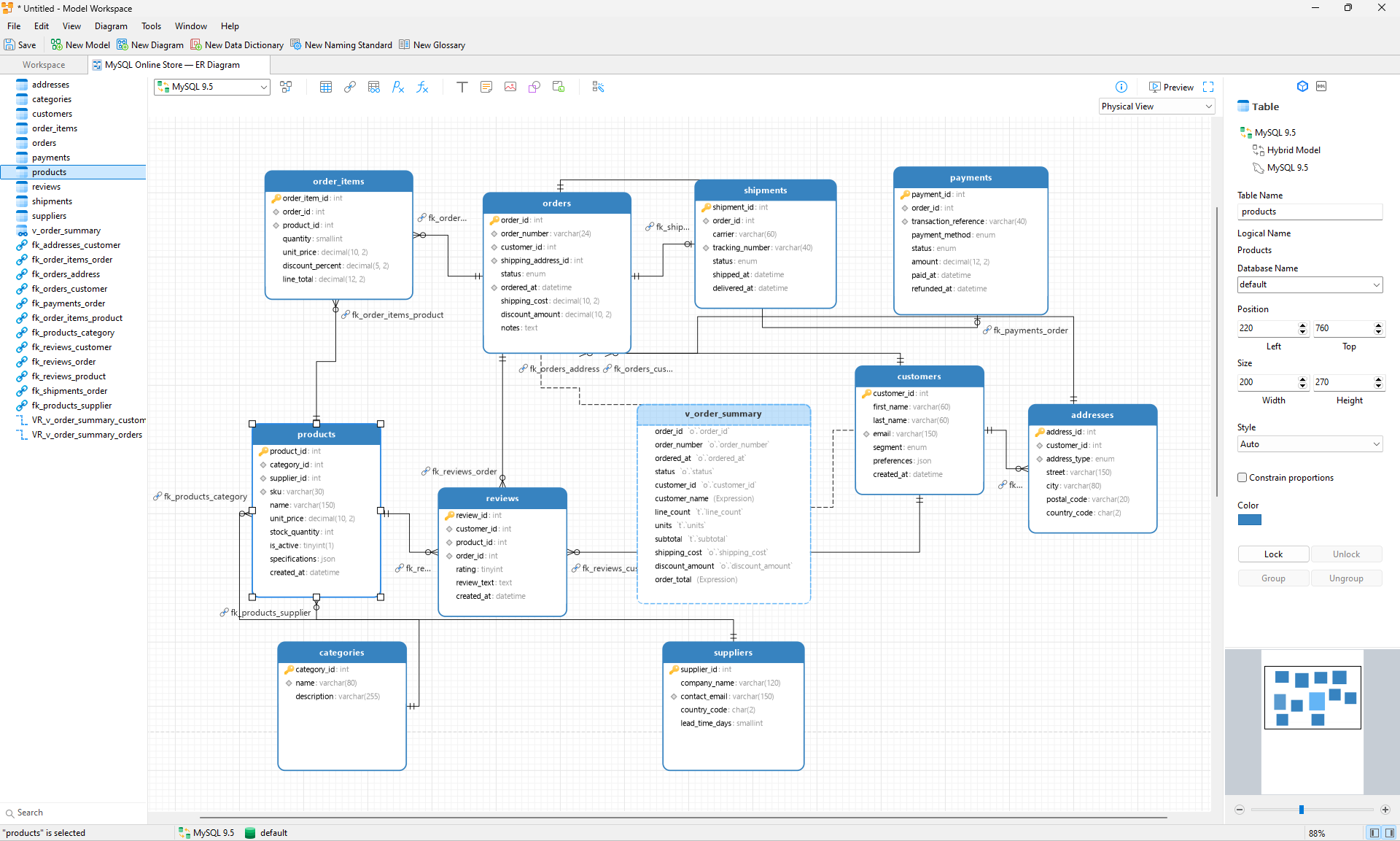
I also built the orders–order items–products query visually, with a delivered-status filter and the generated SQL alongside the diagram. For the model diagram, I reverse-engineered the database into a workspace; the automatic ER Diagram View is the quicker route.
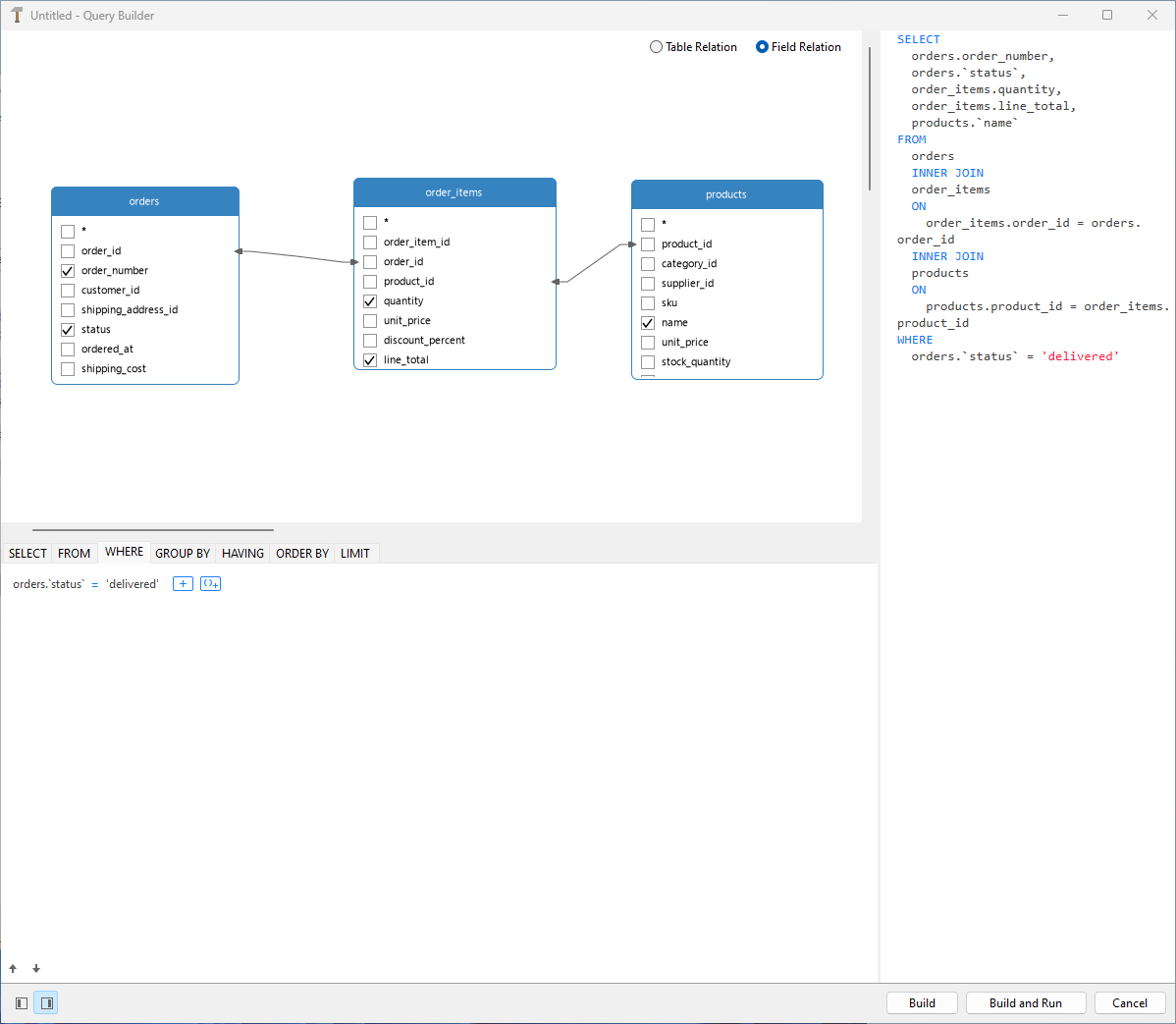
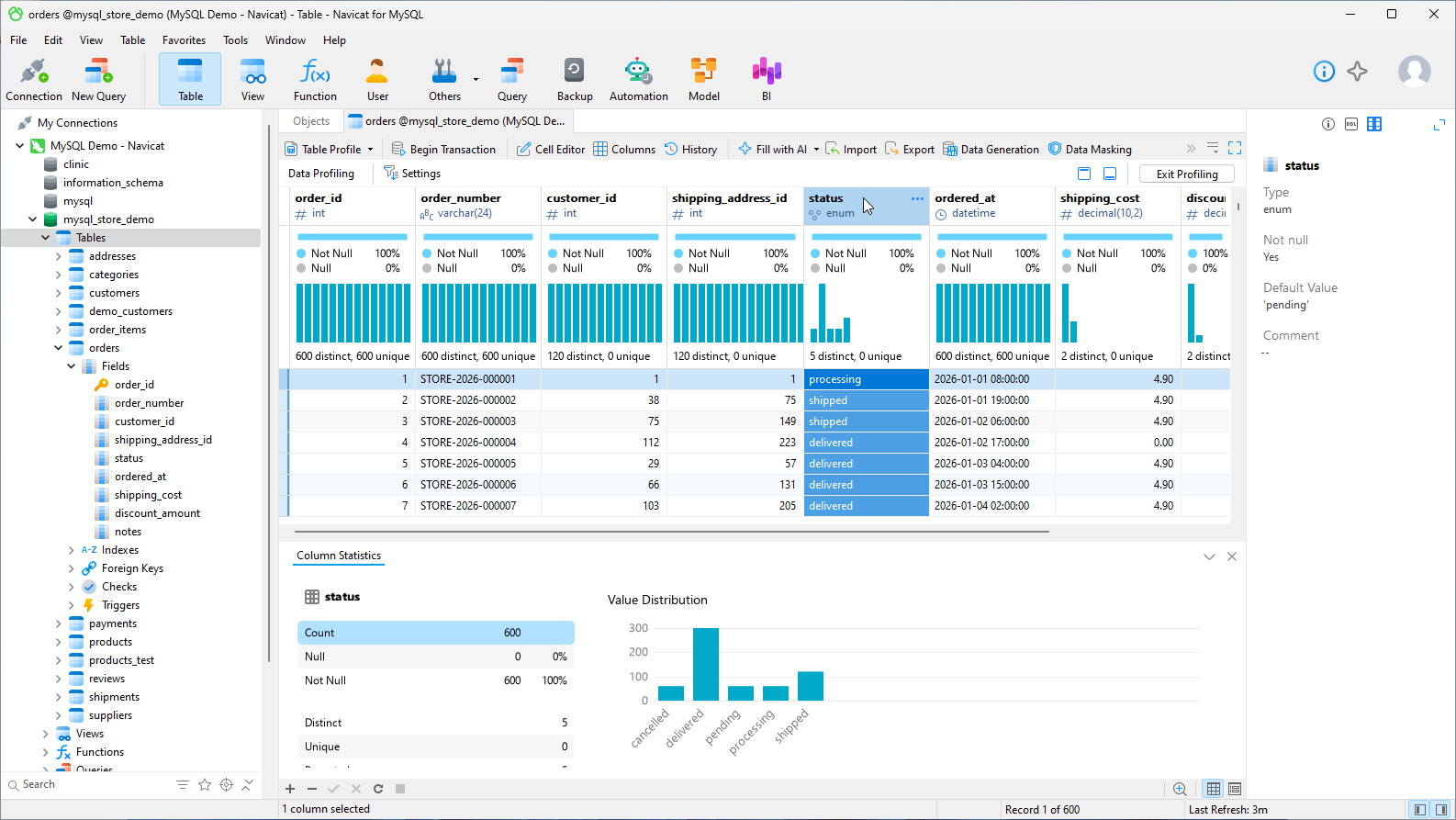
Navicat building a joined order query visually and profiling the distribution of five statuses across 600 orders.
Pros
- Data profiling combines useful statistics and distributions with the table grid.
- Visual query building, modeling, and migration-related tools in one product family.
- Native desktop versions for Windows, macOS, and Linux.
Cons
- The modeling workspace adds setup.
- Product editions and purchasing channels need careful comparison.
My personal note: Reverse-engineering into a model workspace took more preparation than I expected for a simple diagram.
Price: The publisher's US Mac App Store listing for Navicat 18 for MySQL shows $279.99/year. Direct-store licenses and edition terms can differ. Verified annual listing.
7. DbGate
I tested DbGate Premium, which runs as a desktop application or a self-hosted web application. Editions and platforms.
Feature highlights
- Query Designer: join tables visually and see results in the same view
- Charts: turn results into charts saved with the SQL script
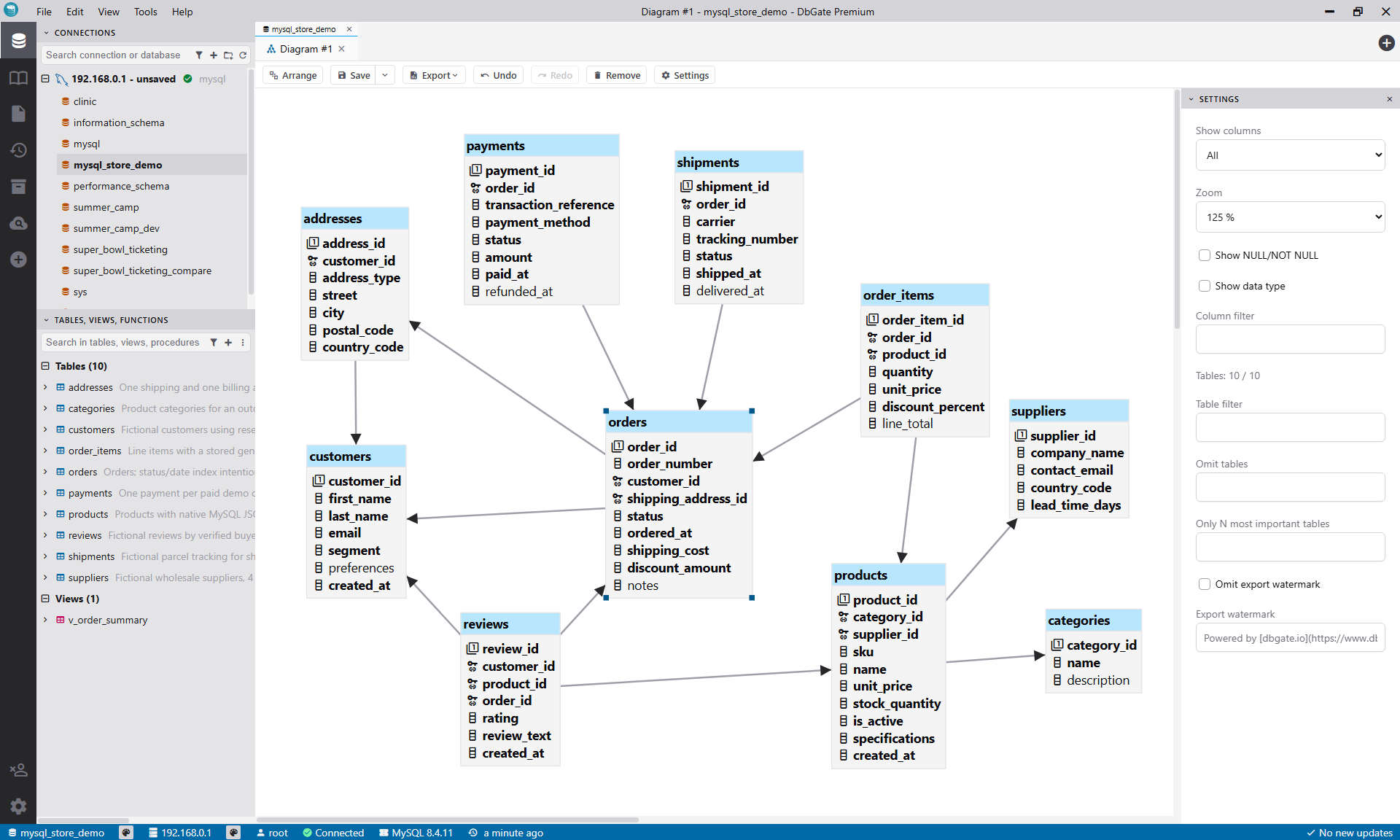
- ER diagrams: a relationship view of the database
- Editable results: change data directly in query output
- Compare tools: find differences between databases
- AI assistance: help writing queries
- Web or desktop: run it locally or host it for a team
I used Query Designer to join orders, order items, and products and display delivered-order results in the same workspace. Then I turned the top ten products' delivered-order revenue into a bar chart, setting the category, measure, and aggregation. Because the chart configuration is saved with the SQL script, the chart is reusable.
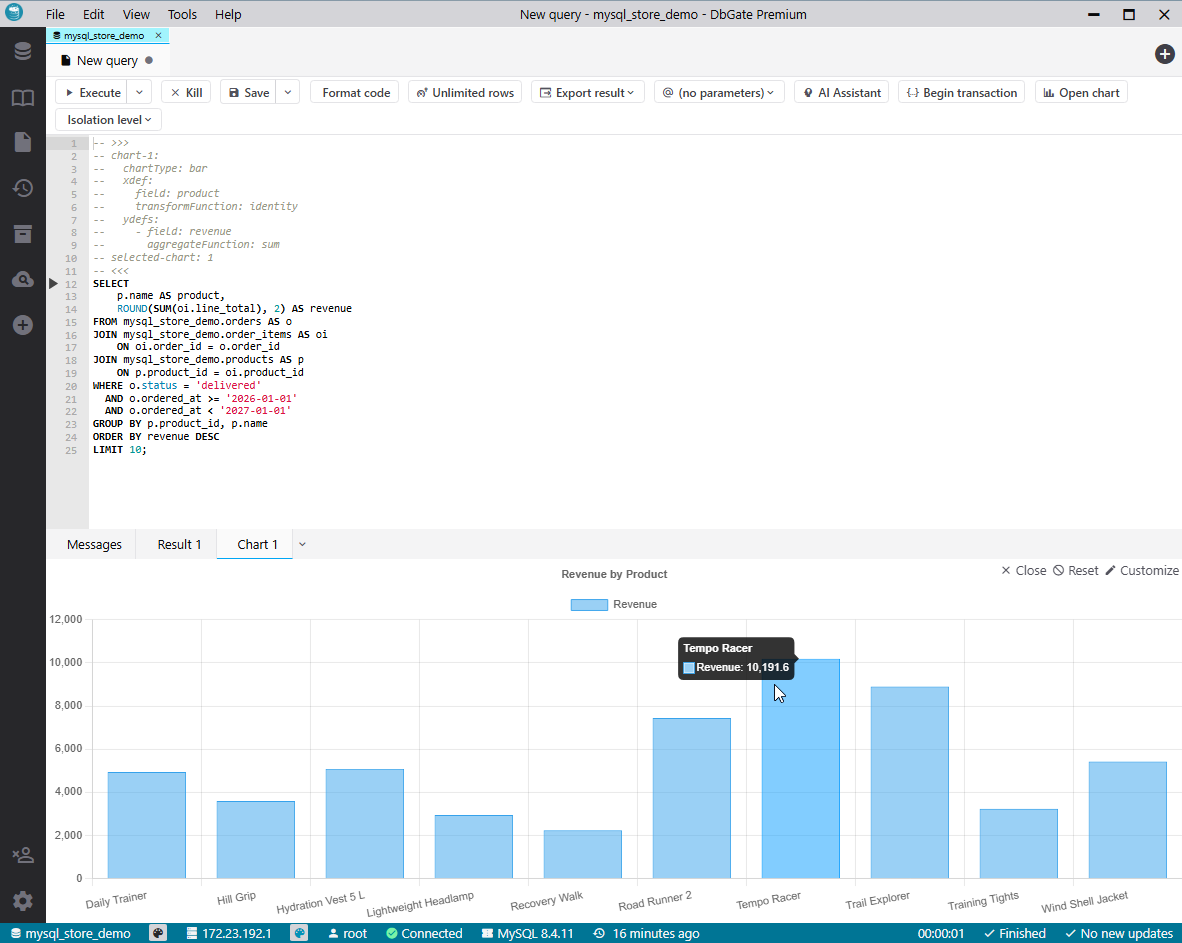
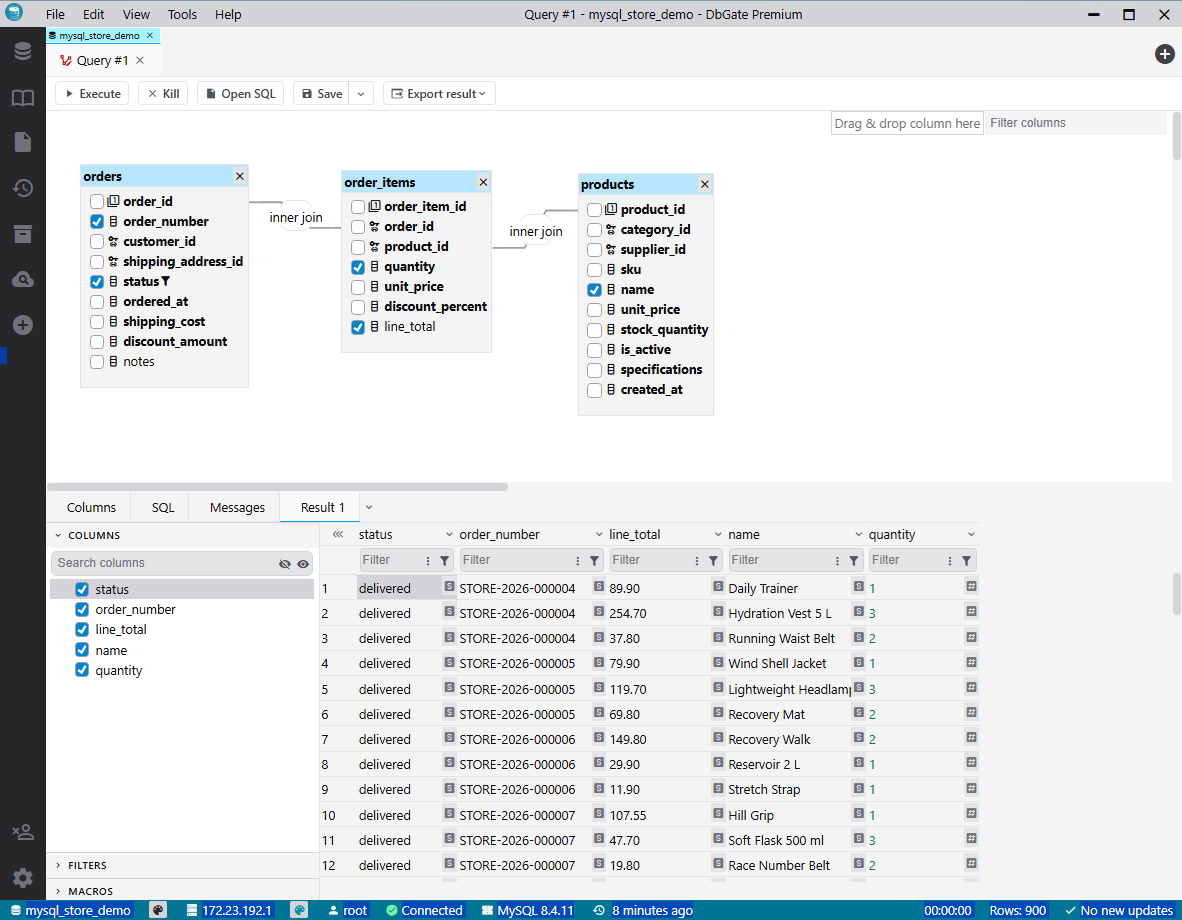
DbGate Premium showing visual query joins and a bar chart of the top ten products by delivered-order item revenue.
Pros
- Modern interface with an approachable query-and-results layout.
- Charts are a useful next step after a result grid.
- Desktop and self-hosted web options.
Cons
- Query Designer and charts are Premium features.
My personal note: The features I liked most, Query Designer and charts, are locked behind Premium.
Price: Community is free. Premium is $120/year for one user, with a 30-day trial. Pricing.
8. SQLyog
I tested the commercial SQLyog trial. Edition comparison.
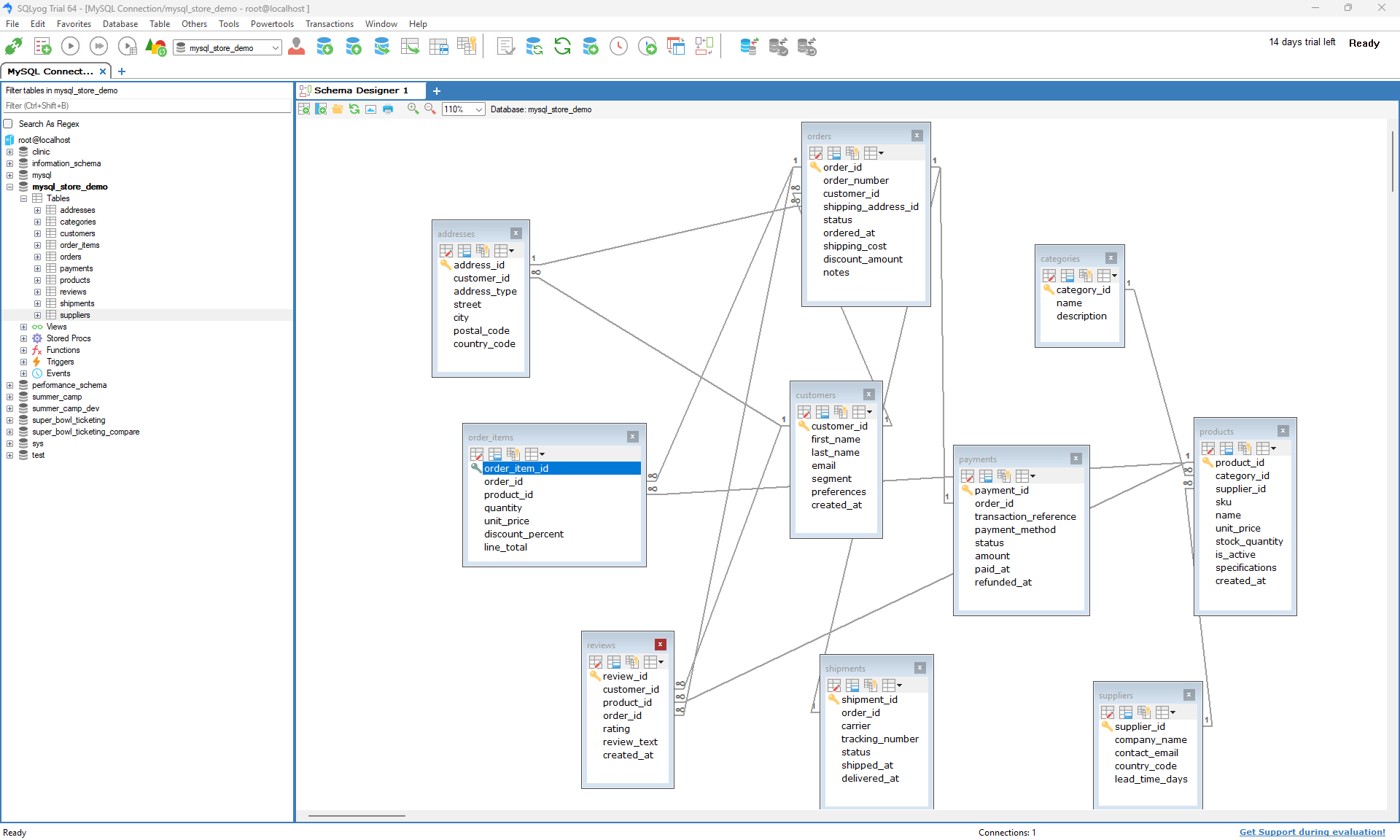
Feature highlights
- Schema Designer: visual table and relationship design
- Query Builder: build queries by selecting tables and fields
- Query profiler: analyze how a query runs
- Schema and data sync: keep two databases aligned
- Scheduled backups: automated, recurring exports
- SSH and HTTP tunneling: reach servers behind firewalls
I built the orders–order items–products query visually. It worked, but selecting additional fields and finding the Criteria row took longer than expected, and I had to move the generated SQL into the Query Editor to run it.
I then worked through the backup wizard. The trial limits each backup job to two objects, so I selected categories and products, and the log confirmed both exported successfully.
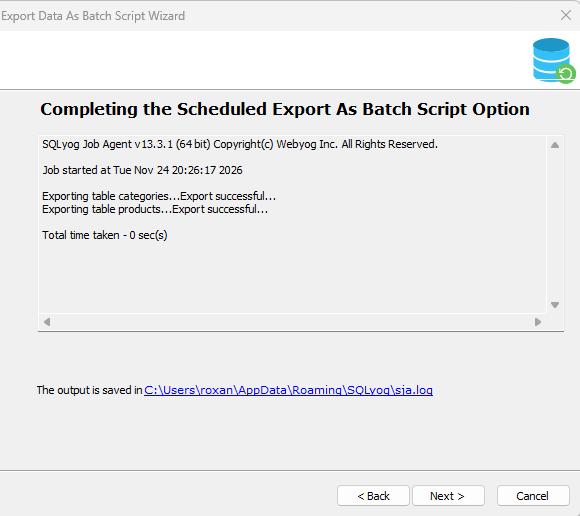
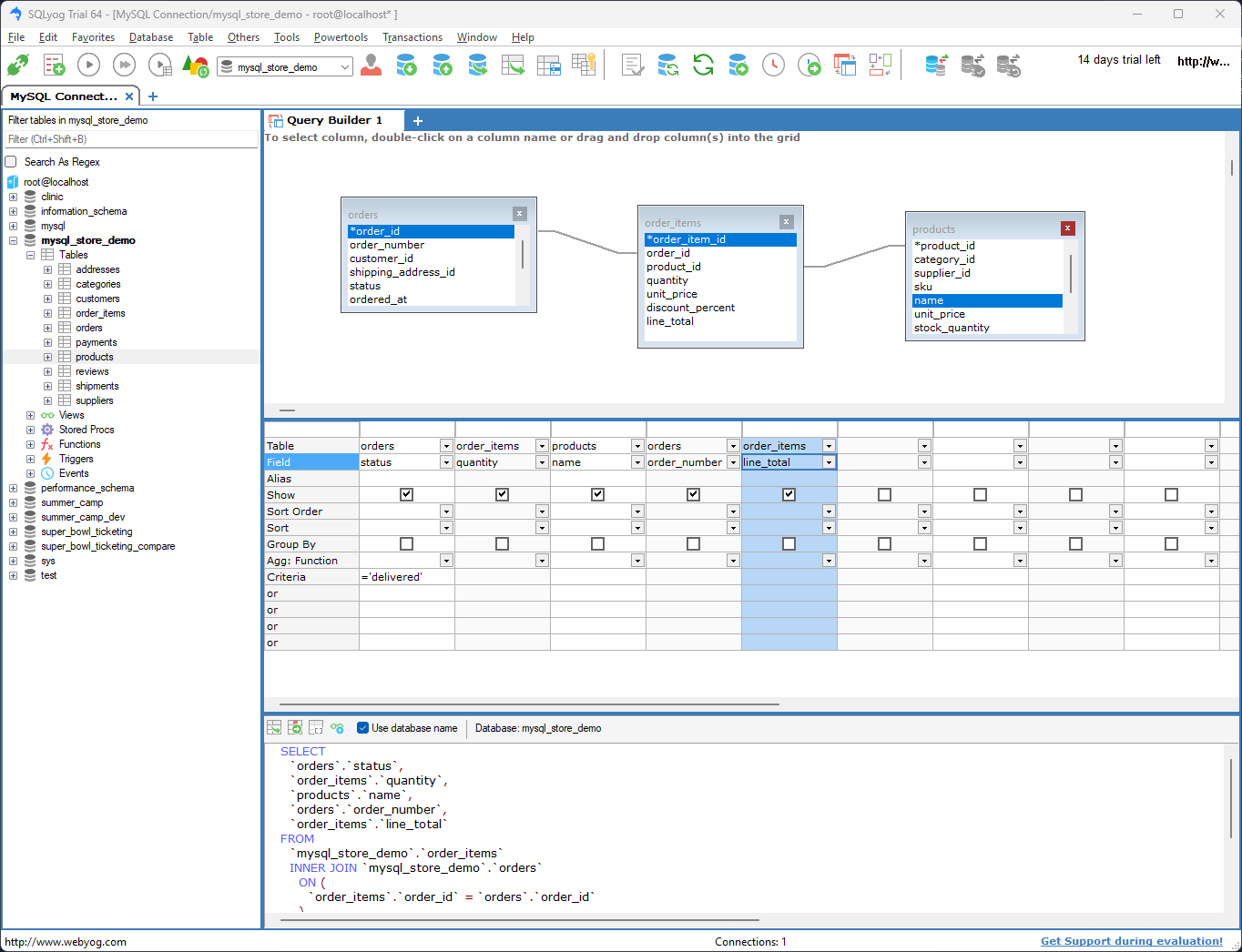
SQLyog's visual query builder and the successful export of the categories and products tables through its backup wizard.
Pros
- A substantial collection of MySQL administration utilities.
- Visual schema tools and backup automation.
- Perpetual licensing with first-year maintenance included.
Cons
- Native Windows application.
- The query-builder execution workflow is less direct.
- The backup wizard spreads configuration across many screens.
My personal note: I had to copy the SQL from the visual query builder into the query editor and run it to see the results. The backup wizard also had too many pages for my liking.
Price: Community is free. The commercial store lists a $299 perpetual license with first-year maintenance. The two-object backup limit applies only to the trial. Pricing · Trial limits · Builder workflow.
9. HeidiSQL
HeidiSQL is free and open source, with a single edition. Native builds are offered for Windows, Linux, and macOS (Apple Silicon); I tested the Windows version. Features · Downloads.
Feature highlights
- SQL editor: completion and formatting
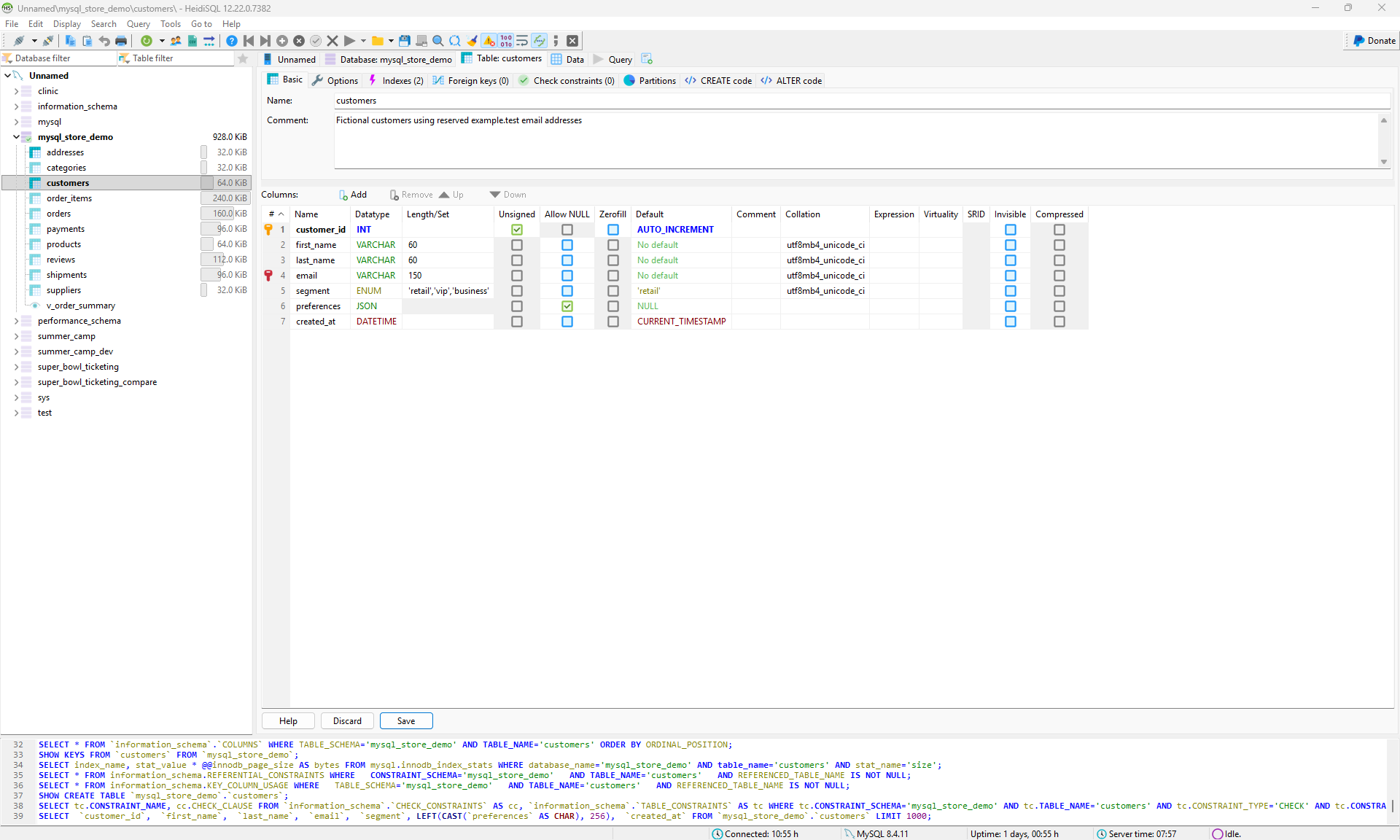
- Table editor: columns, types, defaults, and constraints in one view
- Indexes and foreign keys: manage them from the table editor
- User manager: accounts and privileges
- Export and transfer: to SQL files, compressed files, the clipboard, or another server
- Server processes: see and kill running queries
- Multiple engines: also MariaDB, PostgreSQL, SQL Server, and SQLite
The table editor gave a clear view of columns, types, defaults, indexes, and constraints. I also ran the delivered-order query and inspected the SQL export configuration.
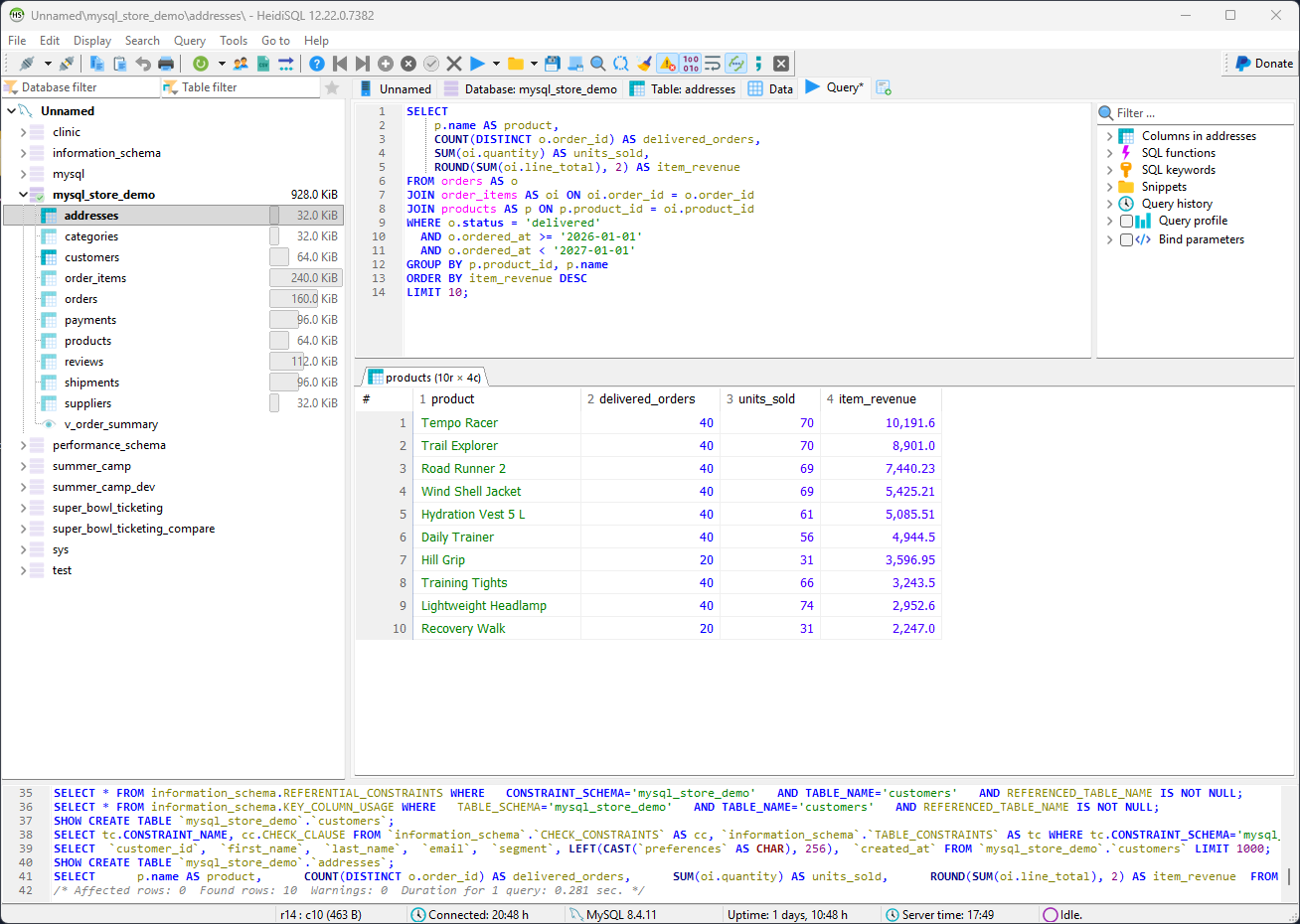
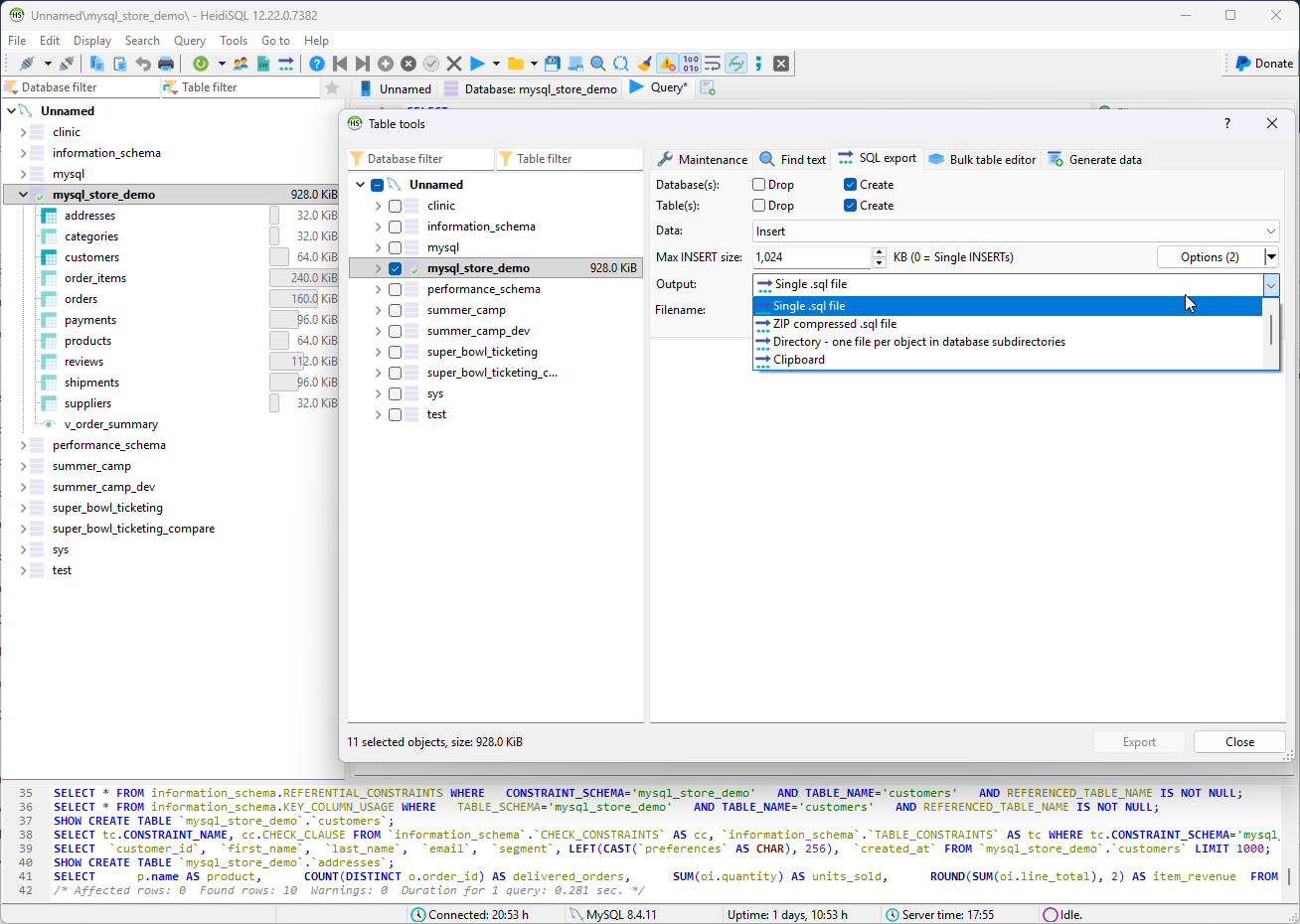
HeidiSQL running a joined order query and configuring SQL export options for the store database.
Pros
- No license fee or paid upgrade for the tools shown.
- Practical table editing and flexible export destinations.
- Native Linux and macOS downloads broaden its usefulness beyond Windows.
Cons
- No built-in ER diagram in the Windows version tested.
- The Windows interface feels dated to me.
- Less suitable when visual modeling is the main requirement.
My personal note: I missed an ER diagram, and the interface looks old-fashioned next to the others.
Price: $0. Donations are optional.
Why not MySQL Workbench?
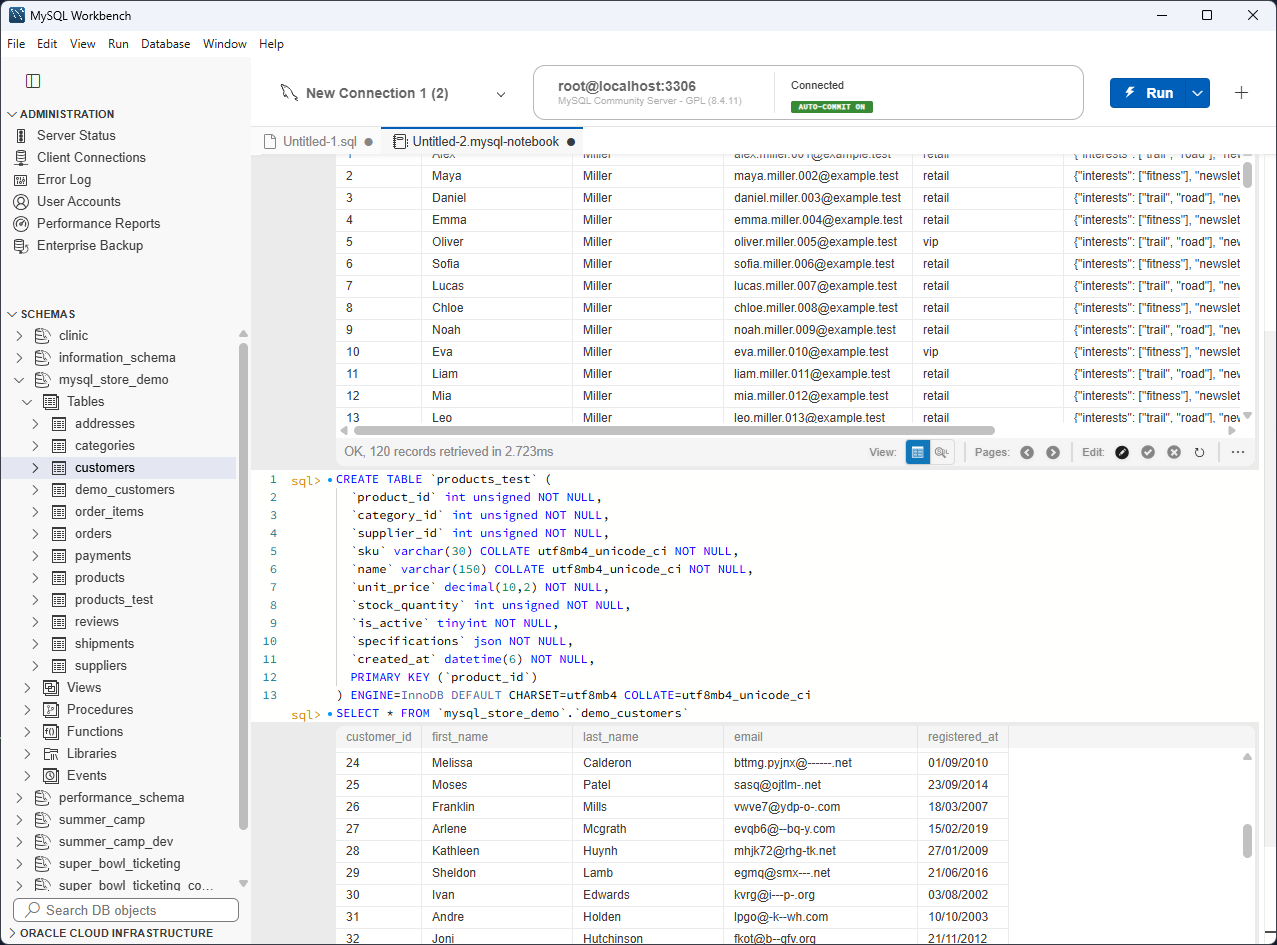
MySQL Workbench is Oracle's free, official MySQL client, so it's the first tool many people try. Oracle rebuilt it as Workbench 26 in 2026. It still has a SQL editor, Visual Explain, and admin tools like server status, user accounts, and performance reports. But when I tested it, the EER diagram and reverse-engineering tools from version 8.0 were gone, and the Database menu now only holds admin options.
Opening a table's data just adds a generated SELECT and its results to the same notebook, mixed in with your other queries, instead of a dedicated data view. Workbench 8.0 still has the modeling tools, but it's end-of-life. For visual work, it's hard to recommend right now.
Which client would I choose?
For most visual MySQL work, I'd start with VisuaLeaf. Query building, diagrams, profiling, and data comparison are all in one place, and it runs on Windows, macOS, and Linux. It's also useful if you work with MongoDB alongside MySQL.
For the other tools, it depends on what you do most:
- MySQL development and administration on Windows: dbForge Studio for MySQL. Standard already includes the profiler and Master-Detail Browser shown here.
- Modeling and test data: DbSchema Pro, especially if the design model is part of your daily work.
- Many different databases: DBeaver, if you can live with its learning curve.
- Data-quality checks: Navicat, for its Data Profiling view.
- Visual queries followed by charts: DbGate Premium.
- Browser access or shared hosting: phpMyAdmin.
- A free, lightweight editor: HeidiSQL.
- Admin and backup tools over interface: SQLyog.
A few things are worth checking before you buy:
- Your operating system. dbForge and SQLyog are Windows-native. On a Mac or Linux, they need extra setup.
- Owning or renting. VisuaLeaf, DbSchema, and SQLyog offer perpetual licenses. dbForge and Navicat sell both perpetual and subscription licenses. DBeaver and DbGate are subscriptions.
- The right edition. Profilers, comparison tools, and generators are usually in paid editions.
My advice is to pick a client around the work you repeat. A paid feature is easy to justify when it replaces a task you'd otherwise do by hand.
If you want to try the workflow from the first section, download VisuaLeaf and connect it to your own MySQL database during the 14-day Professional trial.
Mostly designing schemas, not managing data? See our guide to the best database design tools for 2027, which compares modelers, ER diagram tools, and browser-based options across MySQL, PostgreSQL, and more.
 Roxana-Maria Haidiner
Frequently asked questions
Which MySQL GUI is completely free?
phpMyAdmin and HeidiSQL are free applications. VisuaLeaf, dbForge Studio for MySQL, DbSchema, DBeaver, and DbGate offer free editions with different limits. Navicat Premium Lite is a separate free product with an organization account limit.
Which tools have free ER diagrams?
The free editions of VisuaLeaf, dbForge, DbSchema, DBeaver, and DbGate, plus phpMyAdmin Designer.
Can a GUI speed up queries?
It helps you find bottlenecks. The speedup comes from improving your SQL, indexes, or database configuration.
Do I still need MySQL installed?
You need access to a running MySQL server, whether local, in Docker, or hosted elsewhere. These clients connect to that server; they do not replace it.
Does perpetual mean lifetime updates?
Usually it means continued use of the version covered by the license. Updates and support may be limited to an included maintenance period. Check the product's renewal terms separately.