Fix "permission denied" errors in PostgreSQL
Fix PostgreSQL permission denied errors for tables, schema public (PostgreSQL 15+), sequences and new tables, plus "must be owner of table".
Quick Answer
Your role is missing a privilege on the object named in the error. As the owner or a superuser, grant the one it asks for:
-- permission denied for table orders
GRANT SELECT, INSERT, UPDATE, DELETE ON orders TO app_user;

-- permission denied for sequence orders_id_seq
GRANT USAGE ON SEQUENCE orders_id_seq TO app_user;

-- permission denied for schema sales
GRANT USAGE ON SCHEMA sales TO app_user;
On PostgreSQL 15 and later, "permission denied for schema public" when creating a table needs GRANT CREATE ON SCHEMA public TO app_user;
Read the object type in the error
The error names the level that failed, which tells you which GRANT you need. The SQLSTATE is always 42501 (insufficient_privilege).
| Error | What is missing | Grant |
|---|---|---|
permission denied for table orders | The action (SELECT, INSERT, UPDATE…) on that table | GRANT SELECT ON orders TO … |
permission denied for schema public | CREATE on the schema (or USAGE on another schema) | GRANT CREATE ON SCHEMA public TO … |
permission denied for sequence orders_id_seq | USAGE on the sequence behind a serial column | GRANT USAGE ON SEQUENCE … TO … |
must be owner of table orders | Ownership: ALTER, DROP and some others can't be granted | Change owner, or run as the owner |
Check who you are connected as first. Apps often connect with a different role than the one you use in psql: SELECT current_user, session_user, current_database();
In VisuaLeaf
See a role's grants in VisuaLeaf
VisuaLeaf's SQL User Management shows grants without querying information_schema. Open User Management from the activity bar on your PostgreSQL connection:
- If your own account can't manage users, the Dashboard shows an insufficient-privileges warning with your username, so you know to switch to an admin account first.
- On the Users tab, expand a user to see its full grant list: the privilege, the
schema.tableit applies to, and whether it was grantedWITH GRANT OPTION. Compare that list with the table above to see which privilege is missing. - On the Roles tab, expand a role to see its grants and members. Assign a role to a user from the Create or Edit User dialog.
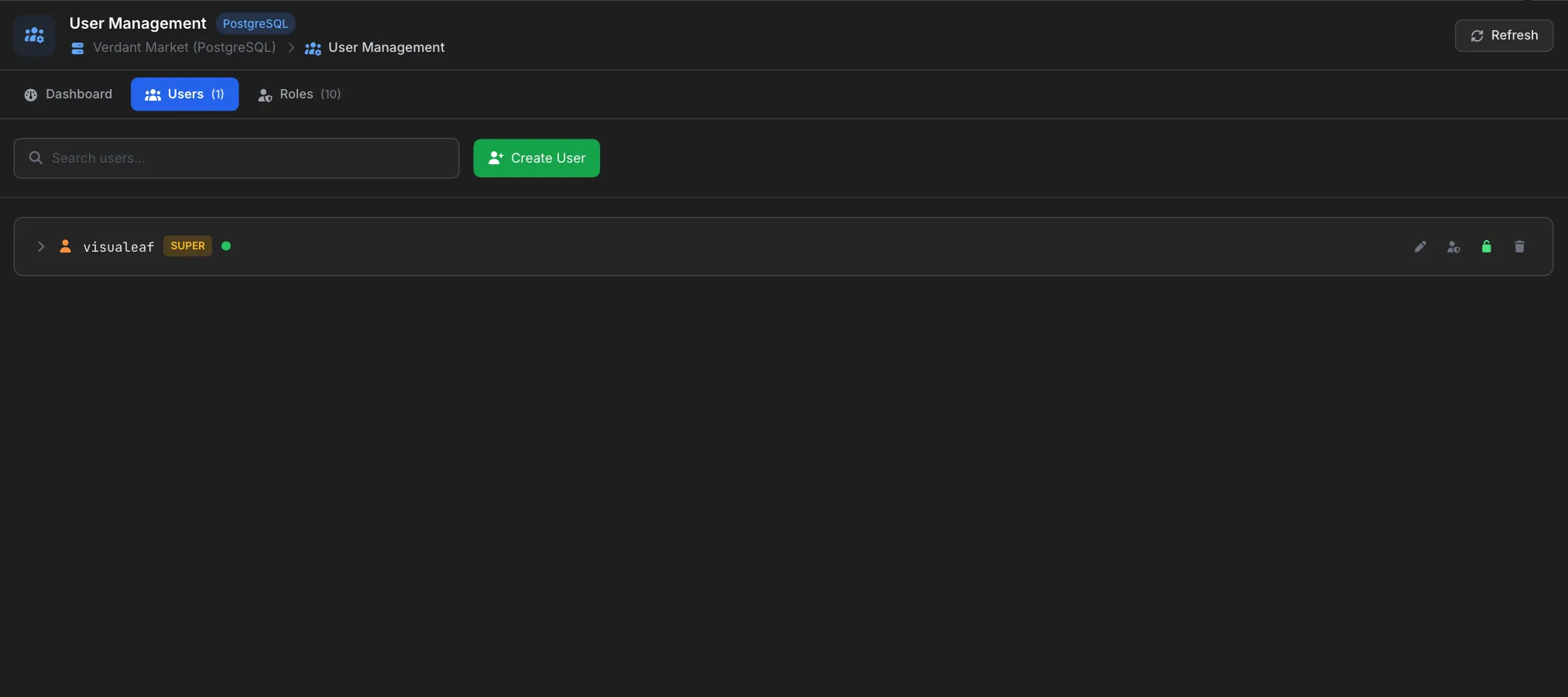
See the SQL User Management docs.
Cause 1: no privilege on the table
Creating a role doesn't give it access to anything. Each table needs an explicit grant for each kind of action:
GRANT SELECT, INSERT, UPDATE, DELETE ON orders TO app_user;

-- every existing table in a schema at once
GRANT SELECT, INSERT, UPDATE, DELETE ON ALL TABLES IN SCHEMA public TO app_user;
A role with only SELECT and INSERT gets the same error on its first UPDATE. \dp orders in psql shows what each role has. For read-only access to everything, PostgreSQL 14+ has the predefined role pg_read_all_data: GRANT pg_read_all_data TO analyst;
Cause 2: schema public on PostgreSQL 15 and later
ERROR:  permission denied for schema public
LINE 1: CREATE TABLE mine (id int);
                     ^
Up to PostgreSQL 14, every role could create tables in public. PostgreSQL 15 removed that default, so apps and migration tools that worked for years fail on a new server. Reading existing tables still works. Grant CREATE to the role that runs migrations, or make it the owner of the database:
-- connected to the app's database, not "postgres"
GRANT CREATE ON SCHEMA public TO app_user;

-- or
ALTER DATABASE myapp OWNER TO app_user;
The same error for any other schema, on a SELECT, means the role lacks USAGE on it: GRANT USAGE ON SCHEMA sales TO app_user;
Cause 3: the sequence behind a serial column
permission denied for sequence orders_id_seq surprises people because the table grant looks complete. An insert into a serial column calls nextval() on a separate sequence, which needs its own grant:
GRANT USAGE ON SEQUENCE orders_id_seq TO app_user;
GRANT USAGE ON ALL SEQUENCES IN SCHEMA public TO app_user;   -- or all of them
Identity columns (GENERATED ... AS IDENTITY) don't need a separate grant: INSERT on the table is enough.
Cause 4: tables created after the grant
GRANT ... ON ALL TABLES IN SCHEMA covers tables that exist right now. A table created by tomorrow's migration starts with no grants. Default privileges fix that for future objects:
ALTER DEFAULT PRIVILEGES IN SCHEMA public
  GRANT SELECT, INSERT, UPDATE, DELETE ON TABLES TO app_user;
ALTER DEFAULT PRIVILEGES IN SCHEMA public
  GRANT USAGE ON SEQUENCES TO app_user;
Default privileges only apply to objects created by the role that ran the command. If migrations run as a different role, add FOR ROLE migrator after ALTER DEFAULT PRIVILEGES.
Cause 5: "must be owner of table"
ALTER TABLE, DROP TABLE, CREATE INDEX and a few others can't be granted. Only the owner (or a superuser) can run them. Change the owner, or make your role a member of the owning role:
ALTER TABLE orders OWNER TO app_user;
GRANT owner_role TO app_user;     -- or act as the current owner
The usual setup is one role that owns the tables and runs migrations, and a less privileged role the app uses at runtime.
What we found testing this
Each of these failed with permission denied for table for a role that had exactly the privilege you'd expect to be enough:
| Statement | Privileges granted | Result | Why |
|---|---|---|---|
UPDATE acct SET balance = 30 WHERE id = 1 | UPDATE (balance) | Denied | The WHERE reads id, which needs SELECT on it |
UPDATE acct SET balance = 30 | UPDATE (balance) | Worked | Nothing is read |
UPDATE ... RETURNING balance | UPDATE (balance) | Denied | RETURNING needs SELECT |
DELETE FROM logs WHERE id = 1 | DELETE | Denied | The WHERE needs SELECT; DELETE FROM logs worked |
TRUNCATE logs | DELETE | Denied | TRUNCATE is its own privilege |
INSERT ... ON CONFLICT DO UPDATE | INSERT, SELECT | Denied | Needs UPDATE too; DO NOTHING worked |
SELECT * FROM acct | SELECT (id, balance) | Denied | Column grants don't cover *; SELECT id, balance worked |
- On a fresh PostgreSQL 16 database,
\dn+ publicshows the new owner. The schema is owned bypg_database_owner, withpg_database_owner=UC/pg_database_ownerand=U/pg_database_owner: everyone gets USAGE, only the database owner gets CREATE. A fresh role got "permission denied for schema public" onCREATE TABLE, while the role named inCREATE DATABASE ... OWNERcreated tables without any grant. That's whyALTER DATABASE ... OWNER TOis a one-line fix. - node-postgres doesn't say which table. For this error,
err.codeis'42501'buterr.tableanderr.schemaare empty, unlike unique violations. The object name is only inerr.message. psycopg raisespsycopg.errors.InsufficientPrivilege(e.sqlstate), psycopg2psycopg2.errors.InsufficientPrivilege(e.pgcode).
Frequently Asked Questions
Why do I get permission denied for schema public on a new database?
PostgreSQL 15 stopped letting every role create objects in the public schema. Only the database owner can by default. Grant CREATE ON SCHEMA public to your app role, or make it the database owner.
I granted UPDATE, so why does my UPDATE fail?
If the statement has a WHERE clause or RETURNING, the role also needs SELECT on the columns it reads. An UPDATE without WHERE needs only UPDATE.
I granted INSERT on the table, so why does the insert still fail?
If the table has a serial column, the role also needs USAGE on its sequence. If the insert uses ON CONFLICT DO UPDATE, it also needs UPDATE.
How do I give a user access to all tables, including future ones?
Use GRANT ... ON ALL TABLES IN SCHEMA for existing tables, plus ALTER DEFAULT PRIVILEGES IN SCHEMA for tables created later. For read-only access everywhere, grant pg_read_all_data (PostgreSQL 14+).