Fix "duplicate key value violates unique constraint" in PostgreSQL
Fix PostgreSQL duplicate key errors: reset a sequence that fell behind after rows were loaded with explicit ids, find real duplicates, or use ON CONFLICT.
Quick Answer
If the constraint is the primary key (..._pkey) and you didn't set the id yourself, the table's sequence is behind the data. Move it past the highest id:
SELECT setval(
  pg_get_serial_sequence('orders', 'id'),
  (SELECT COALESCE(MAX(id), 0) + 1 FROM orders),
  false
);
If it's any other unique constraint, the row really is a duplicate. Find it, or use ON CONFLICT to update or skip it.
What the error means
ERROR:  duplicate key value violates unique constraint "orders_pkey"
DETAIL:  Key (id)=(1) already exists.
An INSERT or UPDATE would have put a value into columns covered by a unique index, and that value is already there. The message names the constraint, and DETAIL shows the exact value that clashed. The SQLSTATE is 23505 (unique_violation).
| Constraint in the error | Usual cause | Fix |
|---|---|---|
tablename_pkey, on an auto-generated id | Sequence is behind the existing rows | Reset it with setval |
Any unique column, e.g. users_email_key | The value really exists | Find it, or use ON CONFLICT |
| Error while creating a unique index | Existing rows already have duplicates | Find and remove them first |
In VisuaLeaf
Reset an out-of-sync sequence in VisuaLeaf
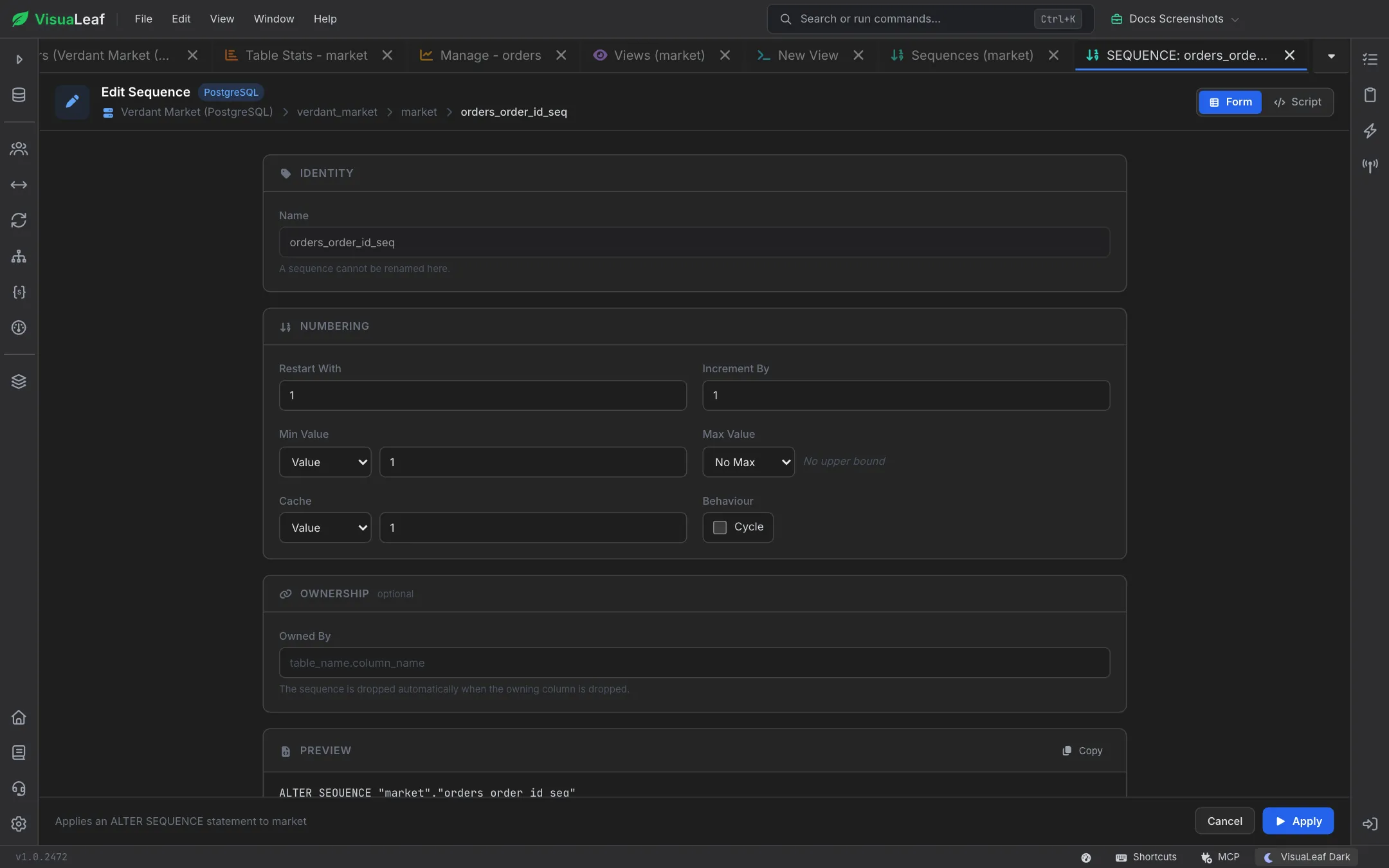
When the error comes from a sequence that has fallen behind the data, VisuaLeaf's Sequences activity fixes it without writing setval by hand.
- In the SQL Editor, run
SELECT max(id) FROM orders;to see the highest id in use. - Right-click the database and open Sequences. Search for the table's sequence, such as
orders_id_seq, and expand it to read its current definition. - Click Edit, set Restart With to one more than that maximum, check the generated
ALTER SEQUENCE … RESTART WITHpreview and click Apply.
Then retry the insert. If it still fails, the value really is a duplicate, which is the second cause below. See Manage Sequences.
Cause 1: the sequence is out of sync
A serial or identity column takes its next value from a sequence, and the sequence never looks at the table. If rows were loaded with explicit ids (a seed script, a CSV loaded with COPY, rows copied by an ETL tool), the sequence still thinks the next id is 1:
\copy items (id, name) FROM 'items.csv' WITH (FORMAT csv)   -- ids 1, 2, 3
INSERT INTO items (name) VALUES ('new');
-- ERROR:  duplicate key value violates unique constraint "items_pkey"
-- DETAIL:  Key (id)=(1) already exists.
Compare the sequence with the data, then set it so the next value is one above the maximum. The third argument false means "this value hasn't been used yet", and COALESCE handles an empty table:
SELECT last_value FROM items_id_seq;   -- 1
SELECT MAX(id) FROM items;             -- 3

SELECT setval(
  pg_get_serial_sequence('items', 'id'),
  (SELECT COALESCE(MAX(id), 0) + 1 FROM items),
  false
);
pg_get_serial_sequence works for both serial and identity columns, so you don't need to guess the sequence name. Make import scripts run the setval at the end so this doesn't come back.
Cause 2: the value really is a duplicate
When the constraint is on a business column like an email or an order reference, the error is doing its job. Look at the existing row with SELECT * FROM orders WHERE ref = 'd'. Common reasons are a retried request that already succeeded, two workers processing the same job, or a case difference your app treats as distinct but a lower(email) unique index doesn't.
Insert or update in one statement: ON CONFLICT
If "already exists" is a normal outcome, tell PostgreSQL what to do instead of raising an error:
INSERT INTO orders (ref, qty) VALUES ('d', 5)
ON CONFLICT (ref) DO UPDATE SET qty = EXCLUDED.qty    -- update the existing row
RETURNING *;

INSERT INTO orders (ref) VALUES ('d')
ON CONFLICT DO NOTHING;                               -- or skip it
EXCLUDED is the row you tried to insert, and the columns in ON CONFLICT (ref) must match a unique index exactly. Unlike a SELECT-then-INSERT in your app, this is safe when two sessions insert at once.
Duplicates that block a new unique index
Adding a unique constraint to a table with duplicates fails with could not create unique index "emails_e_idx" and DETAIL: Key (e)=(x) is duplicated. List them, then remove the extras:
SELECT e, COUNT(*) FROM emails GROUP BY e HAVING COUNT(*) > 1;

-- keep one row per value, delete the rest
DELETE FROM emails a USING emails b
WHERE a.e = b.e AND a.ctid > b.ctid;
Run the DELETE inside a transaction and check the row count before you commit. ctid is a physical row address, fine for a one-off cleanup but nothing to store.
What we found testing this
- pg_dump doesn't cause this, even with
--data-only.pg_dump --data-only -t itemsstill wroteSELECT pg_catalog.setval('public.items_id_seq', 5, true);after the rows, and after restoring into an empty copy the next insert got id 6. When the sequence is behind, look for something that loaded rows with explicit ids, not the backup itself. - Each failed insert moves the sequence forward by one. With ids 1–3 loaded by
COPY, inserts failed on 1, then 2, then 3, and the fourth attempt succeeded with id 4. That's why the error can seem to "fix itself" after a few retries, until the next import. - Skipped upserts still burn ids.
INSERT ... SELECTof 1,000 rows that all hitON CONFLICT DO NOTHINGinserted nothing, but moved the sequence from 1 to 1001. The next real row got id 1002. Gaps in ids are normal; don't use them to count rows. UPDATE ... SET pos = pos + 1can fail even though the end result is unique. Onpos int UNIQUEwith values 1–5,pos + 1failed withKey (pos)=(2) already exists, whilepos - 1succeeded: PostgreSQL checks each row as it goes. Declaring the constraintUNIQUE DEFERRABLE INITIALLY IMMEDIATEmoves the check to the end of the statement, andpos + 1then worked.- NULLs never collide by default. Two
NULLemails went into aUNIQUEcolumn without error. On PostgreSQL 15+,UNIQUE NULLS NOT DISTINCTrejects the second withKey (e)=(null) already exists.
How each client reports it:
| Client | What you get |
|---|---|
| node-postgres | err.code === '23505', plus err.constraint (orders_ref_key), err.detail (Key (ref)=(A1) already exists.), err.table and err.schema |
| psycopg 3 | psycopg.errors.UniqueViolation, e.sqlstate == '23505', e.diag.constraint_name |
| psycopg2 | psycopg2.errors.UniqueViolation, e.pgcode == '23505', e.diag.constraint_name, e.diag.message_detail |
Branch on the constraint name, not the message text, to tell "email taken" from "username taken" in your app.
Frequently Asked Questions
Why do I get duplicate key on the primary key when I never set the id?
The sequence that generates ids is behind the data, usually because rows were loaded with explicit ids by a seed script, COPY or an ETL tool. Reset it with setval to MAX(id) + 1.
How do I reset a sequence for an identity column?
The same way as for serial: setval(pg_get_serial_sequence('table', 'id'), (SELECT COALESCE(MAX(id), 0) + 1 FROM table), false).
Does restoring a pg_dump backup leave sequences out of sync?
No. In our test, even pg_dump --data-only for a single table included a setval call for its sequence, so the restored table continued from the right id.
How do I stop explicit ids from breaking the sequence?
Use GENERATED ALWAYS AS IDENTITY. PostgreSQL then rejects an explicit id with "cannot insert a non-DEFAULT value into column" unless the insert says OVERRIDING SYSTEM VALUE.