Fix "FATAL: password authentication failed for user"
Why PostgreSQL rejects your password: wrong or unset password, a missing user, a Docker volume with old credentials, or special characters in the URL.
Quick Answer
The server checked a password and it didn't match, or the user doesn't exist. Reset the password from a session that can still log in (usually as postgres over the local socket):
ALTER USER myuser WITH PASSWORD 'new-password';Then reconnect with exactly that user and password. If you can't get any session at all, see "Locked out of every account" below.
What the error means
psql: error: connection to server at "localhost" (127.0.0.1), port 5432 failed: FATAL: password authentication failed for user "postgres"The connection reached PostgreSQL, and the pg_hba.conf line that matched your connection asks for a password (scram-sha-256 or md5). The password check then failed. So the network, the port and the server are fine; the problem is the credentials or the role.
| Cause | How to tell |
|---|---|
| Wrong password | Works with the right one; check for typos and stale env vars |
| The user does not exist | \du doesn't list it. PostgreSQL deliberately reports this as a password failure. |
| The user has no password set | rolpassword is NULL in pg_authid |
| The password expired | rolvaliduntil in pg_roles is in the past |
| Password stored as MD5, server expects SCRAM | Fails even with the right password; see below |
| Docker volume kept an old password | You changed POSTGRES_PASSWORD but reused the volume |
| Special characters in a connection URL | Password has @, :, / or # |
| Connecting to a different server | A local install and a container both on port 5432 |
In VisuaLeaf
Check the credentials in VisuaLeaf before your app does
When a connection string is involved, paste it into VisuaLeaf's PostgreSQL connection form, as a JDBC URL or a standard postgresql:// URL, and click Auto-Fill. The form splits it into host, port, database, username and password, so you can check each one. A password with an unencoded @, : or / that breaks the URL in the wrong place, the special-character problem described below, is easy to spot.
Then click Test Connection. It tries the settings without saving them, so you can change one field at a time until the server accepts it. If the server only accepts local logins, connect through an SSH tunnel instead of changing pg_hba.conf. Once it works, Export to URL turns the working settings back into a connection string for your app. See the Connection Manager.
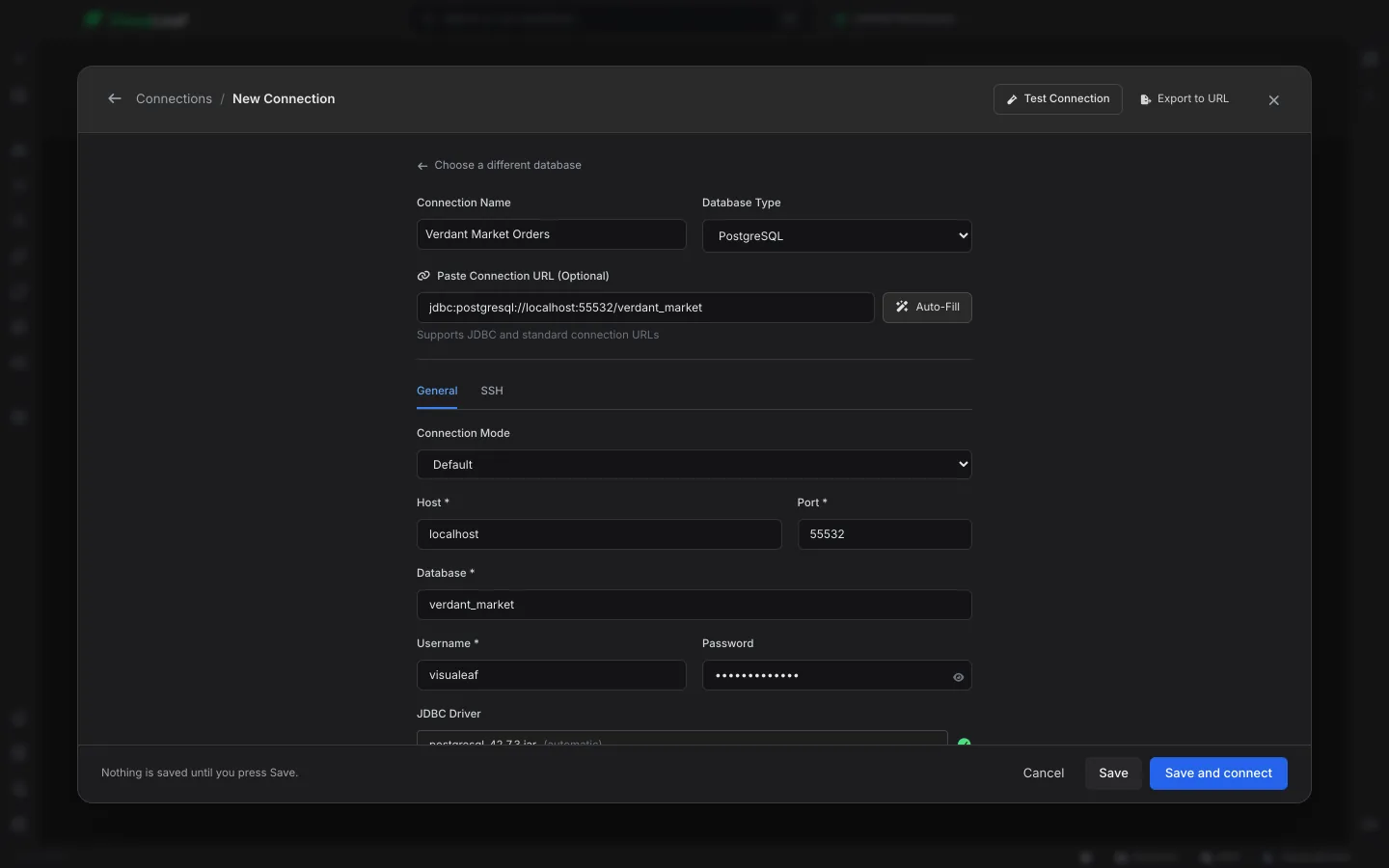
Check the user exists and has a password
Connect however you still can and look at the role. A missing user produces this same message, not "role does not exist", so that nobody can probe which usernames are valid.
\du myuser
SELECT rolname, rolcanlogin, rolpassword IS NOT NULL AS has_password
FROM pg_authid WHERE rolname = 'myuser';   -- superuser only
Create it, or give it a password and login rights:
CREATE ROLE myuser WITH LOGIN PASSWORD 'new-password';
-- or, if it exists:
ALTER ROLE myuser WITH LOGIN PASSWORD 'new-password';
In psql, \password myuser prompts for the new password and sends it already hashed, so it doesn't end up in your shell history or the server log.
Docker: POSTGRES_PASSWORD is only read once
The official image sets the password from POSTGRES_PASSWORD only when it initializes an empty data directory. If a volume already holds a database, changing the variable does nothing and the old password stays.
# change the password inside the running container (local socket, no password needed)
docker exec -it my-postgres psql -U postgres -c "ALTER USER postgres WITH PASSWORD 'new-password';"

# or start over (deletes all data in the volume)
docker compose down -v && docker compose up -d
Also check you are hitting the container at all. If PostgreSQL is installed locally too, both may want port 5432, and your client connects to whichever won. Map the container to another port (-p 5433:5432) to remove the doubt.
Special characters in connection strings
In a URL, characters like @, :, /, ? and # have meaning, so a password containing them gets cut or misread. Percent-encode it:
# password: p@ss:w/rd
postgresql://app:p%40ss%3Aw%2Frd@localhost:5432/mydb
const url = `postgresql://app:${encodeURIComponent(process.env.DB_PASSWORD)}@localhost:5432/mydb`Or skip the URL and pass the password as a separate option (password in node-postgres, password= in psycopg), which needs no escaping.
Locked out of every account
If no role can log in, temporarily let local connections in without a password, reset it, and change it back.
- Find the file:
SHOW hba_file;from any session, or look in the data directory. - Change the method on the local lines to
trust:local all all trust. - Reload:
sudo systemctl reload postgresqlorpg_ctl reload. - Connect with
psql -U postgresand runALTER USER postgres WITH PASSWORD '...'. - Put the original method back (
scram-sha-256orpeer) and reload again.
Don't leave trust in place. It lets anyone who can reach that connection type log in as any user, superusers included.
What the server log says for each cause
The client gets the same one-line error for five different problems. We triggered each one on PostgreSQL 16.14 and read the server log (docker logs for a container, or the file in log_directory). The DETAIL line tells them apart:
| What we did | DETAIL line in the server log |
|---|---|
| Wrong password | Only Connection matched file ".../pg_hba.conf" line 128: "host all all all scram-sha-256". No reason given, which itself tells you the role exists and has a valid password. |
| User that doesn't exist | Role "learn_ghost" does not exist. |
| Role created without a password | User "learn_nopw" has no password assigned. |
VALID UNTIL in the past | User "learn_expired" has an expired password. |
| Right password, stored as MD5 | User "learn_md5" does not have a valid SCRAM secret. |
The MD5 trap. A role whose password was set while password_encryption = 'md5' was in effect (common after upgrading from PostgreSQL 13 or older) can't log in through a scram-sha-256 line, even with the correct password. Check with SELECT rolname FROM pg_authid WHERE rolpassword LIKE 'md5%' and set those passwords again; they'll be stored as SCRAM. A md5 line in pg_hba.conf accepts both kinds.
Not every login failure is a password failure. A role without LOGIN gets its own message even over password auth, FATAL: role "x" is not permitted to log in, so if you see that, the password was never the problem. Fix it with ALTER ROLE x LOGIN.
The same failure in each client. All three connect to localhost, and on our machine localhost resolved to ::1 first, so the address in the message may be IPv6 even though you never typed one:
| Client | What it reported |
|---|---|
| psql | connection to server at "localhost" (::1), port 5432 failed: FATAL: password authentication failed for user "app" |
| node-postgres | error.code is 28P01, message password authentication failed for user "app" |
| psycopg 3 | Lists every address it tried: Multiple connection attempts failed. All failures were: - host: 'localhost', ... hostaddr: '::1' ... password authentication failed |
| psycopg2 | OperationalError: connection to server at "localhost" (::1), port 5432 failed: FATAL: password authentication failed for user "app" |
If no password reaches the server at all, the errors are different: node-postgres throws SASL: SCRAM-SERVER-FIRST-MESSAGE: client password must be a string (usually an unset environment variable), and libpq-based clients like psql and psycopg say fe_sendauth: no password supplied.
Frequently Asked Questions
What is the default password for the postgres user?
There isn't one. Package installs usually let the postgres OS user in via peer authentication with no password; the Docker image uses whatever POSTGRES_PASSWORD was set to on first start.
Why does it say password authentication failed when the user does not exist?
On purpose. Reporting unknown users separately would let an attacker discover valid usernames, so PostgreSQL gives the same error for both. The server log has the real reason.
Where can I see the real reason for the failure?
In the PostgreSQL server log. It adds a DETAIL line such as Role "x" does not exist or User "x" has no password assigned, plus the pg_hba.conf line that matched.
Why does the right password still fail after a PostgreSQL upgrade?
The password is probably still stored as an MD5 hash while pg_hba.conf now requires scram-sha-256. The server log says the user does not have a valid SCRAM secret. Set the password again to store it as SCRAM.
Do I need to restart after changing a password?
No. ALTER USER takes effect immediately for new connections. Changes to pg_hba.conf need a reload, not a restart.