PostgreSQL JSONB: Query, Update, and Index JSON Data
A practical PostgreSQL JSONB workflow for querying nested values, updating individual fields, and indexing containment searches with GIN.


JSONB allows you to store JSON data within a PostgreSQL table row. It is suitable when certain columns remain unchanged, while the remaining columns may have different content across rows.
Let's take the 'support tickets' table, where the status, priority, and the date a ticket was created cannot change. However, the client name, environment, tags, and even error details may be optional and have different formats. That is why the optional content may be stored in the JSONB field.
This storage process is easy enough. However, you need answers to questions such as how to find a nested value, update a single field, or create an effective index for your database engine.
This article explores how to achieve that goal using a support_tickets table and the corresponding details column.
PostgreSQL JSONB operations used in this guide
| Operation | PostgreSQL syntax | What it does |
|---|---|---|
| Return a JSON object | -> |
Keeps the result as JSONB |
| Extract a text value | ->> |
Returns a value you can filter or compare |
| Match part of a document | @> |
Checks whether JSONB contains a structure |
| Update a nested value | jsonb_set() |
Changes one path without replacing the document |
| Index JSONB searches | GIN |
Speeds up supported JSONB queries |
| Check index usage | EXPLAIN |
Shows how PostgreSQL runs the query |
We’ll use each of these against the same support_tickets.details column, so you can see how querying, updating, and indexing work together.
Create the support tickets table
CREATE TABLE support_tickets (
    ticket_id  BIGINT GENERATED ALWAYS AS IDENTITY PRIMARY KEY,
    status     TEXT NOT NULL,
    priority   TEXT NOT NULL,
    created_at TIMESTAMPTZ NOT NULL DEFAULT NOW(),
    details    JSONB NOT NULL
        CHECK (jsonb_typeof(details) = 'object')
);
I kept status, priority, and created_at outside JSONB because they have stable types and are useful for filtering and sorting. The less predictable ticket context goes into details.
Here is one record used in the test:
INSERT INTO support_tickets (status, priority, details)
VALUES (
    'open',
    'high',
    '{
      "customer": {
        "name": "Trevor Lisbon",
        "plan": "Professional"
      },
      "environment": {
        "browser": "Chrome",
        "os": "Windows 11",
        "appVersion": "4.8.2"
      },
      "tags": ["sync", "postgresql"],
      "error": {
        "code": "SYNC_TIMEOUT",
        "retryable": true
      }
    }'::jsonb
);
The CHECK constraint confirms that details contains a JSON object. It does not guarantee that customer.plan exists or that tags is always an array. JSONB validates the JSON format, not your complete application schema.
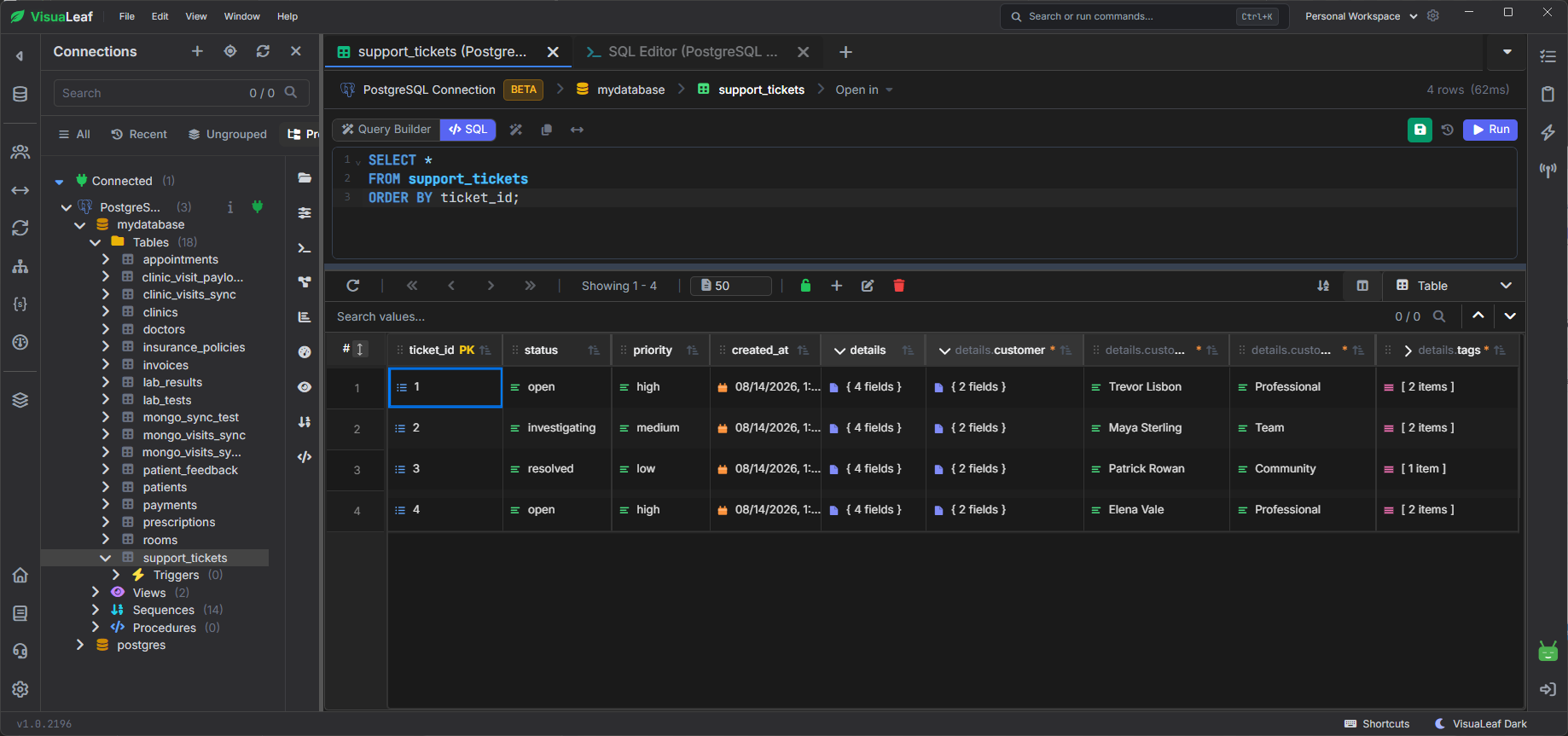
Query nested JSONB values
PostgreSQL provides two operators that look similar but return different data types:
| Operator | Returns | Example |
|---|---|---|
-> |
JSONB | {"name": "Trevor Lisbon", "plan": "Professional"} |
->> |
Text | Professional |
Use -> when you want an object or array to remain JSONB.
Use ->> when you need a scalar value for an ordinary SQL comparison.
This query returns the complete customer object and extracts the plan as text:
SELECT
    ticket_id,
    details -> 'customer' AS customer,
    details -> 'customer' ->> 'plan' AS plan
FROM support_tickets
WHERE ticket_id <= 4
ORDER BY ticket_id;
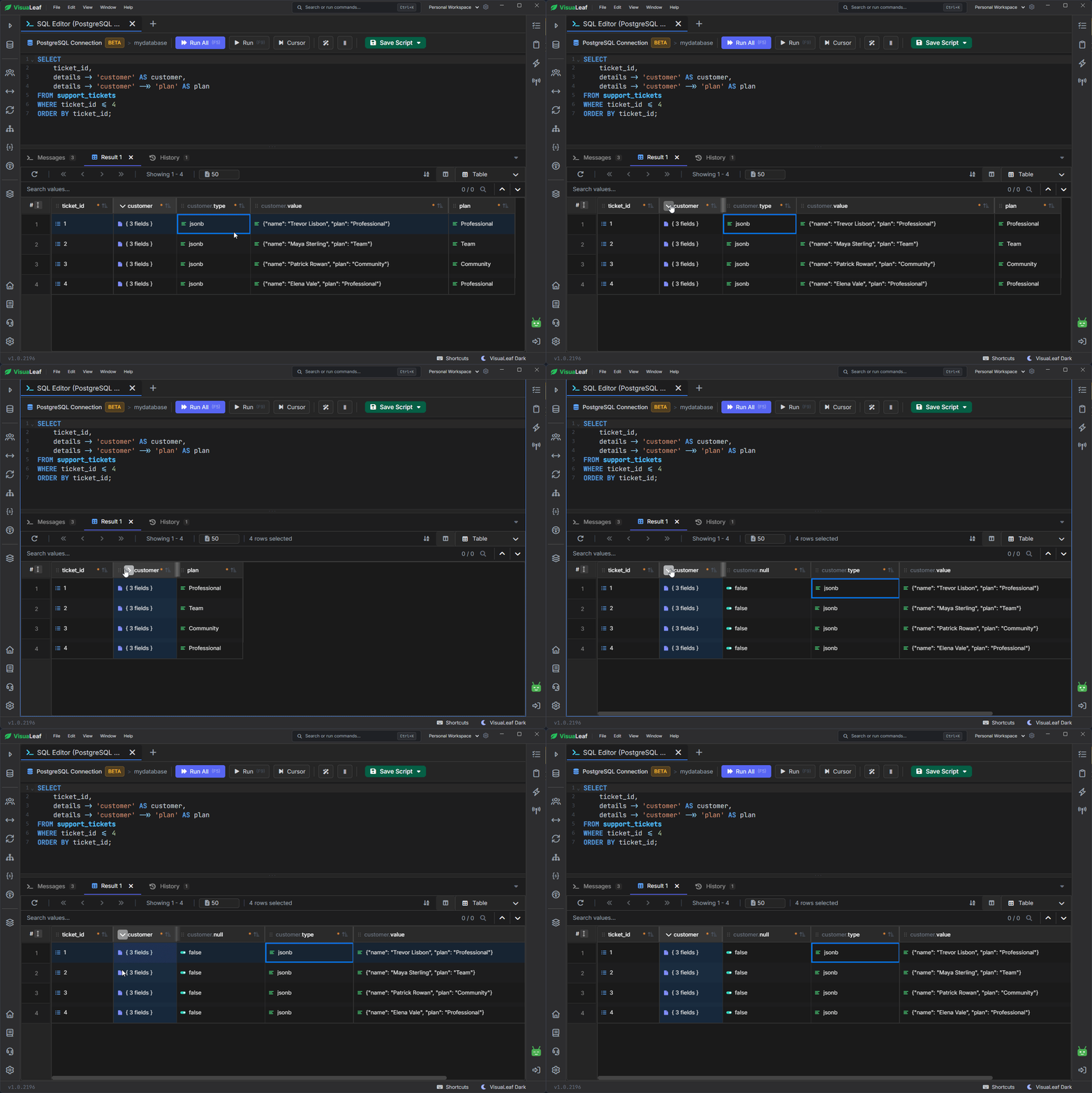
customer JSONB object while plan is returned as text.A common mistake is to use -> for the final value:
WHERE details -> 'customer' -> 'plan' = 'Professional'
The left side is JSONB, while Professional is being treated as a SQL string. PostgreSQL may return:
invalid input syntax for type json
Token "Professional" is invalid.
The clearer fix is:
WHERE details -> 'customer' ->> 'plan' = 'Professional'
To filter by a nested value, use ->> for the final part of the path:
SELECT
    ticket_id,
    status,
    details -> 'customer' ->> 'name' AS customer_name
FROM support_tickets
WHERE details -> 'error' ->> 'code' = 'SYNC_TIMEOUT';
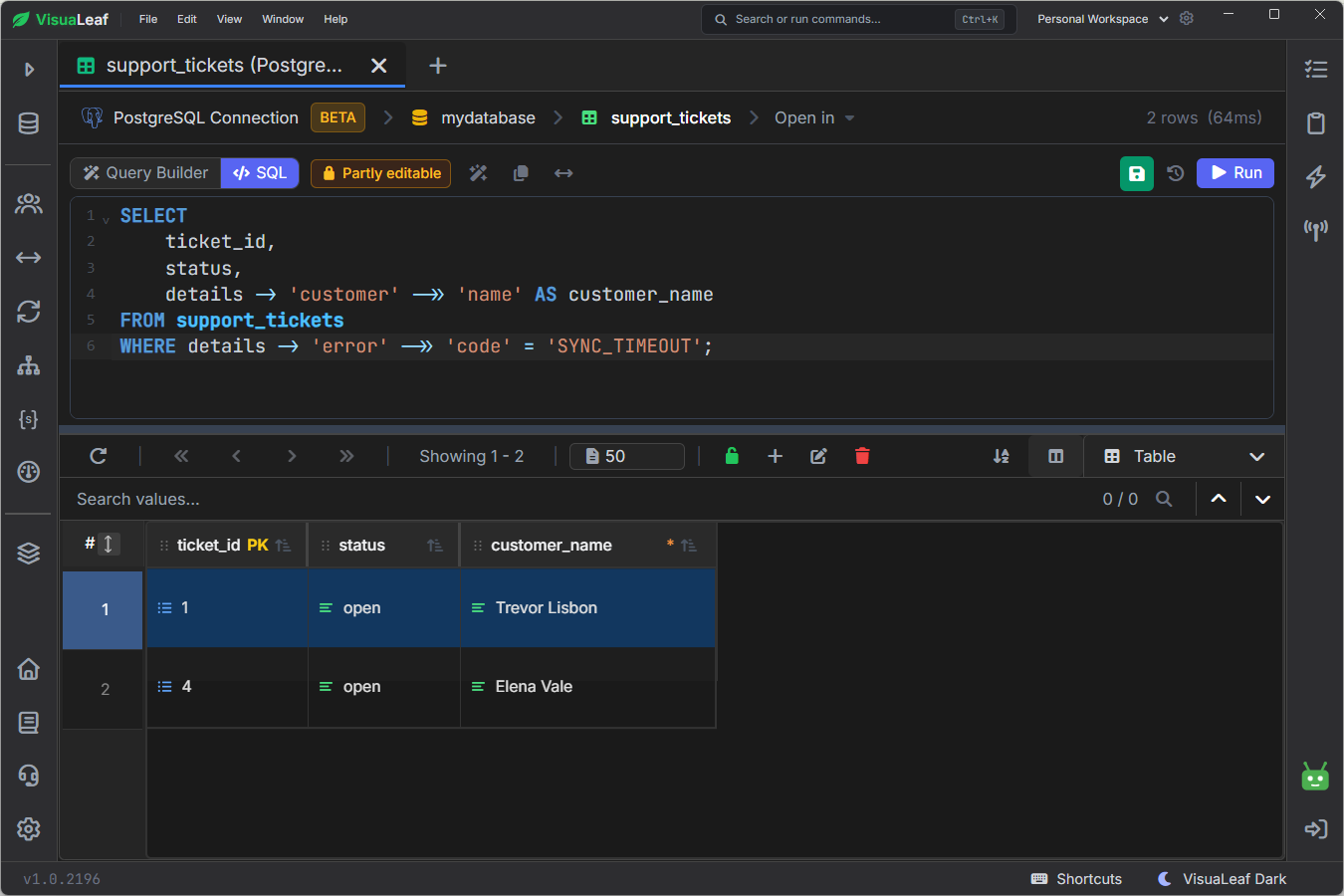
If a row has no error object, PostgreSQL returns SQL NULL for that expression. It does not fail.
Search inside a JSONB array
You can search the tags array with the ? operator:
SELECT ticket_id, status, details -> 'tags' AS tags
FROM support_tickets
WHERE details -> 'tags' ? 'postgresql';
This assumes that tags contains an array of strings. If some rows store "tags": "postgresql" instead, the data is valid JSONB but has the wrong shape for this query.
Match part of a document with @>
The containment operator checks whether one JSONB value contains another:
SELECT ticket_id, status, details -> 'error' AS error
FROM support_tickets
WHERE details @> '{
  "error": {
    "code": "SYNC_TIMEOUT"
  }
}'::jsonb;
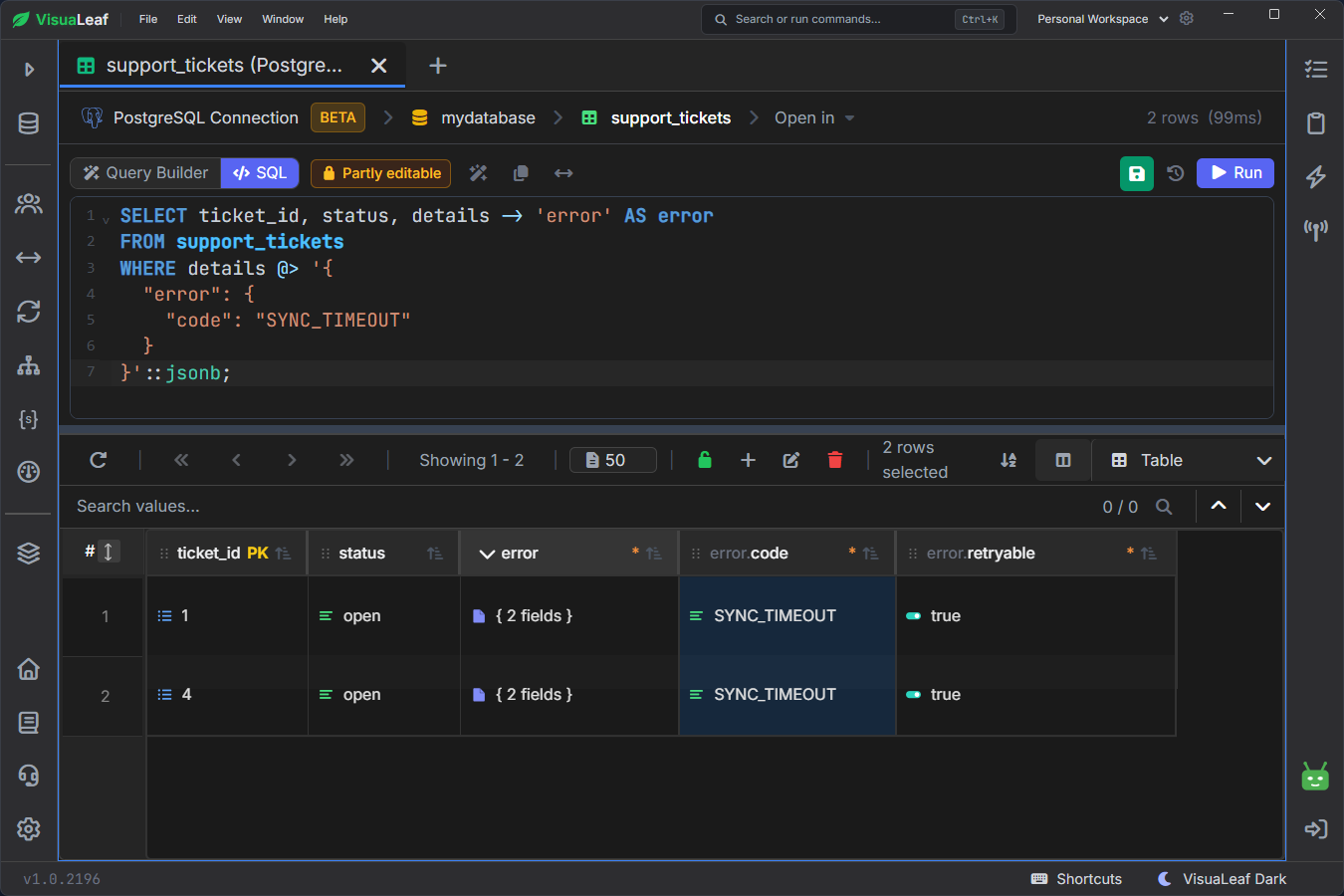
@> to find tickets containing the SYNC_TIMEOUT error object.The structure must match the document. This does not work:
WHERE details @> '{"code": "SYNC_TIMEOUT"}'::jsonb
code is nested under error; it is not a top-level key. This matters when you add a GIN index, because containment queries can use that index directly.
Update a nested value with jsonb_set
Ticket 1 was reproduced in version 4.8.4. Instead of replacing the entire details document, I updated only environment.appVersion:
UPDATE support_tickets
SET details = jsonb_set(
    details,
    '{environment,appVersion}',
    to_jsonb('4.8.4'::text),
    false
)
WHERE ticket_id = 1
RETURNING
    ticket_id,
    details -> 'environment' AS environment;
The result shows appVersion as 4.8.4, while browser and os remain unchanged.
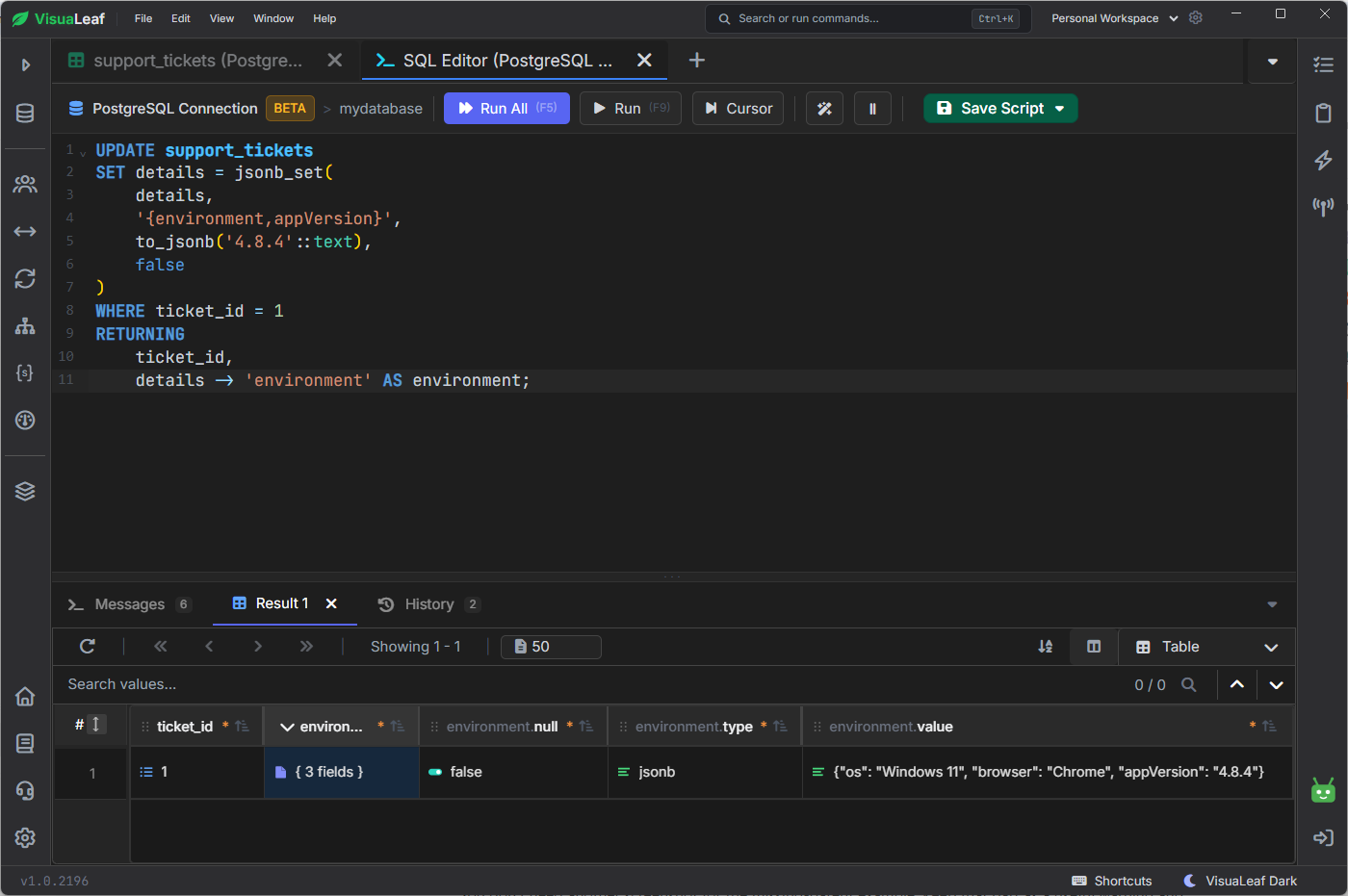
environment.appVersion while preserving the other JSONB fields.The final false means the key must already exist. The ::text cast is also important; without it, PostgreSQL may not know which type to convert:
could not determine polymorphic type because input has type unknown
When the parent object is missing
jsonb_set can create the final key, but not a missing parent object. Ticket 3 has no error object, so updating error.firstSeenAt would run without an error but change nothing.
This version creates the parent when needed:
UPDATE support_tickets
SET details = jsonb_set(
    details,
    '{error}',
    COALESCE(details -> 'error', '{}'::jsonb)
        || jsonb_build_object(
            'firstSeenAt',
            '2026-08-03T11:05:00Z'
        ),
    true
)
WHERE ticket_id = 3
RETURNING details -> 'error' AS error;
RETURNING lets you confirm that the field was actually added.
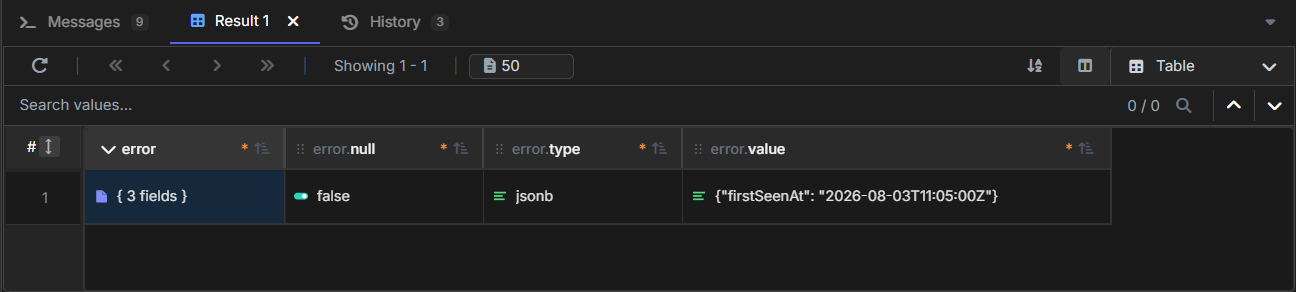
error object.Add a GIN index for containment searches
For the indexing test, I added 40,000 generated tickets. The table contained 40,004 rows in total, while the original four remained available for the earlier examples.
Because the query uses @> against details, I created a containment-focused GIN index:
CREATE INDEX idx_support_tickets_details_gin
ON support_tickets
USING GIN (details jsonb_path_ops);

ANALYZE support_tickets;
jsonb_path_ops works well for containment searches, but it does not support every JSONB operator. For example, it cannot support the ? operator used in the tags query.
I then opened the same query in VisuaLeaf’s Explain view:
SELECT ticket_id
FROM support_tickets
WHERE details @> '{
  "error": {
    "code": "SYNC_TIMEOUT"
  }
}'::jsonb;
PostgreSQL found 402 matching tickets and used idx_support_tickets_details_gin through a Bitmap Index Scan.
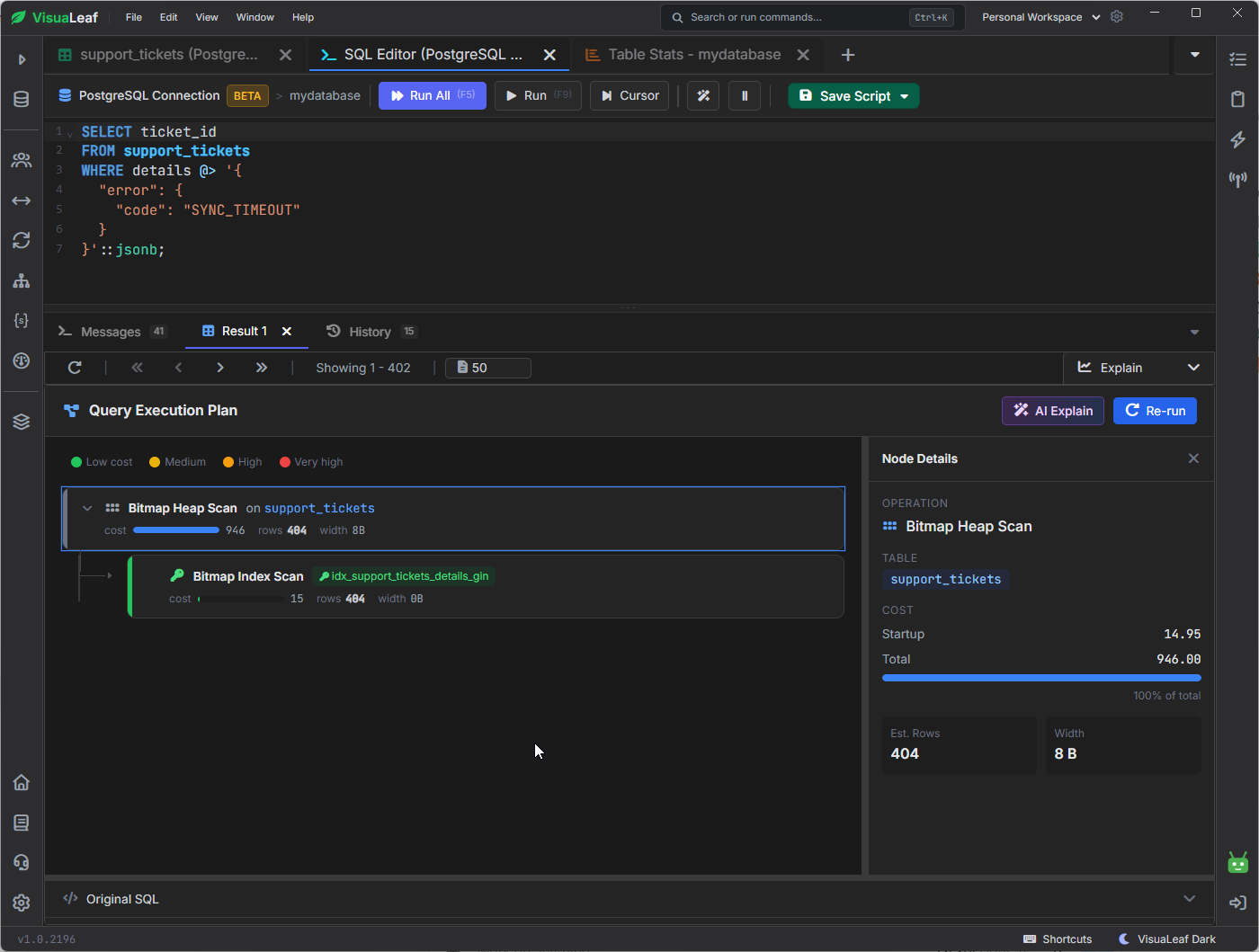
The index worked for this query and dataset. PostgreSQL may still choose a sequential scan for a small table or when many rows match.
When to use JSONB
JSONB is useful for flexible data, but stable fields usually belong in regular columns.
| Use JSONB when... | Use regular columns or tables when... |
|---|---|
| fields vary between records | the structure is stable |
| you store nested objects or arrays | you need strict data types |
| some fields are optional | you need foreign keys or unique constraints |
| the data is rarely joined | you filter, sort, or join it frequently |
In this example, environment and error fit inside JSONB. Fields such as status, priority, and created_at are better as regular columns.
I ran these examples in VisuaLeaf, using its SQL editor, nested JSONB table view, and visual query plan to inspect the results.