ER Diagram vs Database Schema: What’s the Difference?
ER diagrams and database schemas can look alike, but they do different jobs. Learn the difference through a simple clinic example, from design to working database tables.


An ER diagram and a database schema can look like the same thing at first. They are related, but they are used at different moments: first, you plan how the data should connect; then you create the real tables, columns, keys, and rules in the database.
Think of a clinic named HyperClinic. This clinic needs to store patients, doctors, specializations, and appointments.
A quick way to do this is to store everything in one table, called appointments:
| appointment_id | patient_name | patient_phone | doctor_name | specialization | appointment_time |
|---|---|---|---|---|---|
| 16 | Marit Solheim | 555-0147 | Owen Wilson | Cardiology | 2026-10-20 10:00 |
This approach works for one row, but it causes problems when you add another appointment for Marit, change Dr. Wilson's specialization, or have two patients with the same name.
The patient information is repeated. The doctor information is repeated. A typo can lead to inconsistency. And nothing prevents creating an appointment for a doctor who does not exist.
To avoid these problems, the team needs to plan the database before creating tables.
ER Diagram vs Database Schema: A Quick Comparison
The key difference is not the shape of the boxes and arrows. It is the stage of development.
| Stage | Key question | Objects defined | What the diagram shows |
|---|---|---|---|
| Conceptual ER diagram | What does the company need to store? | Entities and relationships | Boxes and lines, no fields |
| Logical data model | How should the data be structured? | Attributes, keys, normalized relationships | Fields with key icons and relationship lines, no data types |
| Physical database schema | How will PostgreSQL implement it? | Tables, columns, data types, constraints, indexes, and DDL statements | Fields with data types |
A schema diagram is a graphic representation of the database schema. Such diagrams are also referred to as physical ER diagrams.
A database schema is the actual structure stored in PostgreSQL and comprises objects such as tables, columns, primary and foreign keys, constraints, and indexes.
Thus, this is not a binary choice. A database design is typically developed from an ER diagram through the logical data model to the database schema.
In this article, we will build HyperClinic in the same order: Step 1 is the conceptual ER diagram, Steps 2 to 4 build the logical model, and Step 5 creates the physical PostgreSQL schema.
Start with the requirements
Nobody will start writing CREATE TABLE before the team figures out the task.
In our case, HyperClinic must be able to:
- save patient information
- save doctors and their specializations
- create appointments
- show which patient sees which doctor
- ensure appointments refer to existing patients and doctors
The job names depend on the company. Requirements may be gathered by a business analyst and designed by a database architect, data modeler, backend developer, or DBA. In a small company, one person may do several of these jobs.
What is important is the workflow, not the name.
The team should ask itself such questions as:
- Is it possible for one patient to have several appointments?
- Is it possible for one doctor to have many patients?
- Do all doctors have only one specialization?
- Is it possible to create an appointment without a doctor?
- Is it possible to create two appointments with the same doctor for the same time?
These are the business rules that PostgreSQL won't be able to guess.
Step 1: Create the Conceptual ER Diagram
Before deciding on columns, data types, or SQL, first identify what HyperClinic needs to store:
- Patient
- Doctor
- Appointment
- Specialization
An entity is simply something the system needs to store.
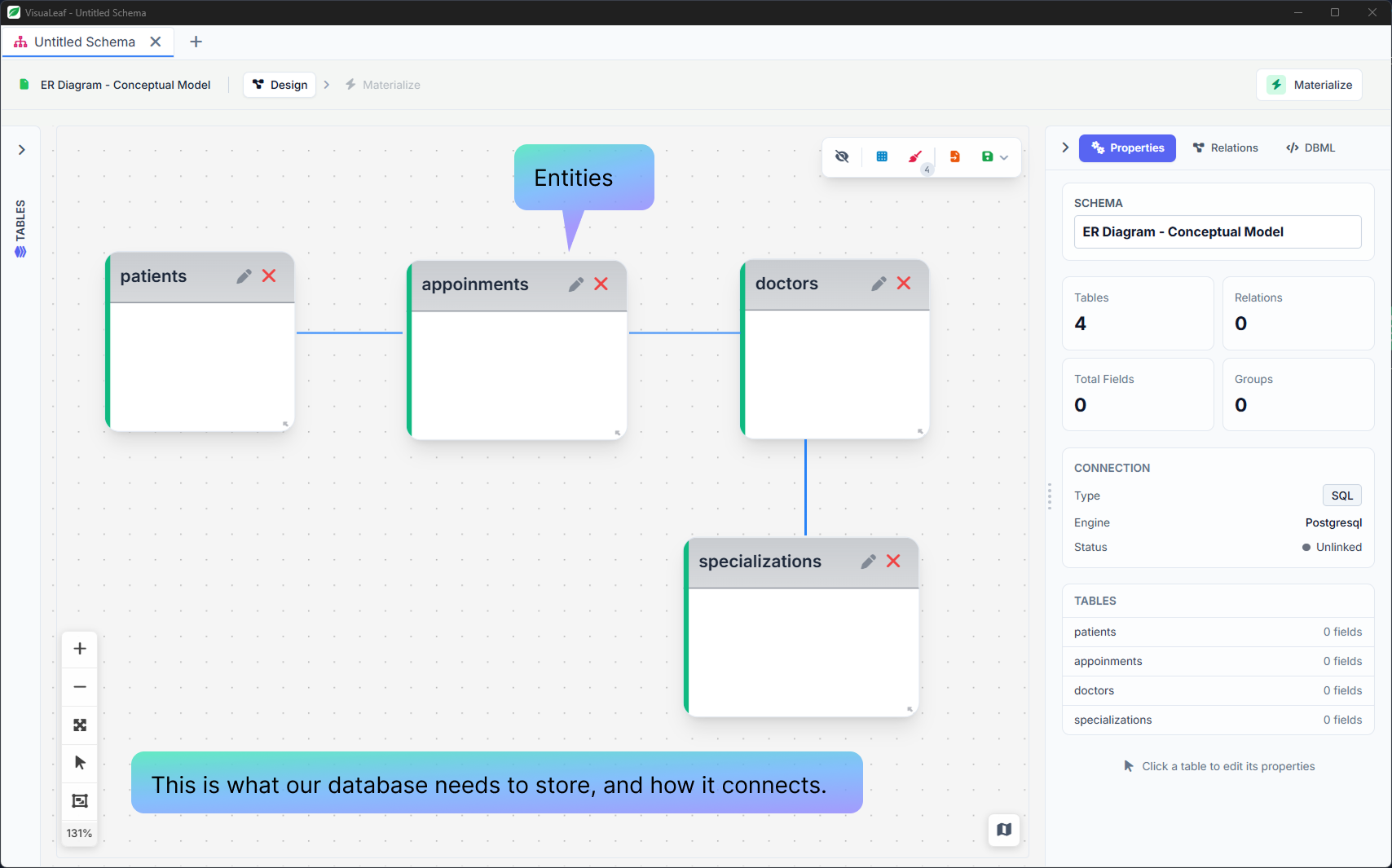
This is a conceptual ER diagram. It helps the team see the big picture without getting into implementation details. The boxes show the entities. The lines show their relationships. There are no columns, primary keys, foreign keys, or PostgreSQL data types yet.
The relationships are:
- A patient has many appointments.
- A doctor has many appointments.
- An appointment is made by one patient and one doctor.
- A specialization has many doctors.
- Each doctor has one specialization.
Step 2: Add Attributes and Primary Keys
This is the point where the model becomes logical.
The conceptual diagram tells us that HyperClinic has patients, doctors, appointments, and specializations. The logical model answers the next question: what information belongs to each one?
You now add attributes, choose identifiers, and organize the data so the same fact is not stored in several places. You are still designing the structure. You are not choosing PostgreSQL types such as VARCHAR(100) or TIMESTAMP yet.
Think of it like planning a house:
- the conceptual diagram says the house needs a kitchen, bedrooms, and a bathroom;
- the logical model decides what belongs in each room;
- the physical schema gives the builder the exact materials and measurements.
The logical model takes three steps: attributes and primary keys (this step), normalization (Step 3), and foreign keys (Step 4).
Start with the attributes. For each entity, write down what the system needs to know about it:
| Entity | Attributes |
|---|---|
| Patient | first name, last name, date of birth, phone |
| Doctor | first name, last name, specialization |
| Specialization | name |
| Appointment | patient, doctor, date and time, reason, status |
Then give every entity a primary key. A primary key is a column, or a set of columns, that uniquely identifies a row.
For instance, patient_id = 1 must identify only one patient. A name cannot be used as a primary key, as patients can have the same name and names change over time.
The same holds for doctors, specializations, and appointments: doctor_id, specialization_id, and appointment_id.
Step 3: Normalize the Logical Model
Normalization means organizing data so each fact is stored in the right place, instead of being repeated in several places.
You do not finish the ER diagram and normalize it later as a separate task. Usually, you draw the entities, test the structure, notice repeated data, and improve the model.
The examples below start from a flat table. The services are only for illustration: the final HyperClinic model does not include them.
First Normal Form: One Value per Field
First normal form, or 1NF, means that one field should contain one value, not a list.
× Not in 1NF:
| appointment_id | patient_name | doctor_name | services | appointment_at |
|---|---|---|---|---|
| 16 | Marit Solheim | Owen Wilson | Consultation, ECG | 2026-10-20 10:00 |
The services field contains two values. This makes the data harder to filter, validate, or update.
✓ In 1NF:
| appointment_id | patient_name | doctor_name | service | appointment_at |
|---|---|---|---|---|
| 16 | Marit Solheim | Owen Wilson | Consultation | 2026-10-20 10:00 |
| 16 | Marit Solheim | Owen Wilson | ECG | 2026-10-20 10:00 |
Each row now contains one service. However, the appointment, patient, and doctor information is repeated. The next step fixes that.
Second Normal Form: Each Field Depends on the Whole Key
Second normal form, or 2NF, applies when a table uses a combined key.
Here, one appointment can have more than one service. The combination of appointment_id and service identifies one row.
× Not in 2NF:
| appointment_id | service | patient_name | doctor_name | appointment_at |
|---|---|---|---|---|
| 16 | Consultation | Marit Solheim | Owen Wilson | 2026-10-20 10:00 |
| 16 | ECG | Marit Solheim | Owen Wilson | 2026-10-20 10:00 |
The patient_name, doctor_name, and appointment_at values depend only on appointment_id. They do not depend on the full combination of appointment_id and service, so they are repeated.
✓ In 2NF:
appointments
| appointment_id | patient_name | doctor_name | appointment_at |
|---|---|---|---|
| 16 | Marit Solheim | Owen Wilson | 2026-10-20 10:00 |
appointment_services
| appointment_id | service |
|---|---|
| 16 | Consultation |
| 16 | ECG |
Now the appointment information is stored once. The appointment_services table only stores the services linked to that appointment. The patient and doctor names are still text here. Step 4 replaces them with IDs.
Third Normal Form: Do Not Repeat Details That Belong Elsewhere
Third normal form, or 3NF, removes indirect repetition.
× Not in 3NF:
| doctor_id | first_name | last_name | specialization_id | specialization_name |
|---|---|---|---|---|
| 1 | Owen | Wilson | 1 | Cardiology |
| 6 | Odile | Marchetti | 1 | Cardiology |
The specialization name depends on specialization_id, not on the doctor. Storing it in doctors means it will be repeated for every cardiologist.
✓ In 3NF:
doctors
| doctor_id | first_name | last_name | specialization_id |
|---|---|---|---|
| 1 | Owen | Wilson | 1 |
| 6 | Odile | Marchetti | 1 |
specializations
| specialization_id | specialization_name |
|---|---|
| 1 | Cardiology |
Now Cardiology is stored once. If the clinic changes its name, the team updates one row in specializations, not every doctor.
After normalization, each table holds only its own facts:
| Table | Example Columns |
|---|---|
patients |
patient_id, first_name, last_name, date_of_birth, phone |
doctors |
doctor_id, first_name, last_name |
specializations |
specialization_id, specialization_name |
appointments |
appointment_id, appointment_at, reason, status |
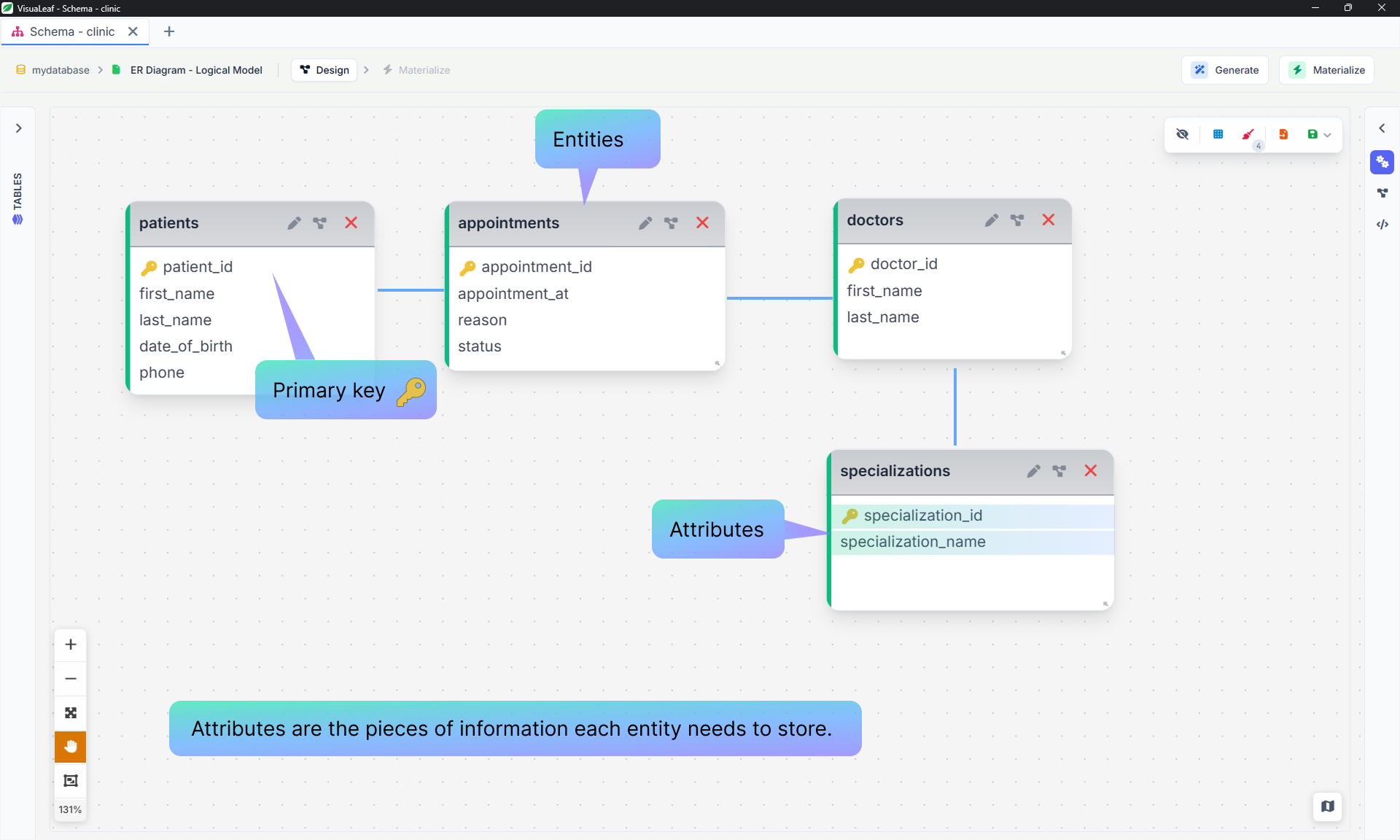
The lines show which tables are related, but the link columns, such as specialization_id in doctors, are not here yet. They come in the next step.
Step 4: Link Related Tables with Foreign Keys
To connect two tables, you add a column to one of them. That column is a foreign key: it stores the ID of a row in the other table. This is how the relationship is implemented in the database.
An appointment should not store redundant information like a patient's name, phone, and date of birth.
Instead, it stores the ID of the linked patient:
appointment_id: 16
patient_id: 1
doctor_id: 1
The field appointments.patient_id is a foreign key that references patients.patient_id.
The field appointments.doctor_id links to doctors.doctor_id.
The field doctors.specialization_id links to specializations.specialization_id.
A foreign key performs two functions:
- It describes the relationship between tables.
- It prevents invalid references.
Without a foreign key, you can insert an appointment with patient_id = 9999, even if patient 9999 does not exist.
If there is a foreign key, PostgreSQL rejects this record.
A column named patient_id alone does not create a foreign key. The REFERENCES constraint creates it.
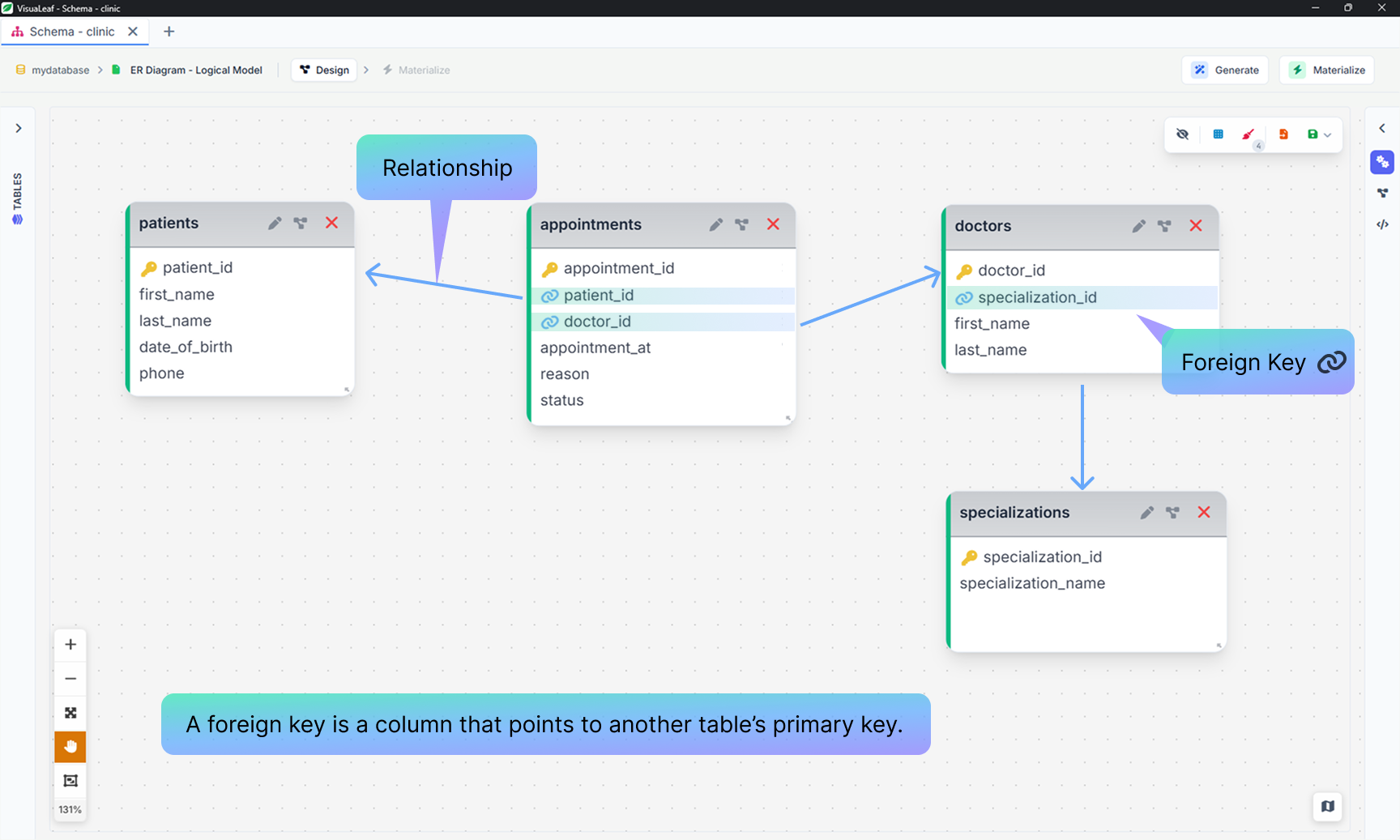
The diagram now shows the foreign key columns, marked with a link icon, and an arrow for each relationship. There are still no data types. Types depend on the database engine, so they come in the physical stage.
Step 5: Define the Physical PostgreSQL Model
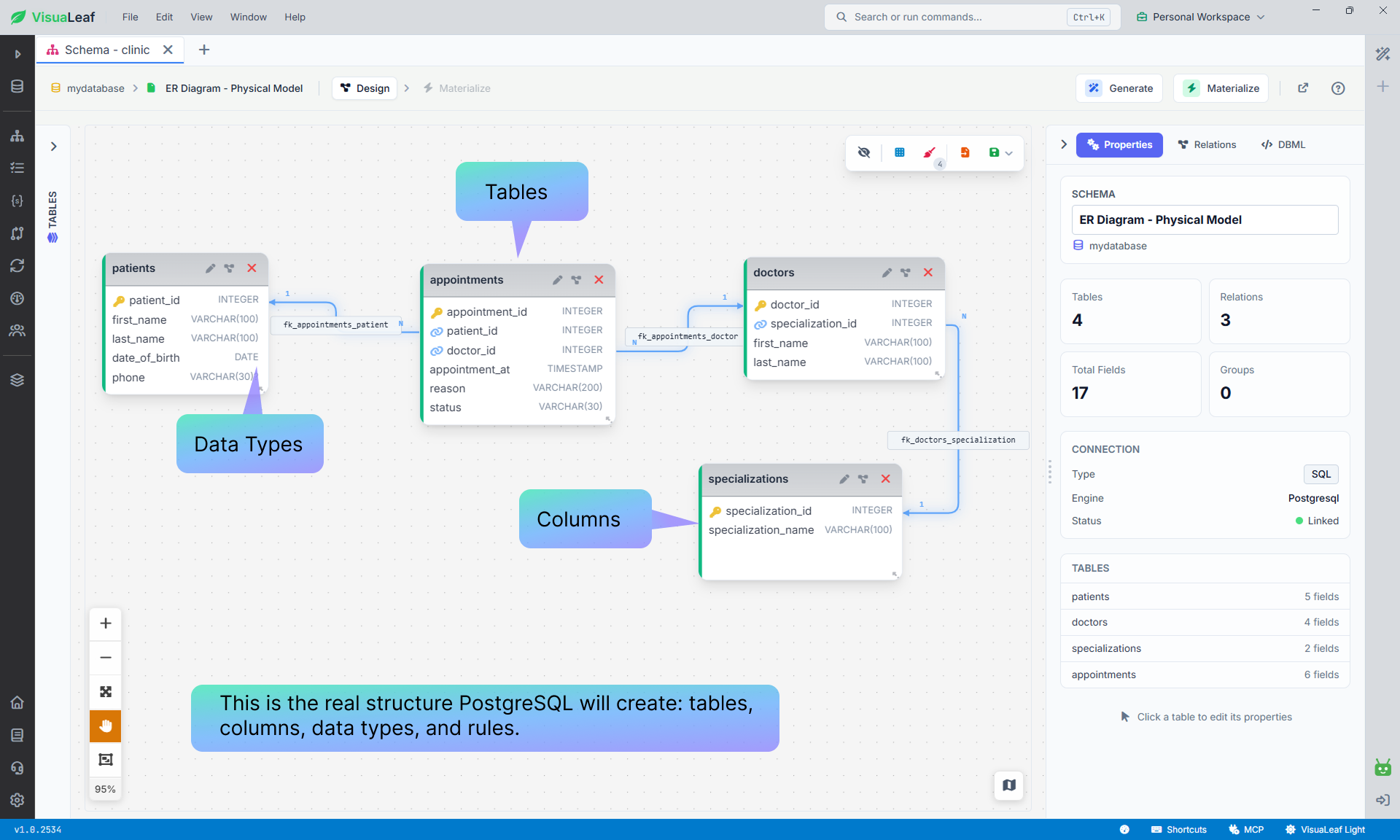
The physical model describes the PostgreSQL tables, columns, data types, and rules that you want to create.
In this example, INT is used for IDs (the diagram shows it as INTEGER, which is the same type), VARCHAR for text, DATE for a date, and TIMESTAMP for a date and time.
Create the Database Schema
The physical model is ready. Now you need to create it on the PostgreSQL server.
You can do this in either of two ways:
- Run the
CREATE SCHEMAandCREATE TABLEstatements in the SQL Editor.
The following statements are DDL, short for Data Definition Language. DDL is the SQL used to create the database structure.
CREATE SCHEMA clinic;

CREATE TABLE clinic.specializations (
  specialization_id INT GENERATED ALWAYS AS IDENTITY PRIMARY KEY,
  specialization_name VARCHAR(100) NOT NULL UNIQUE
);

CREATE TABLE clinic.doctors (
  doctor_id INT GENERATED ALWAYS AS IDENTITY PRIMARY KEY,
  specialization_id INT NOT NULL
    REFERENCES clinic.specializations(specialization_id),
  first_name VARCHAR(100) NOT NULL,
  last_name VARCHAR(100) NOT NULL
);

CREATE TABLE clinic.patients (
  patient_id INT GENERATED ALWAYS AS IDENTITY PRIMARY KEY,
  first_name VARCHAR(100) NOT NULL,
  last_name VARCHAR(100) NOT NULL,
  date_of_birth DATE NOT NULL,
  phone VARCHAR(30)
);

CREATE TABLE clinic.appointments (
  appointment_id INT GENERATED ALWAYS AS IDENTITY PRIMARY KEY,
  patient_id INT NOT NULL
    REFERENCES clinic.patients(patient_id),
  doctor_id INT NOT NULL
    REFERENCES clinic.doctors(doctor_id),
  appointment_at TIMESTAMP NOT NULL,
  reason VARCHAR(200) NOT NULL,
  status VARCHAR(30) NOT NULL DEFAULT 'scheduled',
  CONSTRAINT appointments_status_check
    CHECK (status IN ('scheduled', 'completed', 'cancelled'))
);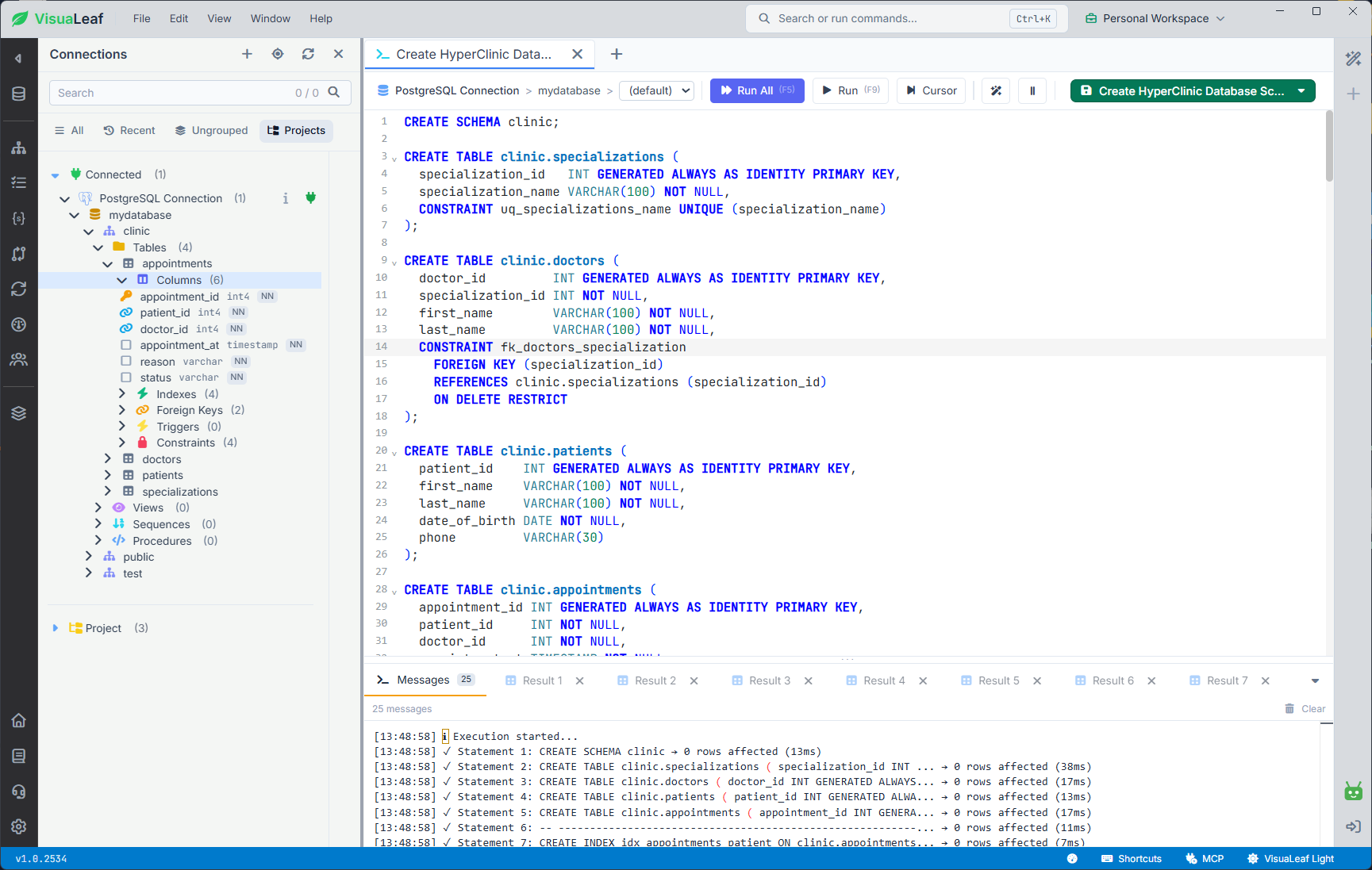
CREATE TABLE statements in SQL Editor. After they succeed, the new clinic schema appears in Schema Manager.- You can also use Materialize instead of running the SQL yourself. Starting with an empty database, VisuaLeaf creates the
clinicschema and its tables directly from the physical model.
Materialize can also apply later changes. In this example, the four original clinic tables already exist, so they are marked as up to date while the new lab_results table is created.
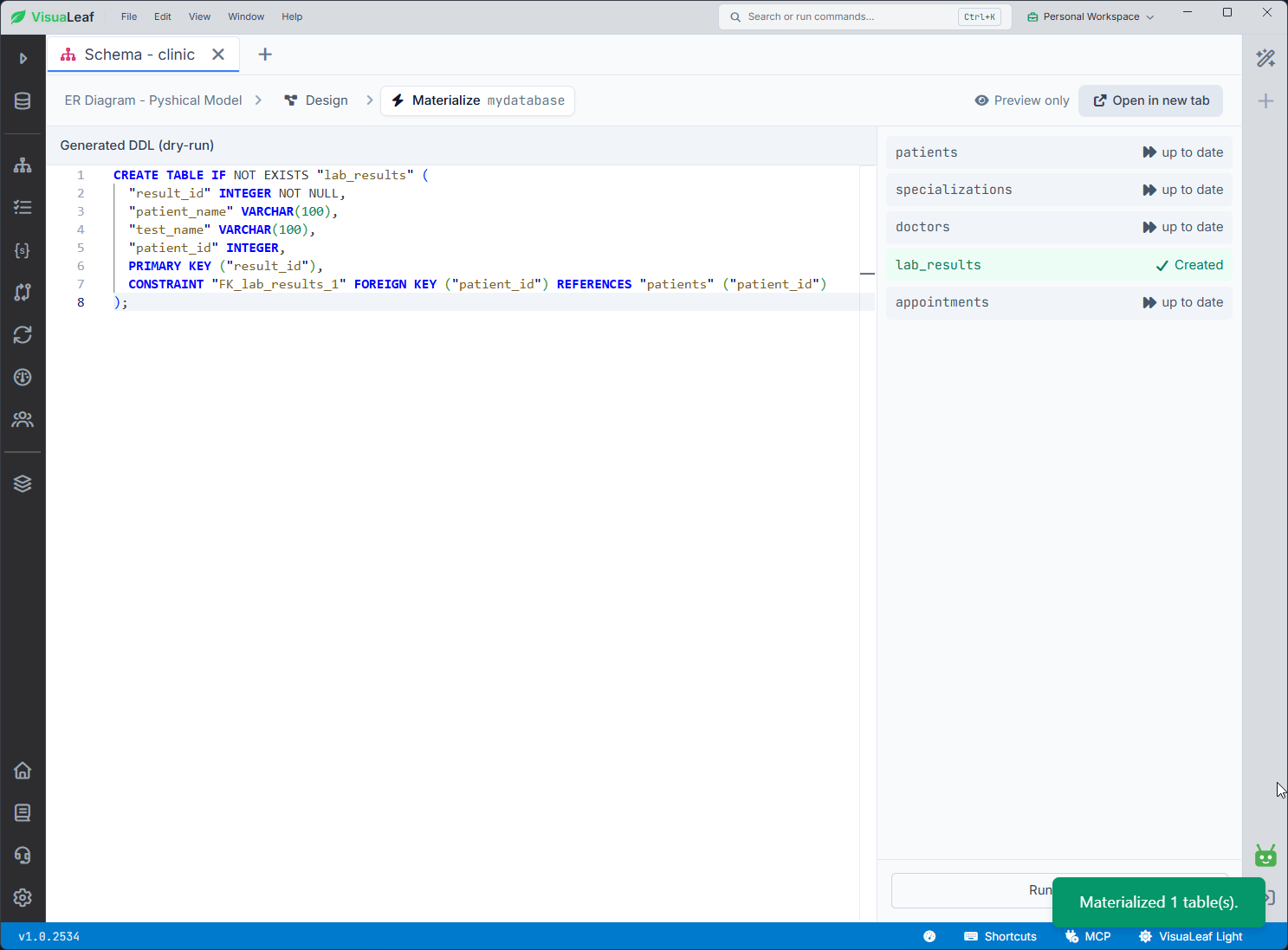
lab_results is created in the connected database.Use one method to create the original schema. If you run the same CREATE TABLE statements after the tables already exist, PostgreSQL returns an “already exists” error.
Step 6: View the Created Database Schema
After either option succeeds, open Schema Manager and select the clinic schema.
You can now see the patients, appointments, doctors, and specializations tables on the PostgreSQL server. This is the implemented database schema: it is no longer only a model or a plan.
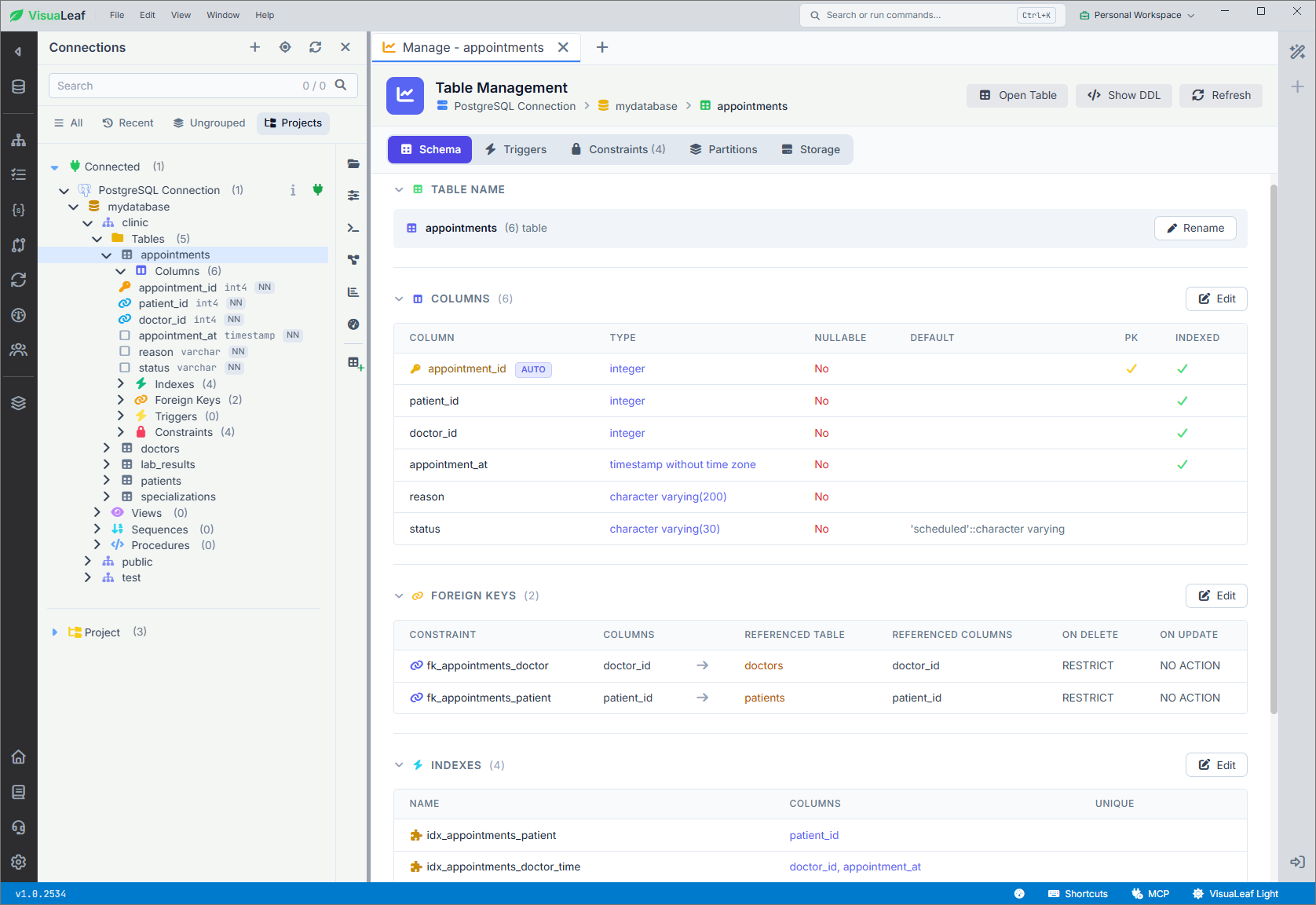
appointments table inside the clinic schema, showing its columns, data types, primary key, and foreign-key relationships.This schema contains several constraints:
NOT NULLrequires a value.PRIMARY KEYmakes each ID unique.REFERENCEScreates foreign-key relationships.UNIQUEprevents duplicate specialization names.DEFAULT 'scheduled'gives new appointments an initial status.CHECKprevents unsupported status values.
For example, PostgreSQL will reject this appointment if patient 9999 does not exist:
INSERT INTO clinic.appointments (
  patient_id,
  doctor_id,
  appointment_at,
  reason
)
VALUES (
  9999,
  3,
  '2026-11-20 10:00',
  'Annual check-up'
);
PostgreSQL returns an error like this:
ERROR:  insert or update on table "appointments" violates foreign key constraint "appointments_patient_id_fkey"
DETAIL:  Key (patient_id)=(9999) is not present in table "patients".
This is the difference between drawing a relationship in a diagram and enforcing it in the database.
ER Diagram vs Database Schema: The Difference
The conceptual, logical, and physical models are the steps between the first idea and the finished database.
| ER diagram | Database schema | |
|---|---|---|
| Main job | Plans what data the system needs and how it connects | Stores the real database structure |
| Includes | Entities, attributes, and relationships | Tables, columns, data types, keys, constraints, and indexes |
| In this example | The HyperClinic models before materialization | The clinic schema after the SQL is run or the model is materialized |
| Where you see it | In the diagram designer | In PostgreSQL and Schema Manager |
An ER diagram helps the team decide what to build. The database schema is the structure PostgreSQL creates from that plan.
If you want to move faster, download the hyperclinic.sql file, open it in SQL Editor, and run it to create the sample schema and data. Then open the `clinic` schema in Visual Designer to view the tables and relationships as a diagram.
Frequently Asked Questions
Is an ER diagram the same as a database schema?
No. An ER diagram is a visual model of the data and its relationships. A database schema is the real structure created in the database: tables, columns, data types, keys, and constraints.
Can you create a database from an ER diagram?
Yes. First, turn the diagram into a physical model with tables, columns, data types, and keys. Then run the generated DDL or use Materialize to create the schema in PostgreSQL.
Does an ER diagram need data types?
A conceptual ER diagram does not. It only shows the main entities and relationships. Data types become important in the physical model, where you decide how PostgreSQL should store each value.
Why do foreign keys matter?
A foreign key prevents relationships that do not make sense. For example, it stops you from creating an appointment for a patient or doctor that does not exist.
What is the difference between a primary key and a foreign key?
A primary key uniquely identifies a row in its own table.
A foreign key stores a value that refers to a primary key in another table.
For example, patients.patient_id is a primary key. appointments.patient_id is a foreign key that refers to it.
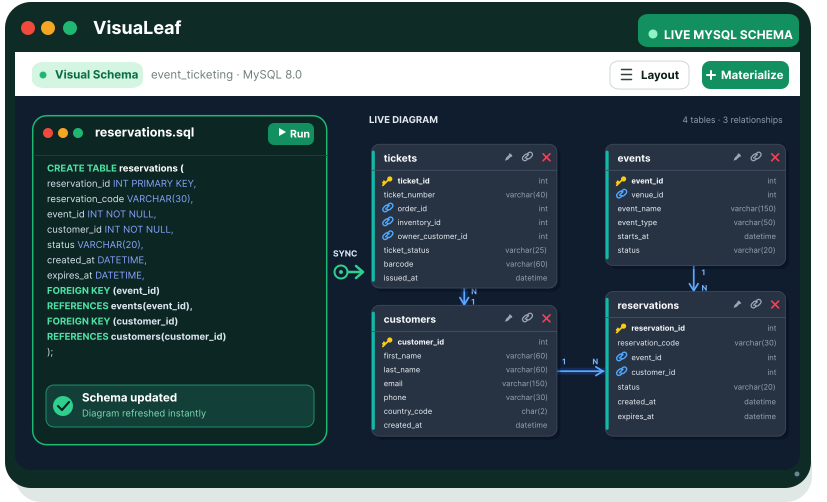
To try this yourself, download VisuaLeaf for free and build the HyperClinic database from the first ER diagram through to the final SQL schema.