How to connect to MongoDB from the command line
Connect to MongoDB from the terminal with mongosh: connection strings, auth, Docker, and scripting with --eval, --file and --json without the usual traps.
Quick Answer
Run mongosh with a connection string. With no arguments it connects to localhost:27017:
mongosh                                             # localhost:27017, database "test"
mongosh "mongodb://localhost:27017/shop"            # a specific database
mongosh "mongodb://app@db.example.com:27017/shop?authSource=admin"   # prompts for the password
mongosh "mongodb+srv://app@cluster0.abcde.mongodb.net/shop"          # Atlas
Leave the password out of the string and mongosh asks for it, so it doesn't end up in your shell history.
Connection string or flags
Everything can go in one URI, or you can use separate flags. These two connect the same way:
mongosh "mongodb://app@db.example.com:27017/shop?authSource=admin"
mongosh --host db.example.com --port 27017 -u app --authenticationDatabase admin shop| Flag | URI equivalent | Notes |
|---|---|---|
--host h --port p | mongodb://h:p | mongosh turns these into a URI with directConnection=true added |
-u / --username | app@ | Omit -p to be prompted |
--authenticationDatabase admin | ?authSource=admin | The database the user was created in |
--tls | ?tls=true | Atlas and +srv strings turn this on for you |
| database name (last argument) | /shop | Also becomes the default authSource, see below |
Inside the shell, db.getMongo()._uri prints the exact connection string mongosh built, which is the quickest way to check what your flags turned into.
In VisuaLeaf
Save the connection once in VisuaLeaf
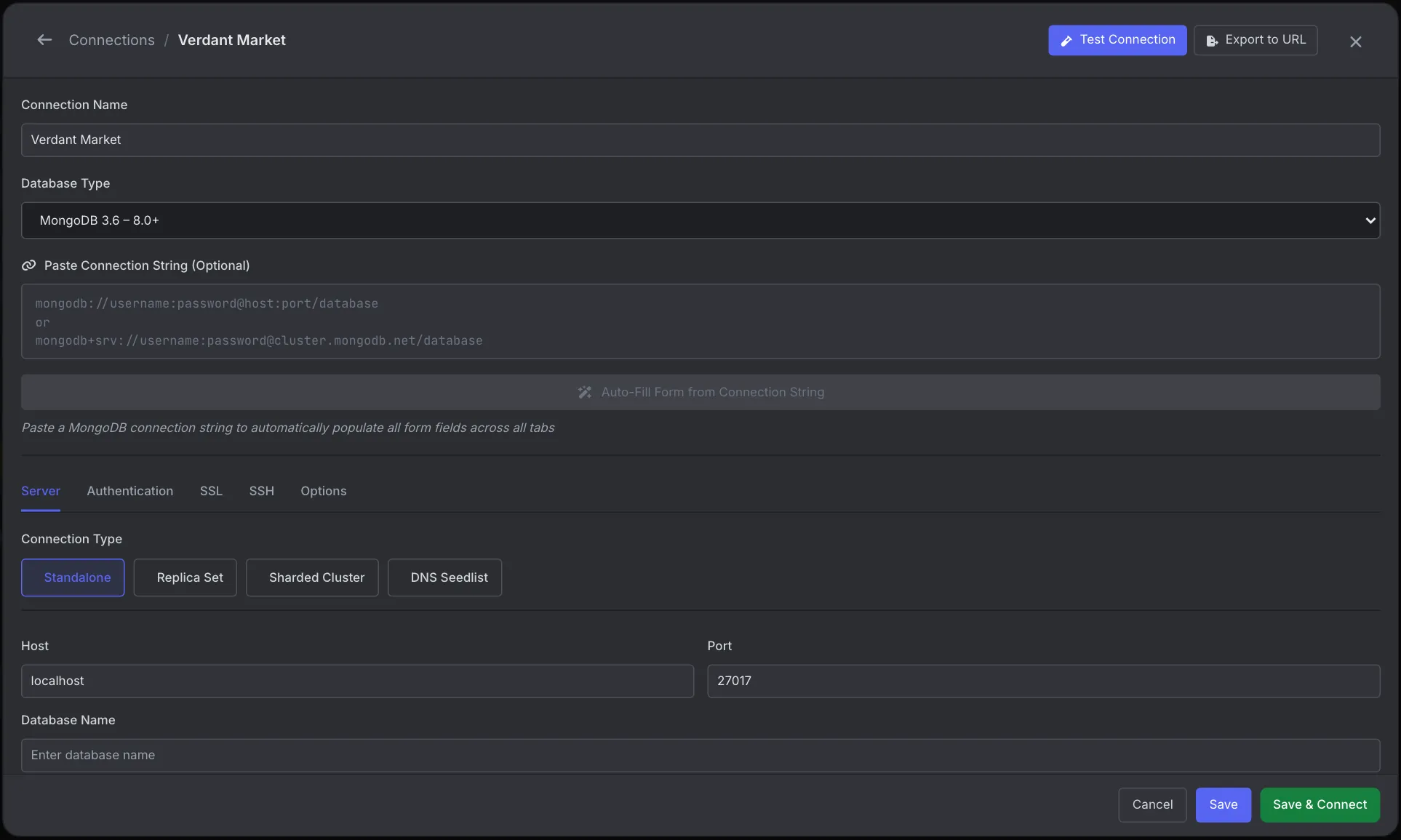
If you keep retyping the same URI, save it as a connection instead. In VisuaLeaf's Connection Manager, click New Connection, paste your mongodb:// or mongodb+srv:// string into Paste Connection String and click Auto-Fill. It fills the Server, Authentication, SSL, SSH and Options tabs from the string.
Test Connection then checks network connectivity, authentication, the TLS handshake and database access step by step. That tells you which part failed, instead of a 30-second wait that ends in a generic timeout. Export to URL turns the saved settings back into a connection string for your scripts.
When you still want a shell, right-click the connection and choose Open MongoDB Shell. Results come back in Tree, Table or BSON view rather than as text. See the Connection Manager docs.
Logging in: authSource is the usual problem
A MongoDB user belongs to one database, usually admin. If you don't say which, mongosh authenticates against the database in the connection string, and you get a bare Authentication failed. that looks exactly like a wrong password.
# fails: authenticates against "shop", but the user lives in "admin"
mongosh "mongodb://app:secret@localhost:27017/shop"

# works
mongosh "mongodb://app:secret@localhost:27017/shop?authSource=admin"
mongosh -u app --authenticationDatabase admin shop
Special characters in a password (@ : / ? # %) must be percent-encoded in a URI, so p@ss becomes p%40ss. Using -u and the password prompt avoids encoding entirely.
For a full diagnosis of login errors, including how to read the server log to tell a wrong password from a wrong authSource, see Authentication failed.
Running commands without opening the shell
For scripts, cron jobs and CI, run a command and exit:
# one expression; its value is printed
mongosh --quiet "mongodb://localhost:27017/shop" --eval 'db.orders.countDocuments()'

# machine-readable output: note the = and the toArray()
mongosh --quiet --json=relaxed "mongodb://localhost:27017/shop" \
  --eval 'db.orders.find({ status: "paid" }).limit(100).toArray()' > paid.json

# a script file
mongosh --quiet "mongodb://localhost:27017/shop" --file report.js

# health check for a shell script
if mongosh --quiet "mongodb://localhost:27017" --eval 'db.adminCommand({ ping: 1 }).ok' >/dev/null 2>&1; then
  echo up
fi
--quiet drops the startup banner. --json=relaxed prints dates as {"$date": ...} and numbers as plain JSON; --json=canonical keeps every type explicit ({"$numberInt": "1"}), which round-trips exactly.
What we found testing this
Every item below was run on MongoDB 7.0 with mongosh 2.9.2. Most of these break scripts silently, which is why they're worth knowing.
--evalon a cursor prints only the first 20 documents. On a 30-document collection,--eval 'db.x.find()'printed 20 results and thenType "it" for more, with exit code 0. Redirected to a file, you lose the rest without any error. Add.toArray(), or raise the limit withconfig.set("displayBatchSize", 1000).--filedoesn't print the last value;--evaldoes. A file ending indb.t.countDocuments()printed nothing for the count. Useprint()orprintjson()in script files.--jsonhas traps.--jsonwithout=swallowed the next argument (the URI) and failed with--json can only have the values relaxed, canonical. And--json=relaxedon a cursor, without.toArray(), dumped aBSONError: Converting circular structure to EJSONstack trace.- Exit codes.
| Situation | Exit code |
|---|---|
| Connection refused (fails in under 1 s) | 1 |
| Wrong password | 1 |
throw in --eval or a --file (the rest of the file doesn't run) | 1 |
| A server error, e.g. an invalid operator | 1 |
quit(3) | 3 |
process.exitCode = 4 | 0: ignored, use quit(n) |
- An unreachable host waits 30 seconds, even with
--host. mongosh addsserverSelectionTimeoutMS=2000to the URI it builds, yet a host that never answers still took 30.97 s, ending inSocket 'connect' timed out after 30000ms (connectTimeoutMS: 30000). For a fast health check, add?connectTimeoutMS=2000&serverSelectionTimeoutMS=2000to the URI: the same unreachable host then failed in 3.7 s. A refused connection fails in about 0.9 s either way. - The database name decides where you authenticate.
mongosh -u root -p ...with no database logged in, because authentication fell back toadmin. The same command withmydbon the end failed withAuthentication failed., because the database name became the authSource. Adding--authenticationDatabase adminfixed it.
Connecting to MongoDB in Docker
# from your machine, through the published port
docker run -d --name mongo -p 27017:27017 mongo:7
mongosh "mongodb://localhost:27017"

# from inside the container (no install needed on your machine)
docker exec -it mongo mongosh

# a container started with MONGO_INITDB_ROOT_USERNAME / _PASSWORD
docker exec -it mongo mongosh -u root -p --authenticationDatabase admin
The official mongo:7 image ships mongosh (2.13 in our test) but not the old mongo shell. If you connect without credentials to a container that has a root user, the connection itself succeeds, and the first command fails with Command listDatabases requires authentication. Connecting isn't the same as logging in.
mongosh vs the old mongo shell
The legacy mongo shell was removed in MongoDB 6.0. Most commands carry over to mongosh; these are the differences that change results:
| Behavior | mongosh |
|---|---|
Whole numbers like 1 | Stored as 32-bit int (we checked with $type). The old shell stored them as double. |
DBQuery.shellBatchSize | Still works but prints a deprecation warning. Use config.set("displayBatchSize", n). |
| Startup script | ~/.mongoshrc.js (not .mongorc.js). In our test it wasn't loaded for --eval runs. --norc skips it explicitly. |
| Output formatting | Types print as ISODate('...'), Long('5'). Use --json for anything a program will parse. |
Frequently Asked Questions
How do I connect to MongoDB from the command line?
Install mongosh and run mongosh "mongodb://host:27017/dbname". With no arguments it connects to localhost:27017. Add -u username and it prompts for the password.
Why does mongosh say Authentication failed when the password is right?
Usually the authSource. Users are normally created in admin, so add ?authSource=admin to the URI or --authenticationDatabase admin to the command.
How do I run a MongoDB query from a bash script?
Use mongosh --quiet --eval with the connection string. Add .toArray() to find() so you get every result, not just the first 20, and --json=relaxed if another program parses the output. Use quit(n) to set the exit code.
Is the mongo command still available?
No. The legacy mongo shell was removed in MongoDB 6.0 and is not in the official Docker images. Use mongosh.
How do I connect to MongoDB Atlas from the terminal?
Copy the mongodb+srv:// connection string from the Atlas Connect dialog and run mongosh with it. Your IP must be on the cluster's access list, or the connection times out.