Fix "MongoServerSelectionError: Server selection timed out after 30000 ms"
Why MongoDB drivers hit a server selection timeout: the Atlas IP access list, firewalls, replica set hostnames or TLS settings, and how to tell which.
Quick Answer
The driver spent 30 seconds looking for a server it could use and found none. With Atlas, the usual cause is that your current IP address isn't on the cluster's IP Access List. Add it under Security → Network Access in Atlas, wait a minute, and retry.
Not on Atlas, or already allowed? Check the server is reachable at all, then work through the causes below:
mongosh "<your connection string>" --eval "db.runCommand({ ping: 1 })"What the error means
Before every operation, a MongoDB driver picks a server that fits it (a primary for writes, for example). It keeps trying until serverSelectionTimeoutMS runs out, 30,000 ms by default, then gives up:
# Node.js driver and mongosh
MongoServerSelectionError: Server selection timed out after 30000 ms

# PyMongo
pymongo.errors.ServerSelectionTimeoutError: ... Timeout: 30s, Topology Description: ...
The error is a symptom, not a cause. The interesting part is why no server qualified, and the driver sometimes puts that in the message instead of the generic text: connect ECONNREFUSED, Socket 'connect' timed out, or a TLS error. Read the full message, and in PyMongo, the Topology Description at the end, before you change anything.
In VisuaLeaf
See which step fails with Test Connection
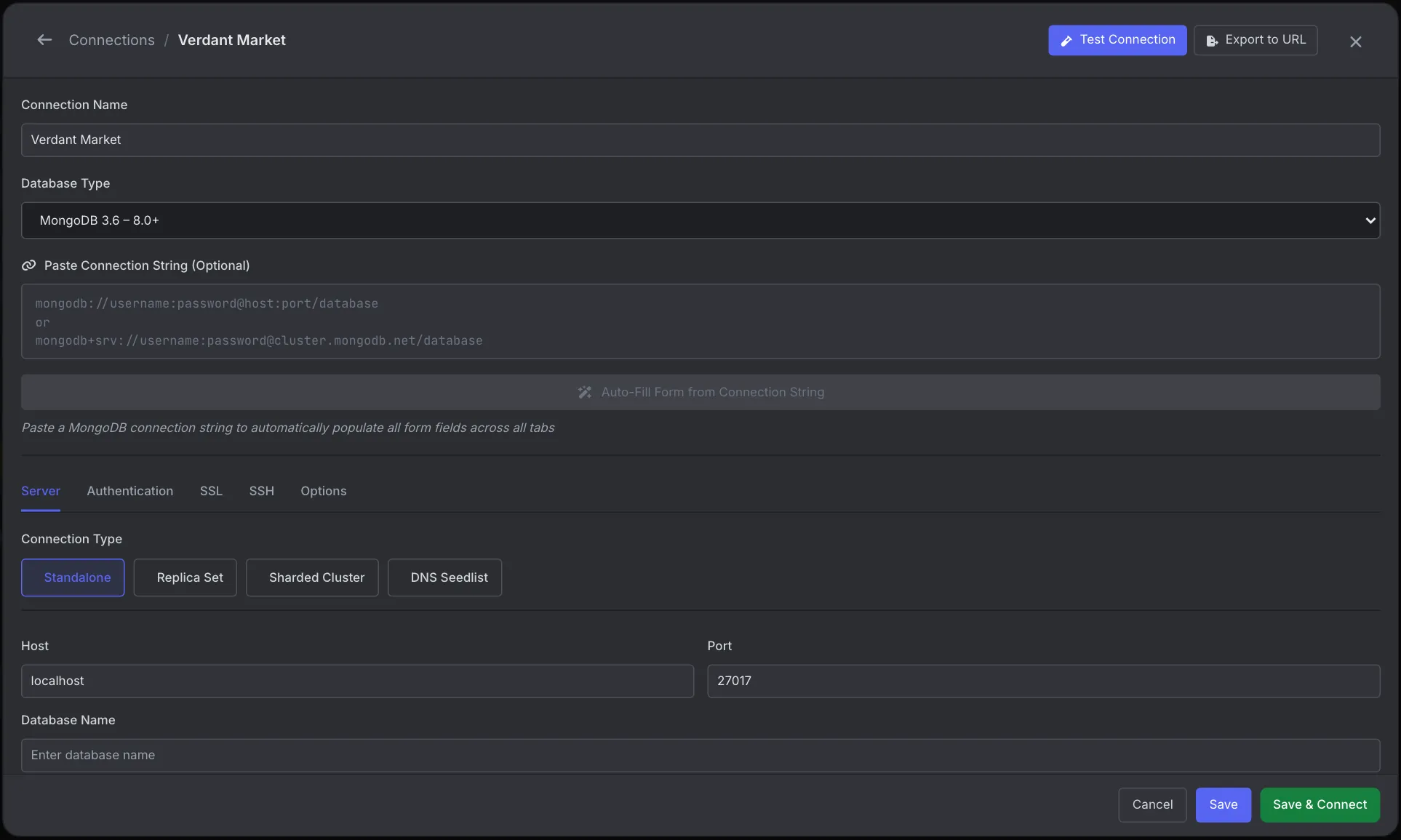
A server selection timeout only says that no server answered in time. VisuaLeaf's connection form breaks that into stages, so you can see where it stops.
- Open the Connection Manager, click New Connection, paste your
mongodb://ormongodb+srv://string into Paste Connection String and click Auto-Fill. A wrong replica set name or TLS setting is now a visible field on the Server or SSL tab instead of a query parameter. - Click Test Connection. It reports progress through network connectivity, authentication, the SSL/TLS handshake and database access, so an IP access list or firewall problem shows up at the first step.
- While you debug, lower Server Selection on the Options tab (30 seconds by default) so each attempt fails fast.
See the Connection Manager docs.
What we found testing this
The text after the error name tells you which cause you have, and it's often more specific than the generic "timed out after 30000 ms". We pointed each client at a port with nothing listening and at an address that never answers (10.255.255.1):
| Situation | Node.js driver 6 / mongosh | PyMongo 4.19 |
|---|---|---|
| Nothing listening (refused) | connect ECONNREFUSED 127.0.0.1:27017 | 127.0.0.1:27017: [Errno 61] Connection refused |
| Packets dropped (firewall, access list, wrong IP) | Socket 'connect' timed out after 30001ms (connectTimeoutMS: 30000) | 10.255.255.1:27017: timed out |
- "Socket 'connect' timed out" means nothing answered at all. That's the signature of an Atlas IP access list, a firewall, or the wrong host, not a down server. A down server on a reachable host refuses instantly instead.
- The defaults differ by client. PyMongo prints its effective settings in the message:
connectTimeoutMS: 20000.0msby default, against 30,000 ms in the Node.js driver and mongosh. Both give up server selection at 30 s. - Shorter timeouts don't hide the cause. With
serverSelectionTimeoutMS=3000&connectTimeoutMS=2000, the unreachable host failed in about 3 seconds in every client, with the same specific message. See the last section for how to set them.
Causes at a glance
| Cause | Typical sign | Fix |
|---|---|---|
| IP not on the Atlas access list | Works from one network, times out from another (home vs office vs CI) | Add the IP in Atlas Network Access |
| Firewall or VPN blocks the port | Times out from everywhere you try | Open outbound 27017 or switch networks |
| Replica set hostnames you can't reach | Self-hosted or Docker replica set; the first connection works, then it times out | Fix the advertised hostnames, or use directConnection=true |
Wrong replicaSet name | Connection string has replicaSet= that doesn't match the server | Use the real name from rs.conf()._id, or remove it |
| TLS mismatch | Message mentions TLS or the socket closed before TLS was established | Match tls=true/false to the server |
| Server is down | ECONNREFUSED in the message | See ECONNREFUSED 27017 |
Cause 1: your IP isn't on the Atlas access list
Atlas drops connections from addresses that aren't on the cluster's IP Access List. The driver can't tell a dropped connection from a slow network, so it waits the full 30 seconds. Mongoose often says so directly: "Could not connect to any servers in your MongoDB Atlas cluster", mentioning an IP that isn't whitelisted.
- In Atlas, open Security → Network Access.
- Click Add IP Address, then Add Current IP Address for your machine.
- For a server or CI runner, add its public egress IP, not its private one.
0.0.0.0/0 (allow from anywhere) makes the error go away, but it leaves your cluster protected only by its password. Use it briefly to confirm the diagnosis, then replace it with specific addresses. For serverless platforms with changing IPs, look at Atlas private endpoints or VPC peering.
Home IP addresses change. If it worked yesterday and not today, check whether your current IP still matches the entry.
Cause 2: a firewall, VPN or network blocks the port
Corporate networks, hotel and university Wi-Fi, and some VPNs block outbound traffic on port 27017. Test the raw TCP connection without MongoDB involved:
nc -vz cluster0-shard-00-00.abcde.mongodb.net 27017
# "succeeded" = reachable; a hang or "timed out" = blocked on the way
For an Atlas mongodb+srv:// string, get the real host names first with nslookup -type=SRV _mongodb._tcp.cluster0.abcde.mongodb.net. If the port is blocked, try another network or a phone hotspot to confirm, then ask whoever runs the network to allow it.
Cause 3: replica set members advertise hostnames you can't reach
When you connect to a replica set, the driver asks the first server for the member list and then connects to those hostnames, the ones in rs.conf(), not the one you typed. If the set was configured with container names or private addresses (mongo1:27017, 10.0.0.5:27017), your laptop can reach the first server but not the members, and selection times out.
rs.conf().members.map(m => m.host) // what the driver will try to connect toTwo fixes:
- Connect to one node directly, ignoring the member list. Good for local development:
mongodb://127.0.0.1:27017/?directConnection=true - Reconfigure the set with hostnames every client can resolve, or add matching entries to
/etc/hostson the client.
A replicaSet= name in the connection string that doesn't match the server's actual set name causes the same timeout. The driver finds a server, sees it belongs to the wrong set, and keeps waiting for one that never appears.
Cause 4: TLS settings don't match
Atlas requires TLS, and mongodb+srv:// turns it on automatically. A self-hosted server usually doesn't use TLS unless you configured it. When the client and server disagree, the connection fails during the handshake and selection eventually times out:
MongoServerSelectionError: Client network socket disconnected before secure TLS connection was establishedSet tls=true or tls=false in the connection string to match the server. Behind a corporate proxy that intercepts TLS, you may also need tlsCAFile= pointing at the proxy's certificate.
Fail faster while you debug
Waiting 30 seconds per attempt makes debugging slow. Lower the timeout while you test, and restore the default in production:
const client = new MongoClient(uri, { serverSelectionTimeoutMS: 5000 })client = MongoClient(uri, serverSelectionTimeoutMS=5000)Or add serverSelectionTimeoutMS=5000 to the connection string, which works in every driver and in mongosh.
Frequently Asked Questions
What does "Server selection timed out after 30000 ms" mean?
The driver could not find a usable MongoDB server within the 30-second serverSelectionTimeoutMS. The server is unreachable, blocked, or not the kind of server the operation needs.
Why does my app connect to Atlas from home but not from the server?
The server's public IP is not on the Atlas IP Access List. Add the IP that server uses for outbound traffic under Security, Network Access.
Should I just allow 0.0.0.0/0 in Atlas?
Only briefly, to confirm the access list is the problem. It lets any IP reach the cluster, so replace it with specific addresses or private networking once you know.
How do I connect to a Docker replica set from my machine?
Add directConnection=true to connect to one member directly, or configure the replica set with hostnames your machine can resolve.