MongoDB default port: 27017
MongoDB listens on port 27017 by default. See the other ports MongoDB uses, how to check and change the port, and how to connect on a custom port.
Quick Answer
mongod listens on TCP port 27017 by default. Running mongosh with no arguments connects to mongodb://127.0.0.1:27017.
mongosh                                   # same as mongodb://127.0.0.1:27017
mongosh "mongodb://localhost:27018"       # a server on another port
Ports MongoDB uses
| Port | Used by |
|---|---|
27017 | Default for mongod and mongos. Standalone servers, replica set members and MongoDB Atlas clusters. |
27018 | Default when a mongod is started with --shardsvr (a shard in a sharded cluster). |
27019 | Default when a mongod is started with --configsvr (a config server). |
These are only defaults. In practice, local setups often run several servers on 27017, 27018 and 27019 just to tell them apart, which is why those numbers show up so often in replica set tutorials.
In VisuaLeaf
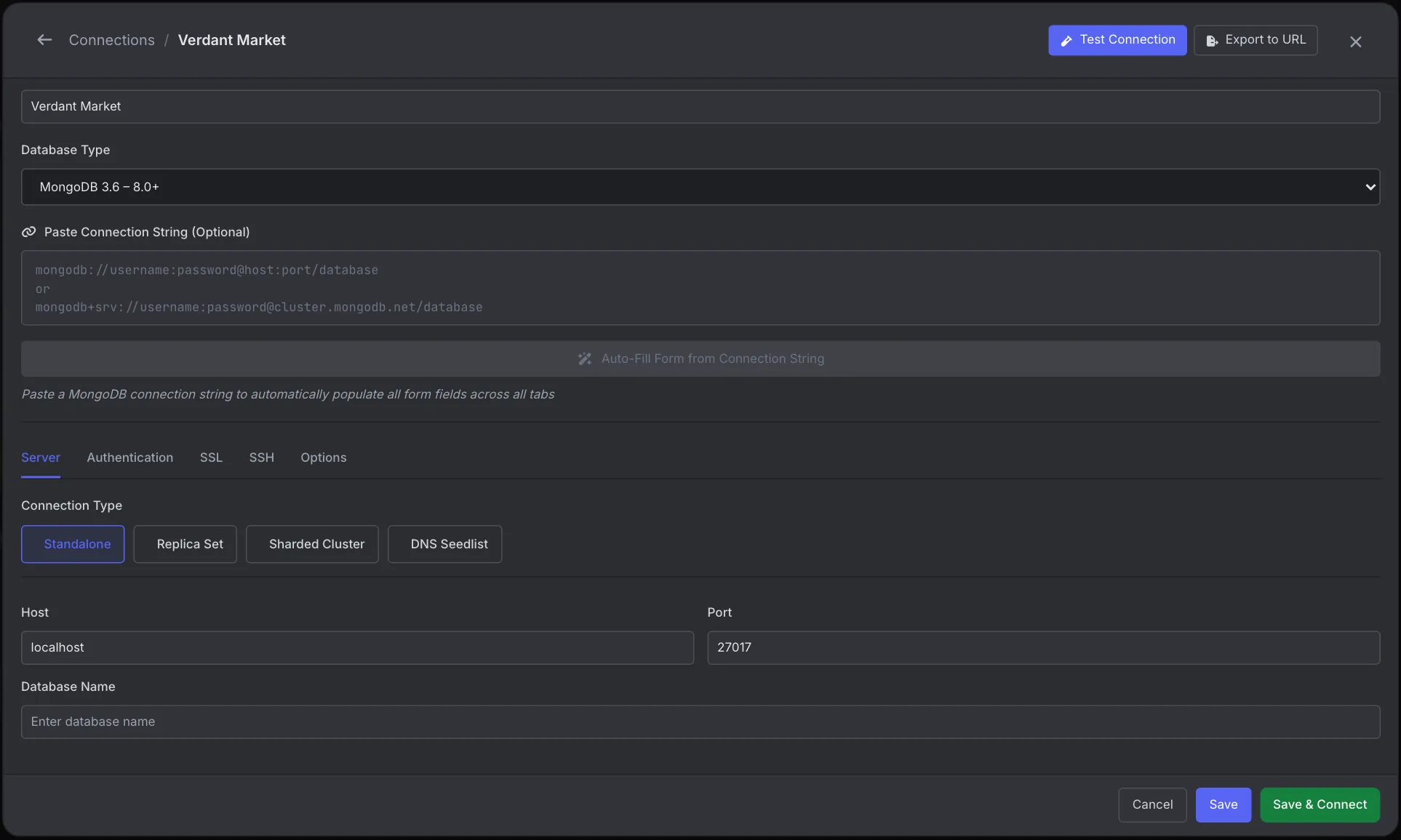
Set the port in the VisuaLeaf connection form
A new MongoDB connection in VisuaLeaf starts with Host localhost and Port 27017 on the Server tab, the same defaults mongosh uses.
- For a server on another port, such as a Docker container started with
-p 27018:27017, enter the host side,27018. The port the server reports inside the container does not matter here. - Click Test Connection before you save.
- Click Export to URL to get the matching connection string for your application, so the port in your code and the port in your GUI cannot drift apart.
Atlas and other mongodb+srv:// clusters use the DNS Seedlist connection type, which has no port field because the ports come from DNS. See the Connection Manager docs.
Check which port MongoDB is running on
If MongoDB was started with a non-default port, it shows up in the server's parsed command-line options:
db.adminCommand({ getCmdLineOpts: 1 }).parsed.net
// { bindIp: '127.0.0.1', port: 27018 }
// no "port" key means the default, 27017
From the operating system:
# macOS / Linux
lsof -iTCP -sTCP:LISTEN -n -P | grep mongod

# Linux
ss -ltnp | grep mongod

# Windows (PowerShell)
Get-NetTCPConnection -State Listen | Where-Object LocalPort -eq 27017
What we found testing this
We started a second mongod on port 27019 next to a default one, inside the official mongo:7 Docker image, and asked each server what it thought its port was.
| Check | Default server (27017) | Server started with --port 27019 |
|---|---|---|
getCmdLineOpts().parsed.net | { bindIp: '*' } | { port: 27019 } |
db.serverStatus().host | 25639b97cd35 | 25639b97cd35:27019 |
- The port only shows up when it isn't the default. Both
getCmdLineOptsandserverStatus().hostleave it out for 27017. Treat "no port shown" as 27017, not as unknown. - The server never sees your Docker port mapping. We published the container as
-p 27088:27017. From the host we connected on 27088, but the server still reported its own port as 27017, and from inside the container 27088 was refused. In a Compose network, other containers usemongo:27017, never the host port. - The official Docker image listens on every interface. Its default server showed
bindIp: '*', while amongodstarted by hand with only--portreported nobindIpat all, which means localhost only. That's why a Docker MongoDB published with-p 27017:27017on a cloud VM is reachable from the internet unless a firewall or authentication stops it.
Change the port
Set net.port in the config file, usually /etc/mongod.conf on Linux or /opt/homebrew/etc/mongod.conf with Homebrew on Apple Silicon:
net:
  port: 27018
  bindIp: 127.0.0.1
Then restart the service, for example sudo systemctl restart mongod or brew services restart mongodb-community. For a one-off server, pass the flag instead:
mongod --port 27018 --dbpath ~/data/db-27018With Docker, the port inside the container stays 27017 and you choose the host side: docker run -p 27018:27017 mongo.
Changing the port is not a security measure. Bots scan every port. What protects a server is bindIp (listen on localhost or a private network only), authentication, and a firewall.
Connect on a custom port
mongosh --port 27018
mongosh "mongodb://localhost:27018/shop"
const client = new MongoClient('mongodb://localhost:27018')client = MongoClient("mongodb://localhost:27018")mongodb+srv:// connection strings, the kind Atlas gives you, never include a port. The driver looks up the hosts and ports from DNS. Adding a port to an SRV string is an error. Build either kind with the free MongoDB connection string builder.
Can't connect to port 27017?
ECONNREFUSED 127.0.0.1:27017: nothing is listening. MongoDB isn't running, or it is on a different port.- Timeout from another machine:
bindIpis127.0.0.1, or a firewall or cloud security group blocks 27017. - Atlas times out: your IP isn't in the Atlas network access list, or your network blocks outbound 27017.
Frequently Asked Questions
What is the default port for MongoDB?
27017. Shard servers default to 27018 and config servers to 27019 when started with --shardsvr or --configsvr.
Why does MongoDB report port 27017 when I connect on another port?
You are probably going through a Docker or SSH port mapping. The server only knows the port it listens on inside the container or host. The mapped port exists only on your side.
What port does MongoDB Atlas use?
Atlas clusters listen on 27017. With a mongodb+srv connection string you don't specify the port; the driver gets it from DNS.
How do I change the MongoDB port?
Set net.port in mongod.conf and restart MongoDB, or start mongod with --port. Then connect with mongosh --port or a connection string that includes the new port.
Does MongoDB use any other ports?
Not by default. Older versions had an HTTP status interface on 28017, but it was removed in MongoDB 3.6.