MongoDB GUI Comparison: VisuaLeaf vs Compass vs Studio 3T
See how VisuaLeaf, MongoDB Compass, and Studio 3T handle large collections, compare data, automate tasks, and analyze queries, and which one fits best.


A MongoDB client can feel fast with a few hundred documents and become frustrating as soon as the result grows.
The database is not always the problem. MongoDB may finish the query while the desktop client is still fetching batches, converting BSON values, and building thousands of rows or JSON blocks.
I tested VisuaLeaf, MongoDB Compass, and Studio 3T with the same collection of 50,844 documents. Then I tested three related workflows: comparing collections, automating repeated work, and investigating an unindexed query.
Test setup
I ran all three applications on the same HP laptop with 16 GB of RAM and Windows 11 Pro. Each application was updated to the latest version available when I ran the test. All three connected to the same MongoDB database through the same internet connection and opened the same largeCollection. The collection contained nested objects and arrays, not only flat fields.
For the first test, I opened the collection without a filter, projection, or custom limit:
db.largeCollection.find({})
Here is what happened:
| MongoDB client | Result |
|---|---|
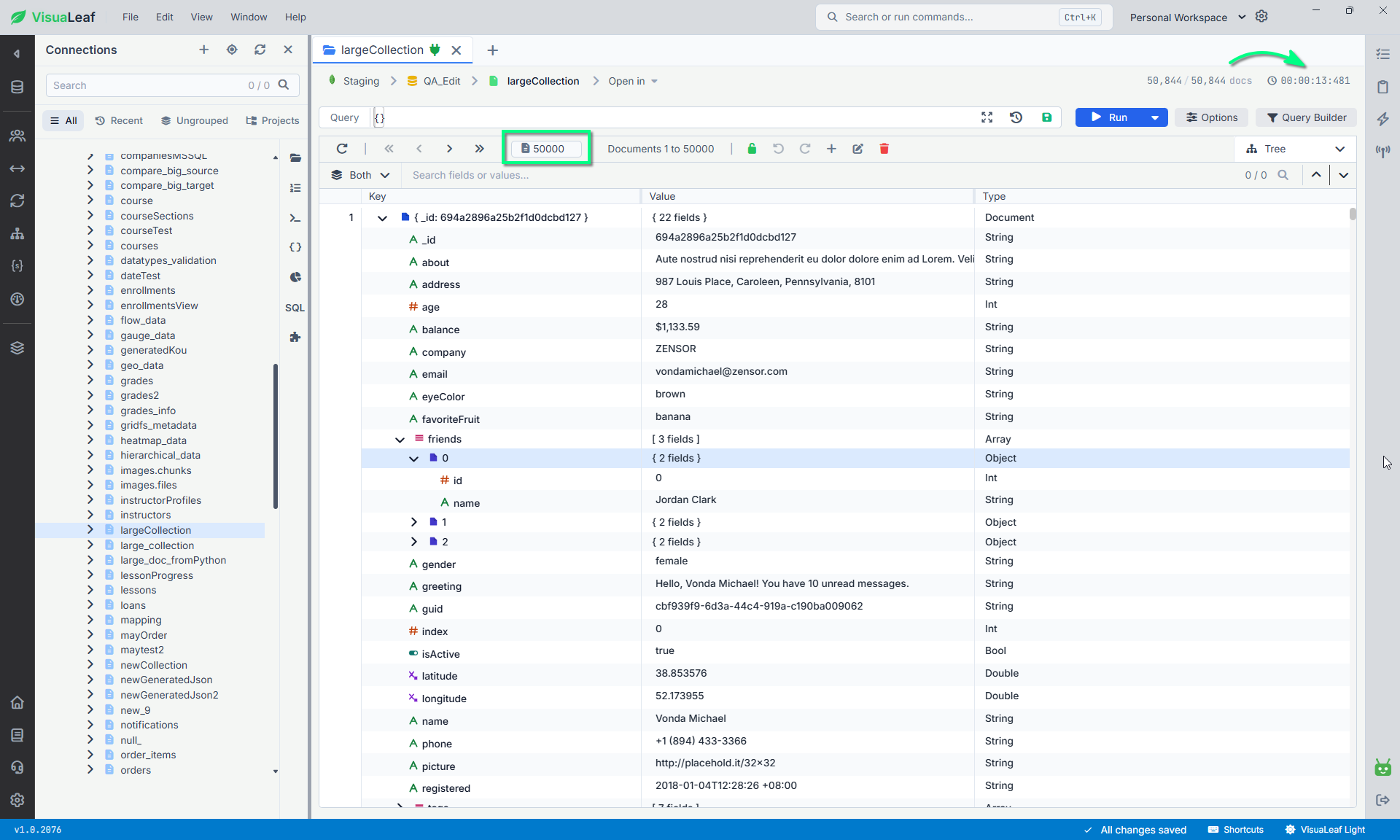
| VisuaLeaf | Loaded 50,000 documents from the 50,844-document collection in 13.481 seconds and remained usable. |
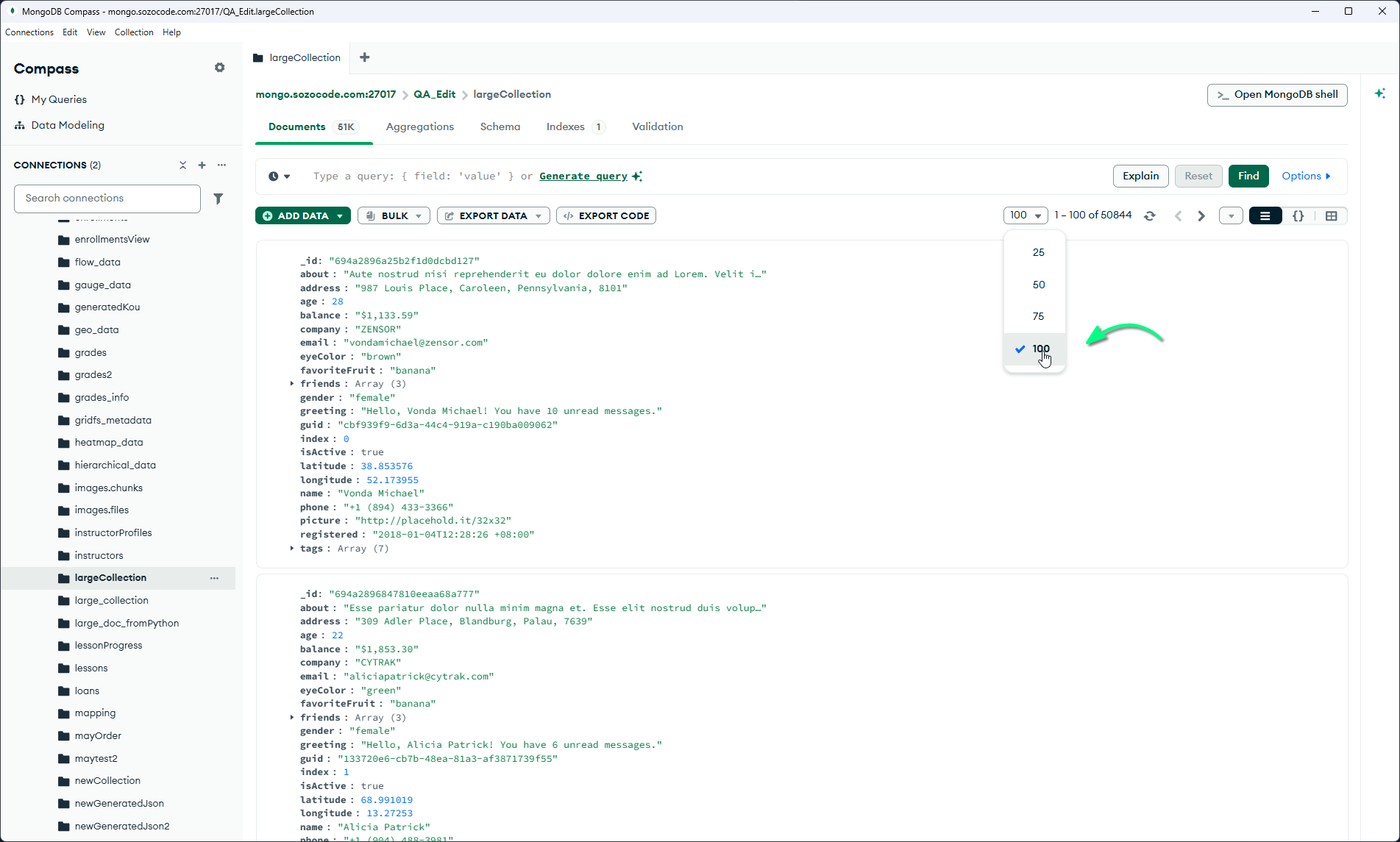
| MongoDB Compass | Remained responsive and displayed up to 100 documents per page |
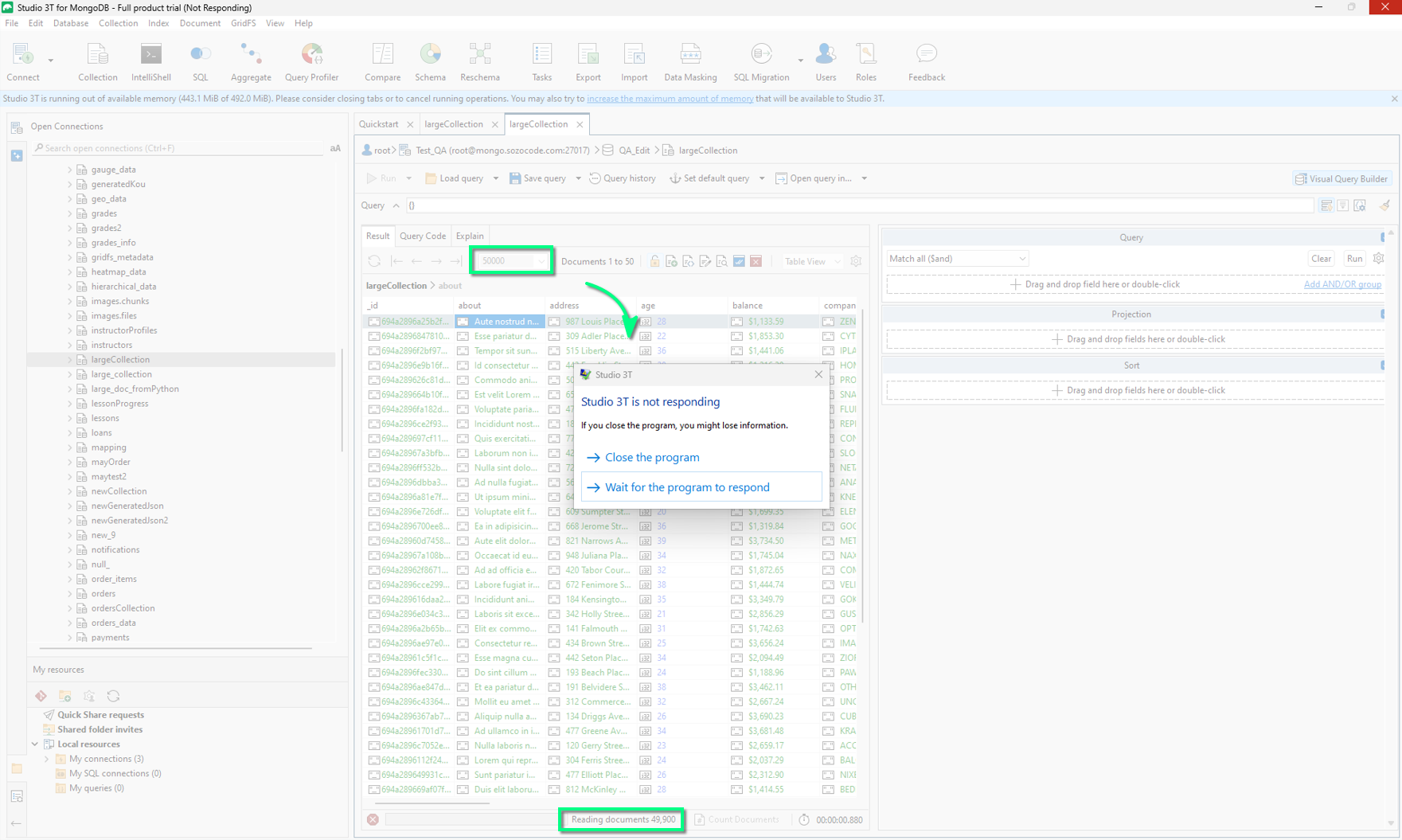
| Studio 3T | The interface was still blocked after two minutes, so I stopped the test |
Test 1: What the large-result test actually shows
The three clients made different choices.
VisuaLeaf allowed one continuous result. That is useful when you need to scroll through a large set, select many documents, inspect distant rows, or export the current result without moving through pages.
Compass limited the amount of data visible at once. This protects the interface from an unexpectedly large query and works well when you only need to inspect a sample, edit one document, or confirm a filter. The tradeoff is that browsing the whole collection requires hundreds of pages.
Studio 3T did not finish this particular operation before I stopped it. That does not prove that every version, display mode, or computer will behave the same way. It does mean that an unrestricted result was not practical in this setup.
If a client struggles, reduce both the number of documents and the number of fields:
db.largeCollection.find(
  {},
  {
    _id: 1,
    company: 1,
    registered: 1
  }
).limit(1000)
This is usually the better daily workflow. A large result may be useful for inspection or export, but it still consumes database resources, network bandwidth, memory, and rendering time.
Test 2: Comparing two MongoDB collections
For this test, I used two controlled collections in the QA_Edit database: orders_compare_source and orders_compare_target.
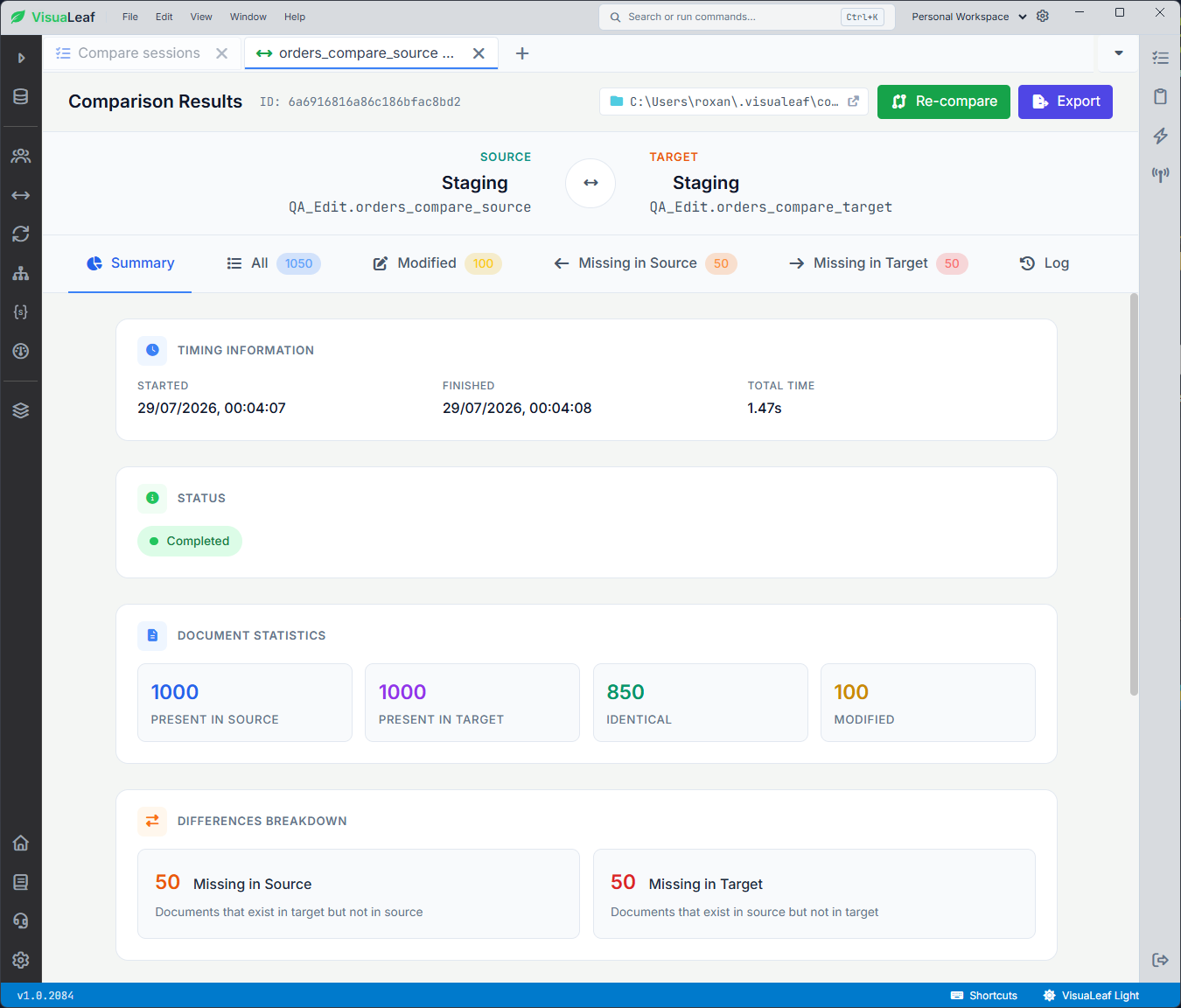
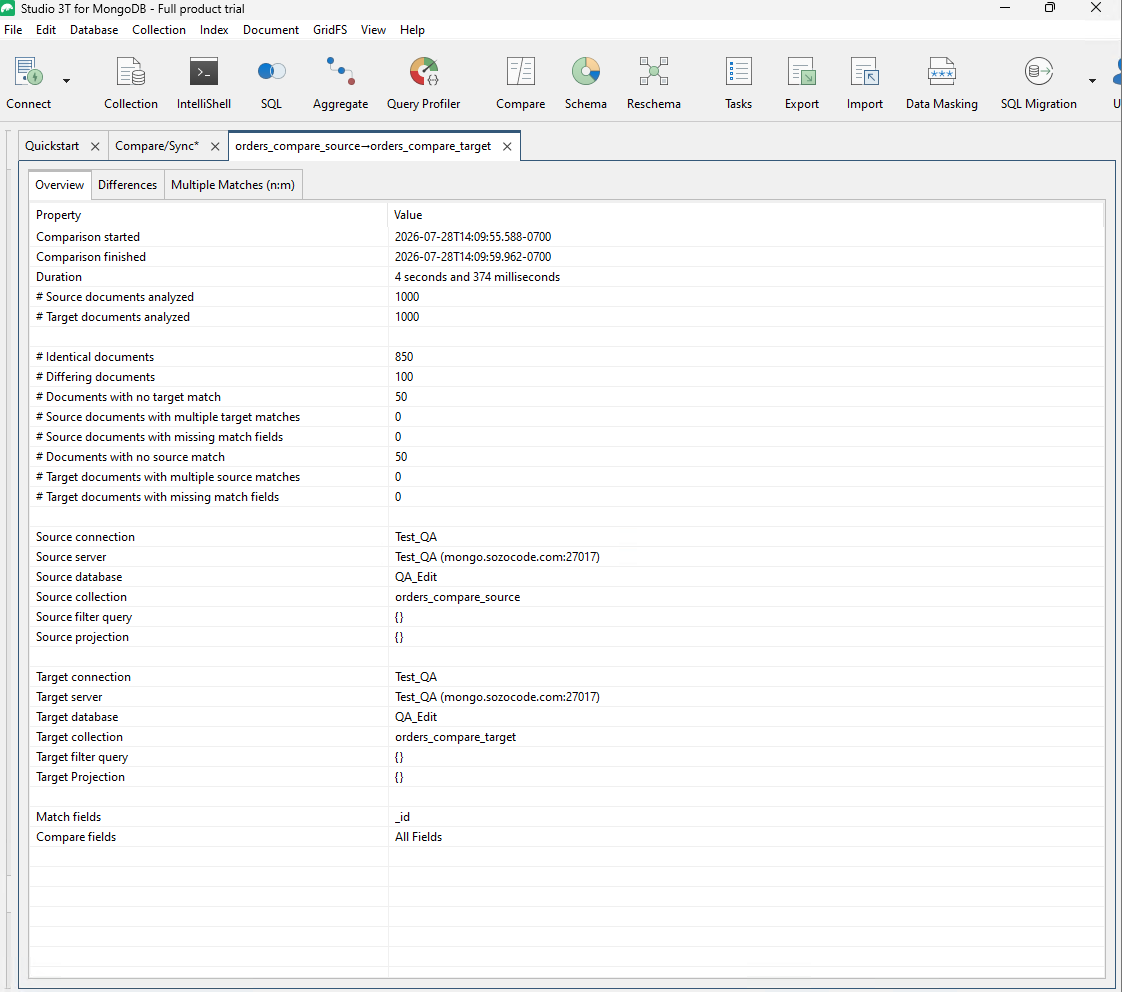
Both collections started with 1,000 identical documents. I then modified 100 documents, removed 50, and added 50 in the target collection. I matched the documents by _id.
VisuaLeaf and Studio 3T both found 850 identical documents, 100 modified documents, 50 missing from the source, and 50 missing from the target.
A useful comparison must answer three questions:
- Which documents exist on only one side?
- Which fields changed inside matching documents?
- What will be inserted, updated, or deleted during synchronization?
VisuaLeaf
VisuaLeaf has a dedicated Collection Compare workflow for schema and data differences. It keeps the comparison next to the document, query, and data-operation tools.
The important setup choice is the matching field. _id works only if both collections preserve the same values. If an import regenerated them, use a stable key such as customerId, orderId, or externalId.
Studio 3T
Studio 3T provides the most detailed comparison controls of the three. Its Data Compare & Sync supports collections on different databases or servers, document- and field-level differences, result export, and synchronization in either direction.
Bi-directional synchronization is useful, but it increases the cost of a wrong choice. Decide which collection is the source of truth before applying changes.
_id as the matching field.MongoDB Compass
Compass does not provide the same dedicated collection-diff workflow. You can still build part of the comparison with an aggregation.
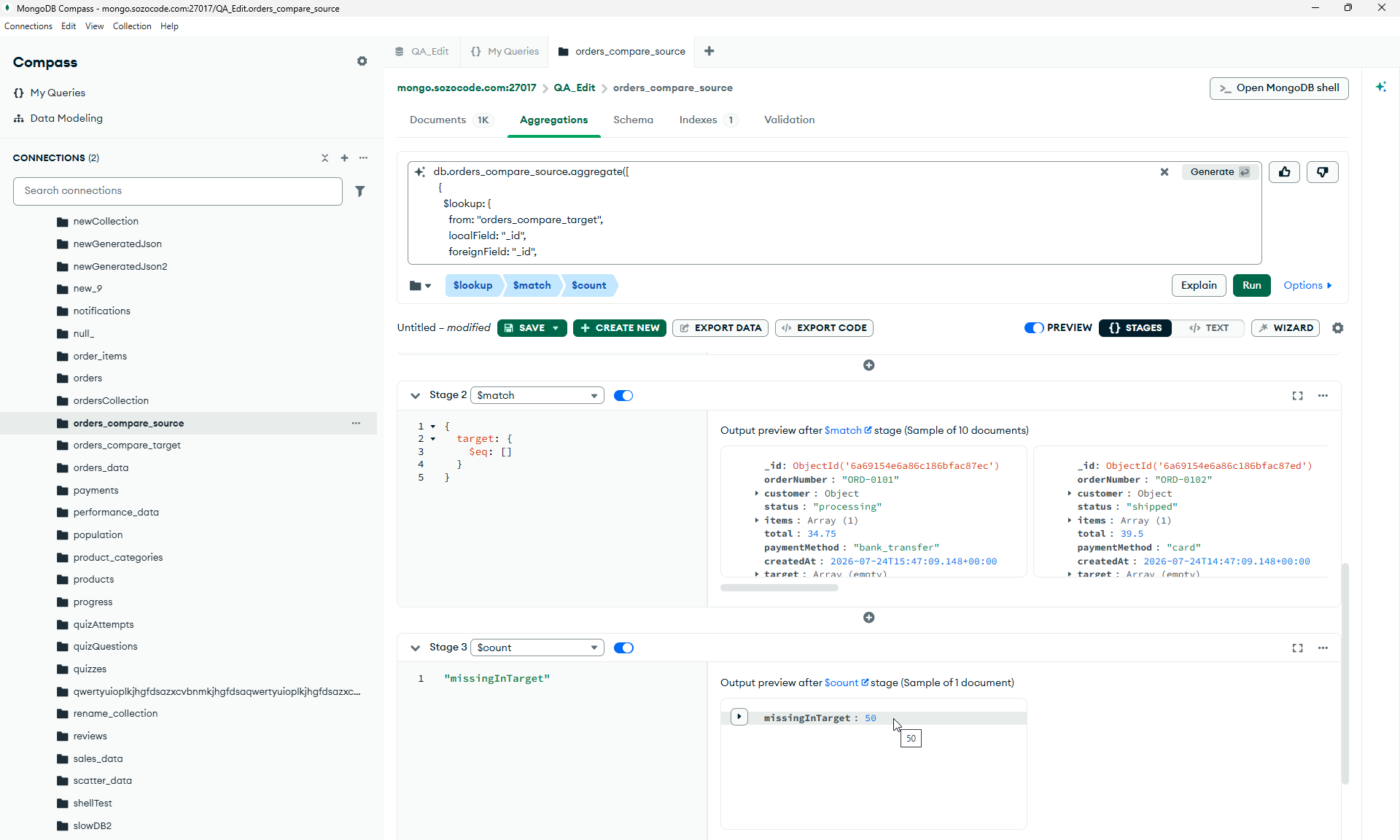
For example, this pipeline finds source documents without a matching _id in the target:
db.orders_compare_source.aggregate([
  {
    $lookup: {
      from: "orders_compare_target",
      localField: "_id",
      foreignField: "_id",
      as: "target"
    }
  },
  {
    $match: {
      target: {
        $eq: []
      }
    }
  },
  {
  $count: "missingInTarget"
  }
  }
])
This finds missing matches, not every field-level change. It also assumes both collections are in the same database. Comparing data on different servers requires a script, a temporary copy, or another tool.
Test 3: Automating Daily Orders
Large collections make small mistakes more expensive.
For this test, I used a daily orders JSON file.
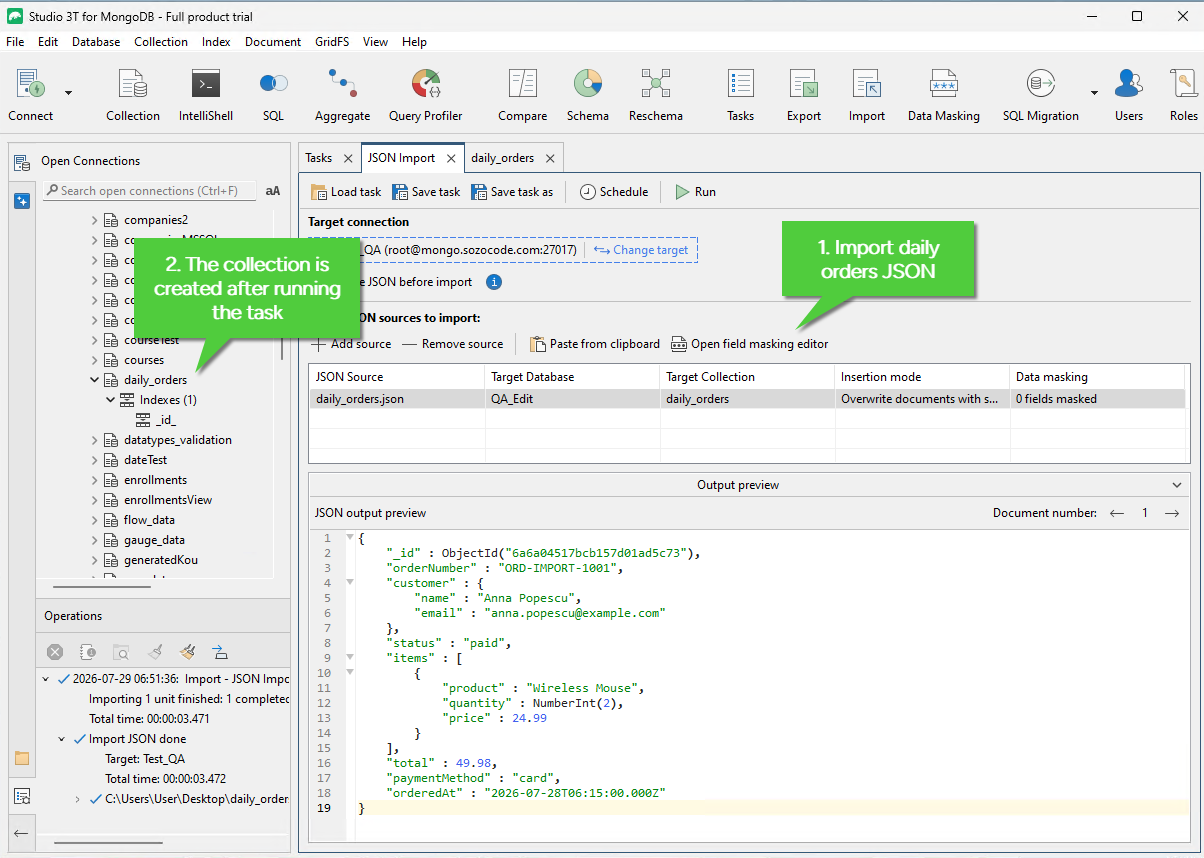
In Studio 3T, I imported the file into a daily_orders collection. Studio 3T can also save and schedule tasks, so it works well when you want to repeat imports, exports, or other database jobs.
In VisuaLeaf, I used Task Manager to connect more than one step:
Import Daily Orders JSON → Add Orders to Main Collection → Export Sales Report
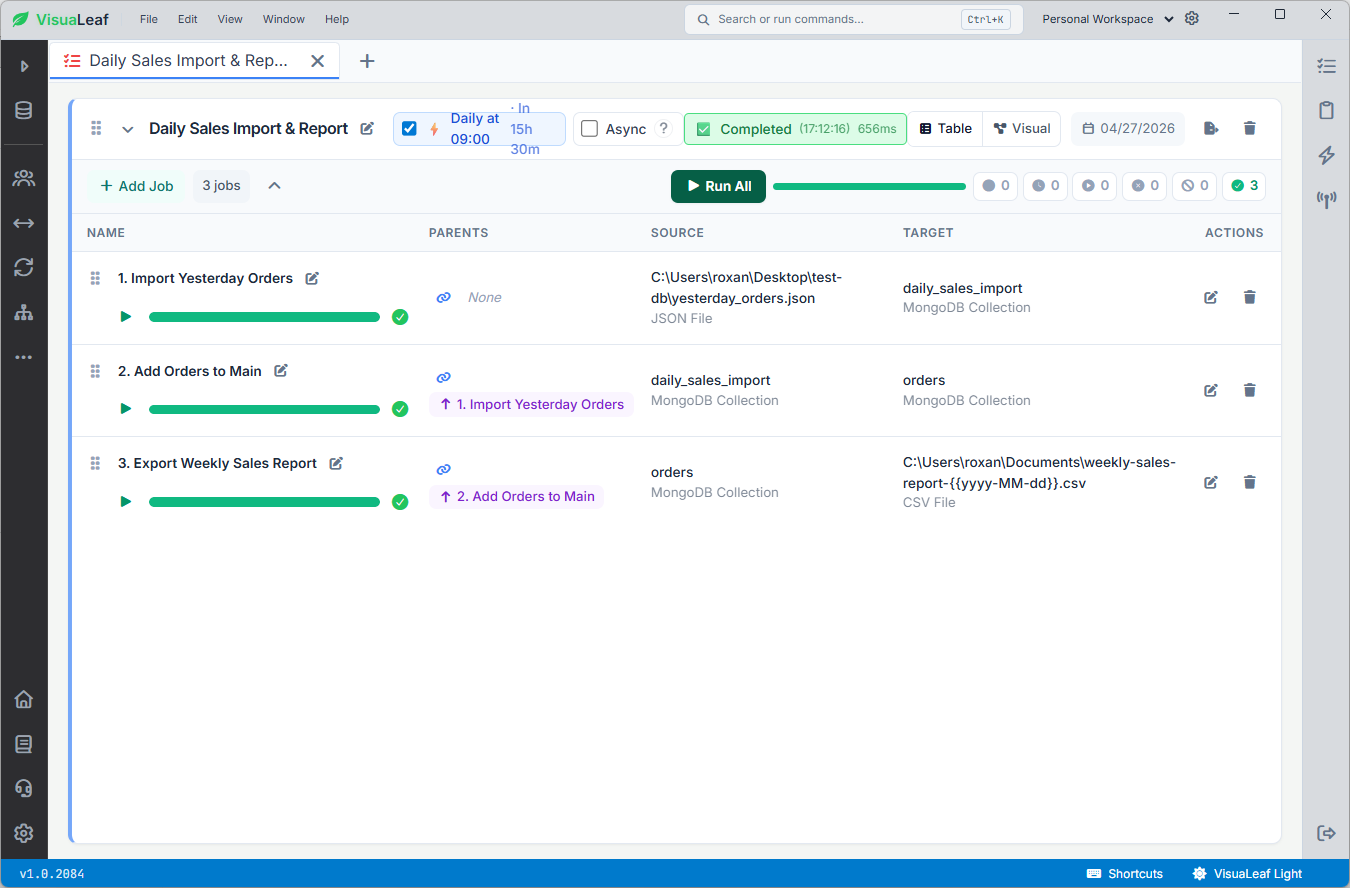
The useful part is that tasks can have parent tasks. So the next task runs after the previous one is completed.
This is helpful when the work is not just “import this file.” In a real workflow, you may need to import data, map fields, move it into the main collection, mask sensitive data, and export a report after that.
For example, field mapping matters because orderedAt should be mapped to createdAt as a MongoDB Date, and values like email or phone numbers may need data masking before export.
So for me, Studio 3T is strong for saving and scheduling database tasks. VisuaLeaf is easier when I want to see a connected workflow in one place and control the order of the steps.
Compass is different. It is great for interactive work, but recurring workflows usually need something outside the desktop app, like a script, cron, Windows Task Scheduler, CI, or an Atlas service.
Test 4: Checking the Query Before Blaming the Client
The first test measured how each tool handled a large result on screen.
This test is different. Here, I wanted to check the work MongoDB was doing before the data even reached the client.
I started with a query that had no supporting index:
db.largeCollection.find({
  company: "ZENSOR"
})
The important part was the explain plan.
I checked:
- scan stage in the winning plan:
COLLSCANorIXSCAN totalDocsExaminedtotalKeysExaminednReturned- execution time
When the query uses COLLSCAN, MongoDB has to scan the collection to find matching documents. That means the slow part is not always the GUI. Sometimes the database is simply doing too much work.
A COLLSCAN is not automatically a problem. But in this case, scanning 50,844 documents to return only 51 showed that the query could benefit from an index.
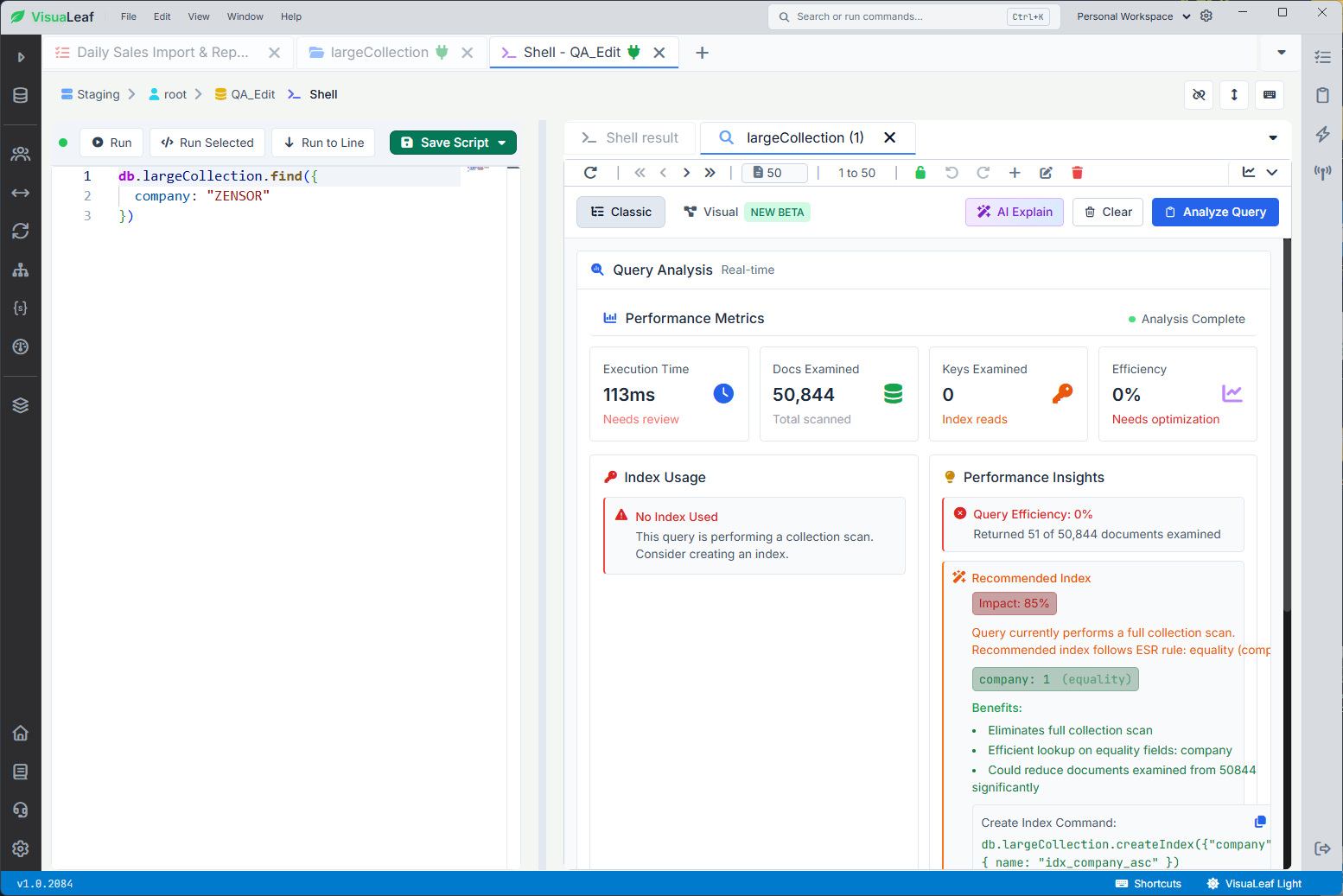
COLLSCAN, examining 50,844 documents to return 51.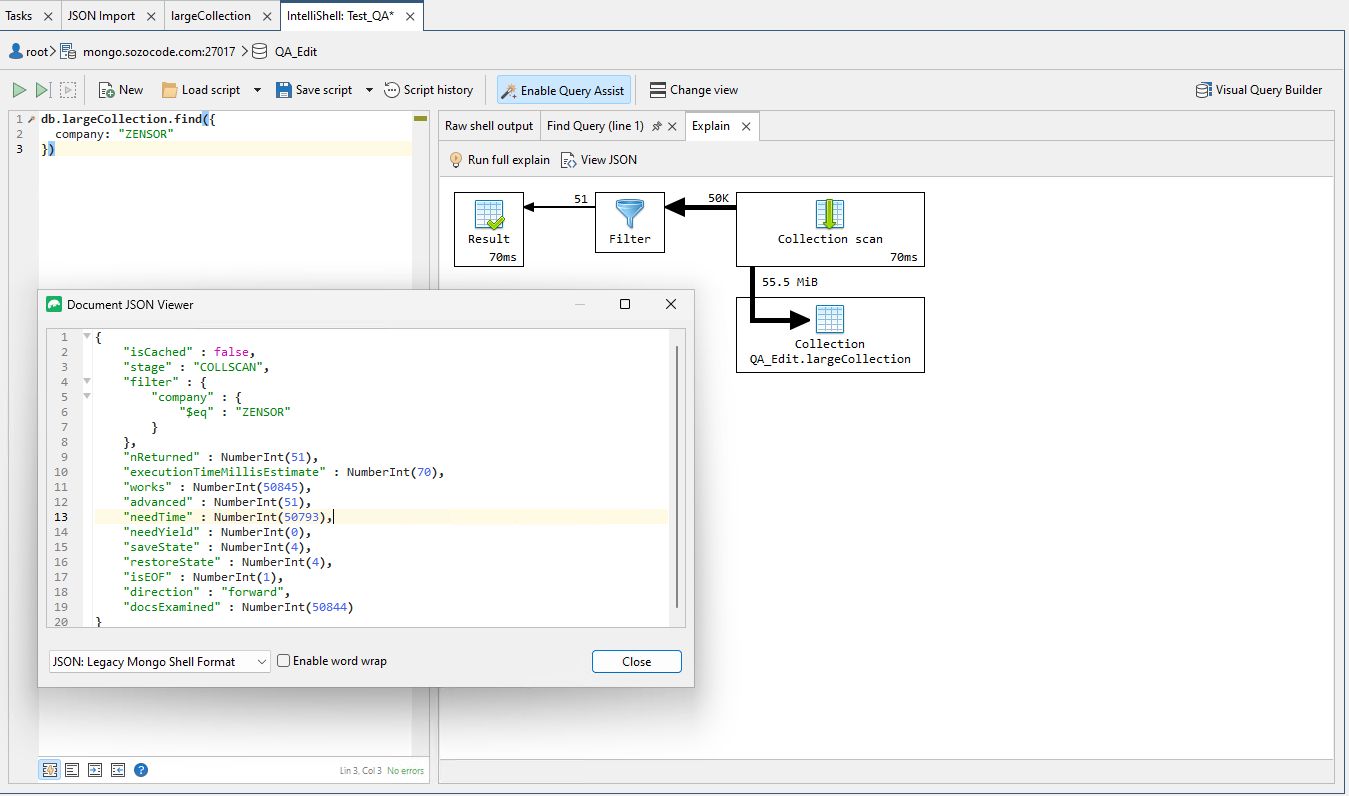
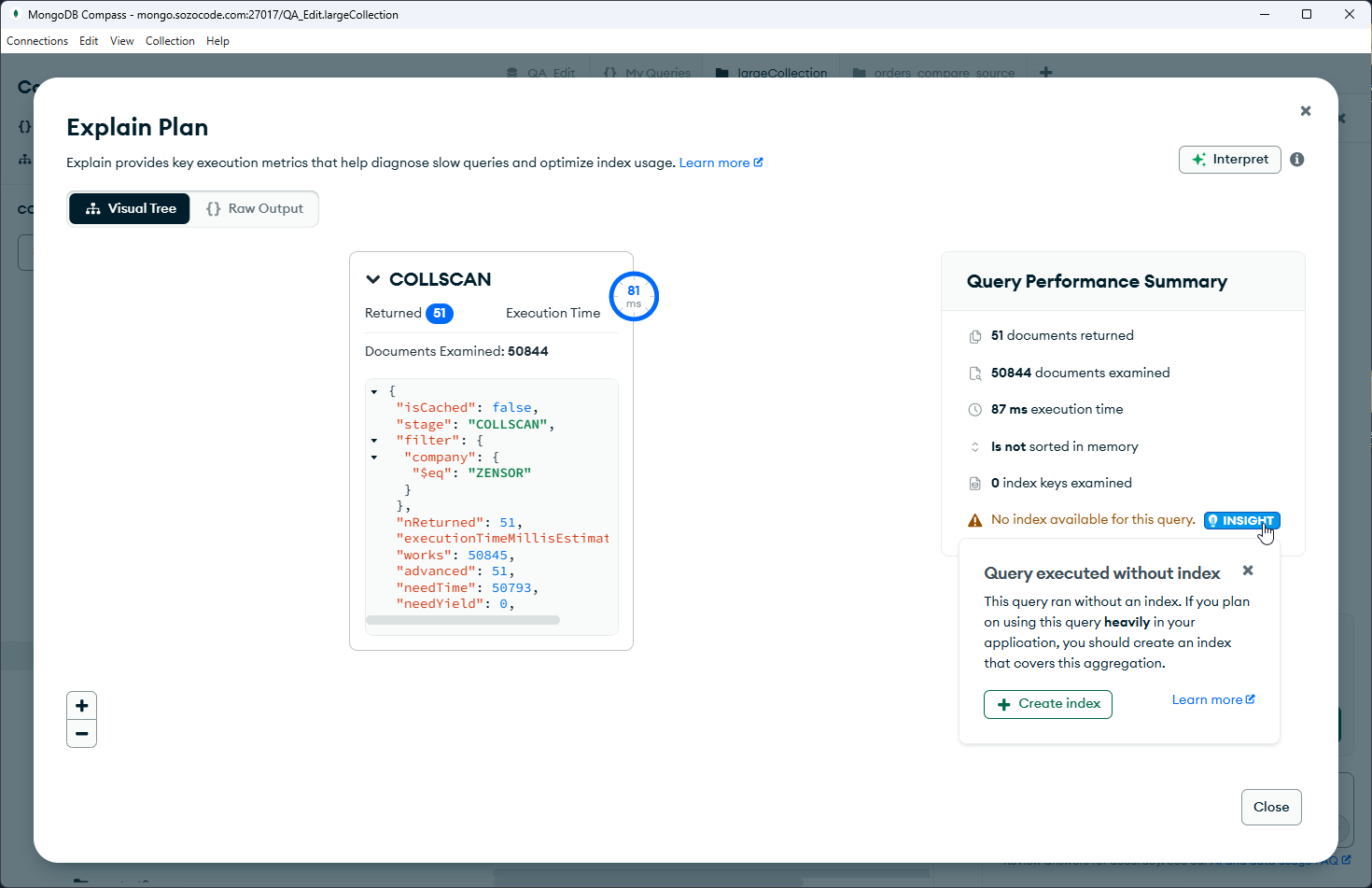
COLLSCAN, examining all 50,844 documents to find 51 matches.After that, I created an index:
db.largeCollection.createIndex({
  company: 1
})
Then I ran the same explain operation again.
A lower execution time is useful, but the stronger evidence is that the winning plan now contains an IXSCAN. In this test, totalDocsExamined dropped from 50,844 to 51, matching the 51 returned documents.
VisuaLeaf’s Query Profiler is useful here because it brings slow queries, execution plans, index usage, scanned documents, returned documents, and optimization hints into one place.
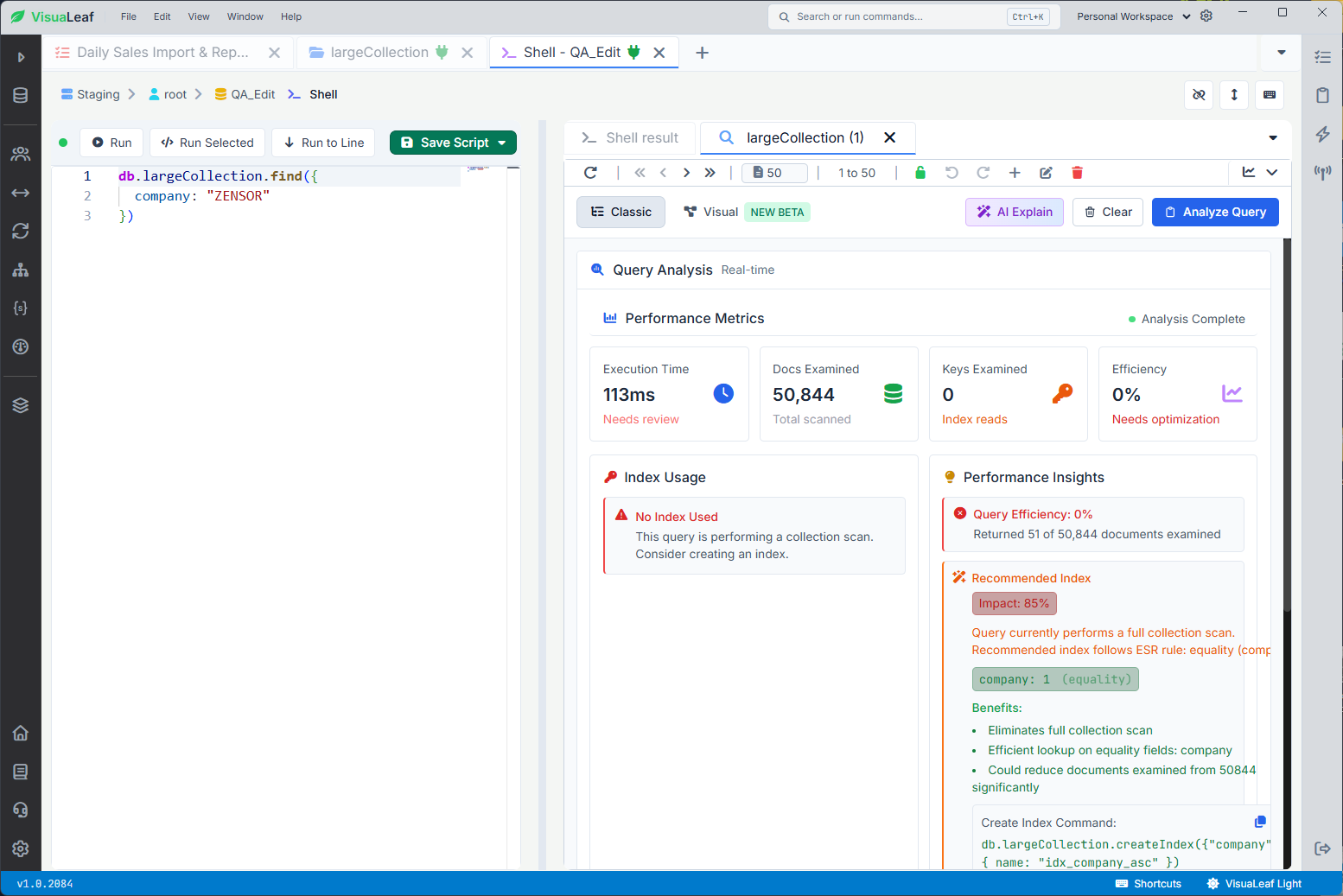
company_1 index, VisuaLeaf examined 51 documents and 51 index keys.Studio 3T has the deepest performance tools in this comparison, with Query Profiler, Visual Explain, and Index Manager.
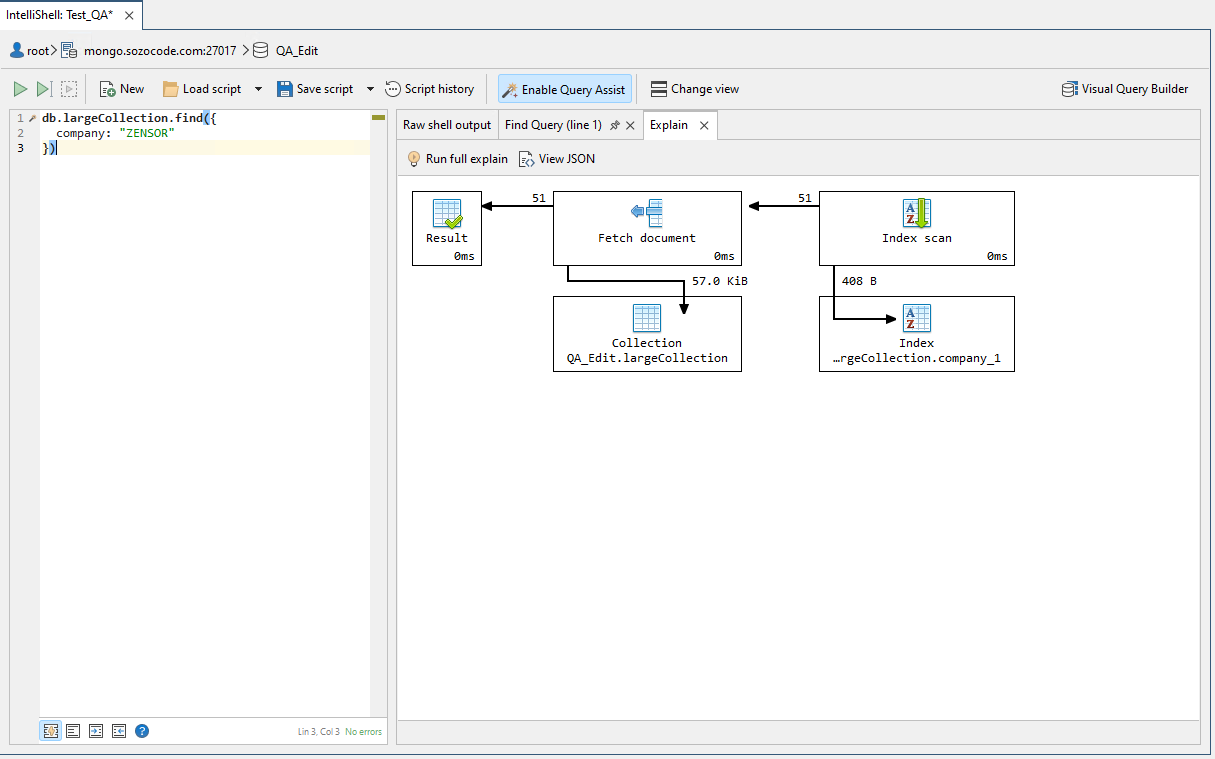
company_1 index, Studio 3T used an index scan and examined 51 documents.Compass also has Explain Plan, which works well when you already know which query you want to inspect.
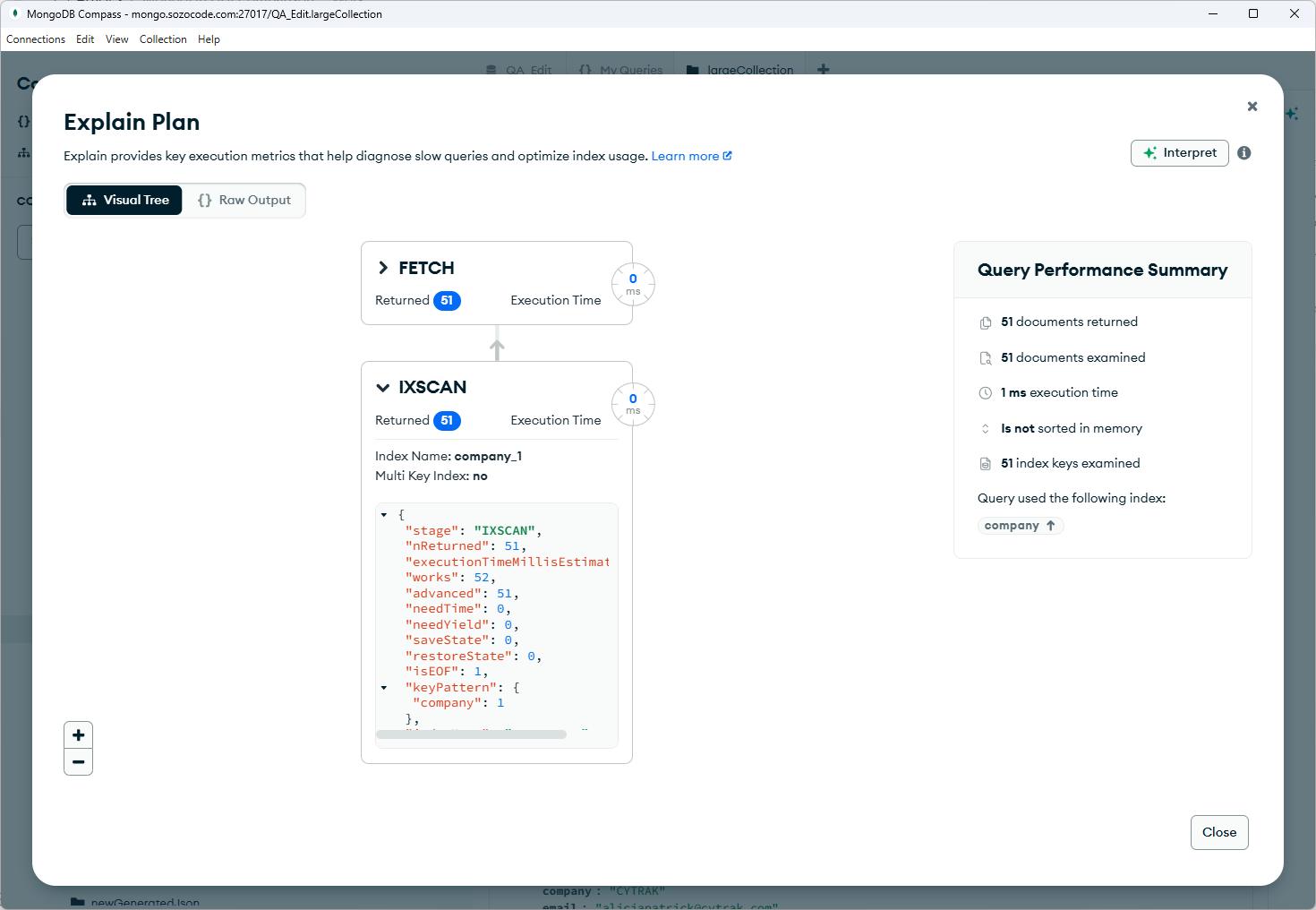
company, Compass changed to IXSCAN and examined only 51 documents.For this test, the main point was simple: before blaming the client, check if MongoDB is scanning too much data.
Which client fits which workflow?
| If you mainly need to… | Best fit | Why |
|---|---|---|
| Open and work with a large continuous result | VisuaLeaf | It loaded 50,000 documents in 13.481 seconds and remained usable |
| Compare two collections visually | VisuaLeaf | It clearly separated identical, modified, and missing documents |
| Automate multi-step data workflows | VisuaLeaf | Import, copy, export, and scheduling can be managed in one workflow |
| Find inefficient queries in the same workspace | VisuaLeaf | Query Profiler combines plans, index usage, scanned documents, and optimization hints |
| Browse documents in small pages with a free official client | MongoDB Compass | Pagination keeps browsing controlled and predictable |
| Access advanced synchronization and administration controls | Studio 3T | It provides more granular diff, sync, and performance options |
There is no single client for every MongoDB job. Compass is a good option for controlled, paginated browsing, while Studio 3T offers advanced administration and synchronization controls. But for everyday work with large results, collection comparisons, automated tasks, and query analysis, VisuaLeaf provides the most complete workflow in one place.
Choose the client around the operation that costs you time, not the longest feature list.