How to export SQLite to CSV
Export SQLite tables and query results to CSV with the sqlite3 shell or Python, keeping headers, NULLs, line breaks and BLOBs intact.
Quick Answer
One command, from your terminal:
sqlite3 -header -csv shop.db "SELECT * FROM orders;" > orders.csvOr inside the sqlite3 shell:
sqlite> .headers on
sqlite> .mode csv
sqlite> .once orders.csv
sqlite> SELECT * FROM orders;
.once sends only the next query to the file. Use .output orders.csv to send everything until .output stdout.
Export a whole table, a query, or every table
Any SELECT works, so filter, join or reorder columns on the way out:
sqlite3 -header -csv shop.db \
  "SELECT o.id, c.name, o.total
   FROM orders o JOIN customers c ON c.id = o.customer_id
   WHERE o.total > 100" > big_orders.csv
To export every table to its own file, loop over the table names:
for t in $(sqlite3 shop.db "SELECT name FROM sqlite_schema WHERE type='table' AND name NOT LIKE 'sqlite\_%' ESCAPE '\'"); do
  sqlite3 -header -csv shop.db "SELECT * FROM \"$t\";" > "$t.csv"
done
The loop splits on spaces, so a table named Order Items breaks it. Rename such tables in the loop, or export them one at a time.
In VisuaLeaf
Copy or export rows from the table grid
- Open the .db file, right-click the table in the sidebar and choose Open Table Query.
- For a handful of rows, select them in the grid and use Copy as CSV, then paste into a spreadsheet or a file.
- For the whole result, use Export on the grid toolbar. To export a join or a filtered query instead, switch the toolbar to SQL, write the query, run it, then export.
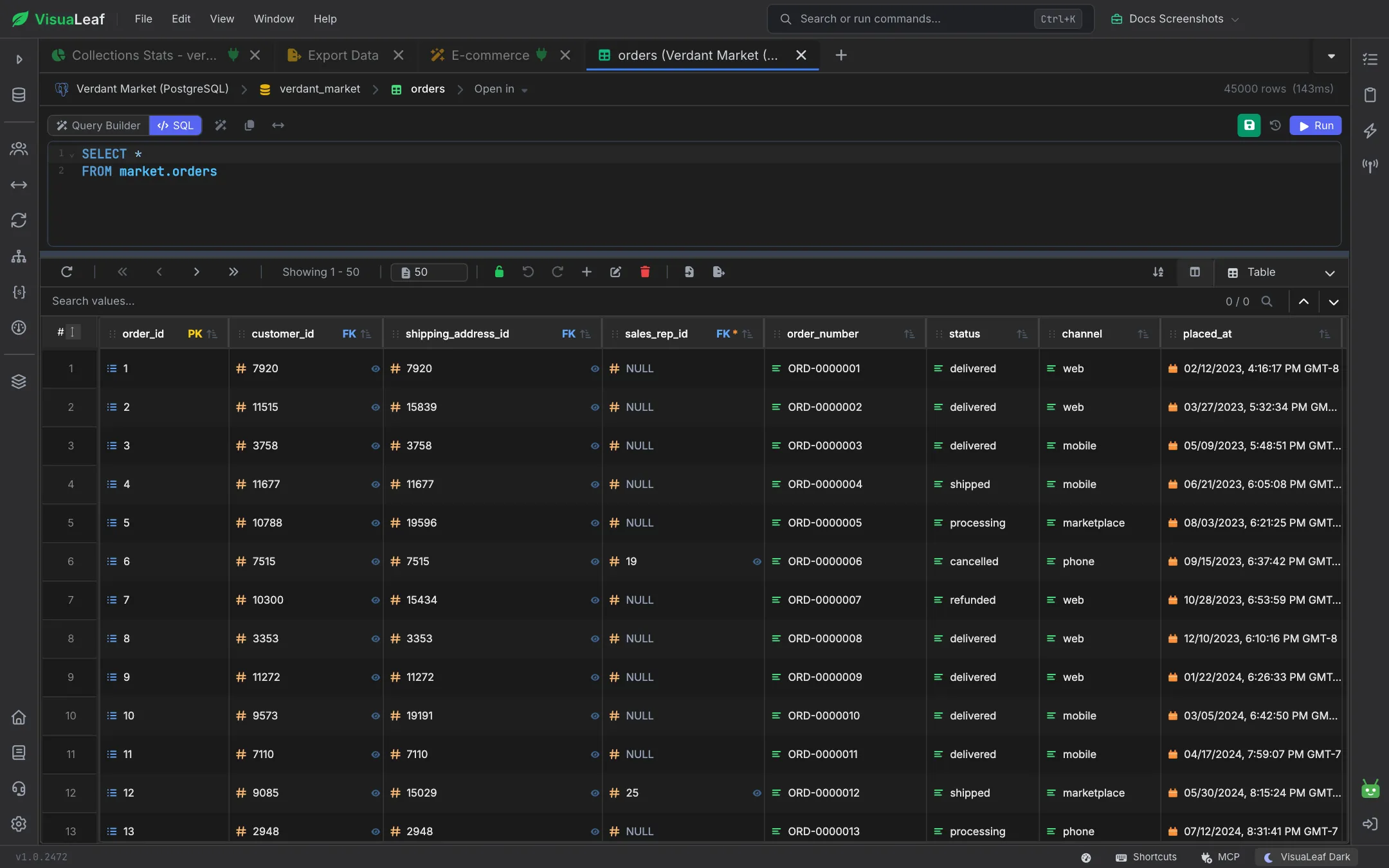
Open a few lines of the exported file before you import it elsewhere: as the test below shows, tools disagree on how to write NULL versus an empty string. See the SQL Table docs.
What we found testing this
We exported rows containing a comma, a quote, a line break, an empty string, a NULL, accented text and a BLOB:
$ sqlite3 -csv shop.db "SELECT * FROM people"
1,"Smith, Jo","line1
line2","","PNG-bytes...",3.0
2,"Ann ""AJ"" Lee",,,,0.1
3,"Zoë","café",x,,1.0e+20- The sqlite3 shell keeps NULL and empty string apart. Python's csv module doesn't. The shell wrote an empty string as
""and NULL as nothing. Python'scsv.writerwrote both as an empty field, so the difference was lost. If it matters, use-nullvalue NULLin the shell, or replaceNoneyourself in Python. - BLOBs come out as raw bytes. A PNG column was written as its binary bytes inside quotes, which corrupts most CSV readers. Python wrote the text
b'\x89PNG'instead. Export BLOBs withhex(photo)orbase64in your query. - Line endings depend on how you write the file.
.onceand.outputwrote CRLF (\r\n) line endings, the CSV standard. Redirecting-csvoutput with>gave LF only. Most tools accept both, but a strict diff or checksum will see different files. - Text with non-ASCII characters is always quoted.
"Zoë"and"café"were quoted whilexwasn't, and a large real number came out as1.0e+20. There was no byte-order mark, so Excel on Windows may misread the accents unless you import the file as UTF-8. - The shell is faster than a Python loop. Exporting 500,000 rows (14.7 MB) took 0.34 s with
sqlite3 -csvand 0.60 s with Python's csv module, on an Apple-silicon Mac.
Export from Python
Use the csv module with newline="", and take the header from cursor.description:
import csv, sqlite3

con = sqlite3.connect("shop.db")
cur = con.execute("SELECT * FROM orders")

with open("orders.csv", "w", newline="", encoding="utf-8") as f:
    w = csv.writer(f)
    w.writerow([d[0] for d in cur.description])
    w.writerows(cur)
For Excel on Windows, write with encoding="utf-8-sig" to add a byte-order mark so accented characters display correctly.
Shell options worth knowing
| Option | Effect |
|---|---|
-header / .headers on | Write column names as the first row |
-csv / .mode csv | Comma-separated, with quoting where needed |
-nullvalue NULL | Write NULL as the text NULL instead of an empty field |
.separator ";" | Use a different delimiter (for example, for European Excel) |
.mode tabs | Tab-separated output instead of CSV |
.once file.csv | Send the next query's output to a file |
.excel | Write the next query to a temporary file and open it in your spreadsheet app |
Frequently Asked Questions
How do I export a SQLite table to CSV with headers?
sqlite3 -header -csv file.db "SELECT * FROM tablename;" > tablename.csv. Inside the shell, run .headers on and .mode csv before the query.
How do I export the whole SQLite database to CSV?
CSV holds one table per file, so loop over the table names from sqlite_schema and export each one. For a full backup, use .dump, which writes SQL instead.
How are NULL values written in a SQLite CSV export?
As an empty field, while empty strings are written as "". Use -nullvalue NULL if the receiving tool needs to see NULLs explicitly.
Why does my CSV show garbled characters in Excel?
The file is UTF-8 without a byte-order mark. Import it through Data > From Text/CSV and choose UTF-8, or write it from Python with encoding="utf-8-sig".