How to import JSON or CSV into MongoDB with mongoimport
Import JSON, JSON arrays or CSV into MongoDB with mongoimport, keep types with typed CSV headers, and update existing documents with upsert or merge.
Quick Answer
Pick the line that matches your file:
# one JSON document per line (NDJSON)
mongoimport --uri="mongodb://localhost:27017/shop" --collection=orders --file=orders.json

# a file that is one big [ ... ] array
mongoimport --uri="mongodb://localhost:27017/shop" --collection=orders --file=orders.json --jsonArray

# CSV whose first row is the column names
mongoimport --uri="mongodb://localhost:27017/shop" --collection=orders --type=csv --headerline --file=orders.csv
The collection and database are created if they don't exist. Existing documents are left alone unless you choose a --mode.
JSON lines or a JSON array?
Look at the first character of the file. If it's [, the file is an array and needs --jsonArray. If it's { and each line is a document, it's newline-delimited JSON, which is mongoimport's default and what mongoexport writes.
$ mongoimport -c orders --file=array.json
Failed: cannot decode array into a primitive.D
0 document(s) imported successfully. 0 document(s) failed to import.
That error means "this file is an array": add --jsonArray. Prefer NDJSON for big files, because it streams line by line. A broken line is reported by its position, and in our test it stopped the whole import, valid lines included:
$ mongoimport -c orders --file=bad.ndjson      # line 2 is cut off
Failed: error processing document #2: unexpected EOF
0 document(s) imported successfully. 0 document(s) failed to import.
mongoimport reads Extended JSON, so {"$date": "…"}, {"$oid": "…"} and {"$numberDecimal": "…"} become real BSON dates, ObjectIds and decimals.
In VisuaLeaf
Import JSON or CSV with Data Transfer
In VisuaLeaf an import is a Data Transfer job, so you choose types and see the result before anything is written.
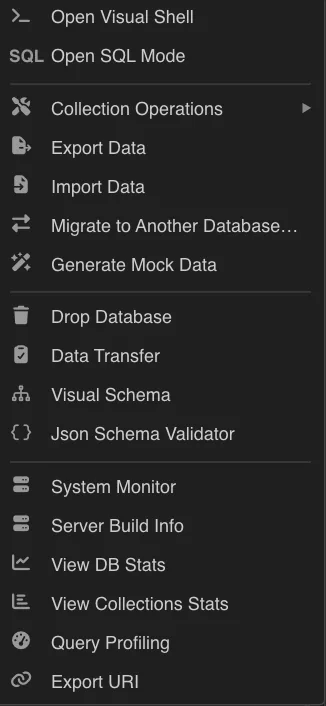
- Right-click the collection or database and choose Import Data.
- Set the source to JSON, either an array or one document per line (the format is detected), or to CSV with your delimiter and header row.
- In field mapping, convert types, for example string to number or a date string to a real date, so values land with the BSON types your queries expect.
- Click Check job to read sample rows and test the connections without writing, then run it now or save it as a job to schedule.
Upsert mode updates documents that already exist instead of inserting duplicates. See Export and import.
Import CSV with real types
Plain CSV import guesses: numbers become numbers and everything else becomes a string, including dates. To get dates, decimals and integers, put a type on each column and add --columnsHaveTypes:
# typed.csv, first line:
# _id.int32(),total.decimal(),createdAt.date(2006-01-02T15:04:05.000Z),customer.city.string()

mongoimport --uri="$URI/shop" -c orders --type=csv --columnsHaveTypes --headerline --file=typed.csv
The date format is a Go-style layout: you write the reference time 2006-01-02T15:04:05 in the shape your file uses. Other types include int64(), double(), boolean() and auto(). A dotted column such as customer.city becomes an embedded document.
If the file already has a plain header row, don't pass the typed names with --fields. mongoimport treats the header row as data and fails on it (see the findings below). Put the typed names in the header and use --headerline.
Update existing documents: insert, upsert, merge
| --mode | Document already exists | Document is new |
|---|---|---|
insert (default) | Fails with a duplicate key error and is skipped | Inserted |
upsert | Replaced entirely by the file's version | Inserted |
merge | Fields from the file are set, other fields are kept | Inserted |
delete | Deleted | Ignored |
Documents are matched on _id unless you pass --upsertFields=sku (create a unique index on those fields first so matching is fast and unambiguous).
What we found testing this
Setup: MongoDB 7.0 in Docker on an Apple-silicon Mac, with files exported from a 50,000-document collection plus small hand-made files.
1. Duplicate keys don't fail the command
$ mongoimport -c orders --jsonArray --file=orders.json      # all three already exist
0 document(s) imported successfully. 3 document(s) failed to import.
$ echo $?
0

$ mongoimport -c orders --jsonArray --file=orders.json --stopOnError
$ echo $?
1
In a script or CI job, use --stopOnError, or check the "failed to import" count, or every rerun of an import will look successful.
2. upsert wipes fields that merge keeps
Our document was {_id: 1, sku: "SKU-1-NEW", price: 9, keep: "me"}. We imported {"_id": 1, "price": 10} both ways:
| Mode | Result |
|---|---|
--mode=merge | {"_id":1,"sku":"SKU-1-NEW","price":10,"keep":"me"} |
--mode=upsert | {"_id":1,"price":10} |
If your file only carries the fields that changed, upsert deletes everything else. Use merge.
3. Typed columns plus an existing header fail on row 1
$ mongoimport --type=csv --columnsHaveTypes --fields='_id.int32(),total.decimal(),…' --file=orders.csv
Failed: type coercion failure in document #0 for column '_id', could not parse token '_id' to type int32
"document #0" is the header row being parsed as data. Replacing the header with the typed names and using --headerline imported all 50,000 rows, with total as Decimal128 and createdAt as a real Date.
4. A 20 MB --jsonArray file imported fine
Many guides say --jsonArray is limited to 16 MB. With tools 100.13.0, a 20.5 MB array of 90,000 documents imported completely, as did the same data as NDJSON. The real limit is 16 MB per document. For very large files NDJSON is still the safer choice, because it doesn't need the whole array parsed at once.
5. More insertion workers help, a little
Importing 50,000 canonical-JSON documents took 770 ms with the default single worker and 564 ms with --numInsertionWorkers=4. That's about 27% faster here. On a remote server, where network round trips dominate, the gain is usually larger. If documents must go in file order, use --maintainInsertionOrder, which runs a single worker.
Frequently Asked Questions
How do I import a JSON file into MongoDB?
mongoimport --uri="mongodb://localhost:27017/shop" --collection=orders --file=orders.json. Add --jsonArray if the file starts with [.
Why does mongoimport say "cannot decode array into a primitive.D"?
The file is a JSON array but mongoimport expected one document per line. Add --jsonArray.
How do I import a CSV with dates in MongoDB?
Give each header a type, such as createdAt.date(2006-01-02T15:04:05.000Z), and run mongoimport with --type=csv --columnsHaveTypes --headerline.
Does mongoimport overwrite existing documents?
Not by default; documents with an existing _id fail and are skipped. --mode=upsert replaces them, and --mode=merge updates only the fields in the file.
Should I use mongoimport or mongorestore?
mongorestore for BSON dumps made by mongodump, which keep indexes and every type. mongoimport for JSON and CSV files from other systems or from mongoexport.