Oracle SQL Developer Alternative: A Visual Oracle GUI
VisuaLeaf is an Oracle SQL Developer alternative for visual queries, ER diagrams, table management, SQL, and PL/SQL. See how it works with a real ORDEROPS schema.


Oracle work rarely stays in one worksheet. You may start by checking a few rows, follow a foreign key into another table, inspect a trigger, and then open the PL/SQL package that applies the business rules. The query itself may be simple. Keeping the schema, data, and program logic in view is the harder part.
Oracle SQL Developer is Oracle’s free integrated development environment. It includes a PL/SQL IDE, query worksheets, database administration, reports, data modeling, and migration tools. It is a capable product. But if you work across several database engines or prefer a more visual workflow, you may want an Oracle SQL Developer alternative for the tasks you handle every day.
For this walkthrough, I connected VisuaLeaf to Oracle AI Database 26ai Free running locally in Docker. Instead of demonstrating isolated buttons, I used a working retail order fulfillment schema to move through the same tasks an Oracle developer might perform: inspect the schema, build a query, review table definitions, and read PL/SQL beside the data it affects.
Connect VisuaLeaf to Oracle Database
The test environment used the following connection details:
- Oracle AI Database 26ai Free Release 23.26.3.0.0
- A local Docker container
- Port
1521 - Pluggable database service
FREEPDB1 - Application user and schema
ORDEROPS
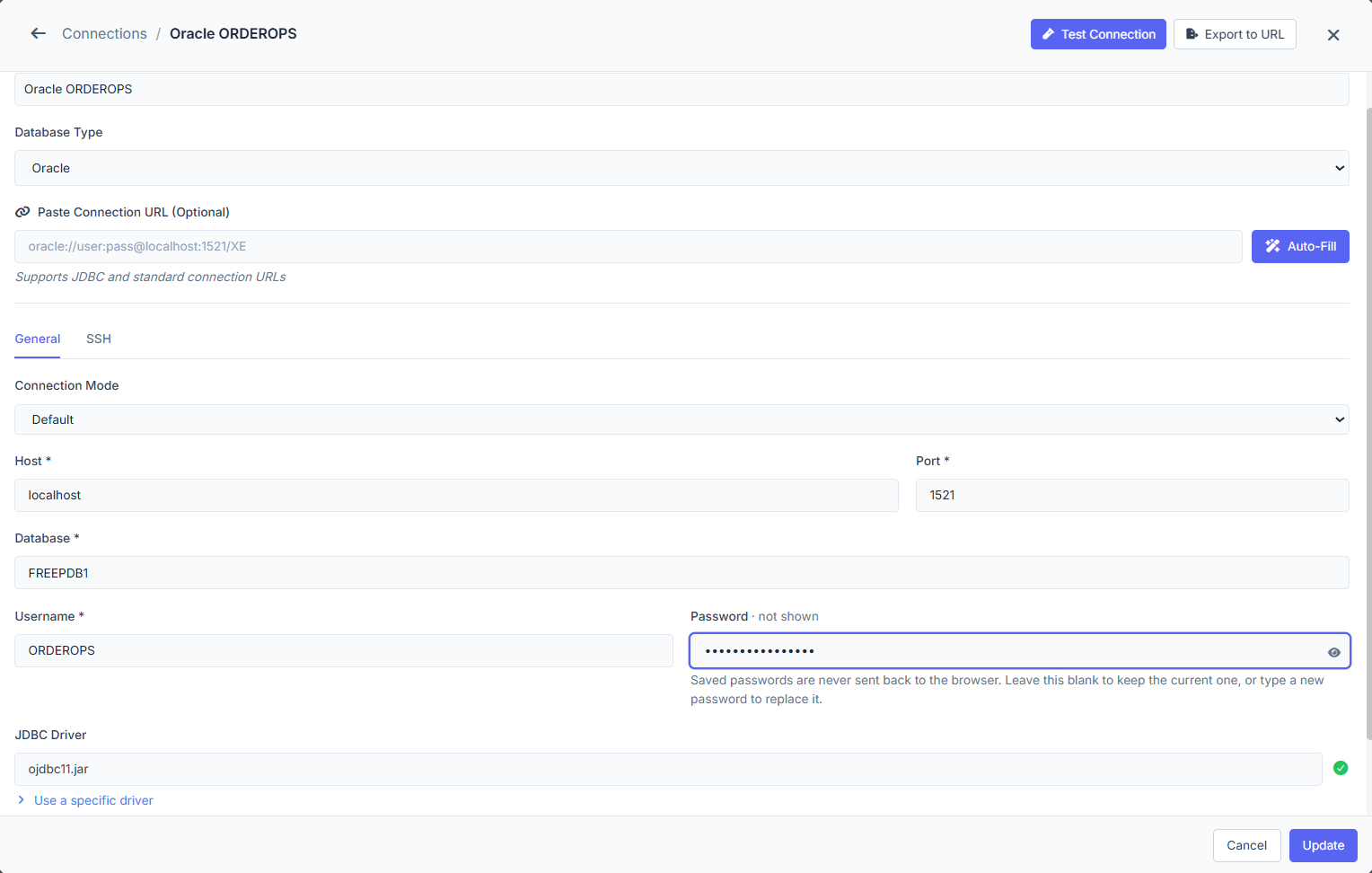
That distinction matters in Oracle. FREEPDB1 is the pluggable database service used for the connection; ORDEROPS is the application schema inside it. In Oracle, every user account owns a schema with the same name, as explained in the Oracle documentation on schemas and schema objects.
Browse Oracle Schemas and Database Objects
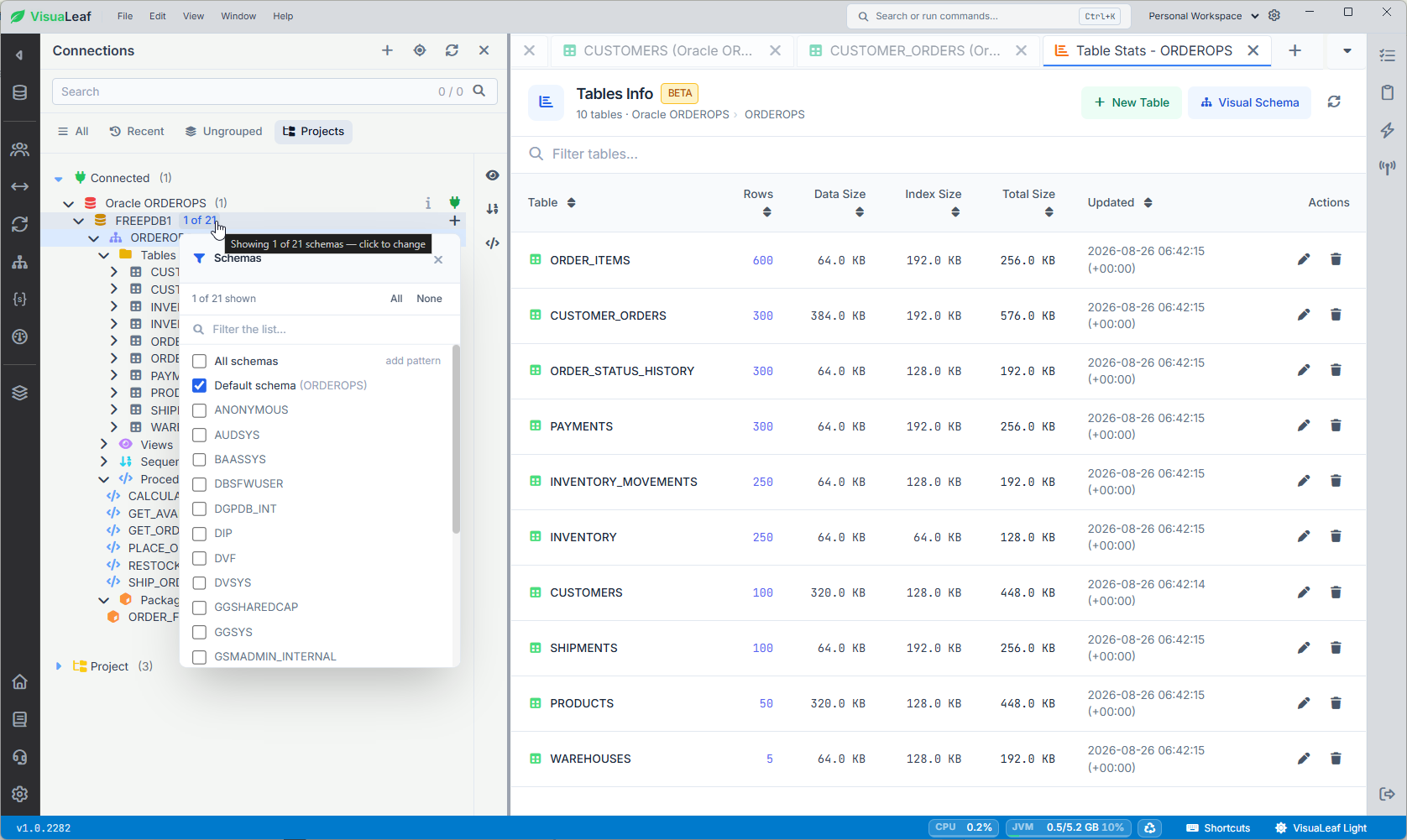
Expanding ORDEROPS reveals more than a list of tables. The tested schema contains ten tables, nine sequences, six procedures, and one package named ORDER_FULFILLMENT_PKG.
The ten tables model a complete order flow:
CUSTOMERSCUSTOMER_ORDERSORDER_ITEMSPAYMENTSPRODUCTSINVENTORYINVENTORY_MOVEMENTSWAREHOUSESSHIPMENTSORDER_STATUS_HISTORY
Each table can be expanded further to see columns, indexes, foreign keys, triggers, and constraints. This is useful in Oracle because the application structure is not defined by tables alone. Sequences may generate identifiers, triggers may react to data changes, and PL/SQL packages may contain rules that are not visible from the rows themselves.
The connection also exposes Oracle’s built-in schemas. In this workflow, the important step is to open ORDEROPS under FREEPDB1, rather than treating the service and schema as the same thing.
Turn an Existing Oracle Schema into an ER Diagram
A database tree tells you which objects exist. An ER diagram shows how they work together.
In this case, the existing ORDEROPS tables were added to a visual model named Retail Order Fulfillment. VisuaLeaf reads the primary keys, foreign keys, and constraints already stored in Oracle and draws the relationships between them.
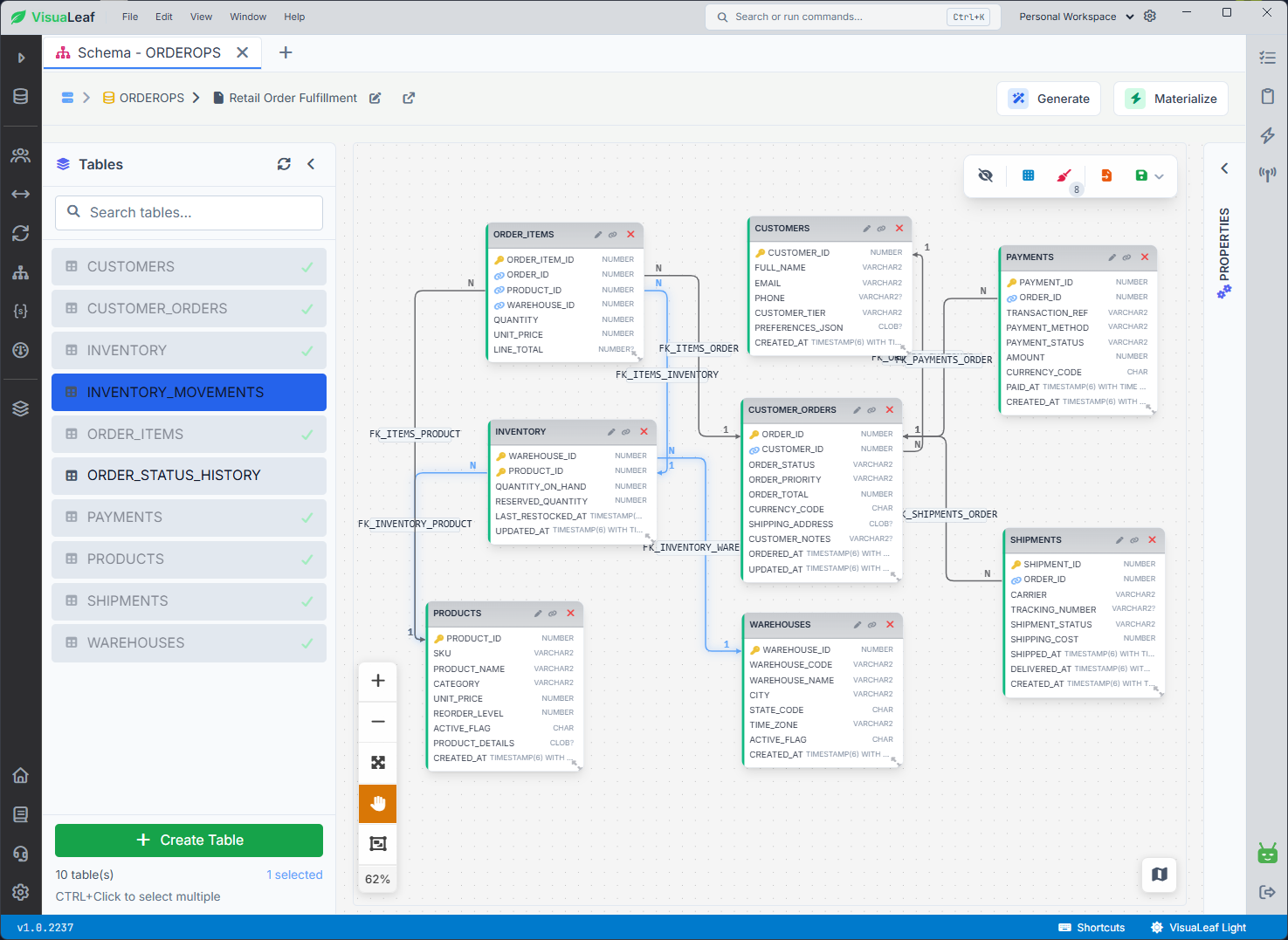
This process is often called reverse engineering: the tool reads an existing database structure and turns it into a visual schema model. It does not invent relationships where no foreign key exists.
The diagram makes the order path easier to follow. CUSTOMER_ORDERS connects customers to order items, payments, shipments, and status history. ORDER_ITEMS links each order to products and inventory. The INVENTORY table connects products with the warehouses that hold them.
The same designer can also be used in the other direction. You can start with an empty model, create tables and relationships visually, and materialize the design into the connected database. That makes the diagram useful for both understanding an existing Oracle schema and planning a new one.
Build a Multi-Table Oracle Query Visually
For a practical query, suppose you need delivered orders with completed payments above $1,000, together with the customer name and tier.
The visual query builder starts with CUSTOMER_ORDERS and joins two more tables:
CUSTOMER_ORDERS.CUSTOMER_ID = CUSTOMERS.CUSTOMER_ID
CUSTOMER_ORDERS.ORDER_ID = PAYMENTS.ORDER_ID
From those tables, the query selects ORDER_ID, ORDER_PRIORITY, FULL_NAME, CUSTOMER_TIER, PAYMENT_METHOD, and AMOUNT. It then applies three conditions:
CUSTOMER_ORDERS.ORDER_STATUS = 'DELIVERED'
PAYMENTS.PAYMENT_STATUS = 'COMPLETED'
PAYMENTS.AMOUNT > 1000
Finally, it sorts the payment amount in descending order.
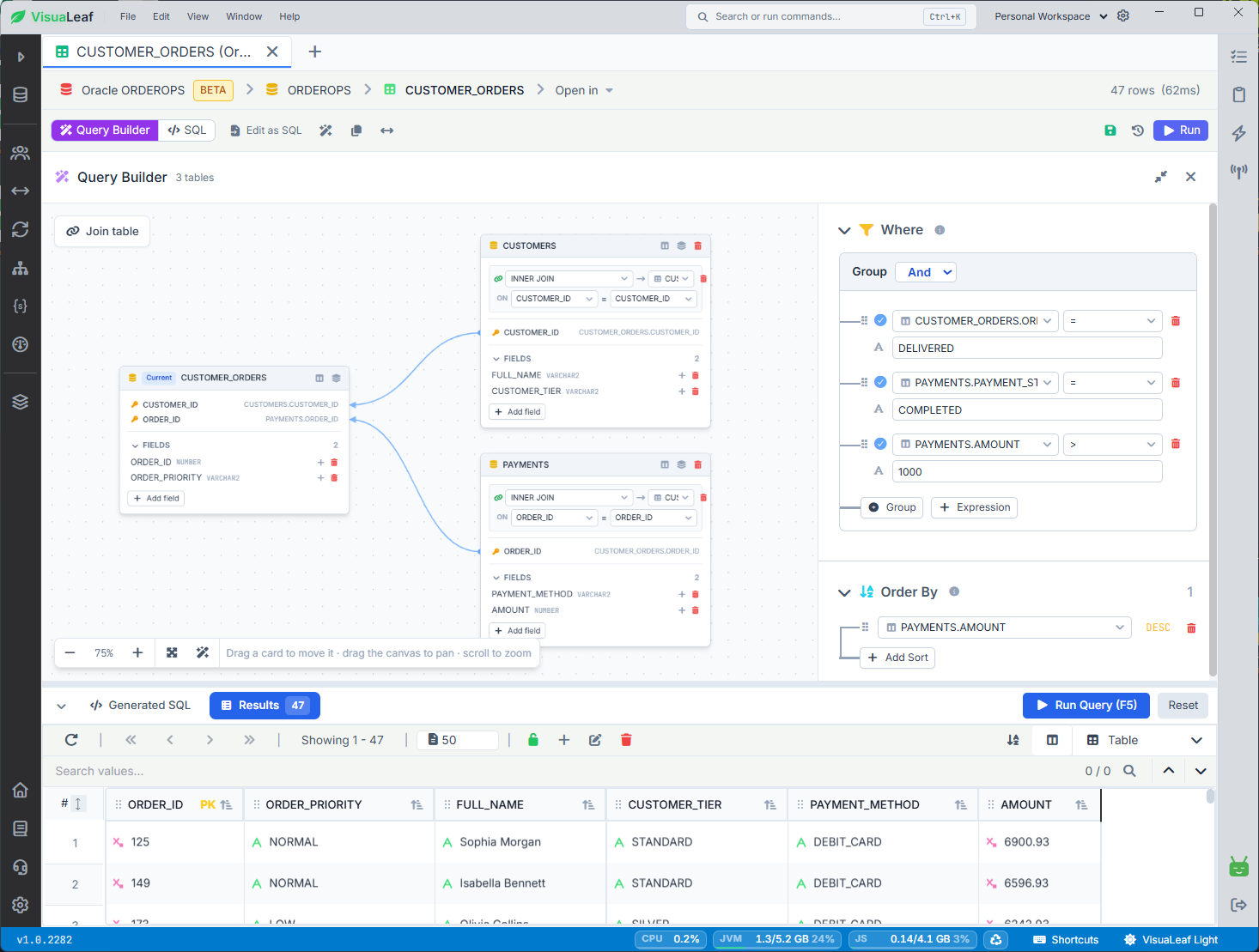
The generated Oracle SQL is equivalent to:
SELECT
    co.order_id,
    co.order_priority,
    c.full_name,
    c.customer_tier,
    p.payment_method,
    p.amount
FROM orderops.customer_orders co
INNER JOIN orderops.customers c
    ON co.customer_id = c.customer_id
INNER JOIN orderops.payments p
    ON co.order_id = p.order_id
WHERE co.order_status = 'DELIVERED'
  AND p.payment_status = 'COMPLETED'
  AND p.amount > 1000
ORDER BY p.amount DESC;
The test data returned 47 matching rows. That number belongs only to this demo dataset; it is not a performance benchmark.
The visual builder is not limited to people who cannot write SQL. It also gives experienced developers a quick way to inspect join paths, selected fields, grouped WHERE conditions, and sorting before switching to the generated SQL for further editing.
To test the same workflow with your own Oracle schema, download VisuaLeaf and connect using your host, port, service name or SID, and Oracle user. The Community Edition is free to install, and the in-app Pro trial does not require a credit card.
Write SQL and Work Directly with Oracle Data
For queries that are easier to express in code, VisuaLeaf includes a regular SQL editor. You can run the full script, execute the current statement, save the script, and check messages or query history.
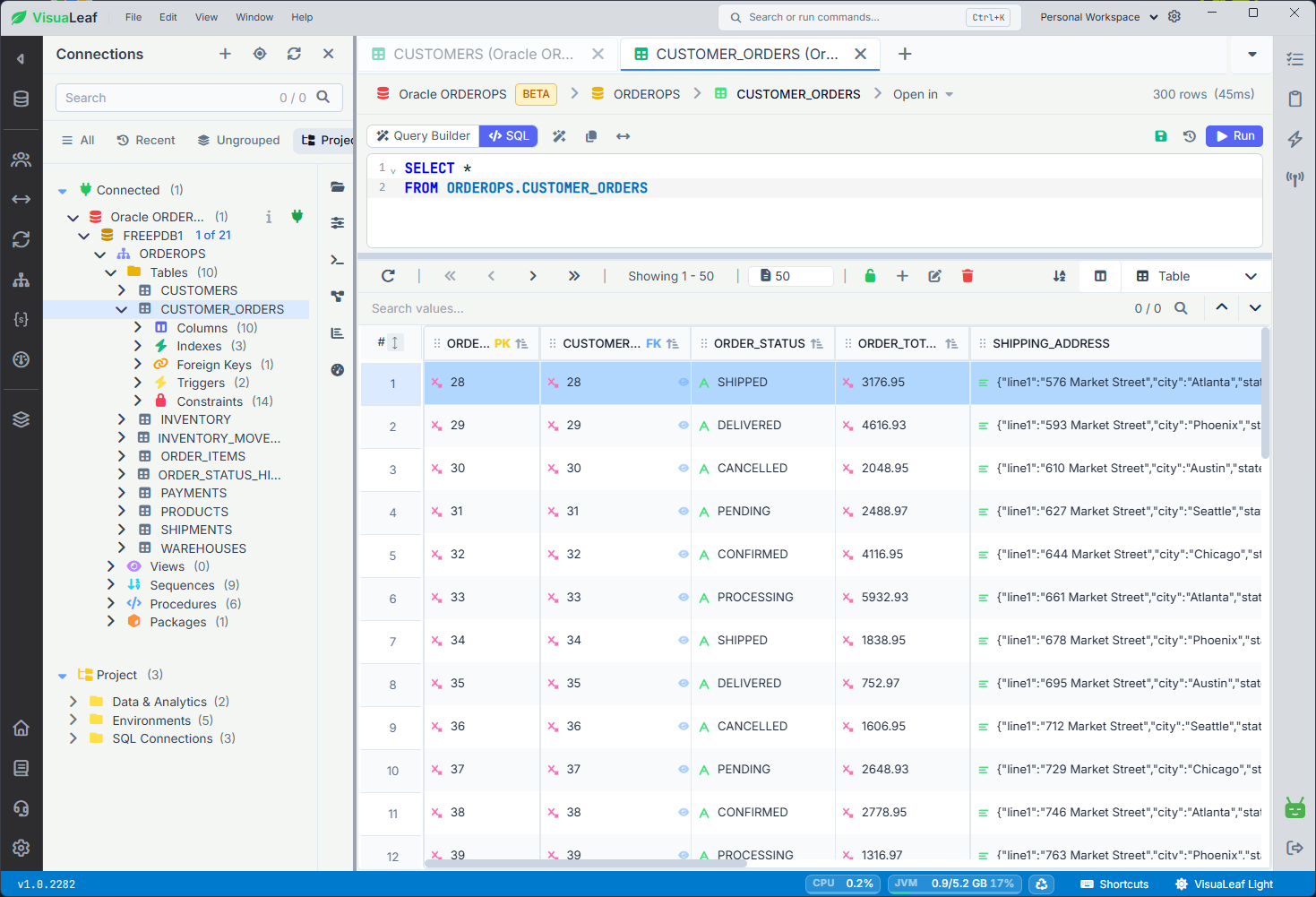
The data grid can remain open below the editor, which is useful when you need to check a query or PL/SQL change against actual rows. In the tested CUSTOMER_ORDERS table, the grid shows primary and foreign key markers alongside Oracle values such as NUMBER, VARCHAR2, and JSON text stored in a CLOB column.
Tables can also be opened directly in a spreadsheet-style grid for browsing, searching, sorting, and row editing. As with any database client, whether a result is safely editable depends on the query and whether VisuaLeaf can identify the underlying row.
Inspect and Manage an Oracle Table
Opening Table Management for INVENTORY shows why a schema browser needs more than a column list.
This table uses a composite primary key made from WAREHOUSE_ID and PRODUCT_ID. Those columns also connect inventory records to WAREHOUSES and PRODUCTS through two foreign keys.
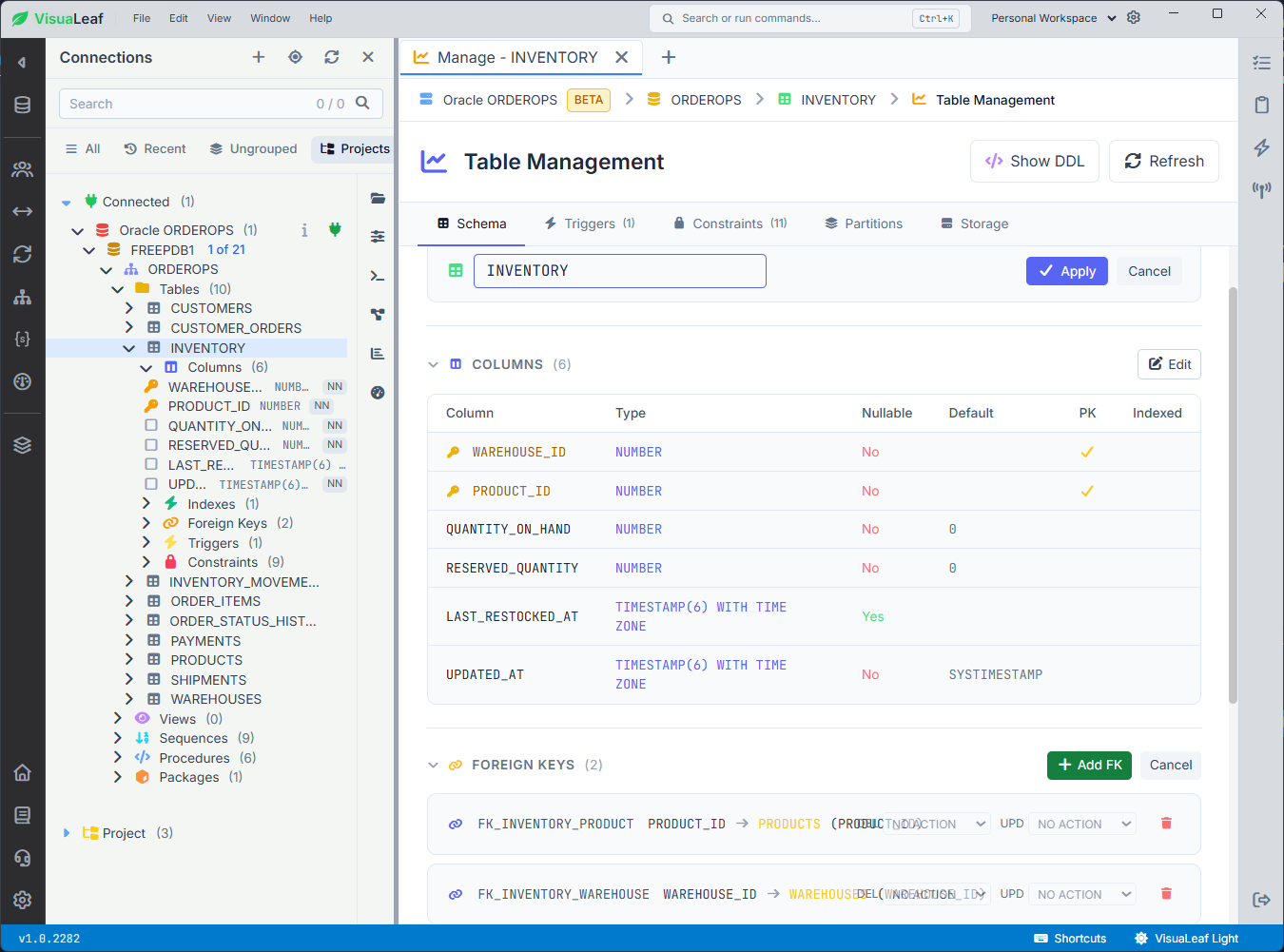
The definition includes Oracle-specific types and defaults:
QUANTITY_ON_HAND NUMBERwith a default of0RESERVED_QUANTITY NUMBERwith a default of0LAST_RESTOCKED_AT TIMESTAMP(6) WITH TIME ZONEUPDATED_AT TIMESTAMP(6) WITH TIME ZONEwithSYSTIMESTAMP
From the same screen, you can inspect nullability, primary keys, foreign keys, triggers, constraints, partitions, and storage settings. The Show DDL option remains important even in a visual workflow: it lets you check the Oracle CREATE TABLE statement behind the model rather than treating the interface as a black box.
The presence of partition and storage panels does not mean this particular table uses every option. It means those Oracle properties can be inspected from the table-management workspace when they apply.
Work with PL/SQL Packages Beside Their Data
Oracle applications often keep important business logic inside packages. A package groups related procedures, functions, and other program objects into one stored unit, with a specification for its public interface and a package body for the implementation. Oracle documents that structure here.
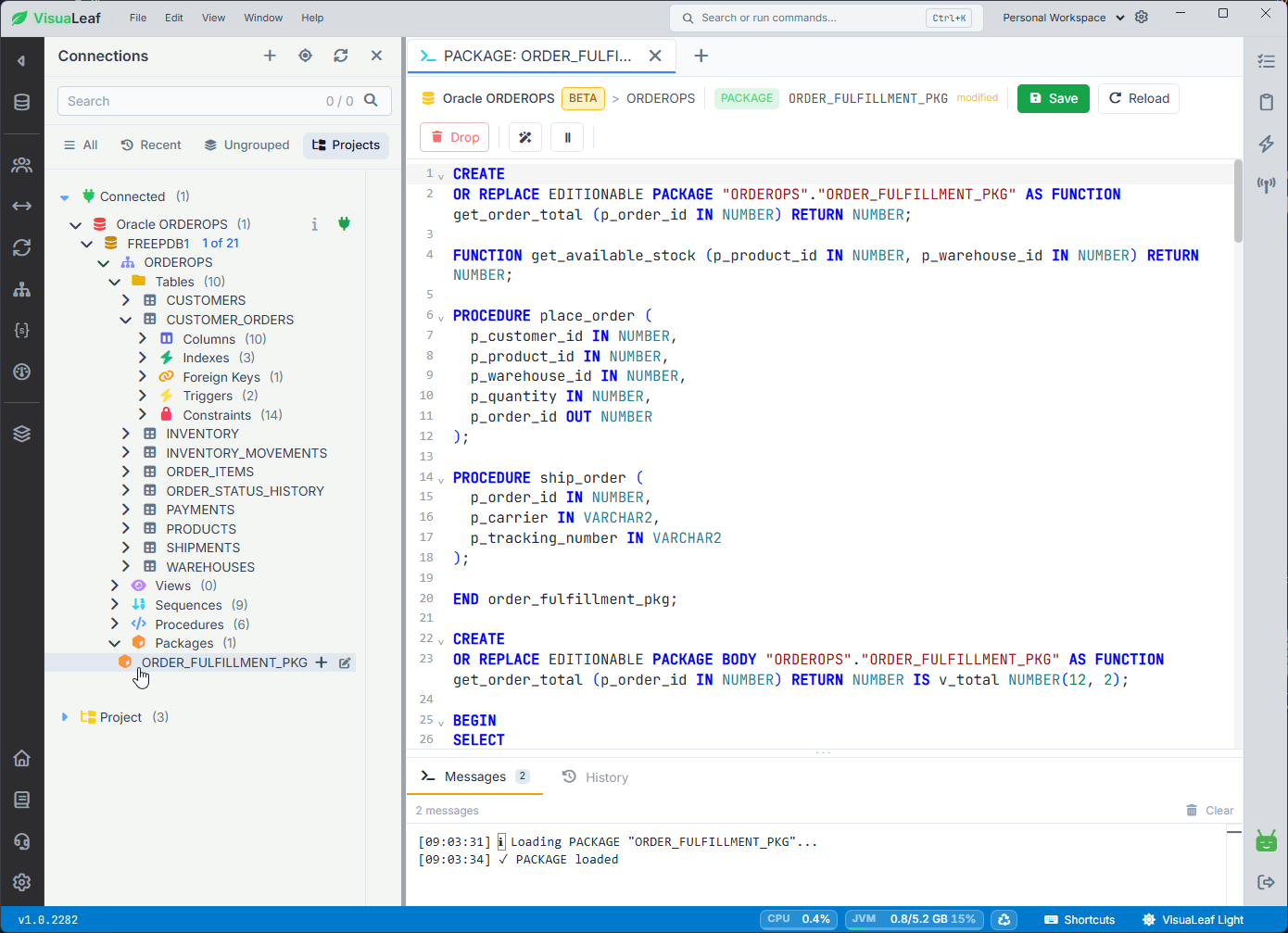
The ORDER_FULFILLMENT_PKG package in this demo contains a place_order procedure. Its parameters identify the customer, product, warehouse, requested quantity, and generated order ID:
p_customer_id  IN NUMBER,
p_product_id   IN NUMBER,
p_warehouse_id IN NUMBER,
p_quantity     IN NUMBER,
p_order_id     OUT NUMBER
The procedure also rejects invalid quantities:
IF p_quantity <= 0 THEN
    RAISE_APPLICATION_ERROR(
        -20001,
        'Order quantity must be greater than zero.'
    );
END IF;
This is only an excerpt from the package body, not a standalone procedure intended to compile by itself.
The package opens directly from the ORDEROPS schema tree, with its specification and body visible in the editor. You can review or edit the stored PL/SQL, save or reload the source, and check the Messages panel without leaving the package view.
Can VisuaLeaf Replace Oracle SQL Developer?
VisuaLeaf makes the most sense when your Oracle work combines several activities: exploring a schema, joining tables, editing data, checking DDL, reading PL/SQL, and understanding relationships. It is also useful when Oracle is not your only database. The same workspace supports Oracle and other SQL and NoSQL databases, so you do not need a completely different interface for PostgreSQL, MySQL, SQL Server, or MongoDB.
Oracle SQL Developer remains the official, Oracle-focused environment for teams that depend on its specialized PL/SQL debugging, database administration, reporting, and migration tools. VisuaLeaf offers a different reason to try it: a direct visual path between schema structure, queries, PL/SQL, and data, with the same interface available for other database engines.
Conclusion: Choosing an Oracle SQL Developer Alternative
The right Oracle SQL Developer alternative depends on the work you actually need to do.
In this ORDEROPS workflow, VisuaLeaf connected to an Oracle pluggable database, exposed tables and stored objects, turned existing foreign keys into an ER diagram, built a three-table query visually, displayed Oracle table definitions, and kept PL/SQL package code beside live order data.
That combination is why you should consider it: not because Oracle SQL Developer cannot handle Oracle development, but because VisuaLeaf offers a different way to move between schema structure, SQL, PL/SQL, and data—especially when Oracle is only one of the databases in your workspace.
To see whether that workflow suits you, download VisuaLeaf, connect it to an existing Oracle schema, and try three things you already do: open a table, build one familiar join, and generate the ER diagram. You will know quickly whether the visual workflow makes your Oracle work easier to follow.