How to Copy and Sync a Local MongoDB Collection to Atlas
Learn how to copy a local MongoDB collection to MongoDB Atlas and keep inserts, updates, and deletes synchronized with Mongo Sync.


Moving data from a local MongoDB database to Atlas usually means exporting files, importing them again, and repeating the same process when something changes.
I wanted to test a simpler way in VisuaLeaf: copy a local collection to MongoDB Atlas and keep the Atlas collection updated automatically.
For this example, I used a local visits collection containing seven documents. The documents included ordinary fields, nested objects, arrays, dates, and ObjectIds, so I could also check whether the original MongoDB structure remained intact in Atlas.
Here is the complete process, followed by an insert, update, and delete test.
What I used
My source and target were:
| Role | Connection | Database | Collection |
|---|---|---|---|
| Source | Local Replica Set |
database_compare_demo |
visits |
| Target | MongoDB Atlas |
database_compare_demo |
visits_atlas_sync |
I used a different target collection name so I could verify the copied data without mixing it with anything already stored in Atlas.
The local source was a replica set because continuous synchronization relies on MongoDB change streams. Change streams are available for replica sets and sharded clusters, not standalone MongoDB deployments. (MongoDB change streams)
If the source is standalone, the job can still perform an initial copy, but it cannot continue watching for later changes.
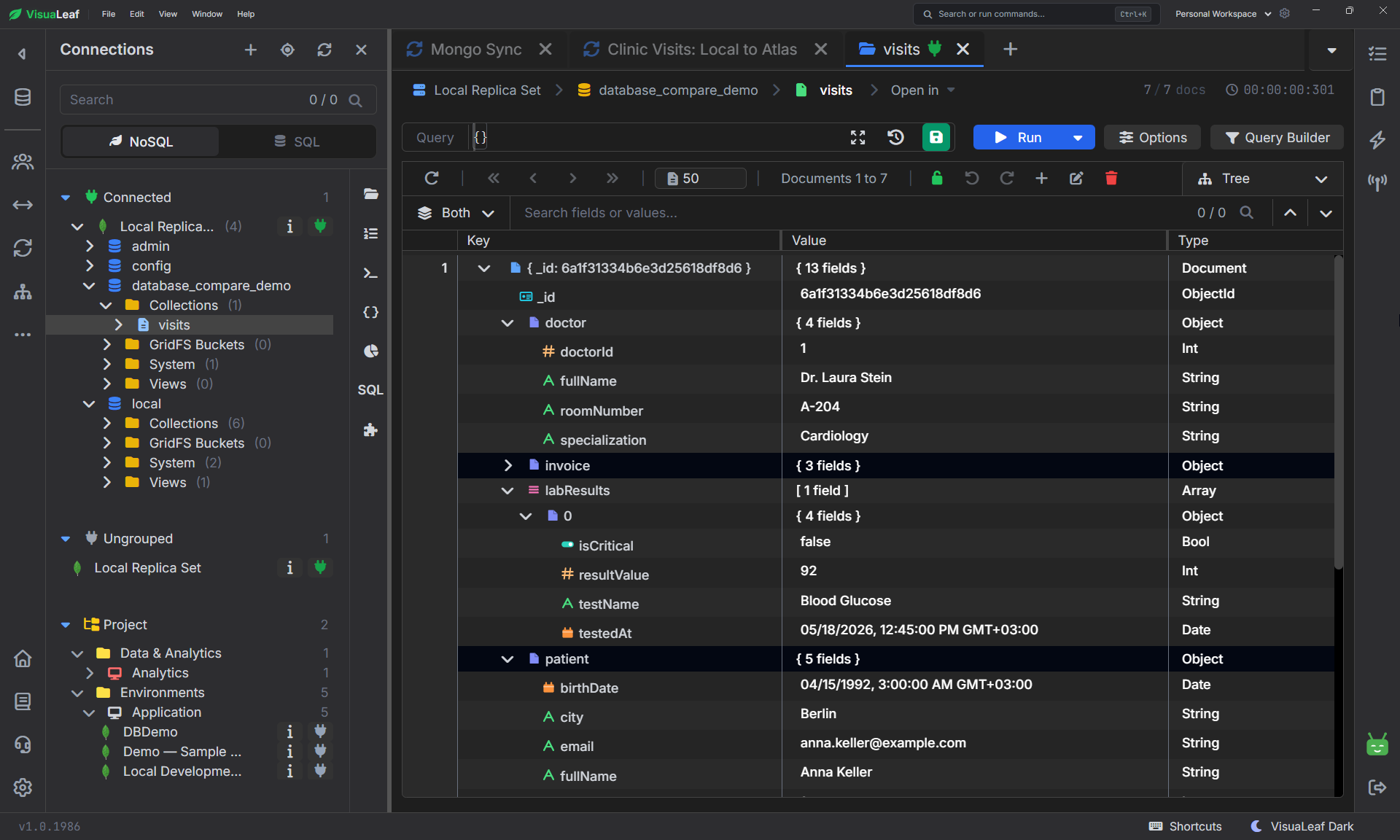
visits collection before it was copied to Atlas.Preparing the Atlas connection
Before creating the sync job, I made sure VisuaLeaf could write to my Atlas cluster.
Before using a standard Atlas connection, I configured two access items:
- A database user with permission to access the target database.
- My computer’s public IP address added to the project’s IP access list.
Atlas database users are separate from the account used to sign in to the Atlas website. For this test, I used a database user with read and write access to database_compare_demo.
I added only my current IP address to the Atlas access list instead of allowing connections from every IP. Atlas only accepts standard client connections from addresses included in that list. (MongoDB Atlas connection prerequisites)
From the Atlas cluster’s Connect window, I copied the driver connection string. Its general format was:
mongodb+srv://<username>:<password>@<cluster-host>/
I used that URI to create a connection in VisuaLeaf and named it MongoDB Atlas. I tested the connection before continuing.
Creating the sync job
I opened Mongo Sync and created a new job with these details:
| Setting | Value |
|---|---|
| Job name | Local Visits to Atlas |
| Description | Copy local clinic visits to Atlas and keep later changes synchronized. |
| Source connection | Local Replica Set |
| Source database | database_compare_demo |
The source connection showed full change-stream support, which meant I could select Full sync later.
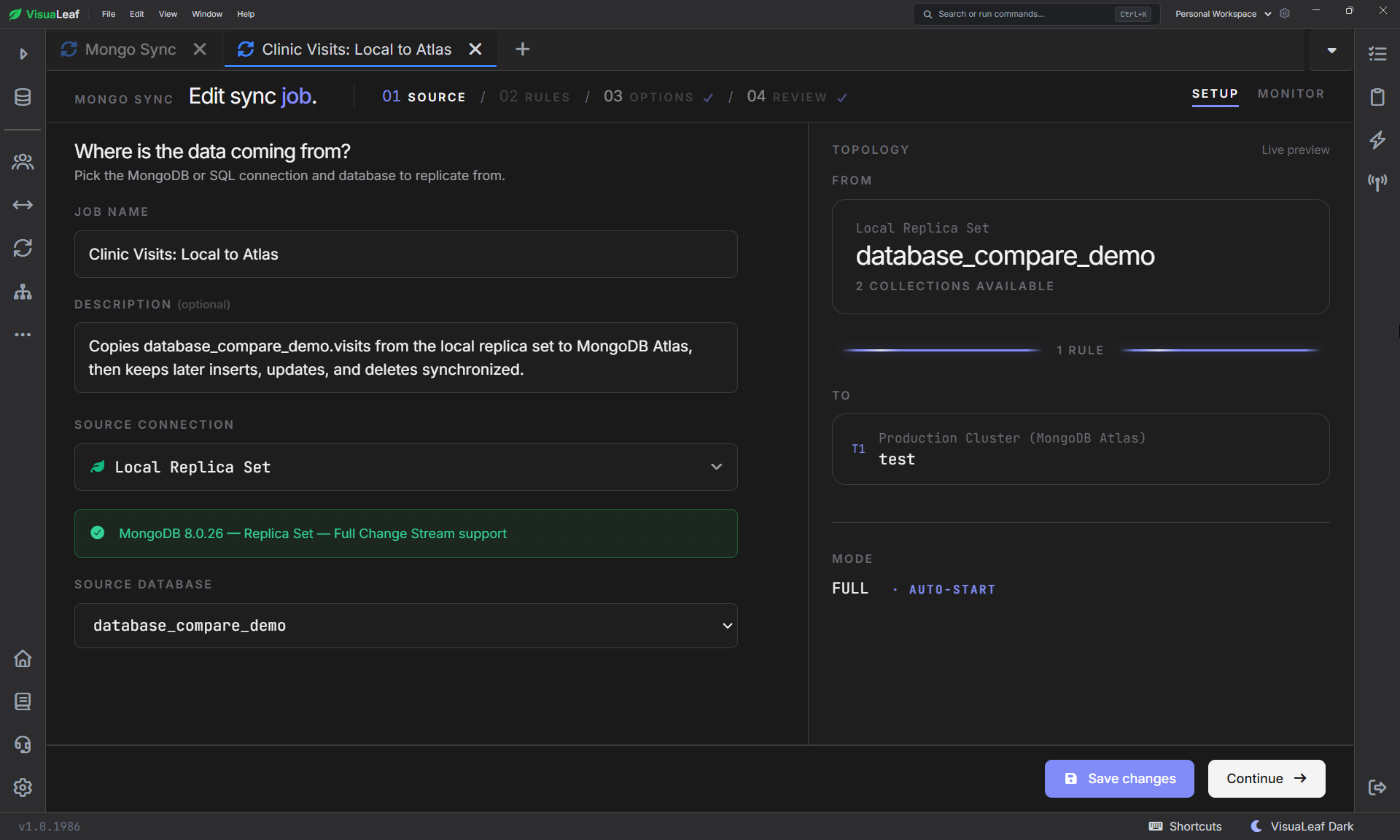
database_compare_demo database selected as the source.Mapping the local collection to Atlas
In the Rules step, I added the Atlas connection as the target and configured one rule:
| Setting | Value |
|---|---|
| Target connection | MongoDB Atlas |
| Target database | database_compare_demo |
| Source collection | visits |
| Target collection | visits_atlas_sync |
| Filter | Empty |
| Transformation | None (pass-through) |
I left the filter empty because I wanted all seven documents.
I also used None (pass-through) instead of generating field mappings. Both sides were MongoDB, so I wanted to preserve each document exactly as it was, including its _id, nested objects, arrays, dates, and optional fields.
Field mappings are useful when renaming fields, changing types, masking values, or sending data into a different schema. They were unnecessary for this direct MongoDB-to-MongoDB copy.
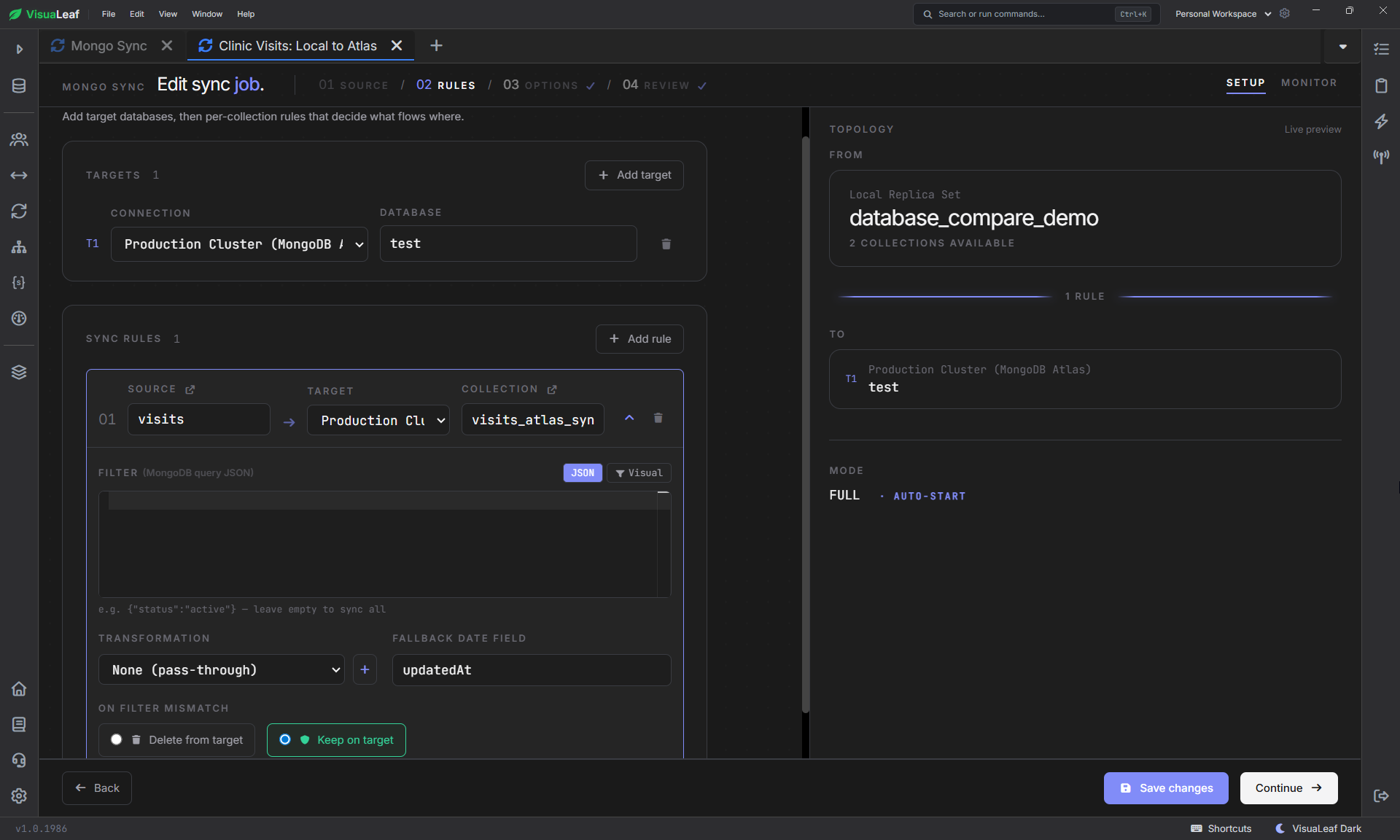
visits collection mapped to visits_atlas_sync with pass-through documents.Choosing Full sync
The Options step offered three modes:
| Mode | What it does | When to use it |
|---|---|---|
| Initial Only | Copies the documents that currently exist, then stops | One-time collection copy |
| Incremental Only | Watches only for changes made after the job starts | The target is already populated |
| Full sync | Copies existing documents and then watches for later changes | Initial copy plus continuous synchronization |
I selected Full sync and enabled Start sync immediately after creation.
This mode first copies the seven documents already stored locally. After the initial phase finishes, it continues listening for new inserts, updates, and deletes.
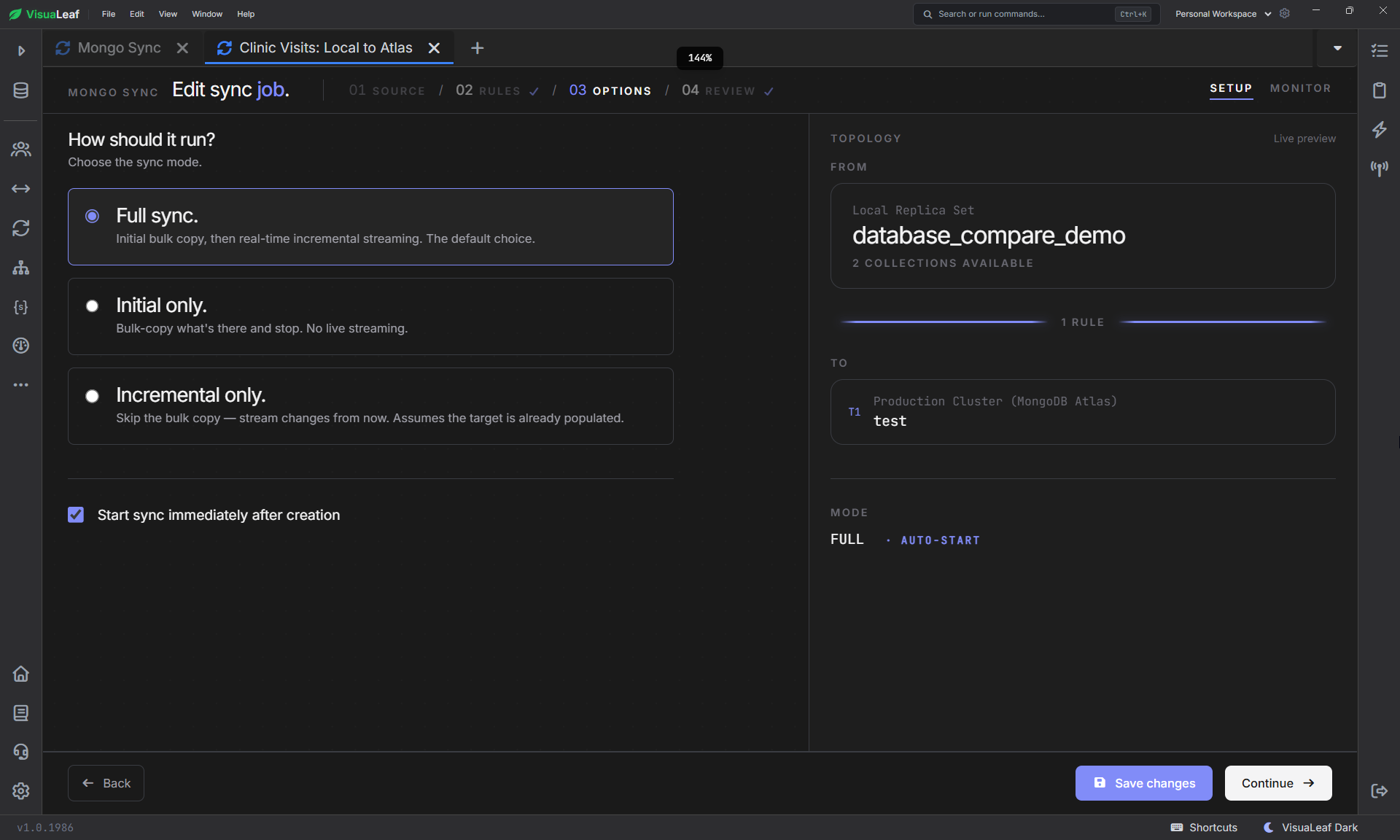
Reviewing and launching the job
The Review screen showed:
Local Replica Set / database_compare_demoas the source;MongoDB Atlas / database_compare_demoas the target;- one rule from
visitstovisits_atlas_sync; - no filter or transformation;
- Full sync with automatic start.
It also estimated an initial copy of approximately seven documents.
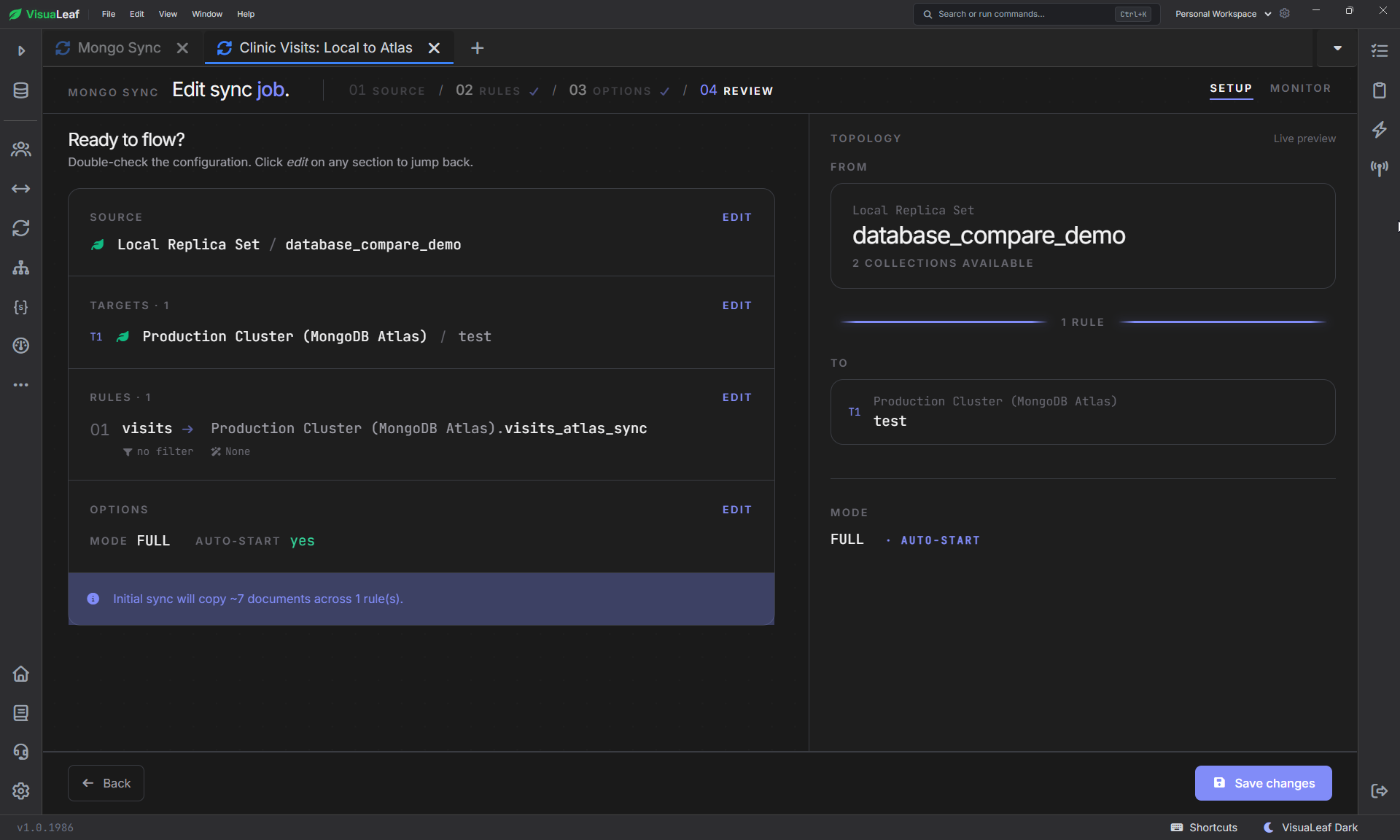
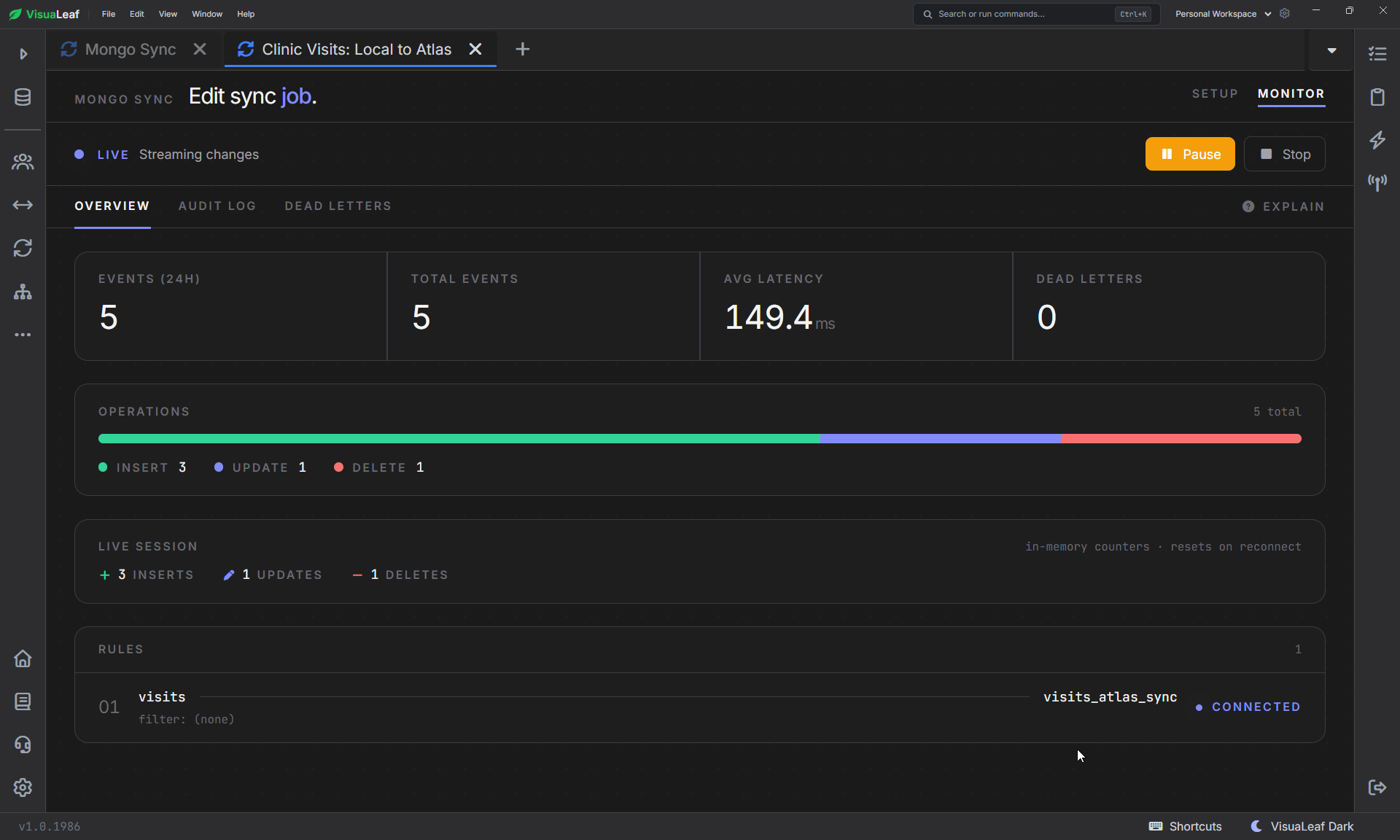
I clicked Create & launch and waited for the initial phase to finish. Once the monitor showed that the job was running and waiting for changes, I checked the Atlas collection directly.
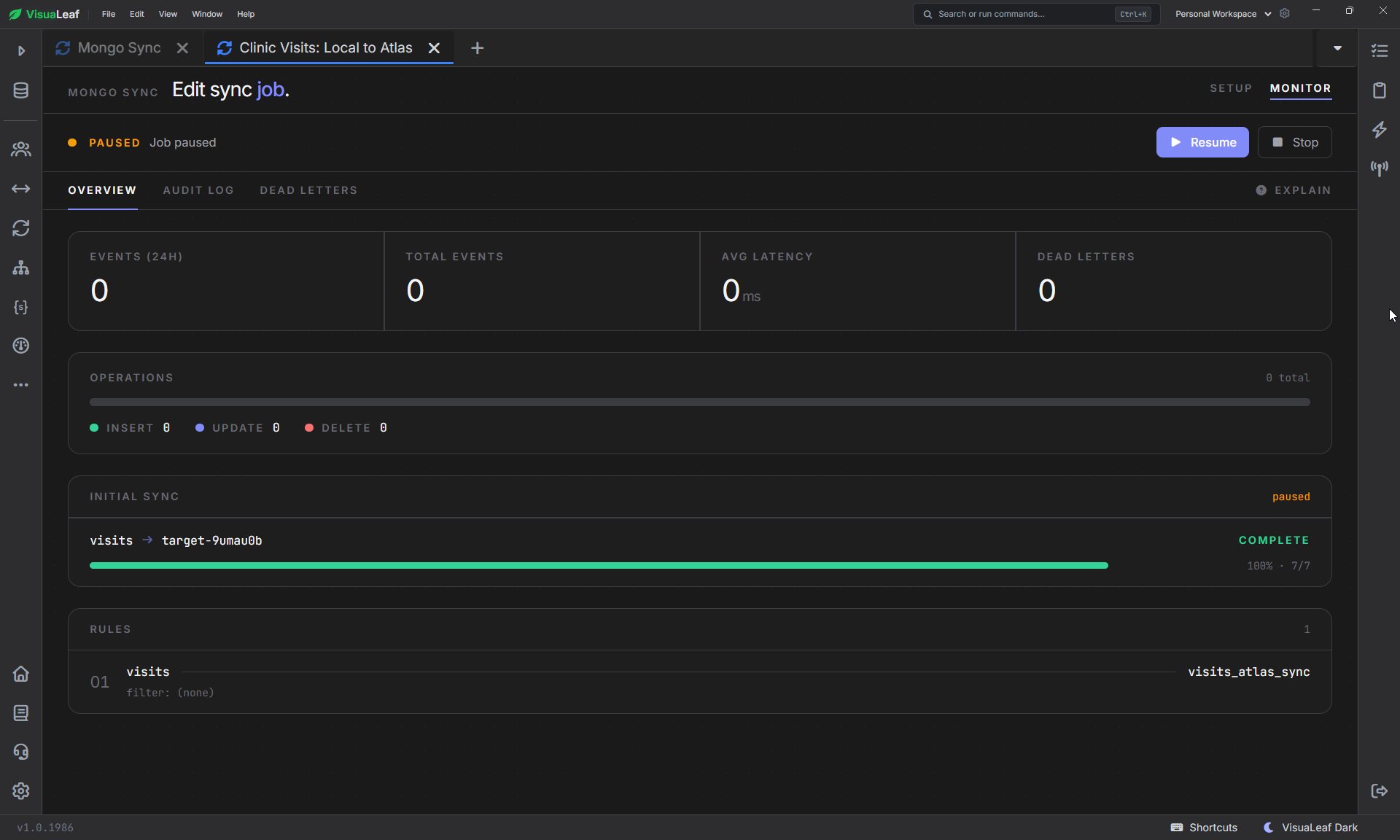
Verifying the initial copy in Atlas
I opened database_compare_demo.visits_atlas_sync on the Atlas connection and counted its documents:
db.visits_atlas_sync.countDocuments({})
The result was 7, matching the local source collection.
I also opened several documents and checked their BSON types. The ObjectIds, dates, nested patient and doctor objects, and arrays were preserved because the job used pass-through documents rather than converting them into a new schema.
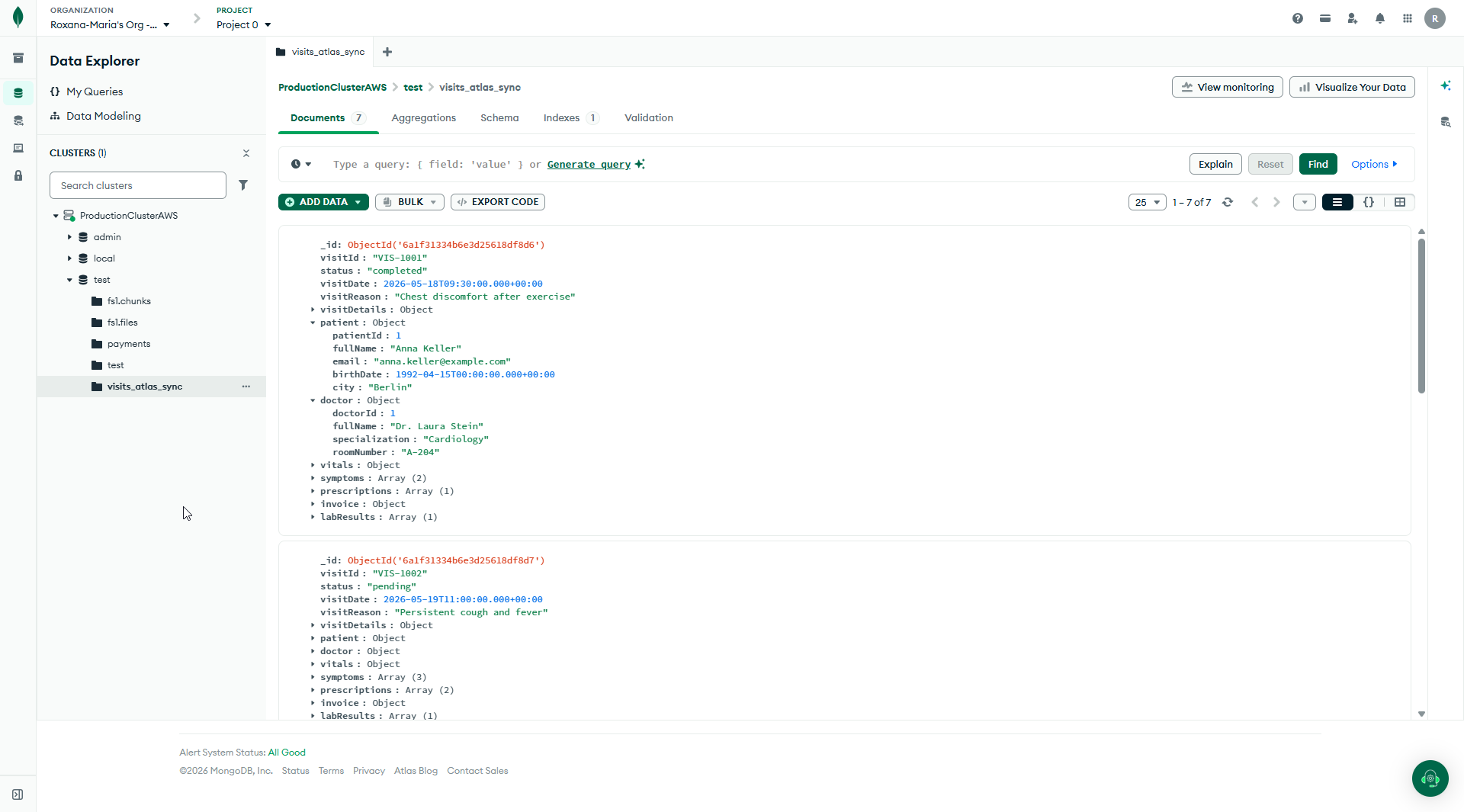
The initial count proved that the collection was copied. It did not yet prove that the Full sync job would handle later changes, so I tested each main operation separately.
Test 1: Inserting a new local document
I inserted one clearly labeled test visit into the local source:
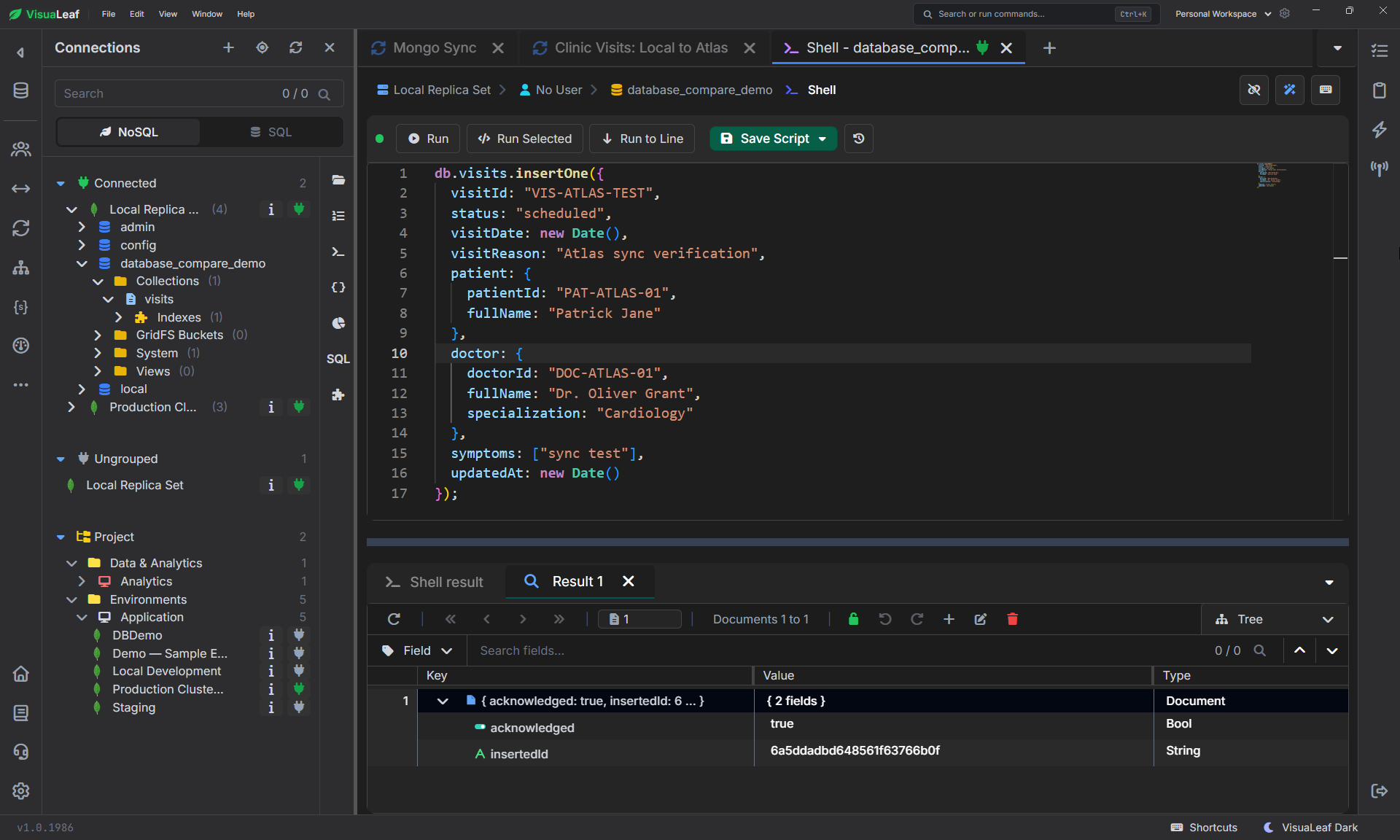
Then I searched for the same visitId in Atlas:
db.visits_atlas_sync.findOne({
  visitId: "VIS-ATLAS-TEST"
})
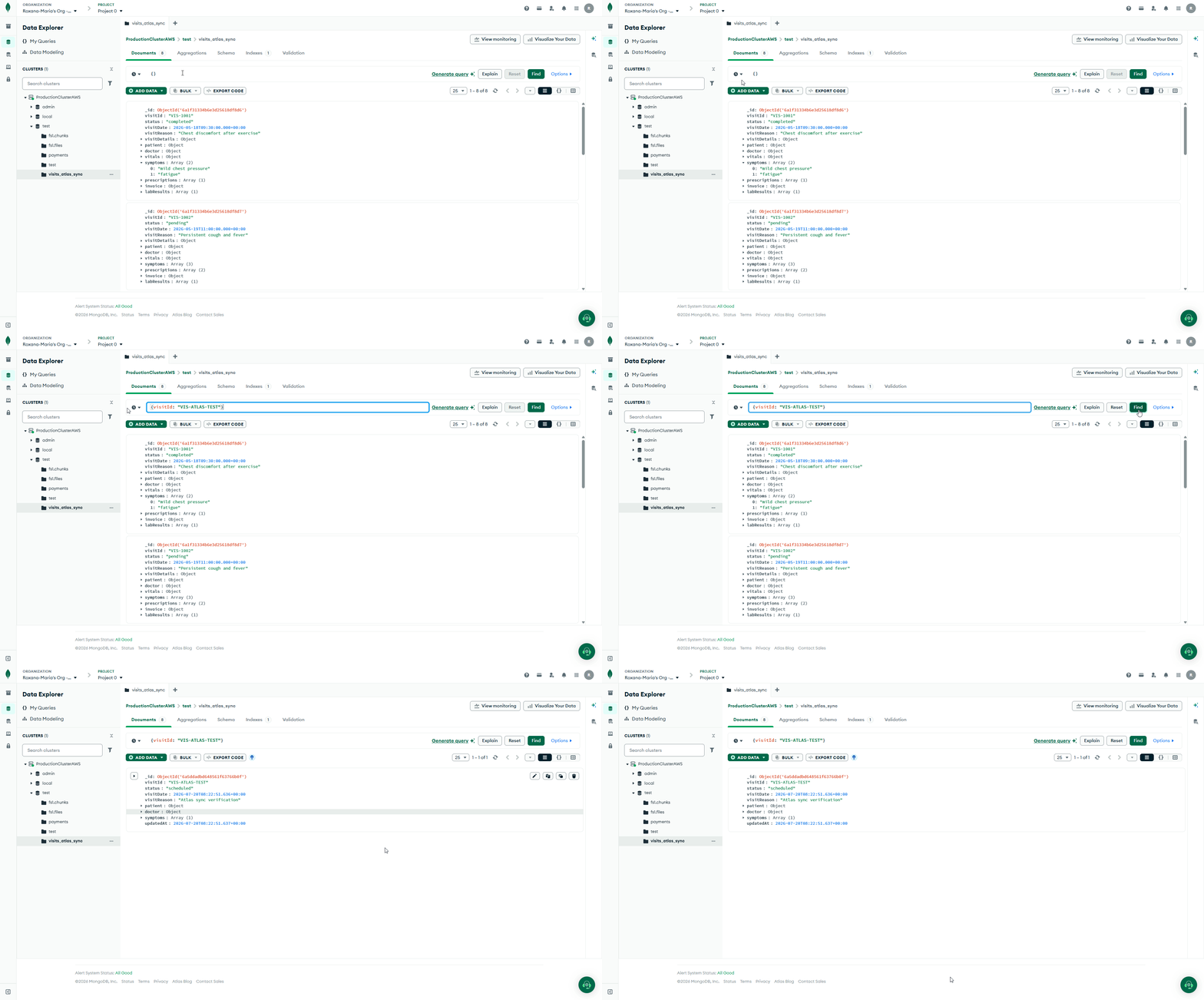
The new document appeared in the target collection without restarting or recreating the job. The target count increased from seven to eight.
Test 2: Updating the local document
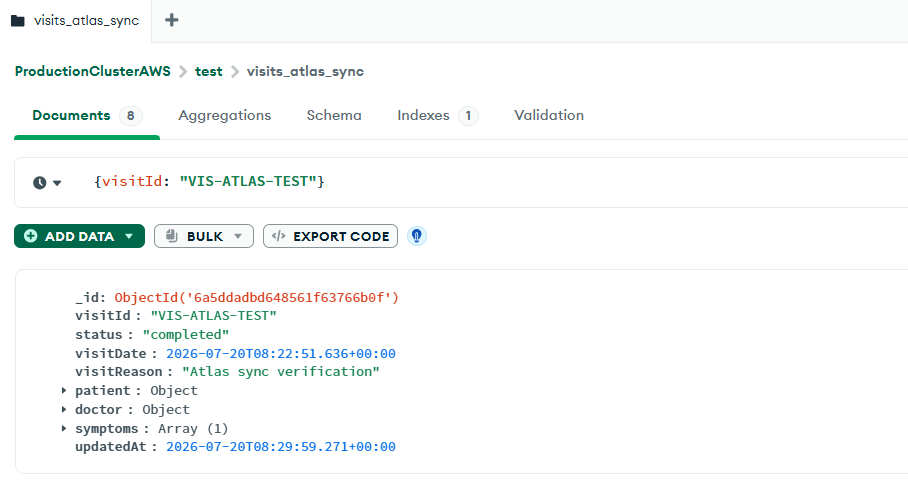
Next, I updated both a top-level field and a nested field:
db.visits.updateOne(
  { visitId: "VIS-ATLAS-TEST" },
  {
    $set: {
      status: "completed",
      "doctor.roomNumber": "204",
      updatedAt: new Date()
    }
  }
)
I checked the Atlas document again:
Test 3: Deleting the local document
Finally, I deleted the test document from the local collection:
db.visits.deleteOne({
  visitId: "VIS-ATLAS-TEST"
})
I verified the target one more time:
db.visits_atlas_sync.countDocuments({
  visitId: "VIS-ATLAS-TEST"
})
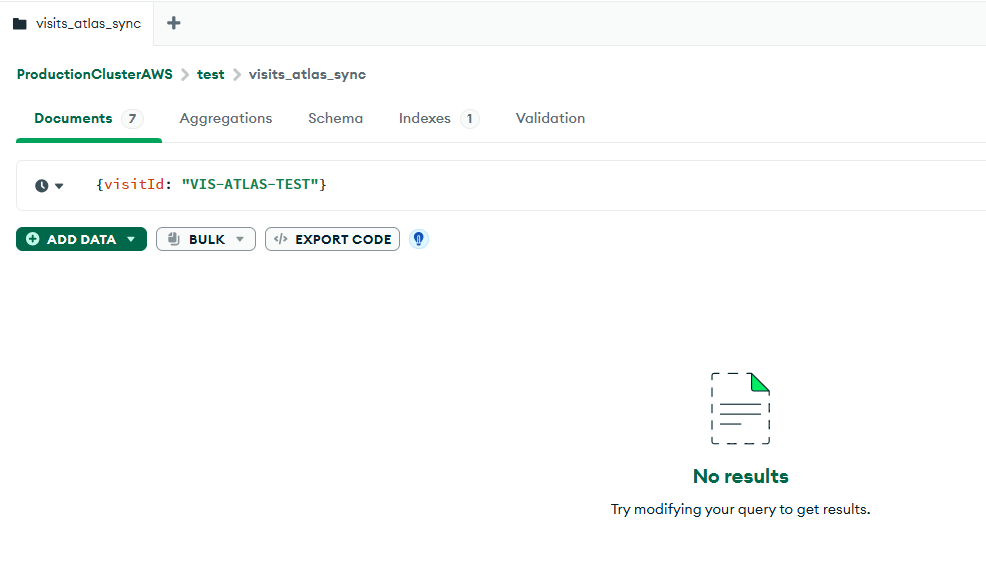
The result returned to 0, and the full Atlas collection returned to seven documents.
When this workflow is useful
This type of Mongo Sync job makes sense when I want to:
- copy selected local collections to an Atlas development or staging environment;
- keep a cloud copy updated while continuing to write locally;
- move a collection without repeatedly exporting and importing JSON files;
- test an application against Atlas using recent local data;
- synchronize only the collections needed for a specific workflow.
The important word is selected. This was a collection-level sync, not a complete production migration.
How this differs from other Atlas migration methods
MongoDB provides other tools for different jobs:
mongodumpandmongorestoreare useful for a self-managed, one-time transfer using a BSON dump.- Atlas Live Migration is designed for moving a deployment into Atlas and managing a production cutover with minimal downtime.
- This Mongo Sync workflow focuses on copying selected collections and continuing to apply their changes.
Atlas recommends its Live Migration workflow when performing a supported production migration. It uses MongoDB’s mongosync technology underneath and includes a cutover process for redirecting applications to the Atlas destination. (Atlas Live Migration)
I would not present a collection-level sync as a replacement for that process.
What I would still verify before using it in production
This small test verified document copying and three change types. It did not test:
- high write volume or very large collections;
- long network interruptions and recovery;
- schema changes while the job was running;
- independent writes made to both source and target;
- users, roles, indexes, validation rules, or other database metadata;
- a full application cutover from local MongoDB to Atlas.
I treated the local collection as the source of truth and used an empty target collection. That kept the test easy to understand and avoided conflicts with existing Atlas documents.
Final takeaway
The first copy was easy to check: 7 local documents appeared in Atlas.
But the more important part was what happened after that. When I inserted, updated, and deleted a local document, the same changes appeared in Atlas without exporting another file or recreating the job.
Because both sides were MongoDB, I could use pass-through mode and keep the original document structure.
For development, staging, testing, or selected collection sync, this is a practical way to move local MongoDB data to Atlas and keep it updated. For a full production migration, I would still follow MongoDB’s official migration process and plan the cutover separately.
Want to try it?
Download VisuaLeaf and test Mongo Sync with your own local MongoDB database and Atlas cluster.
Want to Sync MongoDB to PostgreSQL Instead?
If you want to copy a local MongoDB collection to PostgreSQL and keep it in sync, I covered the full process in this detailed guide: How to Copy a Local MongoDB Collection to PostgreSQL —and Keep It in Sync.