MongoDB Query Optimization: From COLLSCAN to IXSCAN
Learn how to find slow MongoDB queries, create better compound indexes, and manage index recommendations visually in VisuaLeaf.


Not all slow MongoDB queries are bad queries.
Sometimes the query is fine, but MongoDB does not have a good index to help with your filtering, sorting, and retrieving of the data
In this tutorial, we'll use payments as an example of our database. The collection starts without a useful index for our query. We'll identify the slow operation, learn about the recommended index, explain why the compound index works, and manage it visually in VisuaLeaf.
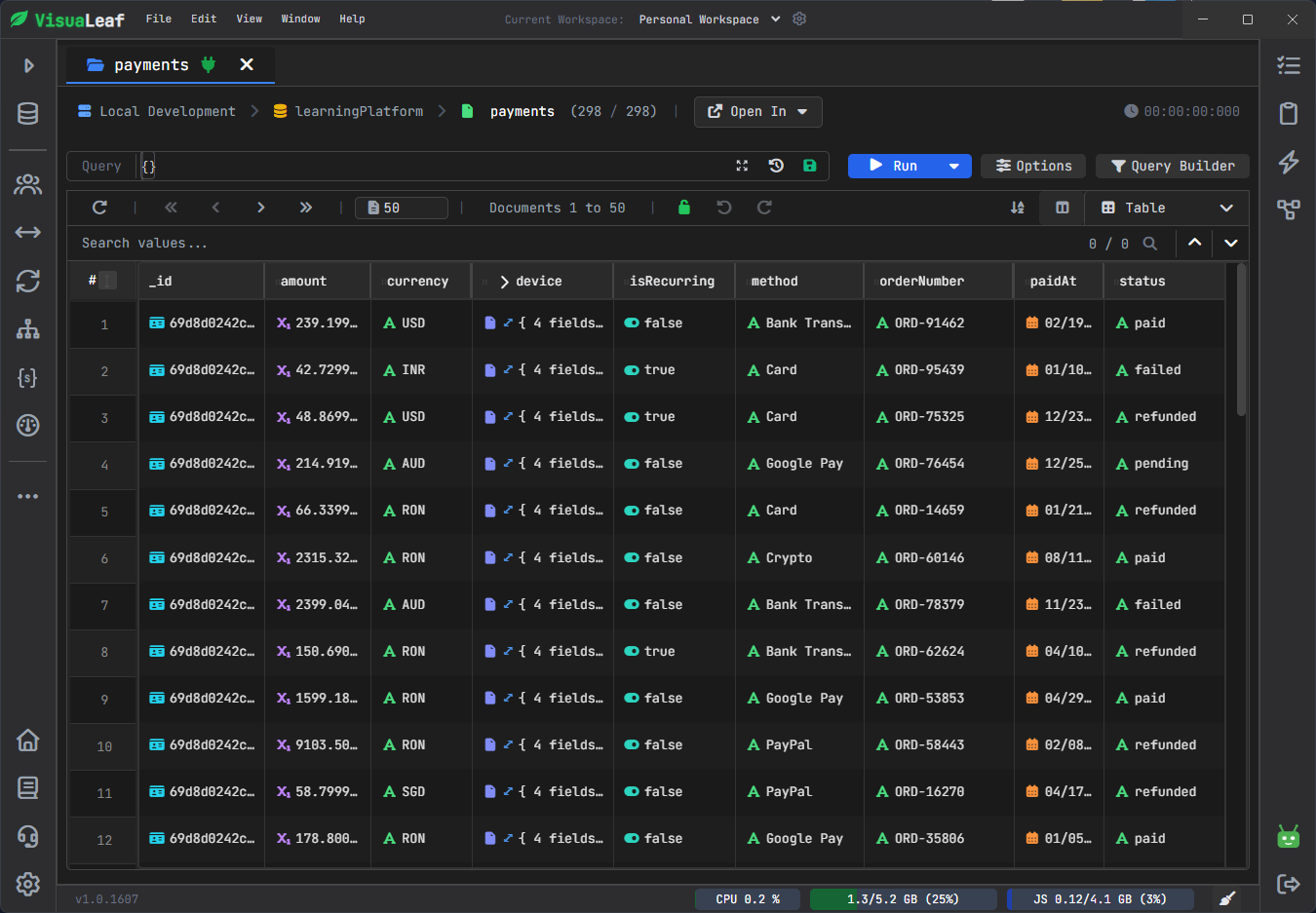
The workflow is simple:
slow query -> query profiler -> index recommendation -> compound index -> index manager
You can use the same workflow when your own MongoDB collections start to feel slow.
The Slow Query Problem
When the size of a database is small, queries executed against it yield fast results.
However, as the database size increases, the same query will take more time. This could be due to the necessity to scan several documents, sort a huge set of returned values, or evaluate non-indexed fields.
This additional processing step causes slow queries.
For instance, consider this query:
db.payments.find({
  status: "paid"
})
If there is no useful index for the "status" field, MongoDB may perform a full scan of the collection.
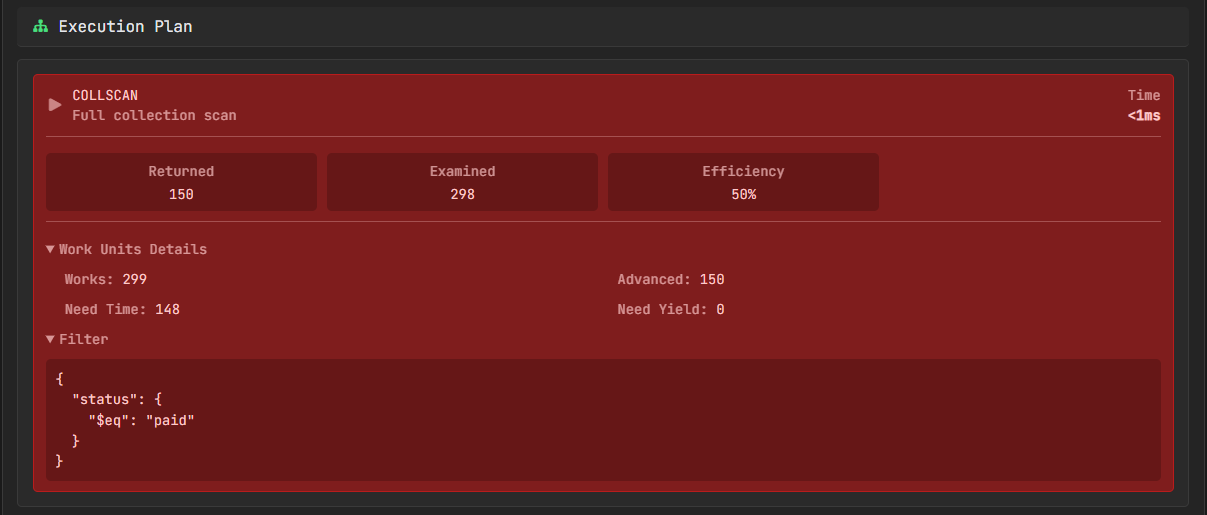
status query has no useful index.Not all collection scans are necessarily harmful. It does not matter for small collections. However, on big collections that your application works with each day, this becomes significant.
In case you analyze a query plan, several steps matter:
| Stage | Meaning |
|---|---|
COLLSCAN |
MongoDB scanned the collection |
IXSCAN |
MongoDB used an index |
FETCH |
MongoDB fetched documents after using an index |
SORT |
MongoDB performed a sort operation |
totalDocsExamined: 50000
Returned: 25
That means MongoDB checked 50,000 documents to return only 25.
The goal is not just to make the query look cleaner. The aim is to reduce the workload of MongoDB.
This technical index functionality is detailed in the official MongoDB Indexes documentation.
The Payments Query We Want to Optimize
Let's try with a more realistic one.
Suppose you have payments stored in your database, and you frequently require paid USD payments above a particular amount, sorted in descending order of payment dates.
The query will be like:
db.payments.find({
  currency: "USD",
  status: "paid",
  amount: { $gte: 100 }
}).sort({
  paidAt: -1
})
This query does four things:
If your payments collection has no useful index for this pattern, so MongoDB has to work harder than necessary.
| Field | What the query does |
|---|---|
currency |
Keeps only payments in USD |
status |
Keeps only paid payments |
amount |
Keeps payments greater than or equal to 100 |
paidAt |
Sorts newest payments first |
A single-field index can help with simple filters, but this query uses multiple fields.
That is why a compound index makes more sense here. It can support the filter, sort, and range condition together.
We will let VisuaLeaf recommend the exact index after we inspect the slow query.
MongoDB documents compound indexes in the official Compound Indexes documentation.
Find the Slow Query in VisuaLeaf
Do not create indexes because a field looks important.
Find the slow query first. Then index the query pattern.
Use the same payments query from the previous section in the Visual Query Builder. Add filters for currency, status, and amount, then sort by paidAt in descending order.
In VisuaLeaf, the Explain view shows the execution plan, scanned documents, returned documents, execution time, and index usage.
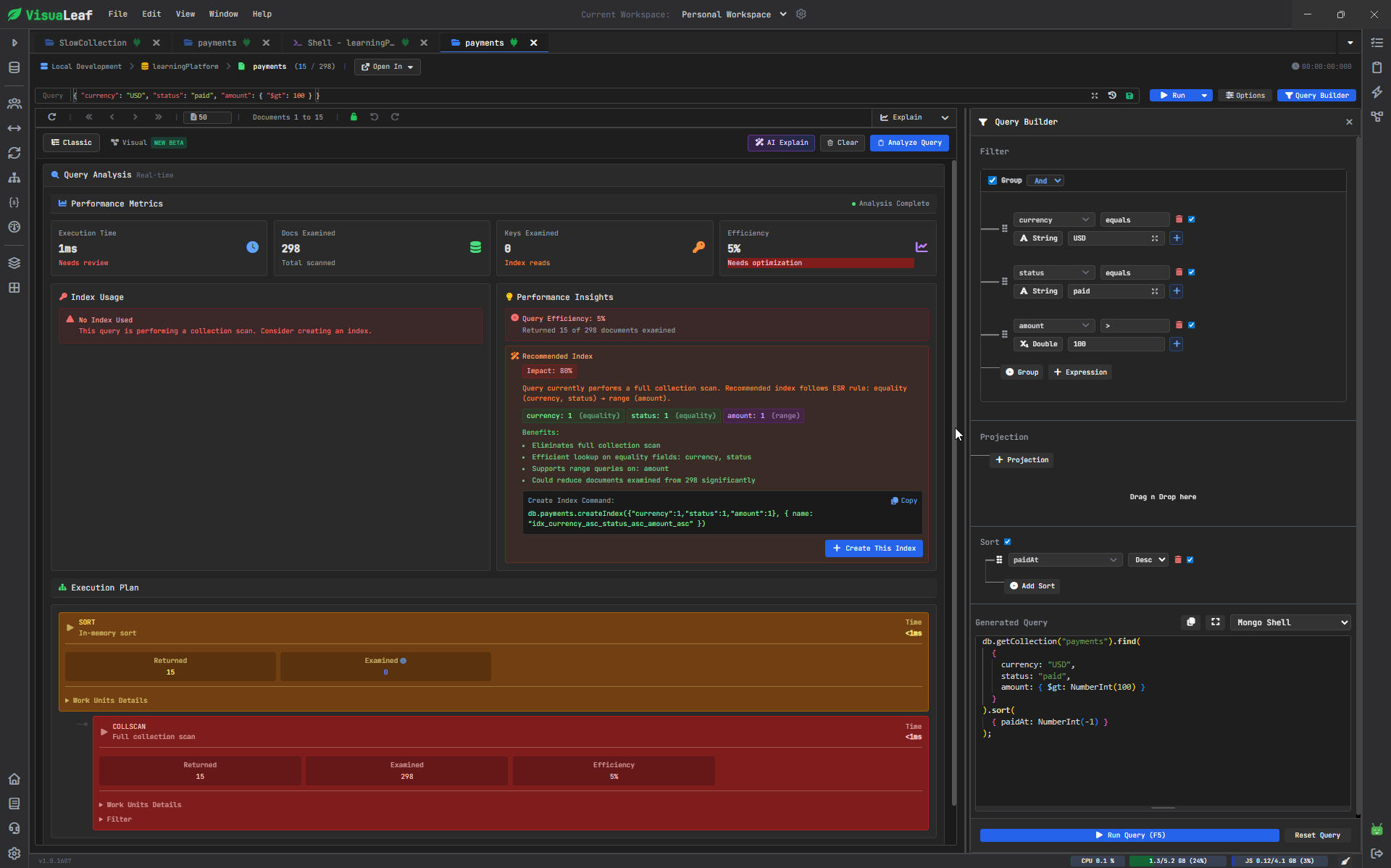
If MongoDB scans many documents and returns only a few, the query probably needs a better index.
Use AI Explain for a Quick Summary
The Explain view provides technical details, but sometimes you may want a quick summary in plain language.
In VisuaLeaf, AI Explain can read the query analysis and explain why the query is slow. In this `payments` example, it detects a collection scan and shows that MongoDB examined 298 documents to return only 15.
It also suggests creating a compound index for the fields used in the query.
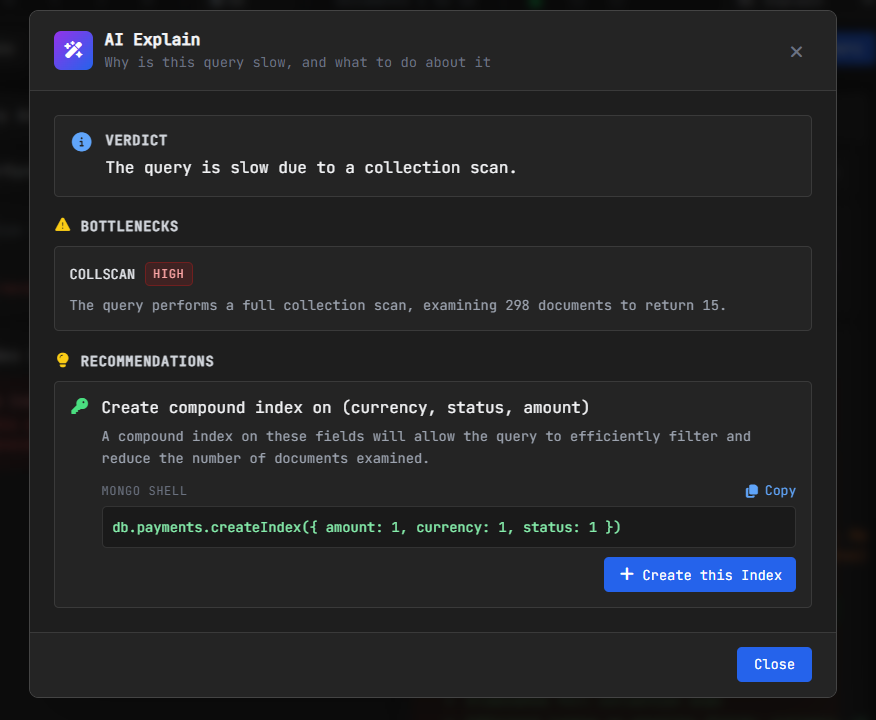
This is a helpful first suggestion, but for our full query, we also sort by paidAt, so the final recommendation includes paidAt as part of the compound index.
You can also run the same check manually with explain():
db.payments.find({
  currency: "USD",
  status: "paid",
  amount: { $gte: 100 }
}).sort({
  paidAt: -1
}).explain("executionStats")
When you read the result, check these values:
| Metric | What you check |
|---|---|
totalDocsExamined |
How many documents MongoDB scanned |
nReturned |
How many documents MongoDB returned |
executionTimeMillis |
How long the query took |
winningPlan |
Which execution plan MongoDB selected |
Look for IXSCAN when MongoDB uses an index, and COLLSCAN when MongoDB scans the collection. For one query, the Explain view is enough.
For repeated slow operations across collections, use VisuaLeaf Query Profiling. The profiler helps you see slow operations over time, not just one query you are testing manually.
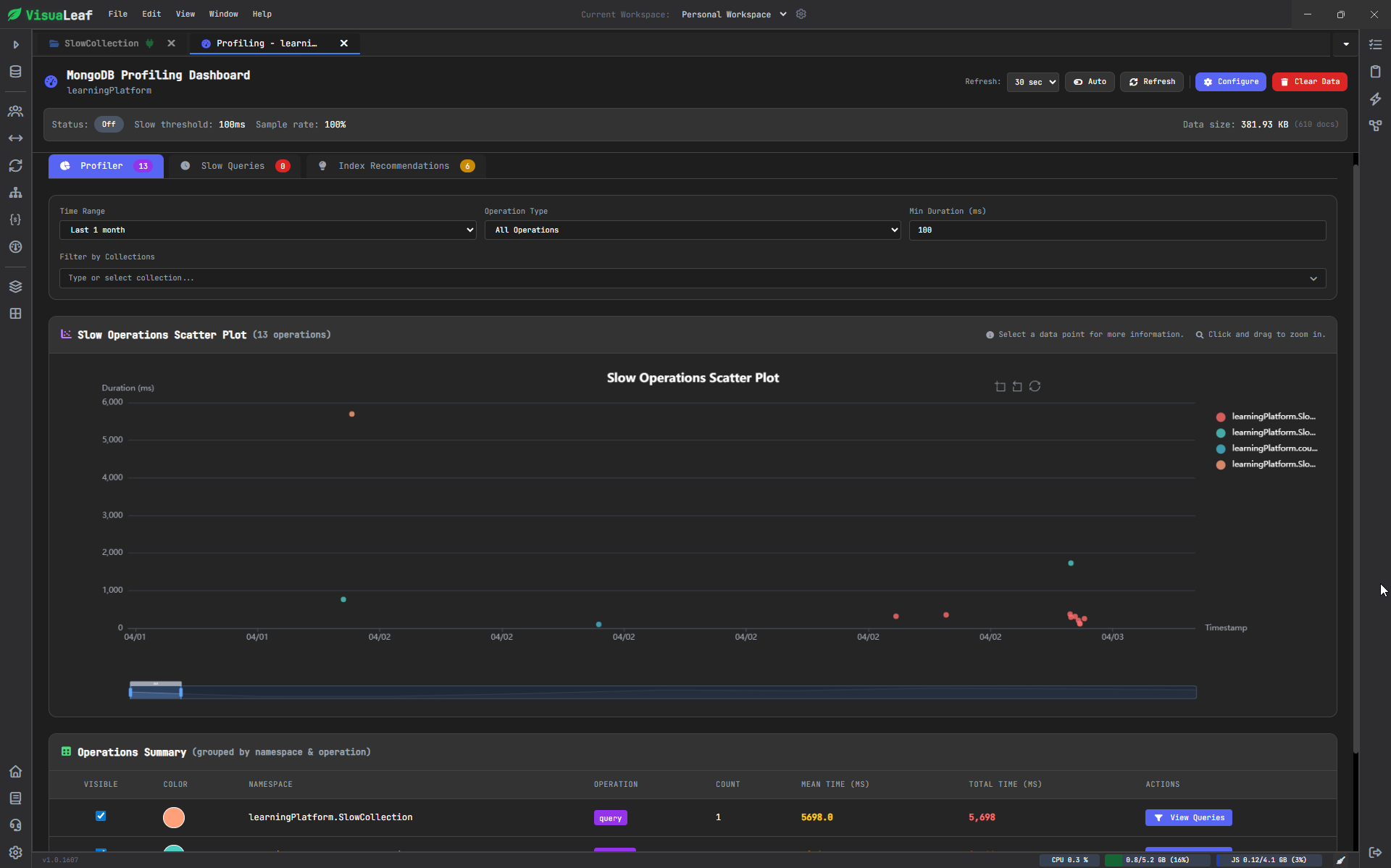
MongoDB also provides database profiling features for slow operations. You can read more in the official Database Profiler documentation.
Read the Index Recommendation
After you find the slow query, check which index would actually help.
In this example, the payments collection has no useful index for the query. VisuaLeaf detects repeated collection scans and recommends a compound index based on the fields used by the query.
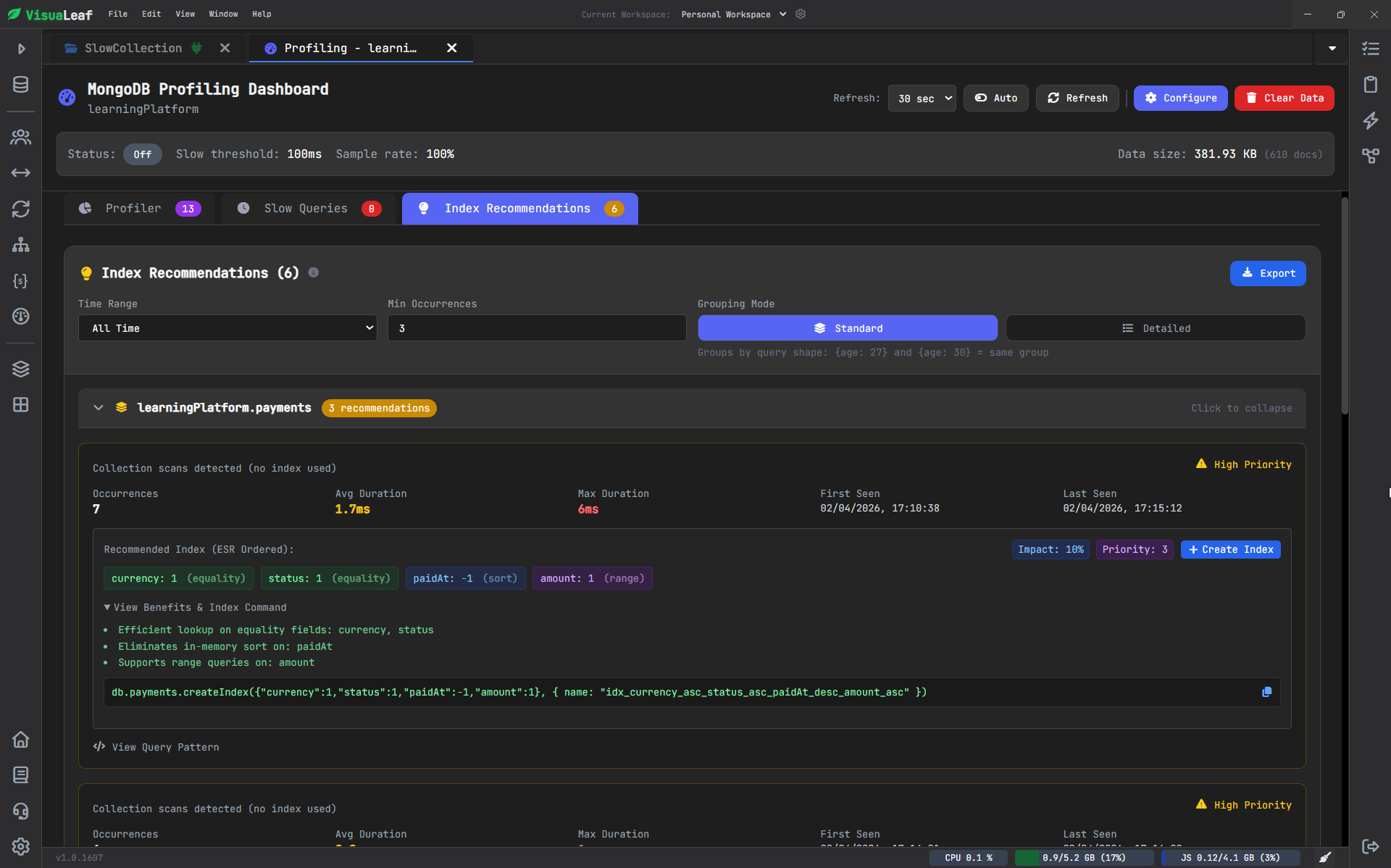
The recommendation for the compound index is:
db.payments.createIndex({
  currency: 1,
  status: 1,
  paidAt: -1,
  amount: 1
})
This is useful because the recommendation does not only say “add an index.”
It shows the exact fields and the order.
That order is the important part.
Why This Compound Index Works
The recommended index corresponds to how the query filters and organizes the data.
Once you have created the recommended index, re-run the same query from the Explain view.
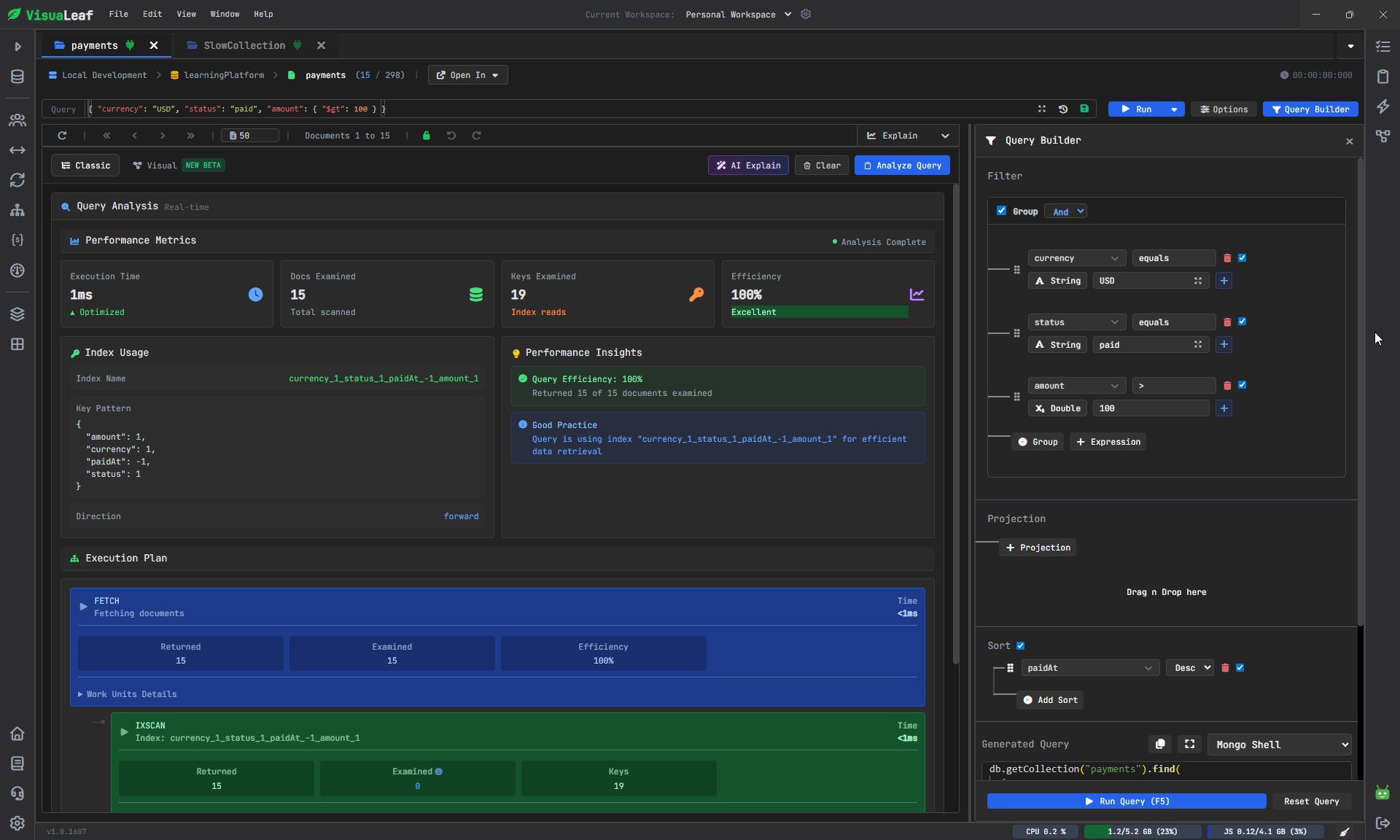
Now MongoDB uses the compound index instead of scanning the full collection.
The query initially filters by the currency and status fields, then sorts by paidAt, and applies a range filter to amount.
In other words:
| Field | Why it is in the index |
|---|---|
currency |
Exact filter |
status |
Exact filter |
paidAt |
Sort by newest payment |
amount |
Range condition |
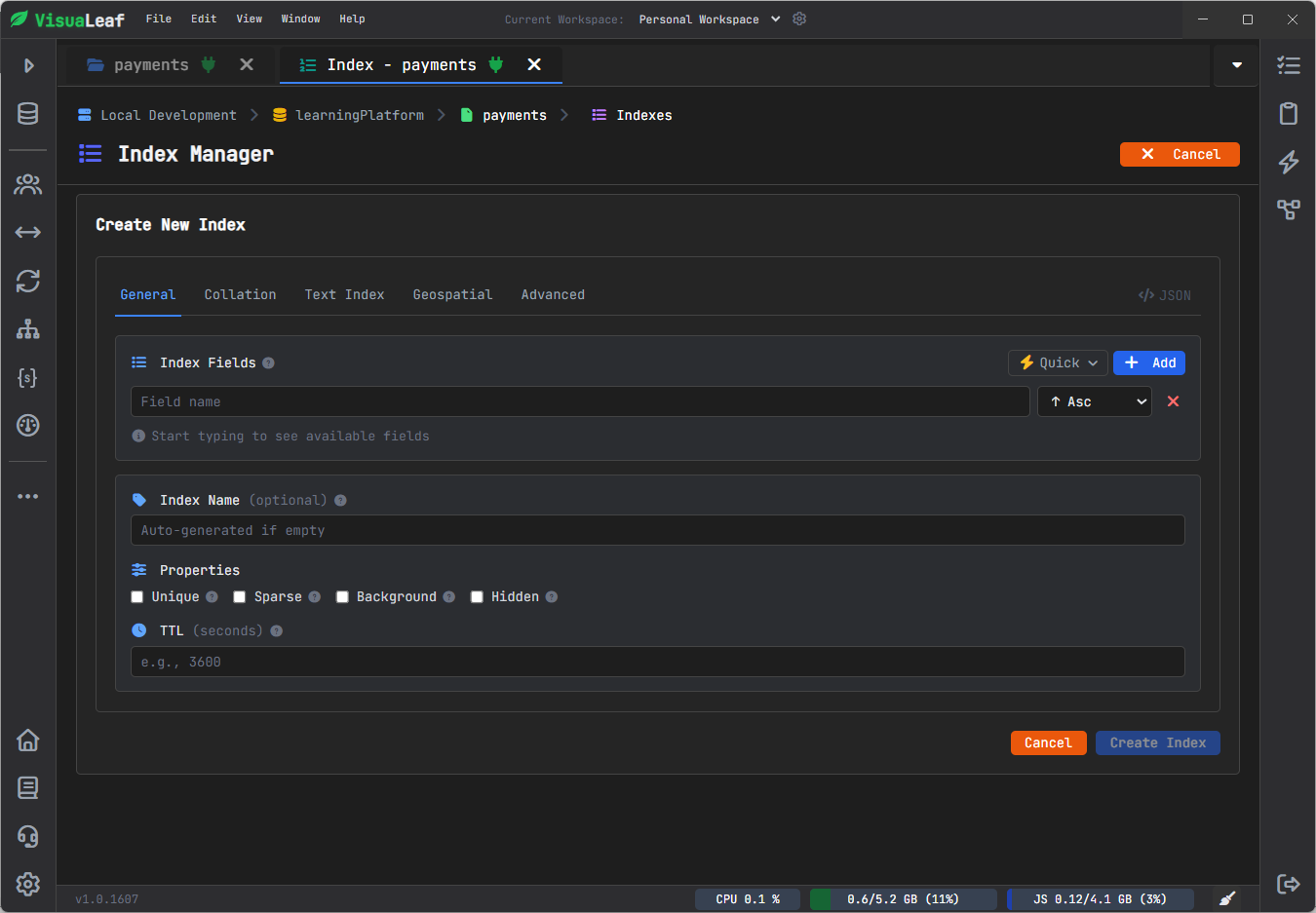
Check and Manage Indexes
Once you’ve indexed something, take a look at what is already there in the collection.
Indexing is simple to do, and it’s easy to neglect.
A collection may accumulate unnecessary indexes, redundant indexes, or even indexes made for queries that no longer run.
Check out your collection in the Index Manager
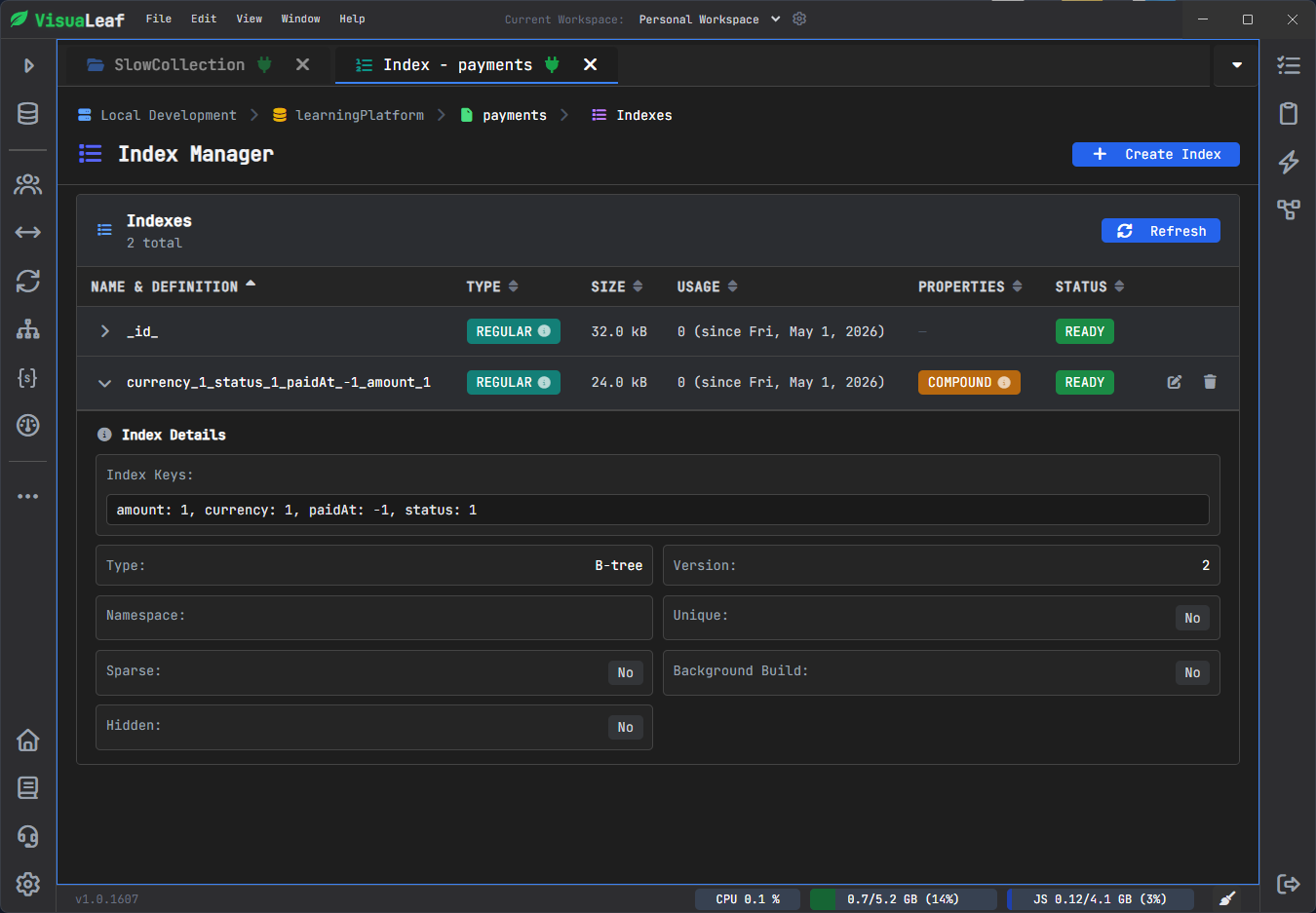
The Index Manager helps you check the index name, fields, type, size, usage, properties, and status.
This helps you avoid creating the same index twice.
It also helps you review old indexes when your application queries change.
You can combine this workflow with the Visual Query Builder, MongoDB Shell, Aggregation Pipeline Builder, and Charts and Dashboards when you need to test, analyze, and present your MongoDB data.
If you prefer, you can create the index visually from the Index Manager instead of writing the command manually.
Indexing Mistakes to Avoid
Indexes help when they match your workload.
They create problems when you add them without a reason.
- Creating indexes for every field
Do not index every field in the collection.
Each index needs storage. Each index also adds work when MongoDB inserts, updates, or deletes documents.
Create indexes for queries your application actually runs.
- Ignoring the sort
A query may filter quickly but still sort slowly.
Example:
db.payments.find({
  status: "paid"
}).sort({
  paidAt: -1
})
A useful index is:
db.payments.createIndex({
  status: 1,
  paidAt: -1
})
This supports the filter and the sort.
- Putting fields in the wrong order
A compound index is not only about choosing the right fields. The order matters too.
For the payments query, starting with the amount is not as useful as starting with the currency and status, because the amount is a range condition.
Same fields. Different order. Different performance.
- Keeping indexes you no longer use
Your application changes.
Your queries change.
Your indexes should change too.
Review unused indexes from time to time and remove the ones that no longer support real queries.
Always Check the Query Again
Creating an index is not the final step.
After adding the index, run the same query again and check the Explain plan. MongoDB’s query planner decides which index to use, so you should always confirm that the new index is actually used.
In VisuaLeaf, you can do this from the Explain view by checking if the query changes from COLLSCAN to IXSCAN.
Conclusion
MongoDB query optimization starts with the query pattern.
Do not guess. Find the slow query first. Check whether MongoDB scans too many documents. Then create an index that matches how your query filters, sorts, and ranges over the data.
For simple filters, a single field index may be enough.
For queries like the payments example, a compound index is usually better.
With VisuaLeaf, you can detect slow queries, review index recommendations, and manage MongoDB indexes visually in one place.
FAQ
Why is my MongoDB query slow?
Your query is slow because MongoDB scans too many documents, sorts too much data, or uses the wrong index. Start with explain("executionStats"). Check totalDocsExamined, nReturned, and the winning plan.
What is the best index for a MongoDB query?
The best index matches the fields used by the query. If your query filters by one field, a single field index may work. If your query filters, sorts, and uses a range condition, a compound index is usually better.
What is a compound index in MongoDB?
A compound index is an index with multiple fields. Use it when your query filters or sorts using more than one field.
Example:
db.payments.createIndex({
currency: 1,
status: 1,
paidAt: -1,
amount: 1
})
What is the ESR rule in MongoDB?
ESR means Equality, Sort, Range. Put equality fields first, sort fields second, and range fields last in many compound index designs.
Example:
currency: equality
status: equality
paidAt: sort
amount: range
How do I know if MongoDB uses my index?
Run explain("executionStats").
Look for IXSCAN. That means MongoDB used an index.
Look for COLLSCAN. That means MongoDB scanned the collection.
Can too many indexes slow MongoDB down?
Yes. Too many indexes add storage cost and write overhead. Create indexes for real queries, not for every field.