MongoDB Schema Validation: How JSON Schema Keeps Your Data Clean
Learn how MongoDB schema validation works with JSON Schema, when to use validation rules, and how to create them visually in VisuaLeaf.


The "schemaless" database has had JSON Schema validation since 2017. Here's what you're missing.
"MongoDB is schemaless."
"MongoDB is unorganized."
"MongoDB lets you store anything, so your data becomes a mess."
These are common misconceptions, but they're only true if you choose to work that way.
Since MongoDB 3.6, the database has had built-in schema validation using JSON Schema. You can enforce field types, required fields, value constraints, and nested object structures at the database level. Documents that don't match get rejected before they're ever written.
MongoDB gives you both worlds: flexibility when you need it, structure when you want it. The choice has always been yours.
The Misconception
The "schemaless" label comes from MongoDB's default behavior: it accepts any document structure without complaint. You can insert { name: "Alice" } followed by { firstName: "Bob", age: 30 } into the same collection. No errors.
For prototyping and exploration, this flexibility is invaluable. For production systems, you might want more guardrails.
MongoDB gives you both options. Since version 3.6, you can define validation rules using $jsonSchema — and the database enforces them on every insert and update. Use the flexibility when you need it, add structure when you're ready.
What is JSON Schema?
JSON Schema is a standard for describing the structure of JSON documents. It's not MongoDB-specific — it's used across the industry for API validation, configuration files, and data contracts.
MongoDB implements JSON Schema Draft 4 with some BSON-specific extensions. You define what fields are required, what types they should be, and what constraints apply. The database does the rest.
Basic Schema Validation
Here's how you create a collection with validation:
db.createCollection("users", {
  validator: {
    $jsonSchema: {
      bsonType: "object",
      required: ["email", "createdAt"],
      properties: {
        email: {
          bsonType: "string",
          pattern: "^[a-zA-Z0-9._%+-]+@[a-zA-Z0-9.-]+\\.[a-zA-Z]{2,}$",
          description: "Must be a valid email address"
        },
        name: {
          bsonType: "string",
          minLength: 1,
          maxLength: 100
        },
        age: {
          bsonType: "int",
          minimum: 0,
          maximum: 150
        },
        role: {
          enum: ["admin", "user", "viewer"],
          description: "Must be one of the allowed roles"
        },
        createdAt: {
          bsonType: "date"
        }
      }
    }
  },
  validationLevel: "strict",
  validationAction: "error"
})
Now try to insert an invalid document:
db.users.insertOne({ email: "not-an-email", name: "Alice" })
// Error: Document failed validation
The database rejected it. No application code needed.
JSON Schema Features
Required Fields
required: ["email", "createdAt", "status"]
Documents missing any of these fields are rejected.
BSON Types
MongoDB extends JSON Schema with bsonType for MongoDB-specific types:
| bsonType | Description |
|---|---|
"string" |
Text |
"int" |
32-bit integer |
"long" |
64-bit integer |
"double" |
Floating point |
"decimal" |
128-bit decimal (financial precision) |
"bool" |
Boolean (note: not "boolean") |
"date" |
Date object |
"objectId" |
MongoDB ObjectId |
"array" |
Array |
"object" |
Nested document |
"null" |
Null value |
"binData" |
Binary data |
Validation Options
validationLevel
"strict"— Validate all inserts and updates (default)"moderate"— Only validate documents that already match the schema; allows existing invalid documents to be updated
validationAction
"error"— Reject invalid documents (default)"warn"— Allow invalid documents but log a warning
For gradual adoption, start with validationAction: "warn" to see what would fail, then switch to "error" once you've cleaned up existing data.
Common Mistakes
1. Using "boolean" instead of "bool"
// Wrong
isActive: { bsonType: "boolean" }

// Correct
isActive: { bsonType: "bool" }
2. Mixing type and bsonType
// Wrong — can't use both
email: { type: "string", bsonType: "string" }

// Correct — use bsonType for MongoDB
email: { bsonType: "string" }
3. Forgetting that additionalProperties defaults to true
By default, MongoDB allows fields not defined in your schema. To reject unknown fields:
{
  bsonType: "object",
  properties: { /* ... */ },
  additionalProperties: false
}
How VisuaLeaf Handles Schema Validation Visually
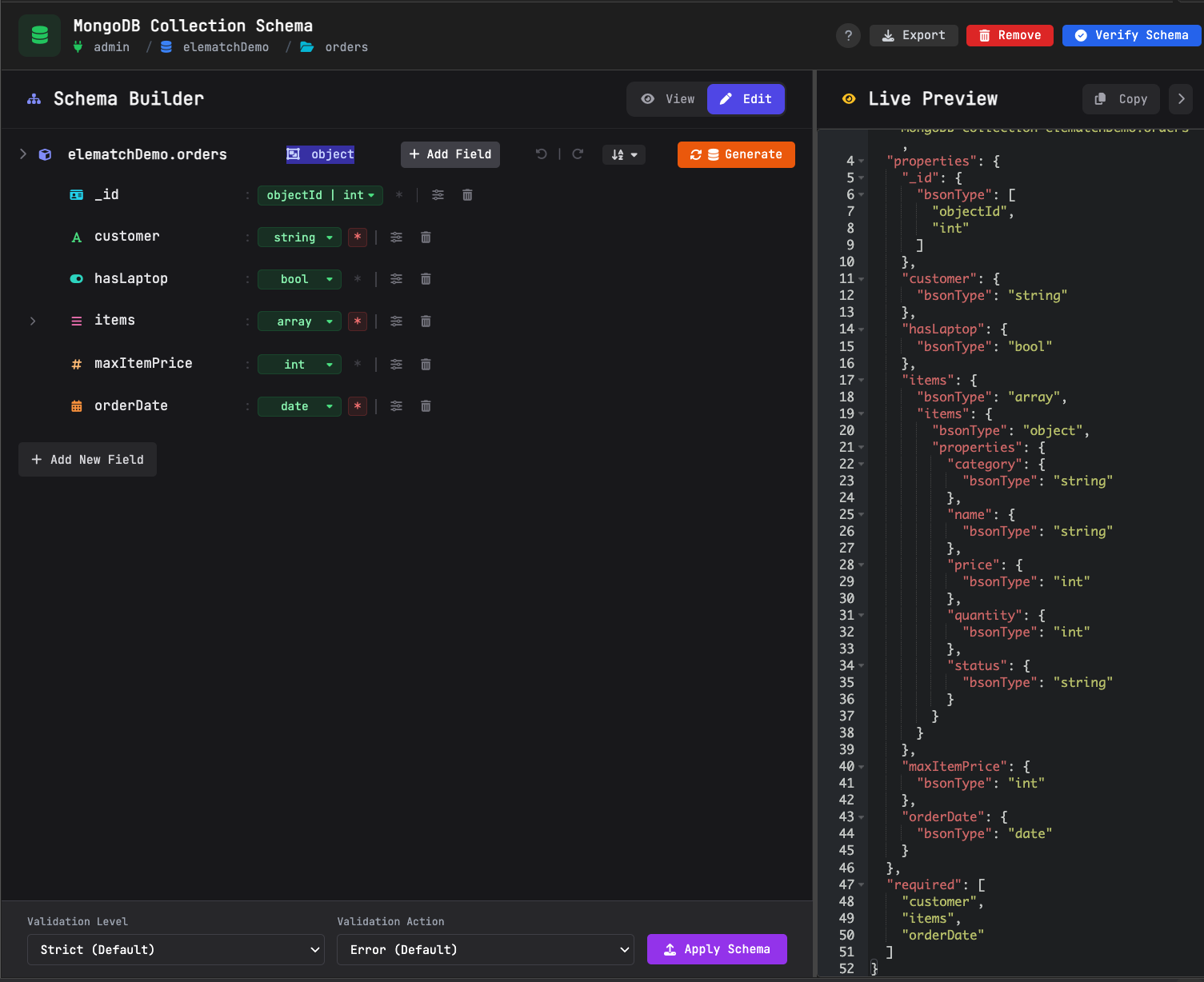
Writing JSON Schema by hand works, but it's tedious for complex schemas. Visualeaf provides a visual schema designer that makes it intuitive.
Auto-Generate from Collection
Starting from scratch? Visualeaf can analyze an existing collection and generate a schema based on the actual documents. It detects:
- Field names and types
- Which fields appear in all documents (candidates for
required) - Nested object structures
- Array item types
Use it as a starting point, then refine.
Tree-Based Schema Editor
Instead of writing JSON, you build schemas visually:
- Expandable tree structure — See your schema hierarchy at a glance
- Inline field editing — Click to rename fields
- Type dropdowns — Select bsonType from a list (string, number, date, objectId, array, object, etc.)
- Required checkboxes — Toggle required fields with one click
- Add/delete/duplicate — Modify structure without editing JSON
Split-Panel Layout
The editor shows two synchronized views:
- Left panel — Interactive tree editor
- Right panel — Live JSON Schema preview with syntax highlighting
Edit in the tree, see the JSON update in real-time. Or edit the JSON directly if you prefer.
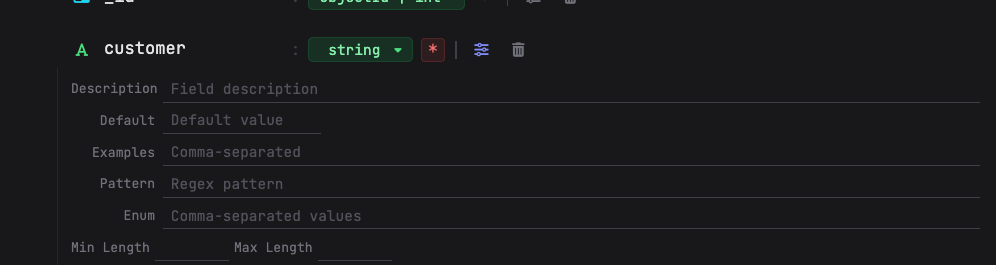
Type-Specific Constraint Panels
When you select a field, Visualeaf shows relevant constraints for that type:
- String: minLength, maxLength, pattern (regex), enum values
- Number: minimum, maximum, multipleOf, exclusiveMin/Max
- Array: minItems, maxItems, uniqueItems, item type
- Object: required fields, nested properties, additionalProperties
No memorizing which constraints apply to which types — the UI shows only what's relevant.
Schema Verification
Before applying a schema, you may want to know: will my existing data pass?
Visualeaf's Verify Schema feature runs your schema against a collection and shows:
- How many documents pass
- How many documents fail
- Which specific documents fail and why
Fix your data or adjust your schema before enforcement.
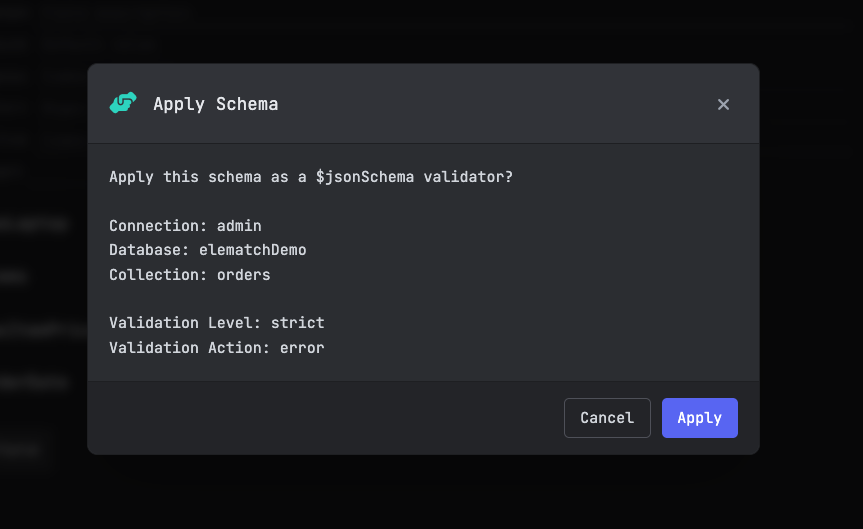
One-Click Application
Once your schema is ready:
- Click Apply Schema
- Select target collection
- Choose validation level (strict/moderate) and action (error/warn)
- Done — schema is now enforced at the database level
No db.runCommand() syntax to remember. No copy-pasting JSON into the shell.
The Bottom Line
MongoDB isn't schemaless unless you want it to be.
$jsonSchema validation has been available since 2017. It enforces structure at the database level — no ORM needed, no application code required. Documents that don't match get rejected before they're stored.
Want strict schemas? MongoDB supports that. Need flexibility for rapid prototyping or evolving data? That's there too. The choice is yours.
That's the real power of MongoDB: it doesn't force you into one approach. Use schemas when structure matters. Skip them when flexibility matters more. The database adapts to your needs, not the other way around.
Visualeaf makes MongoDB schema validation visual. Design schemas with a tree editor, verify against live data, and apply with one click — no JSON syntax required.