
MongoDB Custom Table: We Planned 2 Weeks, It Took 9 Months
Learn how we built a high-performance MongoDB table view that handles nested, irregular documents at 60fps, even with 100k rows and 1000 columns.
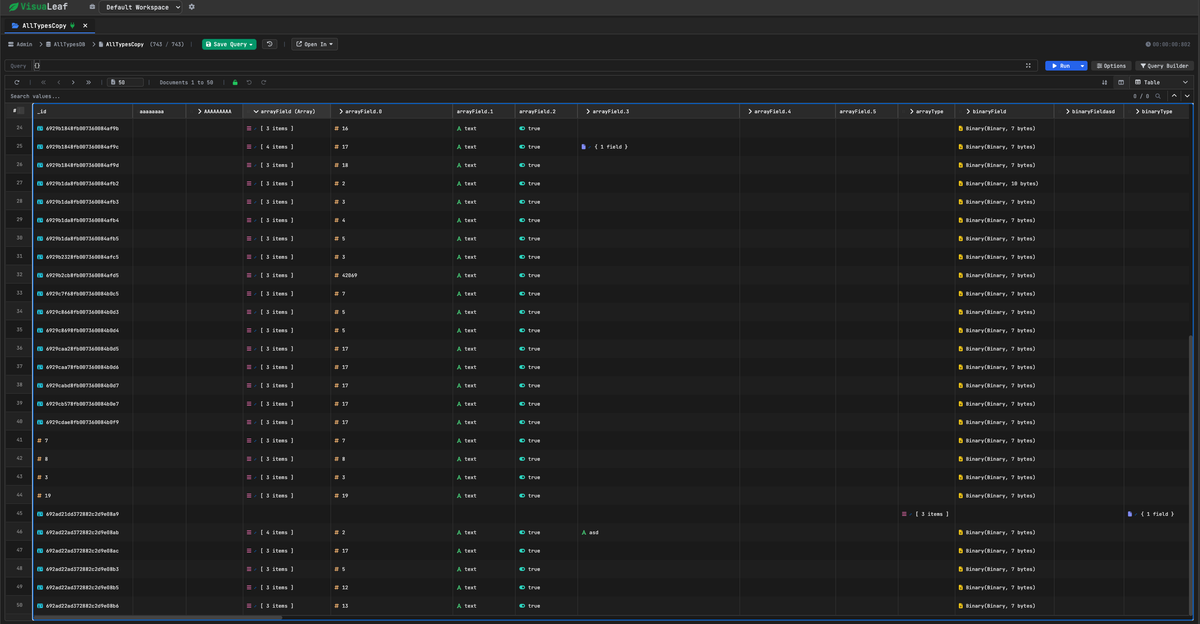
When we started building VisuaLeaf, a MongoDB GUI, I figured the table component would be the easy part. Just use ag-Grid or HandsOnTable, right?
I was so wrong.
MongoDB documents aren't tabular. They're deeply nested, wildly irregular, with 19 different BSON types that all need special handling. When you try to force hierarchical data into a flat grid, things break in spectacular ways.
We spent a month evaluating every major data table library. Then we spent nine months building our own from scratch - the last three of those months were spent optimizing it from "crashes at 1k rows" to "smooth at 100k rows at 60fps."
This is that story.
Why Existing Libraries Didn't Work
MongoDB documents are deeply nested (user.address.city), have 19 specialized BSON types (ObjectId, NumberLong, Decimal128), and every document can have completely different fields. We needed to display 100k+ documents with smooth scrolling while preserving all type information.
The Libraries We Evaluated
HandsOnTable is technically sophisticated with nested object support, but assumes schemas are known upfront. It only scans the first row to determine columns (source), so you must pre-scan all 100k docs and define ~500 columns before initialization - causing 5-30 second init times vs. our lazy 2-second approach. We also needed drag-to-external-zones (for our query builder) and a tree-like expansion UX rather than spreadsheet columns.
ag-Grid handles millions of rows beautifully for tabular data. But core features we needed - nested search with auto-column-expansion, dynamic columns for irregular schemas, and 19 BSON type handlers - would require building so much custom code on top that we'd essentially be creating a custom layer anyway.
The decision: Build exactly what we need with complete architectural control.
Here's how we did it.
The Architecture: Zero-Duplication Shadow Table
Here's the insight that changed everything:
Why are we storing cell values at all?
Think about it. Modern CPUs can traverse an object path like user.address.city in microseconds. That's faster than fetching a cached value from scattered memory locations.
So what if we just... didn't cache anything?
Our entire data structure:
interface ShadowRowData {
  doc: any;              // Reference to original document
  originalIndex: number; // For unsort (4 bytes)
}
That's it. Seriously.
No cell values. No cached strings. Just a reference to the document.
When you query a cell, we compute it on-demand:
getShadowCellData(rowIndex, columnKey) {
  const doc = this.shadowData[rowIndex].doc;
  const value = getValueByPath(doc, columnKey);  // "user.address.city"
  const bsonType = getBsonType(value);           // ObjectId, Long, etc.
  const displayValue = formatBsonValue(value, bsonType);

  return { value, bsonType, displayValue };
}
Memory breakdown for 100k documents:
- Original documents: 24 MB
- Row references: 3.2 MB
- Column metadata: 5 KB
- Total: ~27 MB
Zero duplication. We only store what's actually in your database.
Dynamic Column Expansion
Here's where the on-demand architecture really shines. Click any column header to drill into nested objects:
- On init - Scan all documents, extract every possible path:
user,user.name,user.address,user.address.city - Build path map - Just metadata, no values stored
- Click
user- Create child columns foruser.name,user.email, etc. - Done - Expansion takes <10ms because we're just updating column metadata
The key architectural difference: we scan documents once to build a lightweight metadata map, then compute cell values on-demand during rendering. This means:
- Fast initialization - Building the path map takes ~2 seconds for 100k docs; we're not rendering anything yet
- Lazy rendering - Only visible cells get computed when you scroll
- Dynamic expansion - Clicking to expand just updates metadata; no re-initialization
No data copying. No re-rendering the entire grid. Just insert new columns and move on.
BSON Type Awareness
We implemented MongoDB's exact type ordering. When you sort, we follow the same rules MongoDB does:
MinKey → Null → Numbers → Strings → Objects → Arrays → ObjectId → Date...
Sorting 100k rows? ~180ms. Why so fast? Because we're sorting lightweight 32-byte reference objects, not heavy row structures.
This architecture worked beautifully on paper.
Then I tried to actually render it.
The Performance Journey: Four Key Optimizations
The architecture worked beautifully on paper. Then I tried to render it.
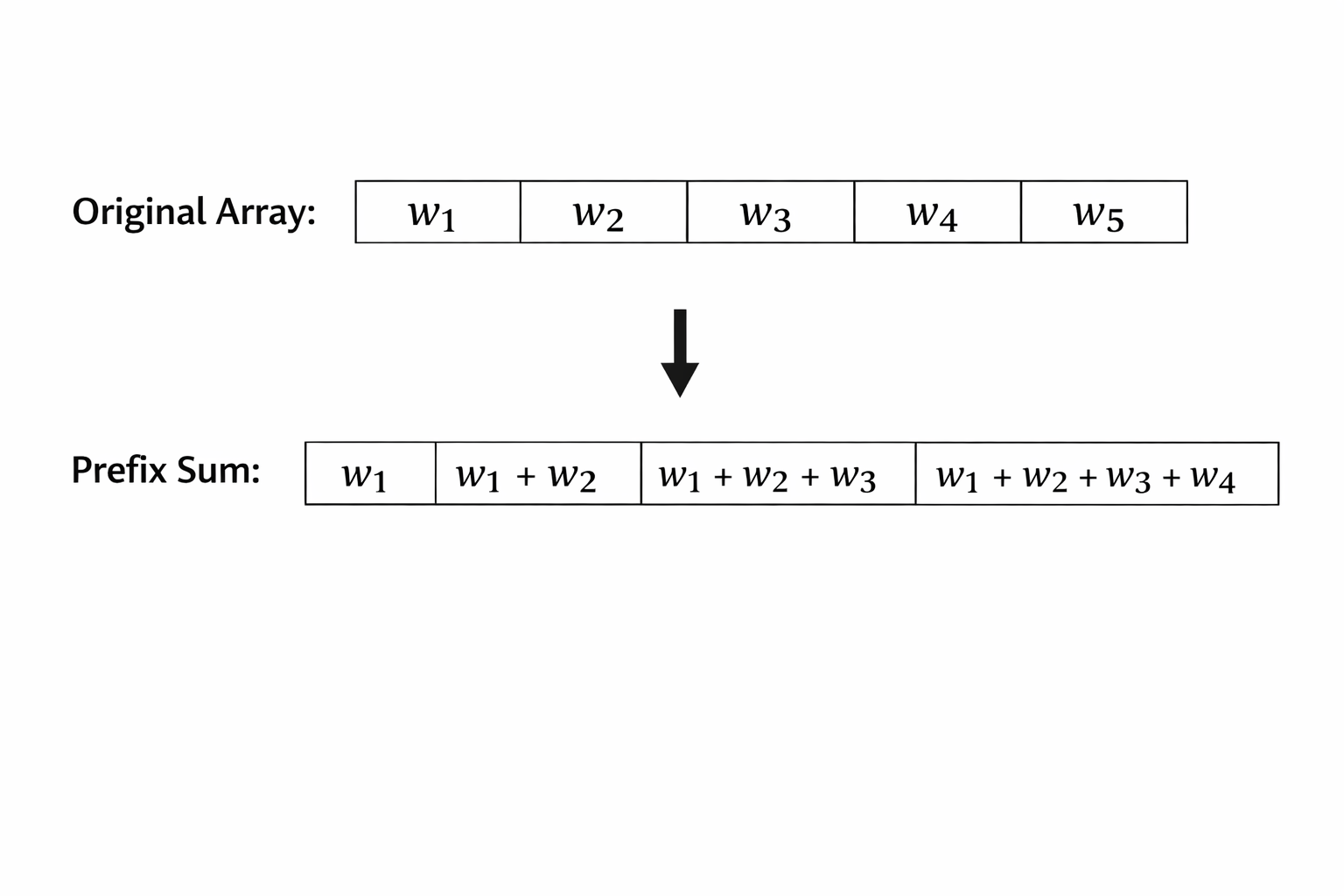
1. Prefix Sum Trees: O(n) → O(log n)
My naive implementation iterated through all rows on every scroll event to find visible rows. For 100k rows at 120Hz scroll events, this meant millions of iterations per second. The browser crashed.
The fix: Build a prefix sum array where tree[i] = cumulative sum of all row heights. Use binary search to find which row is at any Y position. "Iterate through 100,000 rows" became "17 binary search steps."
Result: 100k rows went from crashing to 30fps. Memory: 3GB → 400MB.
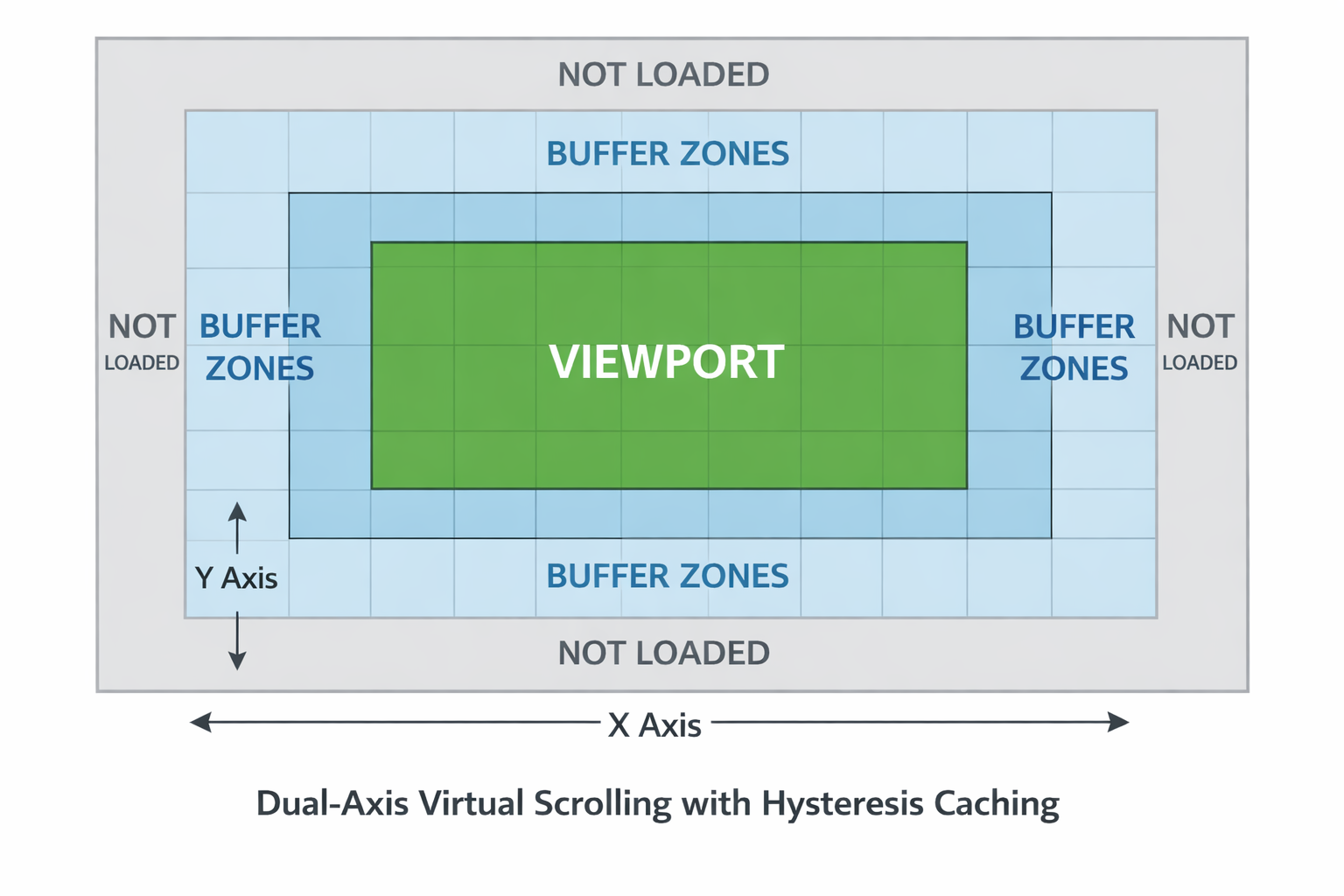
2. Hysteresis Caching: 40x Fewer Rebuilds
At 120Hz scroll events, I was rebuilding the entire visible viewport 120 times per second - destroying and creating thousands of DOM elements every frame.
The fix: Render extra rows/columns beyond the viewport as a "buffer zone." Only rebuild when scrolling moves beyond this buffer. Small scroll movements trigger zero DOM operations.
Result: Rebuilds dropped from 120/sec to 2-3/sec. FPS: 30 → 58.
3. GPU Transforms: CPU → GPU Rendering
Profiling showed every scroll changed left/top CSS properties on 6000+ cells, triggering layout and paint on the CPU.
The fix: Position cells once in absolute table space, then move the entire container with transform: translate(). The GPU handles translation via compositing - no layout or paint recalc.
left/top→ Layout + Paint + Composite (CPU)transform: translate()→ Composite only (GPU)
Result: 58fps → 60fps, CPU usage: 80% → 15%. This was the biggest win.
4. Cell Pooling: Zero GC Pauses
Even at 2-3 rebuilds/sec, each rebuild destroyed and created 5000 DOM elements, triggering garbage collection pauses.
The fix: Object pooling. Return cells to a pool instead of destroying them. The pool stabilizes at ~5000 cells, then zero allocation/deallocation. (Note: HandsOnTable uses the same pattern via their NodesPool class.)
Result: GC pauses: 50ms → 5ms. Micro-stutters eliminated.
The Results
After four major optimizations, here's where we ended up:
| Dataset | FPS | Memory |
|---|---|---|
| 10k rows × 100 cols | 60fps | 80MB |
| 10k rows × 500 cols | 60fps | 120MB |
| 100k rows × 100 cols | 60fps | 180MB |
| 100k rows × 1000 cols | 60fps | 250MB |
What We Built
1. Nested search with auto-expansion
Type "San Francisco" → finds it buried in user.address.city even though that column is collapsed → automatically expands user and user.address → highlights the match.
This would've taken months to build on ag-Grid's API. We got it for free with our architecture.
2. Zero-duplication memory model
100k documents = 24 MB for the actual data + 3.2 MB for references. That's it. No duplication anywhere.
3. Type-aware everything
All 19 BSON types preserved perfectly. ObjectId stays ObjectId. NumberLong maintains precision. Sorting follows MongoDB's exact type ordering.
4. Dynamic column expansion
Click user → reveals user.name, user.email, user.address. Click user.address → reveals city, zip, country. Irregular schemas? No problem.
5. Blazing performance
Sorting 100k documents: ~180ms. Path traversal for an entire viewport of cells: <1ms. Scrolling: locked at 60fps.
Key Takeaways
When to build custom:
- Your data model fundamentally doesn't match library assumptions
- Core features require extensive custom code anyway
- You have 6-9 months to invest
For flat tabular data? Use ag-Grid or HandsOnTable - they're battle-tested and excellent.
Technical lessons:
- Profile first - Chrome DevTools showed GPU transforms would help most, not micro-optimizations
- Algorithm > code - Prefix sums: O(n) → O(log n) = 100k operations → 17
- Learn the rendering pipeline -
transformuses GPU composite,left/topuses CPU layout+paint - Avoid GC in hot paths - Object pooling eliminated all allocation/deallocation in scroll events
- Smart caching - Hysteresis buffers (40x fewer rebuilds) beat aggressive caching
Building a custom table took nine months. But for VisuaLeaf, the table is the foundation - if it can't handle MongoDB's nested, irregular, type-rich documents natively, the rest of the product (query builder, aggregation pipelines, charts) falls apart.
The result: zero-duplication architecture with on-demand computation, 100k rows at 60fps, and features (nested search with auto-expansion, dynamic columns, drag-and-drop to our query builder, full BSON type preservation) that would've required months of custom code on existing libraries anyway.
Performance benchmarks: M1 Pro MacBook (16GB RAM), Chrome 120, macOS Sonoma. Implementation: ~2400 lines in shadow-table.ts. Technical details verified against HandsOnTable v16.2.0 source, ag-Grid v32.x docs, and VisuaLeaf production code.
VisuaLeaf is available at visualeaf.com
Comments ()